3D Secure (3DS) is an authentication protocol which aims to reduce fraud, increase cardholder security and reduce merchant liability for chargebacks. It introduced a step in the transaction process where the customer is shown a screen hosted by or on behalf of their Issuer and is prompted to authenticate themselves, often via a password or similar information that is only known to the customer.
3DS 2 is designed with the mobile checkout experience in mind by introducing new checkout flows that better suit customers paying on mobile with new authentication methods, such as biometrics, or the option of a fully frictionless flow by using a more comprehensive data set provided by the merchant to authenticate the customer without the need for their intervention.
The Global Payments Hosted Payment Page will handle the entire 3D Secure authentication flow, including determining which version of 3D Secure to use, gathering the necessary device information and presenting the challenge to the customer if required. Finally, the HPP will process the authorization with the additional authentication information passed on to the Issuer.
Exemptions
One of the key advantages of 3D Secure 2 is that it provides a framework for merchants to benefit from SCA exemptions under certain conditions. The idea behind these exemptions is to allow for the development of a user-friendly payment experience in circumstances where the risk is low.
Exemptions may be applied by the Issuer based on the transaction details or may be specifically requested by the merchant, with their Acquirer’s permission. In the authentication message you can request an exemption by including it in the Challenge Request Indicator field (see note below).
For more information on the available exemptions requests and when to use them, please refer to our dedicated article.
When a merchant requests an exemption they will no longer be able to avail of a liability shift in the event of a chargeback.
For Mastercard exemption requests, please also refer to our Mastercard Message Extension documentation.
Mandatory & Recommended Fields
In this example we’re only passing mandatory fields along with some recommended ones. The more optional fields you send and data you supply, the more likely the authentication for the transaction will be frictionless. For the full list of optional fields and the allowed values in each, please see the section below.
<form action="https://pay.sandbox.realexpayments.com/pay" method="POST" target="iframe">
  <input type="hidden" name="TIMESTAMP" value="20180613110737">
  <input type="hidden" name="MERCHANT_ID" value="MerchantId">
  <input type="hidden" name="ACCOUNT" value="internet">
  <input type="hidden" name="ORDER_ID" value="N6qsk4kYRZihmPrTXWYS6g">
  <input type="hidden" name="AMOUNT" value="1999">
  <input type="hidden" name="CURRENCY" value="EUR">
  <input type="hidden" name="AUTO_SETTLE_FLAG" value="1">
  <input type="hidden" name="COMMENT1" value="Mobile Channel">
  <input type="hidden" name="HPP_VERSION" value="2">
  <input type="hidden" name="HPP_CHANNEL" value="ECOM">
  <!-- Begin 3D Secure 2 Mandatory and Recommended Fields -->
  <input type="hidden" name="HPP_CUSTOMER_EMAIL" value="test@example.com">
  <input type="hidden" name="HPP_CUSTOMER_PHONENUMBER_MOBILE" value="44|789456123">
  <input type="hidden" name="HPP_BILLING_STREET1" value="Flat 123">
  <input type="hidden" name="HPP_BILLING_STREET2" value="House 456">
  <input type="hidden" name="HPP_BILLING_STREET3" value="Unit 4">
  <input type="hidden" name="HPP_BILLING_CITY" value="Halifax">
  <input type="hidden" name="HPP_BILLING_POSTALCODE" value="W5 9HR">
  <input type="hidden" name="HPP_BILLING_COUNTRY" value="826">
  <input type="hidden" name="HPP_SHIPPING_STREET1" value="Apartment 852">
  <input type="hidden" name="HPP_SHIPPING_STREET2" value="Complex 741">
  <input type="hidden" name="HPP_SHIPPING_STREET3" value="House 963">
  <input type="hidden" name="HPP_SHIPPING_CITY" value="Chicago">
  <input type="hidden" name="HPP_SHIPPING_STATE" value="IL">
  <input type="hidden" name="HPP_SHIPPING_POSTALCODE" value="50001">
  <input type="hidden" name="HPP_SHIPPING_COUNTRY" value="840">
  <input type="hidden" name="HPP_ADDRESS_MATCH_INDICATOR" value="FALSE">
  <input type="hidden" name="HPP_CHALLENGE_REQUEST_INDICATOR" value="NO_PREFERENCE">
  <!-- End 3D Secure 2 Mandatory and Recommended Fields -->
  <input type="hidden" name="MERCHANT_RESPONSE_URL" value="https://www.example.com/responseUrl">
  <input type="hidden" name="SHA1HASH" value="308bb8dfbbfcc67c28d602d988ab104c3b08d012">
  <input type="submit" value="Click To Pay">
</form>Optional Fields
3D Secure 2 allows submission of a much greater data set than its predecessor, the more data submitted the more information the Issuer will have when making the decision whether the transaction authentication should proceed through a Frictionless or a Challenge flow.
The types of data available to submit include:
- Customer account with the merchant (creation date and history)
- Gift card
- Recurring and installment information
- Prior 3D Secure 2 authentication
- Merchant authentication of the customer
<input type="hidden" name="HPP_CUSTOMER_PHONENUMBER_HOME" value="44|789456123">
<input type="hidden" name="HPP_CUSTOMER_PHONENUMBER_WORK" value="44|1801555888">
<input type="hidden" name="HPP_CARDHOLDER_ACCOUNT_AGE_DATE" value="20190110">
<input type="hidden" name="HPP_CARDHOLDER_ACCOUNT_AGE_INDICATOR" value="LESS_THAN_THIRTY_DAYS">
<input type="hidden" name="HPP_CARDHOLDER_ACCOUNT_CHANGE_DATE" value="20190128">
<input type="hidden" name="HPP_CARDHOLDER_ACCOUNT_CHANGE_INDICATOR" value="THIS_TRANSACTION">
<input type="hidden" name="HPP_CARDHOLDER_ACCOUNT_PASSWORD_CHANGE_DATE" value="20190115">
<input type="hidden" name="HPP_CARDHOLDER_ACCOUNT_PASSWORD_CHANGE_INDICATOR" value="LESS_THAN_THIRTY_DAYS">
<input type="hidden" name="HPP_CARDHOLDER_ACCOUNT_PURCHASE_COUNT" value="3">
<input type="hidden" name="HPP_TRANSACTION_TYPE" value="GOODS_SERVICE_PURCHASE">
<input type="hidden" name="HPP_CARDHOLDER_ACCOUNT_IDENTIFIER" value="1f0aae6b-0bac-479f-9ee5-29b9b6cf3aa0">
<input type="hidden" name="HPP_SUSPICIOUS_ACTIVITY" value="NO_SUSPICIOUS_ACTIVITY">
<input type="hidden" name="HPP_PROVISION_ATTEMPTS_DAY" value="1">
<input type="hidden" name="HPP_PAYMENT_ACCOUNT_AGE" value="201901101">
<input type="hidden" name="HPP_PAYMENT_ACCOUNT_AGE_INDICATOR" value="LESS_THAN_THIRTY_DAYS">
<input type="hidden" name="HPP_DELIVERY_EMAIL" value="test@example.com">
<input type="hidden" name="HPP_DELIVERY_TIMEFRAME" value="TWO_DAYS_OR_MORE">
<input type="hidden" name="HPP_SHIP_INDICATOR" value="UNVERIFIED_ADDRESS">
<input type="hidden" name="HPP_SHIPPING_ADDRESS_USAGE" value="20190128">
<input type="hidden" name="HPP_SHIPPING_ADDRESS_USAGE_INDICATOR" value="THIS_TRANSACTION">
<input type="hidden" name="HPP_SHIPPING_NAME_INDICATOR" value="TRUE">
<input type="hidden" name="HPP_PREORDER_DATE" value="20190212">
<input type="hidden" name="HPP_PREORDER_PURCHASE_INDICATOR" value="MERCHANDISE_AVAILABLE">
<input type="hidden" name="HPP_REORDER_ITEM_INDICATOR" value="FIRST_TIME_ORDER">
<input type="hidden" name="HPP_TRANSACTION_ACTIVITY_DAY" value="1">
<input type="hidden" name="HPP_TRANSACTION_ACTIVITY_YEAR" value="3">
<input type="hidden" name="HPP_GIFT_CARD_AMOUNT" value="250">
<input type="hidden" name="HPP_GIFT_CARD_COUNT" value="1">
<input type="hidden" name="HPP_GIFT_CARD_CURRENCY" value="EUR">
<input type="hidden" name="HPP_RECURRING_MAX_INSTALLMENTS" value="5">
<input type="hidden" name="HPP_RECURRING_EXPIRY" value="20190205">
<input type="hidden" name="HPP_RECURRING_FREQUENCY" value="25">
<input type="hidden" name="HPP_PRIOR_TRANSACTION_AUTHENTICATION_METHOD" value="FRICTIONLESS_AUTHENTICATION">
<input type="hidden" name="HPP_PRIOR_TRANSACTION_AUTHENTICATION_IDENTIFIER" value="26c3f619-39a4-4040-bf1f-6fd433e6d615">
<input type="hidden" name="HPP_PRIOR_TRANSACTION_AUTHENTICATION_TIMESTAMP" value="20190110125733">
<input type="hidden" name="HPP_PRIOR_TRANSACTION_AUTHENTICATION_DATA" value="string">
<input type="hidden" name="HPP_CARDHOLDER_LOGIN_AUTHENTICATION_TYPE" value="MERCHANT_SYSTEM_AUTHENTICATION">
<input type="hidden" name="HPP_CARDHOLDER_LOGIN_AUTHENTICATION_TIMESTAMP" value="20180613110212">
<input type="hidden" name="HPP_CARDHOLDER_LOGIN_AUTHENTICATION_DATA" value="string">
<input type="hidden" name="HPP_WHITELIST_STATUS" value="FALSE">Flows & Response
The HPP will handle the call to the Global Payments 3D Secure 2 solution while gathering the necessary device data and contacting the Issuer Access Control Server (ACS). Numerous data points make up the decision whether to present the customer with a 3D Secure authentication challenge or to proceed with a frictionless flow, these include but are not limited to:
- Transaction variables such as amount and the time of day being consistent with previous behavior for that customer.
- The amount of data provided including billing and shipping details.
Frictionless Flow
In a frictionless flow the Issuer can determine that no further authentication is required, that the transaction qualifies for Strong Customer Authentication (SCA) and can proceed. Or based on the information that it has received so far, that the transaction should not proceed any further.
In a blocked transaction scenario, HPP will return a failure response message to your application/website and you may choose to redirect the customer back to the payment page while informing them of the outcome. Otherwise, the HPP will complete the authentication process and proceed to authorization, including the 3D Secure authentication data.
Challenge Flow
In the case of a challenge flow, the Issuer has determined that the customer must further authenticate the transaction. The HPP will display the Issuer ACS to the customer. The challenge may involve a number of steps, including the customer entering a one-time password sent to their phone or answering some questions only they would know the answer to.
The type of challenge displayed to the customer will be determined by the Issuer ACS and will align with at least two elements of Strong Customer Authentication (SCA):
- Possession - something only the customer has, for example their mobile device registered with their bank to which they will receive a code in an SMS.
- Inherence - something only the customer is, for example their fingerprint or other form of biometric data.
- Knowledge - something only the customer knows, for example a unique passphrase or answer to a personal question.
ACS Simulator
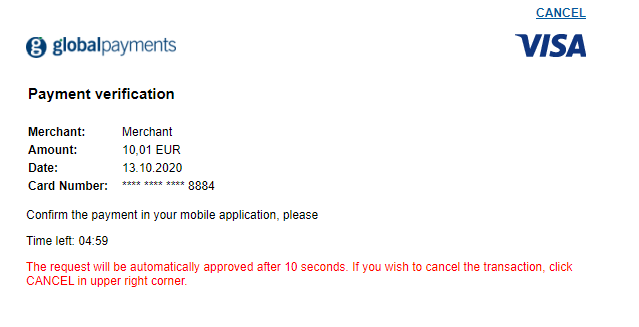
In the Sandbox environment, Global Payments provides an Issuer ACS simulator which allows you to test different challenge outcomes.
Once the challenge has loaded, after ten seconds the simulator will automatically complete the authentication and generate an Authentication Successful response (transStatus = “Y”). This is intended to mimic a scenario where a customer has received a notification on their phone to authenticate using their banking app.
Alternatively, clicking the Cancel button will generate an Authentication Failed response (transStatus = “N”). In either scenario the response will be sent in the Challenge Response message (CRes) to the Challenge Notification Endpoint.
Challenge Outcome
With the customer on the ACS, the following outcomes may occur:
- The authentication is successful
- The authentication fails and the customer is not given another chance.
- The authentication fails and the customer is given another chance
If the customer has successfully completed the challenge and authenticated, the HPP will proceed to authorization and include the 3D Secure authentication data. Alternatively, in a blocked transaction scenario, HPP will return a failure response message (110).
At this point, in both frictionless and challenge scenarios, the transaction may authorize or decline as normal based on whether the customer has sufficient funds in their account or entered their security code correctly and so on. The HPP will return the transaction response along with the additional 3D Secure authentication data you can capture in your website/application.
HPP Response
The Timestamp returned in the response will be identical to the one sent in the request JSON. This, combined with the Order ID and other transaction variables, can be used to definitively link the response received with the transaction request and order created in your application. You should also check the other transaction variables, for example the Amount, against what was stored in your application at the time the request JSON was sent.
A 111 result code indicates that the Issuer requires Strong Customer Authentication (SCA) for a transaction. In order to avoid this outcome, please ensure you enable 3D Secure 2 on the HPP.
[RESULT=00,
 AUTHCODE=12345,
 MESSAGE=[ test system ] Authorised,
 PASREF=14631546336115597,
 AVSPOSTCODERESULT=M,
 AVSADDRESSRESULT=M,
 CVNRESULT=M,
 ACCOUNT=internet,
 MERCHANT_ID=MerchantId,
 ORDER_ID=N6qsk4kYRZihmPrTXWYS6g,
 TIMESTAMP=20180613113227,
 AMOUNT=1001,
 BATCHID=691175,
 CARD_PAYMENT_BUTTON=Pay Invoice,
 MERCHANT_RESPONSE_URL=https://www.example.com/responseUrl,
 HPP_LANG=GB,
 BILLING_CODE=59|123,
 BILLING_CO=GB,
 SHIPPING_CODE=50001|Apartment 852,
 SHIPPING_CO=US,
 COMMENT1=Mobile Channel,
 ECI=5
 AUTHENTICATION_VALUE=ODQzNjgwNjU0ZjM3N2JmYTg0NTM=,
 DS_TRANS_ID=c272b04f-6e7b-43a2-bb78-90f4fb94aa25,
 MESSAGE_VERSION=2.1.0,
 SRD=MMC0F00YE4000000715,
 SHA1HASH=8ab81d4437e24a88a08cffb51c15151846bd7b61]