Loading...


To integrate with 3D Secure 2, you can use our JavaScript Library and one of our server-side SDKs to get started quickly with an end-to-end authentication flow. For more information, see our 3D Secure & SCA - Overview page. Alternatively, you can connect directly to the JSON API with your own client-side implementation.
In this API reference, we present an overview of each request type, examples of request and response values, as well as how to handle them.
The code samples used throughout this article are simple examples and should not be used as Production-ready code.
3D Secure 2 endpoint URLs:
Production: https://api.globalpay-ecommerce.com
Sandbox: https://api.sandbox.globalpay-ecommerce.com
Before testing or implementing 3D Secure 2, you first need to set up and configure endpoints in your application or website that will receive data and event notifications from the Issuer’s Access Control Server (ACS). Each endpoint must be configured to accept an HTTP POST with Base64url encoded values. The Issuer’s ACS uses notifications in two important ways during authentication:
In the following examples, the endpoints are received in the response from the checkEnrollment step (for method notification) and initiateAuthentication step (for challenge notification) and are initiated on the client side.
curl --location --request POST 'https://test.portal.gpwebpay.com/pay-sim/sim/acs' \
--header 'Content-Type: application/x-www-form-urlencoded' \
--data-urlencode 'threeDSMethodData=ewogICJ0aHJlZURTU2VydmVyVHJhbnNJRCIgOiAiNWVmZjliMDAtZjg5ZC00NmQ4LWJmNTktM2I0YTBmYWE0YTFhIiwKICAidGhyZWVEU01ldGhvZE5vdGlmaWNhdGlvblVSTCIgOiAiaHR0cHM6Ly9ncHRlc3RjYXJ0cy5zd2VkZW5jZW50cmFsLmNsb3VkYXBwLmF6dXJlLmNvbS9pbmRleC5waHA_cm91dGU9ZXh0ZW5zaW9uL3BheW1lbnQvZ2xvYmFscGF5bWVudHNfdWNwL3RocmVlRFNlY3VyZU1ldGhvZE5vdGlmaWNhdGlvbiIKfQ'curl --location --request POST 'https://acs2p.test.gpe.cz/tds/challenge/brw/f5f40230-f072-41ec-8c14-436a79982818' \
--header 'Content-Type: application/x-www-form-urlencoded' \
--data-urlencode 'creq=ewogICJtZXNzYWdlVHlwZSIgOiAiQ1JlcSIsCiAgIm1lc3NhZ2VWZXJzaW9uIiA6ICIyLjEuMCIsCiAgInRocmVlRFNTZXJ2ZXJUcmFuc0lEIiA6ICJhMTgyNTVjMi04ZjQ0LTRkNWItYmM2ZC1kYTgxMzI0MTU3OGMiLAogICJhY3NUcmFuc0lEIiA6ICJmNWY0MDIzMC1mMDcyLTQxZWMtOGMxNC00MzZhNzk5ODI4MTgiLAogICJjaGFsbGVuZ2VXaW5kb3dTaXplIiA6ICIwMyIKfQ'In the first request to initiate 3D Secure 2 (Initiate Authentication), in addition to customer billing/shipping details and transaction information we must also provide browser data. You can gather this data independent of the 3D Secure authentication process, for example as soon as the customer lands on your website.
Some devices may return a color depth that is not in the list of accepted values. In this scenario the EMVCo. recommendation is to submit the closest lower value. For example, if the color depth returned by the browser is 30, submit 24 as this is the closest lower value.
In our examples below, we’re gathering as much data as we can on the client-side using JavaScript. For some of the variables (browserLanguage, userAgent and timeZoneOffSet) you could also use server-side methods.
function gatherBrowserData() {
  var colorDepth = screen.colorDepth; // 24
  var javaEnabled = navigator.javaEnabled(); // true
  var browserLanguage = navigator.language; // en_US
  var screenHeight = screen.height; // 1080
  var screenWidth = screen.width; // 1920
  var userAgent = navigator.userAgent;
  // Mozilla/5.0 (Windows NT 6.1; Win64; x64) AppleWebKit/537.36 (KHTML, like Gecko) Chrome/70.0.3538.110 Safari/537.36

  var browserTime = new Date();
  var browserTimezoneZoneOffset = browserTime.getTimezoneOffset(); // 0
}To kick off the 3D Secure authentication process, the first step is to check the version that the card supports. We maintain an up-to-date database of BIN ranges and the versions of 3D Secure they support.
If the card is enrolled in 3D Secure 2, the exact version will be returned (2.x.x) along with the necessary URL to facilitate the gathering of device data by the Issuer ACS (if supported). If the card is not enrolled, the only value returned will be enrolled = false.
curl https://api.sandbox.globalpay-ecommerce.com/3ds2/protocol-versions
-H "Content-type: application/json"
-H "X-GP-VERSION: 2.2.0"
-H "Authorization: securehash 0204a841510d67a46fbd305a60253d7bade32c6e"
-X POST
-d '{
   "request_timestamp": "2019-07-30T08:41:07.590604",
   "merchant_id": "MerchantId",
   "account_id": "internet",
   "number": "4263970000005262",
   "scheme": "VISA",
   "method_notification_url": "https://www.example.com/dsNotificationUrl"
}'Type indicates whether the element is Mandatory (M), Optional (O), or Conditional (C) - dependent on another field.
Unless otherwise stated in the description, the allowed special characters in an alphanumeric string field are [/.-_‘,␣]
| Element/Field | Category | Format | Type | Length | Description |
|---|---|---|---|---|---|
| X-GP-Version | string | numeric | M | 5 | The specific version of 3D Secure 2 to use. The value submitted determines the request and response value the 3D Secure 2 solution will accept and return. We recommend that all merchants use version 2.2.0 |
| Timestamp | timestamp | numeric | M | 24-32 | The timestamp of the request. Minimum of 3 microseconds precision, can be up to 6. Format: yyyy-MM-ddTHH:mm:ss.SSS |
| Merchant ID | string | alphanumeric | M | 1-50 | Your Client ID assigned by us. Allowed characters: [a-zA-Z0-9.] |
| Account | string | alphanumeric | O | 0-30 | The sub-account for this request to be processed through. Allowed characters: [a-zA-Z0-9.] |
| Card Number | string | numeric | M | 12-19 | The full Primary Account Number (PAN) of the card. |
| Card Scheme | string | enum | M | N/A | The type of card. Allowed values: VISA MASTERCARD AMEX DINERS DISCOVER JCB European merchants: mandatory for SCA. |
| Method Notification URL | string | URL | M | 1-256 | The URL that will receive the Method Completion message. European merchants: mandatory for SCA. |
{
   "server_trans_id": "af65c369-59b9-4f8d-b2f6-7d7d5f5c69d5",
   "enrolled": true,
   "ds_protocol_version_start": "2.1.0",
   "ds_protocol_version_end": "2.2.0",
   "acs_protocol_version_start": "2.1.0",
   "acs_protocol_version_end": "2.2.0",
   "acs_info_indicator": [
    "AUTHENTICATION_AVAILABLE_AT_ACS", "DECOUPLED_AUTHENTICATION_SUPPORTED"
   ],
   "method_url": "https://test.portal.gpwebpay.com/pay-sim-gpi/sim/acs",
   "method_data": {
      "three_ds_server_trans_id": "af65c369-59b9-4f8d-b2f6-7d7d5f5c69d5",
      "three_ds_method_notification_url": "https://www.example.com/dsNotificationUrl",
      "encoded_method_data": "eyJ0aHJlZURTTWV0aG9kTm90aWZpY2F0aW9uVVJMIjoiaHR0cHM6XC9cL3d3dy5leGFtcGxlLmNvbVwvbm90aWZpY2F0aW9uVXJsIiwidGhyZWVEU1NlcnZlclRyYW5zSUQiOiJhZjY1YzM2OS01OWI5LTRmOGQtYjJmNi03ZDdkNWY1YzY5ZDUifQ"
   }
}| Element/Field | Category | Format | Description |
|---|---|---|---|
| Server Transaction ID | string | alphanumeric | Unique identifier for the authentication in our 3DS solution (3DS server). Must be used for all requests. |
| Enrolled | boolean | Indicates whether the card is enrolled for 3D Secure 2. | |
| Directory Server (DS) Start Protocol Version | string | numeric | The version range supported by the Directory Server (Card Scheme). |
| Directory Server (DS) End Protocol Version | string | numeric | The version range supported by the Directory Server (Card Scheme). |
| Access Control Server (ACS) Start Protocol Version | string | numeric | The version range supported by the Access Control Server (Issuer). |
| Access Control Server (ACS) End Protocol Version | string | numeric | The version range supported by the Access Control Server (Issuer). |
| ACS Information Indicator | string | enum | Identifies the 3D Secure 2 features that the ACS supports, for example, Whitelisting or Decoupled Authentication. Possible values: NOT_AVAILABLE AUTHENTICATION_AVAILABLE_AT_ACS ATTEMPTS_SUPPORTED_BY_ACS DECOUPLED_AUTHENTICATION_SUPPORTED WHITELISTING_SUPPORTED SCHEME_INFO_INDICATOR_## |
| Method URL | string | Standard URL | The URL to facilitate the ACS gathering device data. If the ACS does not support this functionality, this field will not be returned. |
| Method Data | string | alphanumeric | JSON object containing the Encoded Method Data. This is a Base64Url encoded string made up of the Method Notification URL and the Server Transaction ID which must be sent to the Method URL. |
If the Issuer ACS supports gathering of device data, in the response to the version check the ACS Method URL will be returned. On the client-side we need to open a hidden iFrame targeting the 3DS ACS Method URL and POST the 3DS Method Data object to it.
The 3DS Method Data object is a Base64url encoded JSON object containing the Server Transaction ID and your Method Notification URL. This was returned in the response to the 3D Secure version check in Step 3.
In the event of the Issuer ACS not supporting device data, no Method URL will be returned and you can move onto the next step while setting the 3DS Method Completion Indicator as Unavailable.
<!DOCTYPE html>
<html>

<head>
	<meta charset="ISO-8859-1">
	<title>Sample Open Method URL Page</title>
</head>

<body>
	<iframe id="hidden_iframe" name="hidden_iframe" style="display: none;"></iframe>
</body>
<script>
	var form = document.createElement("form");
         form.setAttribute("method", "POST");
         form.setAttribute("action", "https://www.acsurl.com/method");
         form.setAttribute("target", "hidden_iframe");

         var threeDSMethodData = document.createElement("input");
         threeDSMethodData.setAttribute("type", "hidden");
         threeDSMethodData.setAttribute("name", "threeDSMethodData");
         // add the JSON object returned by Global Payments
         threeDSMethodData.setAttribute("value", threeDSmethodDataObject);
         form.appendChild(threeDSMethodData);
         document.body.appendChild(form);

         form.submit();

</script>

</html>
If the ACS Method URL successfully gathers the device information, in the iFrame it will send a form POST and redirect the browser to your Notification URL. Your client-side code will be able to detect the redirection and close the hidden iFrame accordingly. Collection of device data should complete in seconds, allowing your application to proceed to the next step, setting the 3DS Method Completion Indicator to true.
If gathering the device information is not successful, the maximum timeout set by the ACS is 10 seconds. However, you may wish to proceed to the next step sooner than that. In this case your application should close the iFrame within your determined time frame (for example, 3 seconds) and set the 3DS Method Completion Indicator to False in the next request.
Assuming you have already gathered the relevant device data and (conditionally) the ACS Method URL process is complete, your application can now kick-off 3D Secure 2 authentication. We’ve outlined below the required and recommended data to be sent in the POST to the authentication endpoint. This includes the billing and shipping details of the customer, at least one phone number, the device data and the transaction details (amount, currency and so on).
You must also include your application’s Challenge Notification URL, a flag indicating the outcome from the ACS Method URL (or whether it took place at all) and a link to an About or Contact page on your website with customer care information.
One of the key advantages of 3D Secure 2 is that it provides a framework for merchants to benefit from SCA exemptions under certain conditions. The idea behind these exemptions is to allow for the development of a user-friendly payment experience in circumstances where the risk is low.
Exemptions may be applied by the Issuer based on the transaction details or may be specifically requested by the merchant, with their Acquirer’s permission. In the authentication message you can request an exemption by including it in the Challenge Request Indicator field (see note below).
For more information on the available exemptions requests and when to use them, please refer to our dedicated article.
When a merchant requests an exemption they will no longer be able to avail of a liability shift in the event of a chargeback.
For Mastercard exemption requests, please also refer to our Mastercard Message Extension documentation.
In this example, we’re only passing mandatory fields along with some recommended ones. The more optional fields you send and data you supply, the more likely the authentication for the transaction will be frictionless. For the full list of optional fields and the allowed values in each, please see the section below.
curl https://api.sandbox.globalpay-ecommerce.com/3ds2/authentications
-H "Content-type: application/json"
-H "X-GP-VERSION: 2.2.0"
-H "Authorization: securehash abafc599cfa60c94b8f41d0668dac5ed6b0a21f7"
-X POST
-d '{
   "request_timestamp": "2019-07-30T08:52:44.991911",
   "authentication_source": "BROWSER",
   "authentication_request_type": "PAYMENT_TRANSACTION",
   "message_category": "PAYMENT_AUTHENTICATION",
   "message_version": "2.2.0",
   "challenge_request_indicator":"NO_PREFERENCE",
   "server_trans_id": "ad0fffeb-bfff-44d0-881f-b857fe77c5a2",
   "merchant_id": "MerchantId",
   "account_id": "internet",
   "card_detail": {
      "number": "4263970000005262",
      "scheme": "VISA",
      "expiry_month": "10",
      "expiry_year": "25",
      "full_name": "James Mason"
   },
   "order": {
      "date_time_created": "2019-04-26T10:19:32.552327Z",
      "amount": "1001",
      "currency": "EUR",
      "id": "3400dd37-101d-4940-be15-3c963b6109b3",
      "address_match_indicator": "false",
      "shipping_address": {
         "line1": "Apartment 852",
         "line2": "Complex 741",
         "line3": "House 963",
         "city": "Chicago",
         "postal_code": "50001",
         "state": "IL",
         "country": "840"
      }
   },
   "currency_conversion": {
      "payer_amount": "57600",	//CustomerChosenCurrencyAmount
      "payer_currency": "USD"	//CustomerChosenCurrency
   "payer": {
      "email": "james.mason@example.com",
      "billing_address": {
         "line1": "Flat 456",
         "line2": "House 456",
         "line3": "Unit 4",
         "city": "Halifax",
         "postal_code": "W5 9HR",
         "country": "826"
      },
      "mobile_phone": {
         "country_code": "44",
         "subscriber_number": "7123456789"
      }
   },
   "challenge_notification_url": "https://www.example.com/challengeNotificationUrl",
   "method_url_completion": "YES",
   "browser_data": {
      "accept_header": "text/html,application/xhtml+xml,application/xml;q=0.9,image/webp,image/apng,*/*;q=0.8",
      "color_depth": "TWENTY_FOUR_BITS",
      "ip": "123.123.123.123",
      "java_enabled": "true",
      "javascript_enabled": "true",
      "language": "en-US",
      "screen_height": "1080",
      "screen_width": "1920",
      "challenge_window_size": "FULL_SCREEN",
      "timezone": "0",
      "user_agent": "Mozilla/5.0 (Windows NT 6.1; Win64; x64) AppleWebKit/537.36 (KHTML, like Gecko) Chrome/70.0.3538.110 Safari/537.36"
   },
   "merchant_contact_url": "https://www.example.com/about"
}'| Element/Field | Category | Format | Type | Length | Description |
|---|---|---|---|---|---|
| X-GP-Version | string | numeric | M | 5 | The specific version of 3D Secure 2 to use. The value submitted determines the request and response value the 3D Secure 2 solution will accept and return. We recommend that all merchants use version 2.2.0 |
| Timestamp | timestamp | numeric | M | 24-32 | The timestamp of the request. Minimum of 3 microseconds precision, can be up to 6. Format: yyyy-MM-ddTHH:mm:ss.SSS |
| Merchant ID | string | alphanumeric | M | 1-50 | Your Client ID assigned by us. Allowed characters: [a-zA-Z0-9.] |
| Account | string | alphanumeric | O | 0-30 | The sub-account for this request to be processed through. Allowed characters: [a-zA-Z0-9.] |
| Authentication Source | string | enum | M | N/A | Indicates the type of channel used to initiate the transaction. Allowed Values: BROWSER MERCHANT_INITIATED MOBILE_SDK European merchants: required for SCA. |
| Authentication Request Type | string | enum | M | N/A | Indicates the type of channel used to initiate the transaction. Allowed Values: PAYMENT_TRANSACTION RECURRING_TRANSACTION INSTALMENT_TRANSACTION ADD_CARD MAINTAIN_CARD CARDHOLDER_VERIFICATION European merchants: required for SCA. |
| Message Category | string | enum | M | N/A | Indicates the type of channel used to initiate the transaction. Allowed Values: PAYMENT_AUTHENTICATION NON_PAYMENT_AUTHENTICATION - non payment activity such as adding or maintaining cards or card verification (OTB). European merchants: required for SCA. |
| Challenge Request Indicator | string | enum | O | N/A | Indicates whether a challenge is requested for this transaction. The Issuer may override whatever preference is specified in this field. Allowed values: NO_PREFERENCE - No preference as to whether the customer is challenged - Preference is for the customer not to be challenged. - Preference is for the customer to be challenged. - A challenge is required for the transaction to be authorized due to local/regional mandates or other variables. European merchants: optional for SCA. |
3D Secure 2 allows submission of a much greater data set than its predecessor, the more data submitted the more information the Issuer will have when making the decision whether the transaction authentication should proceed through a Frictionless or a Challenge flow.
The types of data available to submit include:
{
   "merchant_initiated_request_type": "RECURRING_TRANSACTION",
   "card_detail": {
      "first_name": "James",
      "last_name": "Mason"
   },
   "order": {
      "gift_card_count": "01",
      "gift_card_currency": "EUR",
      "gift_card_amount": "25000",
      "delivery_email": "james.mason@example.com",
      "delivery_timeframe": "ELECTRONIC_DELIVERY",
      "shipping_method": "ANOTHER_VERIFIED_ADDRESS",
      "shipping_name_matches_cardholder_name": "true",
      "preorder_indicator": "MERCHANDISE_AVAILABLE",
      "preorder_availability_date:": "2019-04-18",
      "reorder_indicator": "FIRST_TIME_ORDER",
      "transaction_type": "GOODS_SERVICE_PURCHASE"
   },
   "payer": {
      "id": "6dcb24f5-74a0-4da3-98da-4f0aa0e88db3",
      "account_age": "LESS_THAN_THIRTY_DAYS",
      "account_creation_date": "2019-01-10",
      "account_change_date": "2019-01-28",
      "account_change_indicator": "THIS_TRANSACTION",
      "account_password_change_date": "2019-01-15",
      "account_password_change_indicator": "LESS_THAN_THIRTY_DAYS",
      "home_phone": {
         "country_code": "44",
         "subscriber_number": "123456789"
      },
      "work_phone": {
         "country_code": "44",
         "subscriber_number": "1801555888"
      },
      "payment_account_creation_date": "2019-01-01",
      "payment_account_age_indicator": "LESS_THAN_THIRTY_DAYS",
      "suspicious_account_activity": "NO_SUSPICIOUS_ACTIVITY",
      "purchase_count_last_6months": "03",
      "transaction_count_last_24hours": "01",
      "transaction_count_last_year": "05",
      "provision_attempt_count_last_24hours": "01",
      "shipping_address_creation_date": "2019-01-28",
      "shipping_address_creation_indicator": "THIS_TRANSACTION"
   },
   "payer_prior_three_ds_authentication_data": {
      "authentication_method": "FRICTIONLESS_AUTHENTICATION",
      "acs_transaction_id": "26c3f619-39a4-4040-bf1f-6fd433e6d615",
      "authentication_timestamp": "20190110125733",
      "authentication_data": "string"
   },
   "recurring_authorization_data": {
      "max_number_of_instalments": "05",
      "frequency": "25",
      "expiry_date": "2019-08-25"
   },
   "payer_login_data": {
      "authentication_data": "string",
      "authentication_timestamp": "2019-01-28",
      "authentication_type": "MERCHANT_SYSTEM_AUTHENTICATION"
   },
   "decouple_flow_request":"DO_NOT_USE_DECOUPLED",
   "decouple_flow_timeout":"40",
   "whitelist_status":"NOT_WHITELISTED"
}Type indicates whether the element is Mandatory (M), Optional (O), or Conditional (C) - dependent on another field.
Unless otherwise stated in the description, the allowed special characters in an alphanumeric string field are [/.-_‘,␣]
| Element/Field | Category | Format | Type | Length | Description |
|---|---|---|---|---|---|
| Merchant Initiated Request Type | string | enum | C | N/A | For merchant initiated transactions (3RI) informs the ACS of the transaction type. Allowed values: RECURRING_TRANSACTION, INSTALMENT_TRANSACTION ADD_CARD MAINTAIN_CARD_INFORMATION ACCOUNT_VERIFICATION SPLIT_OR_DELAYED_SHIPMENT TOP_UP MAIL_ORDER TELEPHONE_ORDER WHITELIST_STATUS_CHECK OTHER_PAYMENT BILLING_AGREEMENT European merchants: mandatory for SCA if the transaction is merchant initiated (3RI). |
| Cardholder First Name | string | alphanumeric | M | 2-22 | First name of the cardholder. Will be concatenated with last_name with a space. Allowed special characters: [.-'␣] European merchants: mandatory for SCA if the full_name field is not submitted in the request. |
| Cardholder Last Name | string | alphanumeric | M | 2-22 | Last name of the cardholder. Will be concatenated with first_name with a space. Allowed special characters: [.-'␣] European merchants: mandatory for SCA if the full_name field is not submitted in the request. |
| Gift Card Count | integer | O | 0-2 | The total number of prepaid or gift cards purchased. European merchants: optional for SCA. | |
| Gift Card Currency | string | ISO 4217 | O | 0-3 | The currency code of prepaid or gift cards purchased. For example, Euro should be submitted as EUR. European merchants: optional for SCA. |
| Gift Card Amount | integer | O | 0-15 | The total amount of prepaid or gift cards purchased. Format: major units, for example, USD 123.45 = 123. European merchants: optional for SCA. | |
| Delivery Email | string | alphanumeric | C | 0-254 | For ELECTRONIC_DELIVERY, the email address to which the merchandise was delivered. The field must be submitted in the form name@host.domain (for example, ). European merchants: optional for SCA. |
At this point the Issuer will analyze the transaction. It will take into account factors such as the data your application has provided along with historical customer behavior and transaction analysis. The outcome of this process will determine whether the Issuer decides that the customer must further authenticate the transaction; a Challenge Flow.
Alternatively, they can be satisfied that they have enough data to make a decision on whether the transaction should proceed or not and that no further authentication is required; a Frictionless flow.
In a frictionless flow the Issuer can determine that no challenge is required to authenticate the transaction. Or that based on the information it has received so far, that the transaction should not proceed any further. For European merchants and transactions in scope of PSD2, the Issuer will also check that a valid exemption can be applied.
Depending on the outcome and the relevant ECI value, your application can now either proceed to authorization or display a message to the customer telling them their transaction was unsuccessful and return them to the payment page.
{
    "server_trans_id": "ad0fffeb-bfff-44d0-881f-b857fe77c5a2",
    "acs_trans_id": "13c701a3-5a88-4c45-89e9-ef65e50a8bf9",
    "ds_trans_id": "c272b04f-6e7b-43a2-bb78-90f4fb94aa25",
    "authentication_value": "ODQzNjgwNjU0ZjM3N2JmYTg0NTM=",
    "eci": "05",
    "acs_rendering_type": {},
    "status": "AUTHENTICATION_SUCCESSFUL",
    "status_reason": "LOW_CONFIDENCE",
    "authentication_source": "BROWSER",
    "message_category": "PAYMENT_AUTHENTICATION",
    "message_version": "2.2.0",
    "message_extension": [
        {
            "name": "Sample Extension",
            "id": "B000000009-sampleExtension",
            "criticality_indicator": "false",
            "data": {
                "B000000009-sampleExtension": {
                    "sampleData": "sampleValue"
                }
            }
        }
    ],
    "acs_reference_number": "3DS_LOA_ACS_201_13579",
    "whitelist_status": "PENDING_CARDHOLDER_CONFIRMATION"
}{
"server_trans_id": "af65c369-59b9-4f8d-b2f6-7d7d5f5c69d5",
"acs_trans_id": "13c701a3-5a88-4c45-89e9-ef65e50a8bf9",
"ds_trans_id": "c272b04f-6e7b-43a2-bb78-90f4fb94aa25",
"authentication_value": "ODQzNjgwNjU0ZjM3N2JmYTg0NTM=",
"eci": "07",
"status": "AUTHENTICATION_FAILED",
"status_reason": "CARD_AUTHENTICATION_FAILED",
"authentication_source": "BROWSER",
"cardholder_response_info": "Additional authentication is needed for this transaction, please contact [Issuer Name] at 123-456-7890",
"message_category": "PAYMENT_AUTHENTICATION",
"message_version": "2.2.0",
"message_extension": [
{
"name": "Sample Extension",
"id": "B000000009-sampleExtension",
"criticality_indicator": "false",
"data": {
"B000000009-sampleExtension": {
"sampleData": "sampleValue"
}
}
}
],
"acs_reference_number": "3DS_LOA_ACS_201_13579",
"whitelist_status": "PENDING_CARDHOLDER_CONFIRMATION"
}In the challenge flow, the Issuer determines that further authentication is required for the transaction to proceed. This may be due to various reasons, including a high value transaction, unusual payment behavior for this particular customer (time of day, type of merchant and so on) or mismatching/not enough data has been submitted for them to make a determination.
Our 3DS solution will format the Challenge Request message and return it to your application for you to send it to the Issuer ACS. The Challenge Request is made up of various transaction variables including the identifiers for the authentication (Server Transaction ID, ACS Transaction ID and the Challenge Window Size). The Challenge Request must be sent to the ACS within 30 seconds or the challenge will timeout.
{
    "server_trans_id": "ad0fffeb-bfff-44d0-881f-b857fe77c5a2",
    "acs_trans_id": "13c701a3-5a88-4c45-89e9-ef65e50a8bf9",
    "ds_trans_id": "c272b04f-6e7b-43a2-bb78-90f4fb94aa25",
    "authentication_type": "DYNAMIC_CHALLENGE",
    "acs_rendering_type": {},
    "challenge_mandated": true,
    "status": "CHALLENGE_REQUIRED",
    "status_reason": "LOW_CONFIDENCE",
    "challenge_request_url": "https://test.portal.gpwebpay.com/pay-sim-gpi/sim/acs",
    "authentication_source": "BROWSER",
    "message_category": "PAYMENT_AUTHENTICATION",
    "message_version": "2.2.0",
    "message_extension": [
        {
            "name": "Sample Extension",
            "id": "B000000009-sampleExtension",
            "criticality_indicator": "false",
            "data": {
                "B000000009-sampleExtension": {
                    "sampleData": "sampleValue"
                }
            }
        }
    ],
    "encoded_creq": "eyJ0aHJlZURTU2VydmVyVHJhbnNJRCI6ImFmNjVjMzY5LTU5YjktNGY4ZC1iMmY2LTdkN2Q1ZjVjNjlkNSIsImFjc1RyYW5zSUQiOiIxM2M3MDFhMy01YTg4LTRjNDUtODllOS1lZjY1ZTUwYThiZjkiLCJjaGFsbGVuZ2VXaW5kb3dTaXplIjoiNjAweDQwMCIsIm1lc3NhZ2VUeXBlIjoiQ3JlcSIsIm1lc3NhZ2VWZXJzaW9uIjoiMi4xLjAifQ",
    "acs_reference_number": "3DS_LOA_ACS_201_13579",
    "decoupled_response_indicator": "DECOUPLED_AUTHENTICATION_NOT_UTILISED",
    "whitelist_status": "PENDING_CARDHOLDER_CONFIRMATION"
}| Element/Field | Category | Format | Description |
|---|---|---|---|
| ACS Transaction ID | string | alphanumeric | Unique transaction identifier assigned by the ACS. |
| Authentication Source | string | enum | Indicates the type of channel used to initiate the transaction. Allowed Values: BROWSER MERCHANT_INITIATED MOBILE_SDK European merchants: required for SCA. |
| Authentication Type | string | enum | Indicates the type of authentication method the Issuer will use to challenge the customer. Possible values: STATIC_CHALLENGE DYNAMIC_CHALLENGE OUT_OF_BAND_CHALLENGE DECOUPLED |
| Authentication Value | string | alphanumeric | Unique value for the authentication provided by the ACS. Must be used to provide proof of authentication. |
| Cardholder Response Info | string | alphanumeric | Optional text provided by the ACS/Issuer to customer during a Frictionless transaction that was not authenticated. For example, a customer care phone number to call. |
| Challenge Mandated | boolean | Indicates whether a challenge is required due to local/regional mandates or another variable. | |
| Challenge Request URL | string | Standard URL | Fully qualified URL of the ACS to be used for the challenge. |
| Challenge Window Size | string | enum | Dimensions of the challenge window that has been displayed to the customer. The ACS shall reply with content that is formatted to appropriately. Allowed values: WINDOWED_250X400 WINDOWED_390X400 WINDOWED_500X600 WINDOWED_600X400 FULL_SCREEN European merchants: mandatory for SCA. |
| Directory Server Transaction ID | string | alphanumeric | Unique identifier for the authentication assigned by the DS (Card Scheme). |
| Encoded Challenge Request | string | alphanumeric | The Challenge Request (CReq message) that has been Base64url encoded and must be sent to the ACS. |
| Eci | string | alphanumeric | The E-Commerce Indicator indicates whether chargeback protection is available for the transaction or not. |
To facilitate authentication your application/website will need to open the ACS URL in an iFrame. The content of the iFrame will be formatted in line with the Challenge Window Size parameter of the authentication request.
var form = document.createElement("form");
form.setAttribute("method", "POST");
form.setAttribute("action", "https://www.acs.com/challenge");
form.setAttribute("target", "iframe");

var creqData = document.createElement("input");
creqData.setAttribute("type", "hidden");
creqData.setAttribute("name", "creq");
//add creq object obtained from the server
creqData.setAttribute("value", creqObject);
form.appendChild(creqData);

/* optional parameter to include Session Data
var sessionData = document.createElement("input");
sessionData.setAttribute("type", "hidden");
sessionData.setAttribute("name", "threeDSSessionData");
creqDatasetAttribute("value", sessionDataObject);
form.appendChild(sessionData);
*/

document.body.appendChild(form);

form.submit();The type of challenge displayed to the customer will be determined by the Issuer ACS and will align with at least two elements of Strong Customer Authentication:
With the customer on the ACS, the following outcomes may occur:
Once the customer completes the challenge (regardless of the outcome) the ACS performs two actions. First, it informs our 3DS solution of the result and passes along the authentication variables. Next, as with the ACS Method URL, it will send a from POST and redirect the browser to your Notification URL with the Challenge Result (CRes). Your client-side code will be able to detect the redirection.
We provide a Simulator Issuer ACS which allow you to test different challenge outcomes.
In the Sandbox environment, we provide an Issuer ACS simulator which allows you to test different challenge outcomes.
Once the challenge has loaded, after ten seconds the simulator will automatically complete the authentication and generate an Authentication Successful response (transStatus = “Y”). This is intended to mimic a scenario where a customer has received a notification on their phone to authenticate using their banking app.
Alternatively, clicking the Cancel button will generate an Authentication Failed response (transStatus = “N”). In either scenario the response will be sent in the Challenge Response message (CRes) to the Challenge Notification Endpoint.
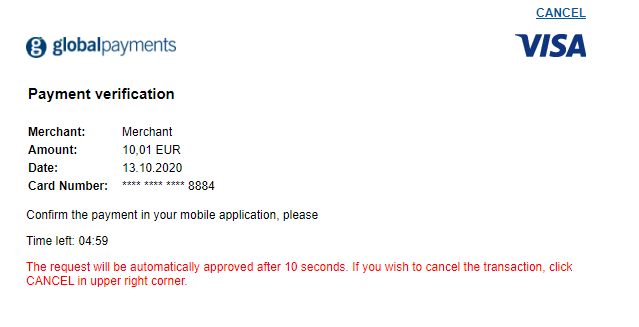
Simulated Issuer Access Control Server
The following fields will be returned to your application from the Issuer ACS.
| Element/Field | Description |
|---|---|
| Server Transaction ID | Unique identifier for the authentication in our 3DS solution (3DS server). Must be used for all requests. |
| ACS Transaction ID | Unique transaction identifier assigned by the ACS. |
| Message Extension | Scheme specific data elements. |
| Message Type | The type of message. In this case it will always be CRes |
| Message Version | 3DS protocol version identifier set by Global Payments. |
| Transaction Status from ACS | Indicates whether a transaction qualifies as an authenticated transaction or account verification. Possible values returned by the ACS: Y - Authentication/Account Verification Successful. N - Not Authenticated/Account Not Verified; Transaction denied. |
If the transaction qualifies as authenticated (Transaction Status = Y), the final step before processing the authorization is to obtain the necessary authentication data from our 3DS solution. This is the data the ACS passed to us when the customer completed the challenge.
To do this, we call the authentications endpoint with the relevant 3DS Server Transaction ID.
https://api.sandbox.globalpay-ecommerce.com/3ds2/authentications/{server_trans_id}?merchant_id={merchant_id}&request_timestamp={request_timestamp}If the customer canceled during the challenge or the authentication did not proceed for another reason, the summary endpoint will also provide you with the information available so you can update your application/website accordingly.
The merchant will receive the Challenge Response message (CRes) encoded in base64 only, which then needs to be decoded. Once decoded, the merchant will be able to see the other parameters of the transaction to proceed to the next step.
The most important information we need for the authorization is the ECI and Authentication Value.
curl "https://api.sandbox.globalpay-ecommerce.com/3ds2/authentications/ad0fffeb-bfff-44d0-881f-b857fe77c5a2?merchant_id=MerchantId&request_timestamp=2019-07-30T08:52:44.991911"
-H "Content-type: application/json"
-H "X-GP-VERSION: 2.2.0"
-H "Authorization: securehash 3acf61a9f49ee7a57fb57d710b97dd00399342a4"
-X GET{
"server_trans_id": "af65c369-59b9-4f8d-b2f6-7d7d5f5c69d5",
"acs_trans_id": "13c701a3-5a88-4c45-89e9-ef65e50a8bf9",
"ds_trans_id": "c272b04f-6e7b-43a2-bb78-90f4fb94aa25",
"authentication_type": "DYNAMIC_CHALLENGE",
"authentication_value": "ODQzNjgwNjU0ZjM3N2JmYTg0NTM=",
"eci": "05",
"challenge_interaction_counter": 1,
"challenge_mandated": true,
"status": "AUTHENTICATION_SUCCESSFUL",
"status_reason": "HIGH_CONFIDENCE",
"challenge_request_url": "https://test.portal.gpwebpay.com/pay-sim-gpi/sim/acs",
"authentication_source": "BROWSER",
"message_category": "PAYMENT_AUTHENTICATION",
"message_version": "2.2.0",
"message_extension": [
{
"name": "Sample Extension",
"id": "B000000009-sampleExtension",
"criticality_indicator": "false",
"data": {
"B000000009-sampleExtension": {
"sampleData": "sampleValue"
}
}
}
],
"encoded_creq": "eyJ0aHJlZURTU2VydmVyVHJhbnNJRCI6ImFmNjVjMzY5LTU5YjktNGY4ZC1iMmY2LTdkN2Q1ZjVjNjlkNSIsImFjc1RyYW5zSUQiOiIxM2M3MDFhMy01YTg4LTRjNDUtODllOS1lZjY1ZTUwYThiZjkiLCJjaGFsbGVuZ2VXaW5kb3dTaXplIjoiNjAweDQwMCIsIm1lc3NhZ2VUeXBlIjoiQ3JlcSIsIm1lc3NhZ2VWZXJzaW9uIjoiMi4xLjAifQ",
"decoupled_response_indicator": "DECOUPLED_AUTHENTICATION_NOT_UTILISED",
"whitelist_status": "PENDING_CARDHOLDER_CONFIRMATION"
}| Element/Field | Category | Format | Description |
|---|---|---|---|
| ACS Transaction ID | string | alphanumeric | Unique transaction identifier assigned by the ACS. |
| Authentication Source | string | enum | Indicates the type of channel used to initiate the transaction. Allowed Values: BROWSER MERCHANT_INITIATED MOBILE_SDK European merchants: required for SCA. |
| Authentication Type | string | enum | Indicates the type of authentication method the Issuer will use to challenge the customer. Possible values: STATIC_CHALLENGE DYNAMIC_CHALLENGE OUT_OF_BAND_CHALLENGE DECOUPLED |
| Authentication Value | string | alphanumeric | Unique value for the authentication provided by the ACS. Must be used to provide proof of authentication. |
| Challenge Mandated | boolean | Indicates whether a challenge is required due to local/regional mandates or another variable. | |
| Challenge Request URL | string | Standard URL | Fully qualified URL of the ACS to be used for the challenge. |
| Challenge Window Size | string | enum | Dimensions of the challenge window that has been displayed to the customer. The ACS shall reply with content that is formatted to appropriately. Allowed values: WINDOWED_250X400 WINDOWED_390X400 WINDOWED_500X600 WINDOWED_600X400 FULL_SCREEN European merchants: mandatory for SCA. |
| Directory Server Transaction ID | string | alphanumeric | Unique identifier for the authentication assigned by the DS (Card Scheme). |
| Encoded Challenge Request | string | alphanumeric | The Challenge Request (CReq message) that has been Base64url encoded and must be sent to the ACS. |
| Eci | string | alphanumeric | The E-Commerce Indicator indicates whether chargeback protection is available for the transaction or not. |
| Challenge Interaction Counter | string | The number of authentication attempts by the customer. | |
| Message Category | string | enum | Indicates the type of channel used to initiate the transaction. Allowed Values: - non payment activity such as adding or maintaining cards or card verification (OTB). European merchants: required for SCA. |
If you are processing the payment with us, now that the 3D Secure process is complete, and depending on the ECI value returned, we can proceed to authorization while including the authentication data. The transaction will be processed as normal and may be successful or declined based on standard criteria; sufficient funds, correct security code entered and so on.
<?xml version="1.0" encoding="UTF-8"?>
<request type="auth" timestamp="20180613104233">
  <merchantid>MerchantId</merchantid>
  <account>internet</account>
  <orderid>AWfoT2k9TzuA0wn8Ze_IIQ</orderid>
  <amount currency="EUR">1000</amount>
  <card>
    <number>4263970000005262</number>
    <expdate>0525</expdate>
    <chname>Philip Marlowe</chname>
    <type>VISA</type>
    <cvn>
      <number>123</number>
      <presind>1</presind>
    </cvn>
  </card>
  <autosettle flag="1"/>
  <mpi>
    <eci>5</eci>
    <ds_trans_id>c272b04f-6e7b-43a2-bb78-90f4fb94aa25</ds_trans_id>
    <authentication_value>ODQzNjgwNjU0ZjM3N2JmYTg0NTM=</authentication_value>
    <message_version>2.2.0</message_version>
    <exempt_status>LOW_VALUE</exempt_status>
  </mpi>
  <sha1hash>c87e5fa0858671510a02477d146ef744233e4ba8</sha1hash>
</request>Type indicates whether the element is Mandatory (M), Optional (O), or Conditional (C) - dependent on another field.
Unless otherwise stated in the description, the allowed special characters in an alphanumeric string field are [/.-_‘,␣]
| Element/Field | Category | Format | Type | Length | Description |
|---|---|---|---|---|---|
| Eci | string | alphanumeric | O | 0-2 | The E-Commerce Indicator indicates whether chargeback protection is available for the transaction or not. |
| Directory Server Transaction ID | string | alphanumeric | Unique identifier for the authentication assigned by the DS (Card Scheme). | ||
| Authentication Value | string | alphanumeric | Unique value for the authentication provided by the ACS. Must be used to provide proof of authentication. | ||
| Message Version | string | numeric | 3DS protocol version identifier set by us. | ||
| Exempt Status | string | enum | O | Identifies the exemption to be applied: LOW_VALUE TRANSACTION_RISK_ANALYSIS TRUSTED_MERCHANT SECURE_CORPORATE_PAYMENT SCA_DELEGATION |
Search for a particular authentication or pull a list based on particular criteria. This request will return a summary object allowing you to see at a high-level the outcome of the authentication. The available filters for search are:
For more information on the use cases of this functionality, please refer to the Documentation section.
curl https://api.sandbox.globalpay-ecommerce.com/3ds2/authentications/search
-H "Content-type:  application/json"
-H "Authorization:  securehash fa4952541e657631c044bd5104e5cae50caa68ec"
-H Content-Type: application/json"
-d '{
	"request_timestamp": "2020-04-28T11:54:37.000",
	"merchant_id": "MerchantID",
	"account_id": "ecom3dsecure2",
	"start_timestamp": "2020-04-28T11:00:00.000",
	"end_timestamp": "2020-04-28T13:00:00.000"
}'Type indicates whether the element is Mandatory (M), Optional (O), or Conditional (C) - dependent on another field.
Unless otherwise stated in the description, the allowed special characters in an alphanumeric string field are [/.-_‘,␣]
| Element/Field | Category | Format | Type | Length | Description |
|---|---|---|---|---|---|
| Timestamp | timestamp | numeric | M | 24-32 | The timestamp of the request. Minimum of 3 microseconds precision, can be up to 6. Format: yyyy-MM-ddTHH:mm:ss.SSS |
| Merchant ID | string | alphanumeric | M | 1-50 | Your Client ID assigned by us. Allowed characters: [a-zA-Z0-9.] |
| Account | string | alphanumeric | O | 0-30 | The sub-account for this request to be processed through. Allowed characters: [a-zA-Z0-9.] |
| Start Timestamp | string | numeric | M | 0-2048 | The timestamp from which the list of records obtained should begin. Minimum of 3 microseconds precision, can be up to 6. Format: yyyy-MM-ddTHH:mm:ss.SSS |
| End Timestamp | string | numeric | M | 0-2048 | The timestamp of which the list of records obtained should end. Minimum of 3 microseconds precision, can be up to 6. Format: yyyy-MM-ddTHH:mm:ss.SSS |
| Card BIN | string | numeric | M | 0-6 | The BIN range of the card number - first six digits. |
| Card Number | string | numeric | M | 12-19 | The full Primary Account Number (PAN) of the card. |
| Server Transaction ID | string | alphanumeric | Unique identifier for the authentication in our 3DS solution (3DS server). Must be used for all requests. | ||
| Order Id | string | alphanumeric | M | 1-50 | A merchant supplied reference to identify this transaction. Must be unique for each attempt. Allowed characters: [a-zA-Z0-9_-] |
| Page Size | string | numeric | O | The number of records to return on each page of the response. | |
| Page Number | string | numeric | O | The page number to return. | |
| Sha1hash | string | alphanumeric | M | 40 | The signature for this request is made up of transaction elements and your Shared Secret. Automatically set by the SDK. Allowed characters: [0-9a-fA-F] |
{
  "page_size": 100,
  "page_number": 1,
  "total_records_available": 3,
  "start_timestamp": "2020-04-28T11:00:00.000",
  "end_timestamp": "2020-04-28T13:00:00.000",
  "transactions": [
    {
      "merchant_id": "MerchantID",
      "account_name": "ecom3dsecure2",
      "order_id": "20200428132617-310",
      "server_trans_id": "77b6ec4c-9f55-4b84-9456-c6098ebd29ca",
      "bin": 401200,
      "scheme": "VISA",
      "authentication_source": "BROWSER",
      "acs_trans_id": "d5dee8e4-41ef-40f0-9488-1af7440a909c",
      "acs_url": "https://test.portal.gpwebpay.com/pay-sim-gpi/sim/acs",
      "trans_status": "AUTHENTICATION_SUCCESSFUL",
      "trans_status_reason": "HIGH_CONFIDENCE"
    },
    {
      "merchant_id": "MerchantID",
      "account_name": "ecom3dsecure2",
      "order_id": "GPTesting-25294",
      "server_trans_id": "e94aaa8e-ad7f-4942-9206-be3fb39b03f8",
      "bin": 401200,
      "scheme": "VISA",
      "authentication_source": "BROWSER",
      "acs_trans_id": "a1ed0905-3f57-44b1-b93a-ed7d8a4de146",
      "acs_url": "https://test.portal.gpwebpay.com/pay-sim-gpi/sim/acs",
      "trans_status": "CHALLENGE_REQUIRED",
      "trans_status_reason": "LOW_CONFIDENCE"
    },
    {
      "merchant_id": "MerchantID",
      "account_name": "ecom3dsecure2",
      "order_id": "GPTesting-25294",
      "server_trans_id": "e94aaa8e-ad7f-4942-9206-be3fb39b03f8",
      "bin": 401200,
      "scheme": "VISA",
      "authentication_source": "BROWSER",
      "acs_trans_id": "2314349a-bbf0-4202-9175-a5253388f019",
      "acs_url": "https://test.portal.gpwebpay.com/pay-sim-gpi/sim/acs",
      "trans_status": "CHALLENGE_REQUIRED",
      "trans_status_reason": "LOW_CONFIDENCE"
    }
  ]
}| Element/Field | Category | Format | Description |
|---|---|---|---|
| ACS Transaction ID | string | alphanumeric | Unique transaction identifier assigned by the ACS. |
| Authentication Source | string | enum | Indicates the type of channel used to initiate the transaction. Allowed Values: BROWSER MERCHANT_INITIATED MOBILE_SDK European merchants: required for SCA. |
| Authentication Request Type | string | enum | Indicates the type of channel used to initiate the transaction. Allowed Values: PAYMENT_TRANSACTION RECURRING_TRANSACTION INSTALMENT_TRANSACTION ADD_CARD MAINTAIN_CARD CARDHOLDER_VERIFICATION European merchants: required for SCA. |
| Authentication Value | string | alphanumeric | Unique value for the authentication provided by the ACS. Must be used to provide proof of authentication. |
| Challenge Mandated | boolean | Indicates whether a challenge is required due to local/regional mandates or another variable. | |
| Challenge Request URL | string | Standard URL | Fully qualified URL of the ACS to be used for the challenge. |
| Directory Server Transaction ID | string | alphanumeric | Unique identifier for the authentication assigned by the DS (Card Scheme). |
| Encoded Challenge Request | string | alphanumeric | The Challenge Request (CReq message) that has been Base64url encoded and must be sent to the ACS. |
| Eci | string | alphanumeric | The E-Commerce Indicator indicates whether chargeback protection is available for the transaction or not. |
| Message Category | string | enum | Indicates the type of channel used to initiate the transaction. Allowed Values: PAYMENT_AUTHENTICATION NON_PAYMENT_AUTHENTICATION - non payment activity such as adding or maintaining cards or card verification (OTB). European merchants: required for SCA. |
| Message Version | string | numeric | 3DS protocol version identifier set by us. |
| Server Transaction ID | string | alphanumeric | Unique identifier for the authentication in our 3DS solution (3DS server). Must be used for all requests. |
| HTTP Status Code | HTTP Status | Description |
|---|---|---|
| 400 | Bad Request | Request message validation failure. The response body will indicate which fields were missing or had invalid values. Please see below. If the JSON formatting of the request was invalid, no response body will be returned. |
| 401 | Unauthorised | The value supplied in the Authorization header was incorrect. Please refer to the How to build the Request Hash documentation in the API Explorer. |
| 404 | Not Found | The specified resource in the request could not be found. Resource may refer to a number of elements including: * Merchant Id * Account * Currency Configuration * Payer Reference |
| 405 | Method Not Allowed | An incorrect REST verb when sending the request. |
| 415 | Unsupported Media Type | Unsupported request format. |
| 500 | Internal Server Error | An unexpected internal error occurred with the 3DS Solution. |
| 501 | Not Implemented | The 3DS Solution does not support the card type submitted in the request. |
| 502 | Bad Gateway | Downstream error with either the Card Scheme Directory Server or the Issuer ACS. |
In the case of a 400 Bad Request the body of the response will indicate which field(s) were either missing or had invalid values and so on.
{
  "three_dsserver_trans_id": "3bc076c0-b108-4916-8af8-042d1ac91aac",
  "error_code": "201",
  "error_component": "S",
  "error_description": "Required Data Element",
  "error_detail": "deviceChannel",
  "error_message_type": "AReq",
  "message_type": "Error",
  "message_version": "2.1.0"
}| Element/Field | Format | Description |
|---|---|---|
| three_dsserver_trans_id | String | Unique identifier for the authentication in the Global Payments 3DS solution (3DS server). Must be used for all requests. |
| error_code | Integer | EMV 3D Secure error code. |
| error_component | String | The 3D Secure component where the error occurred. Possible values: C - 3DS SDK (iOS or Android) S - 3DS Server (Global Payments 3DS Solution) D - DS (Card Scheme Directory Server) A - ACS (Issuer Access Control Server) |
| error_description | String | An overview of the error. |
| error_detail | String | Lists the detail of each individual error. For example, in the event multiple fields have invalid values, each field will be listed. |
| error_message_type | String | The message that the error pertains to. |
| message_type | String | As per EMVCo.this will always be Error - Error. |
| message_version | String | The version of the 3D Secure 2 protocol being used. |
Follow the steps in this section to build the request security hash, concatenate the specified fields and hash them using the SHA-1 algorithm, concatenate the hashed string with your Shared Secret, hash it again, and add the resulted string to the request.
In addition to SHA-1, you can also generate your hash using SHA-256. The resulting hash should be placed in the tag instead of the tag. For more information, contact our support team.
Use the tabs below to follow the steps for a certain request type: Check Version, Initiate Authentication, Obtain Authentication Data, or Authentication Reporting.
| Server Transaction ID | string | alphanumeric | Unique identifier for the authentication in our 3DS solution (3DS server). Must be used for all requests. |
| Amount | integer | M | 1-11 | The amount should be in the smallest unit of the required currency. For example: 2000 = €20.00 |
| Currency | string | ISO 4217 | M | 3 | The processing currency of the transaction. Please see the list of Currency Codes. |
| Card Number | string | numeric | M | 12-19 | The full Primary Account Number (PAN) of the card. |
| Card Scheme | string | enum | M | N/A | The type of card. Allowed values: VISA MASTERCARD AMEX DINERS DISCOVER JCB European merchants: mandatory for SCA. |
| Expiry Month | string | MM | M | 2 | Expiry month from the card. European merchants: mandatory for SCA. |
| Expiry Year | string | YY | M | 2 | Expiry year from the card. European merchants: mandatory for SCA. |
| Cardholder Full Name | string | alphanumeric | M | 2-45 | The full name of the cardholder. Allowed special characters: [.-'␣] European merchants: mandatory for SCA. |
| Order Id | string | alphanumeric | M | 1-50 | Unique merchant created identifier for the transaction. Allowed characters: [a-zA-Z0-9_-] European merchants: mandatory for SCA. |
| Order Date Time Created | timestamp | numeric | M | 0-32 | The timestamp of when the order was created. Minimum of 3 microseconds precision, can be up to 6. Must also include timezone. Format: yyyy-MM-ddTHH:mm:ss.SSS(Z | ±hh:mm) |
| Shipping Address Match Indicator | Boolean | N/A | O | N/A | Indicates whether the shipping address matches the billing address. European merchants: optional for SCA. |
| Shipping Address Line 1 | string | alphanumeric | O | 0-50 | First line of the customer's shipping address. Allowed characters for API: ^[\p{L}\p{M}\p{Blank}\p{N}.-_'’,&#]*$ Allowed characters for HPP: .-_'’,&# European merchants: optional for SCA. |
| Shipping Address Line 2 | string | alphanumeric | O | 0-50 | Second line of the customer's shipping address. Allowed characters for API: ^^[\p{L}\p{M}\p{Blank}\p{N}.-_'’,&#]*$ Allowed characters for HPP: .-_'’,&# European merchants: optional for SCA. |
| Shipping Address Line 3 | string | alphanumeric | 0 | 0-50 | Third line of the customer's shipping address. Allowed characters for API: ^^[\p{L}\p{M}\p{Blank}\p{N}.-_'’,&#]*$ Allowed characters for HPP: .-_'’,&# European merchants: optional for SCA. |
| Shipping Address City | string | alphanumeric | O | 0-50 | The city of the customer's shipping address. European merchants: optional for SCA. |
| Shipping Address Postal Code | string | alphanumeric | O | 0-16 | ZIP or other postal code customer's shipping address. Allowed characters: [a-zA-Z0-9-␣] European merchants: optional for SCA. |
| Shipping Address State | string | ISO 3166-2 | O | 0-3 | The state of the customer's shipping address. Should be the country subdivision code defined in ISO 3166-2 minus the country code itself. For example: Illinois = IL. Applicable for US and CA addresses. For each country’s ISO 3166-2 codes, see the ISO Online Browsing Platform. See codes for Ireland or Great Britain. European merchants: if state applicable for the billing address country, required for SCA. |
| Shipping Address Country | string | ISO 3166-1 | O | 0-3 | The country of the customer's shipping address. Numeric three-digit country code. For example, US = 840. European merchants: optional for SCA. |
| Payer Amount | integer | numeric | O | 1-11 | The amount the customer chose to pay. Should be in the smallest unit of the required currency. For example: 2000 = $20.00 |
| Payer Currency | string | ISO 4217 | O | 3 | The currency the customer chose to pay in. See the list of Currency Codes. |
| Payer Email Address | string | alphanumeric | M* | 1-254 | Customer’s email address, including the full domain name. The field must be submitted in the form name@host.domain (for example, james.mason@example.com). The domain can be between 2-24 characters. Allowed characters: [a-zA-Z0-9_-.][a-zA-Z0-9_-.]@[a-zA-Z0-9_-.].[a-zA-Z] European merchants: mandatory for SCA. *Unless Customer Phone Number is being sent. |
| Billing Address Line 1 | string | alphanumeric | M | 1-50 | First line of the customer's billing address. Allowed characters for API: ^^[\p{L}\p{M}\p{Blank}\p{N}.-_'’,&#]*$ Allowed characters for HPP: .-_'’,&# European merchants: mandatory for SCA. |
| Billing Address Line 2 | string | alphanumeric | M | 1-50 | Second line of the customer's billing address. Can be submitted as blank if not relevant for the particular customer. Allowed characters for API: ^[\p{L}\p{M}\p{Blank}\p{N}.-_'’,&#]*$ Allowed characters for HPP: .-_'’,&# European merchants: mandatory for SCA. |
| Billing Address Line 3 | string | alphanumeric | M | 1-50 | Third line of the customer's billing address. Can be submitted as blank if not relevant for the particular customer. Allowed characters for API: ^[\p{L}\p{M}\p{Blank}\p{N}.-_'’,&#]*$ Allowed characters for HPP: .-_'’,&# European merchants: mandatory for SCA. |
| Billing Address City | string | alphanumeric | M | 1-40 | The city of the customer's billing address. European merchants: mandatory for SCA. |
| Billing Address Postal Code | string | alphanumeric | M | 1-16 | ZIP or other postal code customer's billing address. Allowed characters: [a-zA-Z0-9-␣] European merchants: mandatory for SCA. |
| Billing Address State | string | ISO 3166-2 | C | 0-3 | The state of the customer's billing address. Should be the country subdivision code defined in ISO 3166-2 minus the country code itself. For example, Illinois = IL. Applicable for US and CA addresses. For each country’s ISO 3166-2 codes, see the ISO Online Browsing Platform. See codes for Ireland or Great Britain. European merchants: if state applicable for the billing address country, required for SCA. |
| Billing Address Country | string | ISO 3166-1 | M | 3 | The country of the customer's billing address. ISO 3166-1 numeric three-digit country code. For example, US = 840. European merchants: mandatory for SCA. |
| Country Code | string | numeric | M | 0-3 | The country code of the phone number. European merchants: Required if captured by your application or website. We recommend that you send at least one phone number (Mobile, Home or Work). Not Mandatory if Customer Email is being sent. |
| Subscriber Number | string | numeric | M | 0-15 | The phone number. European merchants: Required if captured by your application or website. We recommend that you send at least one phone number (Mobile, Home or Work). Not Mandatory if Customer Email is being sent. |
| Challenge Notification URL | string | URL | M | 1-256 | The URL that will receive the Challenge Result message and inform your application that the customer has completed the challenge. European merchants: mandatory for SCA. |
| Method URL Completion | string | enum | M | N/A | Indicates whether the 3DS Method was completed successfully. Allowed values: YES NO UNAVAILABLE European merchants: mandatory for SCA. |
| Accept Header | string | alphanumeric | M | 1-2048 | HTTP accept headers as sent by the browser. Allowed characters: [a-zA-Z0-9-/,+;.*=␣] European merchants: mandatory for SCA. |
| Color Depth | string | enum | M | Browser color depth. Allowed values: ONE_BIT, TWO_BITS, FOUR_BITS, EIGHT_BITS, FIFTEEN_BITS, SIXTEEN_BITS, TWENTY_FOUR_BITS, THIRTY_TWO_BITS, FORTY_EIGHT_BITS European merchants: mandatory for SCA. |
| IP | string | alphanumeric | M | 7-39 | IP address returned by the browser. IPv4 and IPv6 accepted. Allowed characters: [a-fA-F0-9:] European merchants: mandatory for SCA. |
| Java Enabled | boolean | N/A | M | N/A | Whether the browser can execute Java. European merchants: mandatory for SCA. |
| JavaScript Enabled | boolean | N/A | M | N/A | Whether the browser can execute JavaScript. European merchants: mandatory for SCA. |
| Language | string | alphanumeric | M | 1-8 | Browser Language. Allowed characters: [a-zA-Z0-9-] European merchants: mandatory for SCA. |
| Screen Height | integer | M | 1-6 | Total height of the customer's screen in pixels. European merchants: mandatory for SCA. |
| Screen Width | integer | M | 1-6 | Total width of the customer's screen in pixels. European merchants: mandatory for SCA. |
| Challenge Window Size | string | enum | M | Dimensions of the challenge window that has been displayed to the customer. The ACS shall reply with content that is formatted to appropriately. Allowed values: WINDOWED_250X400 WINDOWED_390X400 WINDOWED_500X600 WINDOWED_600X400 FULL_SCREEN European merchants: mandatory for SCA. |
| Timezone | integer | M | 1-5 | Time difference between UTC time and the customer's browser local time, in minutes. European merchants: mandatory for SCA. |
| User Agent | string | alphanumeric | M | 1-2048 | Exact content of the HTTP user-agent header sent by the browser. Allowed characters - [a-zA-Z0-9/-_.␣():;',"] European merchants: mandatory for SCA. |
| Merchant Contact URL | string | URL | M | 1-256 | The URL of the merchant's website or customer care site. Should provide contact information for use in the event of a problem. European merchants: mandatory for SCA. |
| Delivery Timeframe | string | enum | O | N/A | Indicates the delivery timeframe for the order. Allowed values: ELECTRONIC_DELIVERY SAME_DAY OVERNIGHT TWO_DAYS_OR_MORE European merchants: optional for SCA. |
| Shipping Method | string | enum | O | N/A | Indicates shipping method chosen for the transaction. Must be specific to this transaction, not generally to the merchant. If one or more items are included in the sale, use the Shipping Indicator code for the physical goods. If all the goods are digital, use the Shipping Method code that describes the most expensive item. Allowed values: BILLING_ADDRESS ANOTHER_VERIFIED_ADDRESS UNVERIFIED_ADDRESS SHIP_TO_STORE DIGITAL_GOODS TRAVEL_AND_EVENT_TICKETS OTHER European merchants: optional for SCA. |
| Shipping Name Matches Cardholder Name | Boolean | N/A | O | N/A | Indicates whether the account customer name matches the shipping address name. European merchants: optional for SCA. |
| Preorder Indicator | string | enum | O | N/A | Indicates whether the customer is paying for merchandise that will be available at a future date. Allowed values: MERCHANDISE_AVAILABLE FUTURE_AVAILABILITY European merchants: optional for SCA. |
| Preorder Availability Date | string | YYYY-MM-DD | O | 0-10 | In the case of a preorder, the expected date when the merchandise will be available. European merchants: optional for SCA. |
| Reorder Indicator | string | enum | O | N/A | Indicates whether the customer is reordering previous purchased items. Allowed values: FIRST_TIME_ORDER REORDER European merchants: optional for SCA. |
| Transaction Type | string | enum | O | N/A | The type of transaction being authenticated. Allowed values: GOODS_SERVICE_PURCHASE CHECK_ACCEPTANCE ACCOUNT_FUNDING QUASI_CASH_TRANSACTION PREPAID_ACTIVATION_AND_LOAD European merchants: optional for SCA. |
| Payer Account Identifier | string | alphanumeric | O | 0-64 | Optional field to pass additional information about the customer European merchants: optional for SCA. |
| Account Age Indicator | string | enum | O | Length of time the customer has had an account with the merchant. Allowed values: NO_ACCOUNT THIS_TRANSACTION LESS_THAN_THIRTY_DAYS THIRTY_TO_SIXTY_DAYS MORE_THAN_SIXTY_DAYS European merchants: optional for SCA. |
| Account Creation Date | string | YYYY-MM-DD | O | 0-10 | Date the customer opened their account with the merchant. European merchants: optional for SCA. |
| Account Change Date | string | YYYY-MM-DD | O | 0-10 | Date the customer's account with the merchant was last changed. For example, if the billing or shipping details changed, new payment account or new users added. European merchants: optional for SCA. |
| Account Change Indicator | string | enum | O | Length of time since the account has changed. Allowed values: THIS_TRANSACTION LESS_THAN_THIRTY_DAYS THIRTY_TO_SIXTY_DAYS MORE_THAN_SIXTY_DAYS European merchants: optional for SCA. |
| Password Change Date | string | YYYY-MM-DD | O | 0-10 | Date the customer's account with the merchant had a password change or account reset. European merchants: optional for SCA. |
| Password Change Indicator | string | enum | O | Length of time since the customer's account with the merchant has had a password change or account reset. Allowed values: NO_CHANGE THIS_TRANSACTION LESS_THAN_THIRTY_DAYS THIRTY_TO_SIXTY_DAYS MORE_THAN_SIXTY_DAYS European merchants: optional for SCA. |
| Country Code | string | numeric | M* | 0-3 | The country code of the phone number. European merchants: Required if captured by your application or website. We recommend that you send at least one phone number (Mobile, Home or Work). *Unless Customer Email is being sent. |
| Subscriber Number | string | numeric | M* | 0-15 | The phone number. European merchants: Required if captured by your application or website. We recommend that you send at least one phone number (Mobile, Home or Work). *Unless Customer Email is being sent. |
| Payment Account Creation Date | string | YYYY-MM-DD | O | 0-10 | Date the payment account was associated with the customer's account. European merchants: optional for SCA. |
| Payment Account Age Indicator | string | enum | O | Length of time the customer has had an account with the merchant. Allowed values: NO_ACCOUNT - The customer does not have an account, for example, guest checkout THIS_TRANSACTION LESS_THAN_THIRTY_DAYS THIRTY_TO_SIXTY_DAYS. MORE_THAN_SIXTY_DAYS European merchants: optional for SCA. |
| Previous Suspicious Activity | string | enum | O | N/A | Indicates whether there has been suspicious activity on this customer's account, including fraudulent activity. (Note this is a boolean in the SDK). Allowed values: SUSPICIOUS_ACTIVITY. NO_SUSPICIOUS_ACTIVITY European merchants: optional for SCA. |
| Purchases in the last six months | integer | O | 0-4 | Number of purchases with this customer's account during the previous six months. European merchants: optional for SCA. |
| Number of Transactions in the Last 24 Hours | integer | O | 0-3 | Number of transactions (successful and abandoned) for this customer account with the merchant in the previous 24 hours. European merchants: optional for SCA. |
| Number of Transactions in the Last Year | integer | O | 0-3 | Number of transactions (successful and abandoned) for this customer account with the merchant in the previous year. European merchants: optional for SCA. |
| Add Card Attempts | integer | O | 0-3 | Number of Add Card attempts in the last 24 hours. European merchants: optional for SCA. |
| Shipping Address Creation Date | string | YYYY-MM-DD | O | 0-10 | Date the shipping address was first used with the merchant. European merchants: optional for SCA. |
| Shipping Address Usage Indicator | string | enum | O | N/A | When the shipping address was first used with the merchant. Allowed values: THIS_TRANSACTION LESS_THAN_THIRTY_DAYS THIRTY_TO_SIXTY_DAYS MORE_THAN_SIXTY_DAYS European merchants: optional for SCA. |
| Prior Authentication Method | string | enum | O | Method used by the customer previously to authenticate. Allowed values: FRICTIONLESS_AUTHENTICATION CHALLENGE_OCCURRED AVS_VERIFIED OTHER_ISSUER_METHOD European merchants: optional for SCA. |
| Prior Authentication Transaction ID | string | UUID | O | 0-36 | ACS Transaction ID for a prior 3DS authenticated transaction. European merchants: optional for SCA. |
| Prior Authentication Timestamp | timestamp | numeric | O | 0-32 | Date and time in UTC of the prior customer authentication. Minimum of 3 microseconds precision, can be up to 6. Must also include timezone. Format: yyyy-MM-ddTHH:mm:ss.SSS(Z|±hh:mm) European merchants: optional for SCA. |
| Prior Authentication Data | string | alphanumeric | O | 0-2048 | Data that documents and supports a specific authentication process. European merchants: optional for SCA. |
| Max Number of Instalments | integer | C | 0-3 | Indicates the maximum number of authorizations permitted for instalment payments. European merchants: required for instalment transactions for SCA. |
| Recurring Authorization Frequency | integer | C | 0-4 | The minimum number of days between recurring authorizations. European merchants: required for recurring transactions for SCA. |
| Recurring Authorization Expiry Date | string | YYYY-MM-DD | C | 0-10 | Date after which no further recurring authorizations shall be performed. European merchants: required for recurring transactions for SCA. |
| Customer Authentication Data | string | alphanumeric | O | 0-2048 | Not currently in use. European merchants: optional for SCA. |
| Customer Authentication Timestamp | timestamp | numeric | O | 0-32 | The timestamp of the authentication with the merchant. Minimum of 3 microseconds precision, can be up to 6. Must also include timezone. Format: yyyy-MM-ddTHH:mm:ss.SSS(Z|±hh:mm) European merchants: optional for SCA. |
| Customer Authentication Method | string | enum | O | Method used by the customer previously to authenticate with the merchant. Allowed values: NOT_AUTHENTICATED MERCHANT_SYSTEM_AUTHENTICATION FEDERATED_ID_AUTHENTICATION ISSUER_CREDENTIAL_AUTHENTICATION THIRD_PARTY_AUTHENTICATION FIDO_AUTHENTICATION European merchants: optional for SCA. |
| Decoupled Flow Request | string | enum | O | N/A | Indicates whether the Merchant requests to utilise Decoupled Authentication. Values accepted: true false European merchants: optional for SCA. If not included in the request the default is false. |
| Decoupled Flow Timeout | string | string | C | 1-5 | Indicates the maximum amount of time that the Merchant will wait for an ACS to provide the results of a Decoupled Authentication transaction (in minutes). Numeric values between 1 and 10080 accepted (minutes) Required if Decoupled Flow Request is set to true. European merchants: optional for SCA. |
| Whitelist Status | string | enum | O | N/A | Enables the communication of trusted beneficiary/whitelist status between the ACS, the DS and the 3DS Requestor (Merchant). Values accepted: true false European merchants: optional for SCA. |
| ACS Render Type |
| Contains information about the rendering type that the ACS is sending for the cardholder authentication |
| Message Category | string | enum | Indicates the type of channel used to initiate the transaction. Allowed Values: PAYMENT_AUTHENTICATION NON_PAYMENT_AUTHENTICATION - non payment activity such as adding or maintaining cards or card verification (OTB). European merchants: required for SCA. |
| Message Version | string | numeric | 3DS protocol version identifier set by us. |
| Message Extension | Scheme specific data elements used to to carry additional data. Message extension is sent based on rules set by each scheme and may not always be present in the response. |
| Message Extension Criticality Indicator | boolean | Indicates whether the data in the Message Extension affects the overall response. True - The message is critical. The overall response can only be understood by taking into account the extension data. False - The message is non-critical. The overall response message is not affected by the extension data and can be interpreted as normal. Under normal circumstances the Criticality Indicator will return as false. |
| Message Extension Data | string | alphanumeric | The data carried in the extension. Maximum 8059 characters. |
| Message Extension ID | string | alphanumeric | A unique identifier for the extension. Maximum 64 characters. |
| Message Extension Name | string | alphanumeric | The name of the extension data set as defined by the extension owner. Maximum 64 characters. |
| Server Transaction ID | string | alphanumeric | Unique identifier for the authentication in our 3DS solution (3DS server). Must be used for all requests. |
| Transaction Status | string | enum | Indicates whether a transaction qualifies as an authenticated transaction or account verification. Possible values: AUTHENTICATION_SUCCESSFUL AUTHENTICATION_FAILED AUTHENTICATION_COULD_NOT_BE_PERFORMED AUTHENTICATION_ATTEMPTED_BUT_NOT_SUCCESSFUL CHALLENGE_REQUIRED AUTHENTICATION_ISSUER_REJECTED DECOUPLED_AUTHENTICATION_CONFIRMED CHALLENGE_PREFERENCE_ACKNOWLEDGED_INFORMATIONAL_ONLY |
| Transaction Status Reason | string | enum | Provides information on why the Transaction Status field has the specified value. Possible values: CARD_AUTHENTICATION_FAILED UNKNOWN_DEVICE UNSUPPORTED_DEVICE EXCEEDS_AUTHENTICATION_FREQUENCY_LIMIT EXPIRED_CARD INVALID_CARD_NUMBER INVALID_TRANSACTION NO_CARD_RECORD SECURITY_FAILURE STOLEN_CARD SUSPECTED_FRAUD TRANSACTION_NOT_PERMITTED_TO_CARDHOLDER CARDHOLDER_NOT_ENROLLED_IN_SERVICE TRANSACTION_TIMED_OUT_AT_THE_ACS LOW_CONFIDENCE MEDIUM_CONFIDENCE HIGH_CONFIDENCE VERY_HIGH_CONFIDENCE EXCEEDS_ACS_MAXIMUM_CHALLENGES NON_PAYMENT_TRANSACTION_NOT_SUPPORTED THREERI_TRANSACTION_NOT_SUPPORTED ACS_TECHNICAL_ISSUE DECOUPLED_AUTHENTICATION_REQUIRED_BY_ACS DECOUPLED_MAX_EXPIRY_TIME_EXCEEDED INSUFFICIENT_TIME_TO_AUTHENTICATE AUTHENTICATION_ATTEMPTED_BUT_NOT_PERFORMED SCHEME_STATUS_REASON## |
| Decoupled Response Indicator | string | enum | Indicates whether the ACS will utilise Decoupled Authentication to authenticate the Cardholder. Possible values: DECOUPLED_AUTHENTICATION_UTILISED DECOUPLED_AUTHENTICATION_NOT_UTILISED |
| Whitelist Status | string | enum | Enables the communication of trusted beneficiary/whitelist status between the ACS, the DS and the 3DS Requestor (Merchant). Possible values: WHITELISTED_BY_CARDHOLDER NOT_WHITELISTED_BY_CARDHOLDER NOT_ELIGIBLE PENDING_CARDHOLDER_CONFIRMATION REJECTED_BY_CARDHOLDER WHITELIST_STATUS_UNKNOWN |
| Message Version | string | numeric | 3DS protocol version identifier set by us. |
| Message Extension | Scheme specific data elements used to to carry additional data. Message extension is sent based on rules set by each scheme and may not always be present in the response. |
| Message Extension Criticality Indicator | boolean | Indicates whether the data in the Message Extension affects the overall response. True - The message is critical. The overall response can only be understood by taking into account the extension data. False - The message is non-critical. The overall response message is not affected by the extension data and can be interpreted as normal. Under normal circumstances the Criticality Indicator will return as false. |
| Message Extension Data | string | alphanumeric | The data carried in the extension. Maximum 8059 characters. |
| Message Extension ID | string | alphanumeric | A unique identifier for the extension. Maximum 64 characters. |
| Message Extension Name | string | alphanumeric | The name of the extension data set as defined by the extension owner. Maximum 64 characters. |
| Server Transaction ID | string | alphanumeric | Unique identifier for the authentication in our 3DS solution (3DS server). Must be used for all requests. |
| Transaction Status | string | enum | Indicates whether a transaction qualifies as an authenticated transaction or account verification. Possible values: AUTHENTICATION_SUCCESSFUL AUTHENTICATION_FAILED AUTHENTICATION_COULD_NOT_BE_PERFORMED AUTHENTICATION_ATTEMPTED_BUT_NOT_SUCCESSFUL CHALLENGE_REQUIRED AUTHENTICATION_ISSUER_REJECTED DECOUPLED_AUTHENTICATION_CONFIRMED CHALLENGE_PREFERENCE_ACKNOWLEDGED_INFORMATIONAL_ONLY |
| Transaction Status Reason | string | enum | Provides information on why the Transaction Status field has the specified value. Possible values: CARD_AUTHENTICATION_FAILED UNKNOWN_DEVICE UNSUPPORTED_DEVICE EXCEEDS_AUTHENTICATION_FREQUENCY_LIMIT EXPIRED_CARD INVALID_CARD_NUMBER INVALID_TRANSACTION NO_CARD_RECORD SECURITY_FAILURE STOLEN_CARD SUSPECTED_FRAUD TRANSACTION_NOT_PERMITTED_TO_CARDHOLDER CARDHOLDER_NOT_ENROLLED_IN_SERVICE TRANSACTION_TIMED_OUT_AT_THE_ACS LOW_CONFIDENCE MEDIUM_CONFIDENCE HIGH_CONFIDENCE VERY_HIGH_CONFIDENCE EXCEEDS_ACS_MAXIMUM_CHALLENGES NON_PAYMENT_TRANSACTION_NOT_SUPPORTED THREERI_TRANSACTION_NOT_SUPPORTED ACS_TECHNICAL_ISSUE DECOUPLED_AUTHENTICATION_REQUIRED_BY_ACS DECOUPLED_MAX_EXPIRY_TIME_EXCEEDED INSUFFICIENT_TIME_TO_AUTHENTICATE AUTHENTICATION_ATTEMPTED_BUT_NOT_PERFORMED SCHEME_STATUS_REASON## |
| Whitelist Status | string | enum | Enables the communication of trusted beneficiary/whitelist status between the ACS, the DS and the 3DS Requestor (Merchant). Possible values: WHITELISTED_BY_CARDHOLDER NOT_WHITELISTED_BY_CARDHOLDER NOT_ELIGIBLE PENDING_CARDHOLDER_CONFIRMATION REJECTED_BY_CARDHOLDER WHITELIST_STATUS_UNKNOWN |
| Decoupled Response Indicator | string | enum | Indicates whether the ACS will utilise Decoupled Authentication to authenticate the Cardholder. Possible values: DECOUPLED_AUTHENTICATION_UTILISED DECOUPLED_AUTHENTICATION_NOT_UTILISED |
| Transaction Status | string | enum | Indicates whether a transaction qualifies as an authenticated transaction or account verification. Possible values: AUTHENTICATION_SUCCESSFUL AUTHENTICATION_FAILED AUTHENTICATION_COULD_NOT_BE_PERFORMED AUTHENTICATION_ATTEMPTED_BUT_NOT_SUCCESSFUL CHALLENGE_REQUIRED AUTHENTICATION_ISSUER_REJECTED DECOUPLED_AUTHENTICATION_CONFIRMED CHALLENGE_PREFERENCE_ACKNOWLEDGED_INFORMATIONAL_ONLY |
| Transaction Status Reason | string | enum | Provides information on why the Transaction Status field has the specified value. Possible values: CARD_AUTHENTICATION_FAILED UNKNOWN_DEVICE UNSUPPORTED_DEVICE EXCEEDS_AUTHENTICATION_FREQUENCY_LIMIT EXPIRED_CARD INVALID_CARD_NUMBER INVALID_TRANSACTION NO_CARD_RECORD SECURITY_FAILURE STOLEN_CARD SUSPECTED_FRAUD TRANSACTION_NOT_PERMITTED_TO_CARDHOLDER CARDHOLDER_NOT_ENROLLED_IN_SERVICE TRANSACTION_TIMED_OUT_AT_THE_ACS LOW_CONFIDENCE MEDIUM_CONFIDENCE HIGH_CONFIDENCE VERY_HIGH_CONFIDENCE EXCEEDS_ACS_MAXIMUM_CHALLENGES NON_PAYMENT_TRANSACTION_NOT_SUPPORTED THREERI_TRANSACTION_NOT_SUPPORTED ACS_TECHNICAL_ISSUE DECOUPLED_AUTHENTICATION_REQUIRED_BY_ACS DECOUPLED_MAX_EXPIRY_TIME_EXCEEDED INSUFFICIENT_TIME_TO_AUTHENTICATE AUTHENTICATION_ATTEMPTED_BUT_NOT_PERFORMED SCHEME_STATUS_REASON## |
The blueprint of the hash for this request is:
"request_timestamp.merchant_id.cardnumber"Based on the XML example above our initial string will be:
"2019-04-26T10:16:10.154248.MerchantId.4263970000005262"After step 1, you'll have a string like: 72A214632FB0D3448D61F85EA88B94CD3AB79F97
You'll need to concatenate this with your Shared Secret, for example:
"72A214632FB0D3448D61F85EA88B94CD3AB79F97.Po8lRRT67a"Our final string that we add to the request should be a hash, using the SHA-1 algorithm, of your concatenated string. For example: 833869AD3052564C850393FD750694B211133406