Our Card Storage solution is designed to enhance your customer's experience while alleviating your PCI Compliance requirements. We store all the sensitive cardholder data while your application can simply store the customer references. You can then call on the HPP to allow your customer to pay with one of their saved cards. They can also update and delete them. It is also possible to raise payments against stored cards using our API.
In this guide, you'll learn how to create a customer reference (Payer) and store a card (Payment Method). We also cover displaying stored cards to the customer on the HPP.
Card Storage is a chargeable service. To add it, please ask your account manager.
Create a payer and store a card
On the server-side, we'll add the Card Storage fields. You can add your own unique values to use as the customer and card references (Payer and Payment Method, respectively). Otherwise, we'll do it for you and return them in the response.
If you don't want to charge the card before storing it, process an Open-To-Buy (OTB) instead. This way, you’ll know if the card is active and whether the customer passed 3D Secure authentication and provided the correct security code and address.
// configure client, request and HPP settings
GatewayConfig config = new GatewayConfig();
config.setMerchantId("MerchantId");
config.setAccountId("internet");
config.setSharedSecret("secret");
config.setServiceUrl("https://pay.sandbox.realexpayments.com/pay");

HostedPaymentConfig hostedPaymentConfig = new HostedPaymentConfig();
hostedPaymentConfig.setVersion(HppVersion.Version2);
hostedPaymentConfig.setCardStorageEnabled(true);
config.setHostedPaymentConfig(hostedPaymentConfig);

HostedService service = new HostedService(config);

// data to be passed to the HPP along with transaction level settings
HostedPaymentData hostedPaymentData = new HostedPaymentData();
hostedPaymentData.setOfferToSaveCard(true); // display the save card tick box
hostedPaymentData.setCustomerExists(false); // new customer
// supply your own references for the customer and payment method
// hostedPaymentData.setCustomerKey("a7960ada-3da9-4a5b-bca5-7942085b03c6");
// hostedPaymentData.setPaymentKey("48fa69fe-d785-4c27-876d-6ccba660fa2b");

try {
   String hppJson = service.charge(new BigDecimal("19.99"))
      .withCurrency("EUR")
      .withHostedPaymentData(hostedPaymentData)
      .serialize();

   // TODO: pass the HPP JSON to the client-side
} catch (ApiException e) {
   // TODO: add your error handling here
}<?php
require_once('vendor/autoload.php');
use GlobalPayments\Api\ServiceConfigs\Gateways\GpEcomConfig;
use GlobalPayments\Api\HostedPaymentConfig;
use GlobalPayments\Api\Services\HostedService;
use GlobalPayments\Api\Entities\HostedPaymentData;
use GlobalPayments\Api\Entities\Enums\HppVersion;
use GlobalPayments\Api\Entities\Exceptions\ApiException;
$config = new GpEcomConfig();
$config->merchantId = "MerchantId";
$config->accountId = "internet";
$config->sharedSecret = "secret";
$config->serviceUrl = "https://pay.sandbox.realexpayments.com/pay";
$config->hostedPaymentConfig = new HostedPaymentConfig();
$config->hostedPaymentConfig->version = HppVersion::VERSION_2;
$config->hostedPaymentConfig->cardStorageEnabled = "1";
$service = new HostedService($config);
// data to be passed to the HPP along with transaction level settings
$hostedPaymentData = new HostedPaymentData();
$hostedPaymentData->offerToSaveCard = true; // display the save card tick box
$hostedPaymentData->customerExists = false; // new customer
// supply your own references for the customer and payment method
// $hostedPaymentData->customerKey = "a7960ada-3da9-4a5b-bca5-7942085b03c6";
// $hostedPaymentData->paymentKey = "48fa69fe-d785-4c27-876d-6ccba660fa2b";
try {
$hppJson = $service->charge(19.99)
->withCurrency("EUR")
->withHostedPaymentData($hostedPaymentData)
->serialize();
// TODO: pass the HPP JSON to the client-side
} catch (ApiException $e) {
// TODO: Add your error handling here
}// configure client, request and HPP settings
var service = new HostedService(new GpEcomConfig
{
MerchantId = "MerchantId",
AccountId = "internet",
SharedSecret = "secret",
ServiceUrl = "https://pay.sandbox.realexpayments.com/pay",
HostedPaymentConfig = new HostedPaymentConfig
{
Version = "2",
CardStorageEnabled = true
}
});
// data to be passed to the HPP along with transaction level settings
var hostedPaymentData = new HostedPaymentData
{
OfferToSaveCard = true, // display the save card tick box
CustomerExists = false // new customer
// supply your own references
// CustomerKey = "a7960ada-3da9-4a5b-bca5-7942085b03c6",
// PaymentKey = "48fa69fe-d785-4c27-876d-6ccba660fa2b"
};
try
{
var hppJson = service.Charge(19.99m)
.WithHostedPaymentData(hostedPaymentData)
.WithCurrency("EUR")
.Serialize();
// TODO: pass the HPP JSON to the client-side
}
catch (ApiException exce)
{
// TODO: add your error handling here
}<form action="https://pay.sandbox.realexpayments.com/pay" method="POST" target="iframe">
<input type="hidden" name="TIMESTAMP" value="20180613141207">
<input type="hidden" name="MERCHANT_ID" value="MerchantId">
<input type="hidden" name="ACCOUNT" value="internet">
<input type="hidden" name="ORDER_ID" value="N6qsk4kYRZihmPrTXWYS6g">
<input type="hidden" name="AMOUNT" value="1999">
<input type="hidden" name="CURRENCY" value="EUR">
<input type="hidden" name="AUTO_SETTLE_FLAG" value="1">
<input type="hidden" name="HPP_VERSION" value="2">
<input type="hidden" name="MERCHANT_RESPONSE_URL" value="https://www.example.com/responseUrl">
<!-- Card Storage Fields -->
<input type="hidden" name="CARD_STORAGE_ENABLE" value="1">
<input type="hidden" name="OFFER_SAVE_CARD" value="1">
<input type="hidden" name="PAYER_EXIST" value="0">
<input type="hidden" name="PAYER_REF" value="376a2598-412d-4805-9f47-c177d5605853">
<input type="hidden" name="PMT_REF" value="ca46344d-4292-47dc-9ced-e8a42ce66977">
<!-- End Card Storage Fields -->
<input type="hidden" name="SHA1HASH" value="308bb8dfbbfcc67c28d602d988ab104c3b08d012">
<input type="submit" value="Click here to Purchase">
</form>HPP example
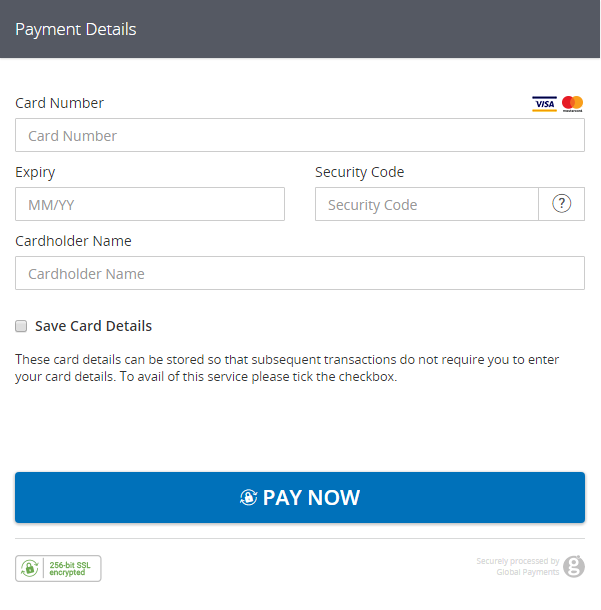
HPP response
The HPP response contains the various Card Storage references we need. Since we're using HPP Card Management, we only need to store the customer reference for the next step.
Alternatively, you can use the HPP just to store the card and then raise payments against it using our API. For that, you'll need both the customer and the card references. We'll also return the card type, expiry date, and the cardholder name entered on the HPP for your own reference—along with the first six and last four digits of the card number.
All your stored customers can be viewed in Ecommerce Portal in the Customers section, along with their saved cards. There, you can manually charge a stored card or set up a scheduled payment.
The Timestamp returned in the response will be identical to the one sent in the request. This, combined with the Order ID and other transaction variables, can be used to definitively link the response received with the transaction request and order created in your application.
You should also check the other transaction variables (for example, the Amount) against what was stored in your application at the time the request JSON was sent.
// configure client settings
GatewayConfig config = new GatewayConfig();
config.setMerchantId("MerchantId");
config.setSharedSecret("secret");
config.setServiceUrl("https://pay.sandbox.realexpayments.com/pay");

HostedService service = new HostedService(config);

/* TODO: grab the response JSON from the client-side
   sample response JSON (values will be Base64 encoded):
   String responseJson = "{ \"MERCHANT_ID\": \"MerchantId\", \"ACCOUNT\": \"internet\", \"ORDER_ID\": \"GTI5Yxb0SumL_TkDMCAxQA\", \"AMOUNT\": \"1999\", "
 + "\"TIMESTAMP\": \"20170725154824\", \"SHA1HASH\": \"843680654f377bfa845387fdbace35acc9d95778\", \"RESULT\": \"00\", \"AUTHCODE\": \"12345\", "
 + "\"CARD_PAYMENT_BUTTON\": \"Place Order\", \"AVSADDRESSRESULT\": \"M\", \"AVSPOSTCODERESULT\": \"M\", \"BATCHID\": \"445196\", \"MESSAGE\": \"[ test system ] Authorised\", "
 + "\"PASREF\": \"15011597872195765\", \"CVNRESULT\": \"M\", \"HPP_FRAUDFILTER_RESULT\": \"PASS\", \"PAYER_SETUP\": \"00\", \"PAYER_SETUP_MSG\": \"Successful\", "
 + "\"SAVED_PAYER_REF\": \"5e7e9152-2d53-466d-91bc-6d12ebc56b79\", \"PMT_SETUP\": \"00\", \"PMT_SETUP_MSG\": \"Successful\","
 + " \"SAVED_PMT_REF\": \"ca68dcac-9af2-4d65-b06c-eb54667dcd4a\", \"SAVED_PMT_TYPE\": \"MC\", \"SAVED_PMT_DIGITS\": \"542523xxxx4415\", "
 + "\"SAVED_PMT_EXPDATE\": \"1025\", \"SAVED_PMT_NAME\": \"James Mason\"}";
 */

try {
   Transaction response = service.parseResponse(responseJson, true);
   String responseCode = response.getResponseCode(); // 00
   String responseMessage = response.getResponseMessage(); // [ test system ] Authorised
   HashMap<String, String> responseValues = response.getResponseValues(); // get values accessible by key
   // Payer Setup Details
   String payerSetupResult = responseValues.get("PAYER_SETUP"); // 00
   String payerSetupMessage = responseValues.get("PAYER_SETUP_MSG"); // Successful
   String payerReference = responseValues.get("SAVED_PAYER_REF"); // 5e7e9152-2d53-466d-91bc-6d12ebc56b79
   // Card Setup Details
   String cardSetupResult = responseValues.get("PMT_SETUP"); // 00
   String cardSetupMessage = responseValues.get("PMT_SETUP_MSG"); // Successful
   String cardReference = responseValues.get("SAVED_PMT_REF"); // ca68dcac-9af2-4d65-b06c-eb54667dcd4a
   // Card Details Stored
   String cardType = responseValues.get("SAVED_PMT_TYPE"); // MC
   String cardDigits = responseValues.get("SAVED_PMT_DIGITS"); // 542523xxxx4415
   String cardExpiry = responseValues.get("SAVED_PMT_EXPDATE"); // 1025
   String cardName = responseValues.get("SAVED_PMT_NAME"); // James Mason
   // TODO: update your application and display transaction outcome to the customer
} catch (ApiException exce) {
   // TODO: add your error handling here
}<?php
require_once('vendor/autoload.php');
use GlobalPayments\Api\ServiceConfigs\Gateways\GpEcomConfig;
use GlobalPayments\Api\Services\HostedService;
use GlobalPayments\Api\Entities\Exceptions\ApiException;
// configure client settings
$config = new GpEcomConfig();
$config->merchantId = "MerchantId";
$config->accountId = "internet";
$config->sharedSecret = "secret";
$config->serviceUrl = "https://pay.sandbox.realexpayments.com/pay";
$service = new HostedService($config);
/*
* TODO: grab the response JSON from the client-side.
* sample response JSON (values will be Base64 encoded):
* $responseJson ='{"MERCHANT_ID":"MerchantId","ACCOUNT":"internet","ORDER_ID":"GTI5Yxb0SumL_TkDMCAxQA","AMOUNT":"1999",' .
* '"TIMESTAMP":"20170725154824","SHA1HASH":"843680654f377bfa845387fdbace35acc9d95778","RESULT":"00","AUTHCODE":"12345",' .
* '"CARD_PAYMENT_BUTTON":"Place Order","AVSADDRESSRESULT":"M","AVSPOSTCODERESULT":"M","BATCHID":"445196",' .
* '"MESSAGE":"[ test system ] Authorised","PASREF":"15011597872195765","CVNRESULT":"M","HPP_FRAUDFILTER_RESULT":"PASS",' .
* '"PAYER_SETUP":"00","PAYER_SETUP_MSG":"Successful","SAVED_PAYER_REF":"5e7e9152-2d53-466d-91bc-6d12ebc56b79",' .
* '"PMT_SETUP":"00","PMT_SETUP_MSG":"Successful","SAVED_PMT_REF":"ca68dcac-9af2-4d65-b06c-eb54667dcd4a",' .
* '"SAVED_PMT_TYPE":"MC","SAVED_PMT_DIGITS":"542523xxxx4415","SAVED_PMT_EXPDATE":"1025","SAVED_PMT_NAME":"James Mason"}";
*/
try {
// create the response object from the response JSON
$parsedResponse = $service->parseResponse($responseJson, true);
$responseCode = $parsedResponse->responseCode; // 00
$responseMessage = $parsedResponse->responseMessage; // [ test system ] Authorised
$responseValues = $parsedResponse->responseValues; // get values accessible by key
// Payer Setup Details
$payerSetupResult = $responseValues["PAYER_SETUP"]; // 00
$payerSetupMessage = $responseValues["PAYER_SETUP_MSG"]; // Successful
$payerReference = $responseValues["SAVED_PAYER_REF"]; // 5e7e9152-2d53-466d-91bc-6d12ebc56b79
// Card Setup Details
$cardSetupResult = $responseValues["PMT_SETUP"]; // 00
$cardSetupMessage = $responseValues["PMT_SETUP_MSG"]; // Successful
$cardReference = $responseValues["SAVED_PMT_REF"]; // ca68dcac-9af2-4d65-b06c-eb54667dcd4a
// Card Details Stored
$cardType = $responseValues["SAVED_PMT_TYPE"]; // MC
$cardDigits = $responseValues["SAVED_PMT_DIGITS"]; // 542523xxxx4415
$cardExpiry = $responseValues["SAVED_PMT_EXPDATE"]; // 1025
$cardName = $responseValues["SAVED_PMT_NAME"]; // James Mason
// TODO: update your application and display transaction outcome to the customer
} catch (ApiException $e) {
// For example if the SHA1HASH doesn't match what is expected
// TODO: add your error handling here
}// configure client settings
var service = new HostedService(new GpEcomConfig
{
MerchantId = "MerchantId",
AccountId = "internet",
SharedSecret = "secret",
ServiceUrl = "https://pay.sandbox.realexpayments.com/pay",
});
// TODO: grab the response JSON from the client-side for example:
// var responseJson = Request.Form["hppResponse"];
try
{
Transaction response = service.ParseResponse(responseJson, true);
var responseCode = response.ResponseCode; // 00
var responseMessage = response.ResponseMessage; // [ test system ] Authorised
var responseValues = response.ResponseValues; // get values accessible by key
// Payer Setup Details
var payerSetupResult = responseValues["PAYER_SETUP"]; // 00
var payerSetupMessage = responseValues["PAYER_SETUP_MSG"]; // Successful
var payerReference = responseValues["SAVED_PAYER_REF"]; // 5e7e9152-2d53-466d-91bc-6d12ebc56b79
// Card Setup Details
var cardSetupResult = responseValues["PMT_SETUP"]; // 00
var cardSetupMessage = responseValues["PMT_SETUP_MSG"]; // Successful
var cardReference = responseValues["SAVED_PMT_REF"]; // ca68dcac-9af2-4d65-b06c-eb54667dcd4a
// Card Details Stored
var cardType = responseValues["SAVED_PMT_TYPE"]; // MC
var cardDigits = responseValues["SAVED_PMT_DIGITS"]; // 542523xxxx4415
var cardExpiry = responseValues["SAVED_PMT_EXPDATE"]; // 1025
var cardName = responseValues["SAVED_PMT_NAME"]; // James Mason
// TODO: update your application and display transaction outcome to the customer
}
catch (ApiException exce)
{
// TODO: add your error handling here
}<!-- Additional Response Fields -->
[REALWALLET_CHOSEN=1,
PAYER_SETUP=00,
PAYER_SETUP_MSG=Successful,
SAVED_PAYER_REF=376a2598-412d-4805-9f47-c177d5605853,
PMT_SETUP=00,
PMT_SETUP_MSG=Successful,
SAVED_PMT_TYPE=VISA,
SAVED_PMT_REF=cd46344a-4292-47dc-9ced-e8a42ce66977,
SAVED_PMT_DIGITS=426397xxxx5262,
SAVED_PMT_EXPDATE=1025,
SAVED_PMT_NAME=James Mason]Display stored cards to the customer
Now that we have our customer reference, we can send it to the HPP to display all of the customer’s stored cards for subsequent transactions. The customer can then choose a card to pay with and also manage their cards by updating or deleting them. We'll capture the security code on the HPP and include it in the authorization.
The reference is returned in the response field SAVED_PAYER_REF. We then add it to our request when the customer returns to checkout.
// configure client, request and HPP settings
GatewayConfig config = new GatewayConfig();
config.setMerchantId("MerchantId");
config.setAccountId("internet");
config.setSharedSecret("secret");
config.setServiceUrl("https://pay.sandbox.realexpayments.com/pay");

HostedPaymentConfig hostedPaymentConfig = new HostedPaymentConfig();
hostedPaymentConfig.setVersion(HppVersion.Version2);
hostedPaymentConfig.setDisplaySavedCards(true);
config.setHostedPaymentConfig(hostedPaymentConfig);

HostedService service = new HostedService(config);

// data to be passed to the HPP along with transaction level settings
HostedPaymentData hostedPaymentData = new HostedPaymentData();
hostedPaymentData.setOfferToSaveCard(true);
hostedPaymentData.setCustomerExists(true);
hostedPaymentData.setCustomerKey("376a2598-412d-4805-9f47-c177d5605853");
// supply your own reference for any new card saved
// hostedPaymentData.setPaymentKey = "376a2598-412d-4805-9f47-c177d5605853"

try {
   String hppJson = service.charge(new BigDecimal("19.99"))
      .withHostedPaymentData(hostedPaymentData)
      .withCurrency("EUR")
      .serialize();
   // TODO: pass the HPP JSON to the client-side

} catch (ApiException exce) {
   // TODO: add your error handling here
}<?php
require_once('vendor/autoload.php');
use GlobalPayments\Api\ServiceConfigs\Gateways\GpEcomConfig;
use GlobalPayments\Api\HostedPaymentConfig;
use GlobalPayments\Api\Services\HostedService;
use GlobalPayments\Api\Entities\HostedPaymentData;
use GlobalPayments\Api\Entities\Enums\HppVersion;
use GlobalPayments\Api\Entities\Exceptions\ApiException;
$config = new GpEcomConfig();
$config->merchantId = "MerchantId";
$config->accountId = "internet";
$config->sharedSecret = "secret";
$config->serviceUrl = "https://pay.sandbox.realexpayments.com/pay";
$config->hostedPaymentConfig = new HostedPaymentConfig();
$config->hostedPaymentConfig->version = HppVersion::VERSION_2;
$config->hostedPaymentConfig->displaySavedCards = true;
$service = new HostedService($config);
// data to be passed to the HPP along with transaction level settings
$hostedPaymentData = new HostedPaymentData();
$hostedPaymentData->offerToSaveCard = true;
$hostedPaymentData->customerExists = true;
$hostedPaymentData->customerKey = "5e7e9152-2d53-466d-91bc-6d12ebc56b79";
// supply your own reference for any new card saved
// $hostedPaymentData->paymentKey = "376a2598-412d-4805-9f47-c177d5605853"
try {
$hppJson = $service->charge(19.99)
->withCurrency("EUR")
->withHostedPaymentData($hostedPaymentData)
->serialize();
// TODO: pass the HPP JSON to the client-side
} catch (ApiException $e) {
// TODO: Add your error handling here
}// configure client, request and HPP settings
var service = new HostedService(new GpEcomConfig
{
MerchantId = "MerchantId",
AccountId = "internet",
SharedSecret = "secret",
ServiceUrl = "https://pay.sandbox.realexpayments.com/pay",
HostedPaymentConfig = new HostedPaymentConfig
{
Version = "2",
DisplaySavedCards = true
}
});
// data to be passed to the HPP along with transaction level settings
var hostedPaymentData = new HostedPaymentData
{
OfferToSaveCard = true,
CustomerExists = true,
CustomerKey = "5e7e9152-2d53-466d-91bc-6d12ebc56b79"
// supply your own reference for any new card saved
// PaymentKey = "48fa69fe-d785-4c27-876d-6ccba660fa2b"
};
try
{
var hppJson = service.Charge(19.99m)
.WithHostedPaymentData(hostedPaymentData)
.WithCurrency("EUR")
.Serialize();
// TODO: pass the HPP JSON to the client-side
}
catch (ApiException exce)
{
// TODO: add your error handling here
}<form action="https://pay.sandbox.realexpayments.com/pay" method="POST" target="iframe">
<input type="hidden" name="TIMESTAMP" value="20180613110737">
<input type="hidden" name="MERCHANT_ID" value="MerchantId">
<input type="hidden" name="ACCOUNT" value="internet">
<input type="hidden" name="ORDER_ID" value="N6qsk4kYRZihmPrTXWYS6g">
<input type="hidden" name="AMOUNT" value="19.99">
<input type="hidden" name="CURRENCY" value="EUR">
<input type="hidden" name="SHA1HASH" value="308bb8dfbbfcc67c28d602d988ab104c3b08d012">
<input type="hidden" name="AUTO_SETTLE_FLAG" value="1">
<input type="hidden" name="HPP_VERSION" value="2">
<input type="hidden" name="MERCHANT_RESPONSE_URL" value="https://www.example.com/responseUrl">
<!-- Card Storage Fields -->
<input type="hidden" name="HPP_SELECT_STORED_CARD" value="376a2598-412d-4805-9f47-c177d5605853">
<input type="hidden" name="PAYER_EXIST" value="1">
<input type="hidden" name="OFFER_SAVE_CARD" value="1">
<!-- End Card Storage Fields -->
<input type="submit" value="Click here to Purchase">
</form>HPP example
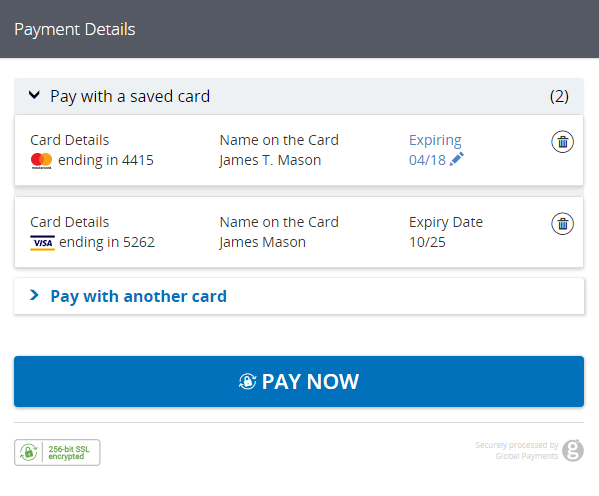
HPP response
The reference of the card the customer chooses to pay with will be returned in the HPP response. Any cards they choose to delete or edit will also be returned.
The Timestamp returned in the response will be identical to the one sent in the request JSON. This, combined with the Order ID and other transaction variables, can be used to definitively link the response received with the transaction request and order created in your application.
You should also check the other transaction variables (for example, the Amount) against what was stored in your application at the time the request JSON was sent.
// configure client settings
GatewayConfig config = new GatewayConfig();
config.setMerchantId("MerchantId");
config.setSharedSecret("secret");
config.setServiceUrl("https://pay.sandbox.realexpayments.com/pay");

HostedService service = new HostedService(config);

/* TODO: grab the response JSON from the client-side.
   sample response JSON (values will be Base64 encoded):
   String responseJson = "{ \"MERCHANT_ID\": \"MerchantId\", \"ACCOUNT\": \"internet\", \"ORDER_ID\": \"GTI5Yxb0SumL_TkDMCAxQA\", \"AMOUNT\": \"1999\", "
 + "\"TIMESTAMP\": \"20170725154824\", \"SHA1HASH\": \"843680654f377bfa845387fdbace35acc9d95778\", \"RESULT\": \"00\", \"AUTHCODE\": \"12345\", "
 + "\"CARD_PAYMENT_BUTTON\": \"Place Order\", \"AVSADDRESSRESULT\": \"M\", \"AVSPOSTCODERESULT\": \"M\", \"BATCHID\": \"445196\", \"MESSAGE\": \"[ test system ] Authorised\", "
 + "\"PASREF\": \"15011597872195765\", \"CVNRESULT\": \"M\", \"HPP_FRAUDFILTER_RESULT\": \"PASS\", \"HPP_CHOSEN_PMT_REF\": \"099efeb4-eda2-4fd7-a04d-29647bb6c51d\", "
 + "\"HPP_EDITED_PMT_REF\": \"037bd26a-c76b-4ee4-8063-376d8858f23d\", \"HPP_DELETED_PMT_REF\": \"3db4c72c-cd95-4743-8070-f17e2b56b642\"}";
 */

try {
   Transaction response = service.parseResponse(responseJson, true);
   String responseCode = response.getResponseCode(); // 00
   String responseMessage = response.getResponseMessage(); // [ test system ] Authorised
   HashMap<String, String> responseValues = response.getResponseValues(); // get values accessible by key
   // card used to complete payment, edited or deleted
   String chosenCard = responseValues.get("HPP_CHOSEN_PMT_REF"); // 099efeb4-eda2-4fd7-a04d-29647bb6c51d
   String editedCard = responseValues.get("HPP_EDITED_PMT_REF"); // 037bd26a-c76b-4ee4-8063-376d8858f23d
   String deletedCard = responseValues.get("HPP_DELETED_PMT_REF"); // 3db4c72c-cd95-4743-8070-f17e2b56b642
   // TODO: update your application and display transaction outcome to the customer
} catch (ApiException exce) {
   // TODO: add your error handling here
}<?php
require_once('vendor/autoload.php');
use GlobalPayments\Api\ServiceConfigs\Gateways\GpEcomConfig;
use GlobalPayments\Api\Services\HostedService;
use GlobalPayments\Api\Entities\Exceptions\ApiException;
// configure client settings
$config = new GpEcomConfig();
$config->merchantId = "MerchantId";
$config->accountId = "internet";
$config->sharedSecret = "secret";
$config->serviceUrl = "https://pay.sandbox.realexpayments.com/pay";
$service = new HostedService($config);
/*
* TODO: grab the response JSON from the client-side.
* sample response JSON (values will be Base64 encoded):
* $responseJson ='{"MERCHANT_ID":"MerchantId","ACCOUNT":"internet","ORDER_ID":"GTI5Yxb0SumL_TkDMCAxQA","AMOUNT":"1999",' .
* '"TIMESTAMP":"20170725154824","SHA1HASH":"843680654f377bfa845387fdbace35acc9d95778","RESULT":"00","AUTHCODE":"12345",' .
* '"CARD_PAYMENT_BUTTON":"Place Order","AVSADDRESSRESULT":"M","AVSPOSTCODERESULT":"M","BATCHID":"445196",' .
* '"MESSAGE":"[ test system ] Authorised","PASREF":"15011597872195765","CVNRESULT":"M","HPP_FRAUDFILTER_RESULT":"PASS",' .
* '"HPP_CHOSEN_PMT_REF":"099efeb4-eda2-4fd7-a04d-29647bb6c51d","HPP_EDITED_PMT_REF":"037bd26a-c76b-4ee4-8063-376d8858f23d",' .
* '"HPP_DELETED_PMT_REF" => "3db4c72c-cd95-4743-8070-f17e2b56b642"";
*/
try {
$parsedResponse = $service->parseResponse($responseJson, true);
$responseCode = $parsedResponse->responseCode; // 00
$responseMessage = $parsedResponse->responseMessage; // [ test system ] Authorised
$responseValues = $parsedResponse->responseValues; // get values accessible by key
// card used to complete payment, edited or deleted
$chosenCard = $responseValues["HPP_CHOSEN_PMT_REF"]; // 099efeb4-eda2-4fd7-a04d-29647bb6c51d
$editedCard = $responseValues["HPP_EDITED_PMT_REF"]; // 037bd26a-c76b-4ee4-8063-376d8858f23d
$deletedCard = $responseValues["HPP_DELETED_PMT_REF"]; // 3db4c72c-cd95-4743-8070-f17e2b56b642
// TODO: update your application and display transaction outcome to the customer
} catch (ApiException $e) {
// TODO: Add your error handling here
}// configure client settings
var service = new HostedService(new GpEcomConfig
{
MerchantId = "MerchantId",
AccountId = "internet",
SharedSecret = "secret",
ServiceUrl = "https://pay.sandbox.realexpayments.com/pay",
});
// TODO: grab the response JSON from the client-side for example:
// var responseJson = Request.Form["hppResponse"];
try
{
Transaction response = service.ParseResponse(responseJson, true);
var responseCode = response.ResponseCode; // 00
var responseMessage = response.ResponseMessage; // [ test system ] Authorised
var responseValues = response.ResponseValues; // get values accessible by key
var chosenCard = responseValues["HPP_CHOSEN_PMT_REF"]; // 099efeb4-eda2-4fd7-a04d-29647bb6c51d
var editedCard = responseValues["HPP_EDITED_PMT_REF"]; // 037bd26a-c76b-4ee4-8063-376d8858f23d
var deletedCard = responseValues["HPP_DELETED_PMT_REF"]; // 3db4c72c-cd95-4743-8070-f17e2b56b642
// TODO: update your application and display transaction outcome to the customer
}
catch (ApiException exce)
{
// TODO: add your error handling here
}<!-- Additional Response Fields -->
[HPP_CHOSEN_PMT_REF=ca46344d-4292-47dc-9ced-e8a42ce66977,
HPP_EDITED_PMT_REF=078c6d4a-03df-4716-a8ae-dd266f3d041a,
HPP_DELETED_PMT_REF: f80d04d7-bb27-4bf2-a8ac-571deb5222e9]Explore more functionality to enrich your application.
With our Card Storage API, you can securely store customer details along with their card data. Global Payments returns a token representation of the card, which can be stored with no increased PCI Compliance requirements.
Tokens can be used for recurring billing or to enable one-click checkout. You can store multiple cards against a single customer reference, as well as add, delete, and update cards.
In this guide, you'll learn how to create the necessary customer (Payer) and card (Payment Method) references as well as how to charge them.
Card Storage is a chargeable service. To add it, please consult your account manager.
Step 1: Create a customer
A customer (Payer) is a reference you can store multiple cards against. You can also store additional information like address and phone numbers against a customer reference.
Your stored customers can be viewed in Ecommerce Portal in the Customers section, along with their saved cards. There, you can manually charge a stored card or set up a scheduled payment.
It's not possible to delete customers. Only stored cards can be deleted.
Here, we use a random string generator for the customer and card references.
// configure client & request settings
GatewayConfig config = new GatewayConfig();
config.setMerchantId("MerchantId");
config.setAccountId("internet");
config.setSharedSecret("secret");
config.setServiceUrl("https://api.sandbox.realexpayments.com/epage-remote.cgi");

ServicesContainer.configureService(config);

// supply the the payer/customer details
Address address = new Address();
address.setStreetAddress1("Flat 123");
address.setStreetAddress2("House 456");
address.setStreetAddress3("The Cul-De-Sac");
address.setCity("Halifax");
address.setProvince("West Yorkshire");
address.setPostalCode("W6 9HR");
address.setCountry("United Kingdom");

Customer customer = new Customer();
customer.setKey(UUID.randomUUID().toString());
customer.setTitle("Mr.");
customer.setFirstName("James");
customer.setLastName("Mason");
customer.setCompany("Acme Ltd");
customer.setAddress(address);
customer.setMobilePhone("+25544778544");
customer.setEmail("text@example.com");
customer.setComments("Campaign Ref E7373G");

try {
   Customer response = customer.create();
   // get the stored payer/customer reference for future transactions
   String payerRef = response.getKey();
   // TODO: add a card/payment method to the payer, see next step
}

catch (ApiException exce) {
        // TODO: add your error handling here
}<?php
require_once('vendor/autoload.php');
use GlobalPayments\Api\ServiceConfigs\Gateways\GpEcomConfig;
use GlobalPayments\Api\ServicesContainer;
use GlobalPayments\Api\Entities\Address;
use GlobalPayments\Api\Entities\Customer;
use GlobalPayments\Api\Utils\GenerationUtils;
use GlobalPayments\Api\Entities\Exceptions\ApiException;
$config = new GpEcomConfig();
$config->merchantId = "MerchantId";
$config->accountId = "internet";
$config->sharedSecret = "secret";
$config->serviceUrl = "https://api.sandbox.realexpayments.com/epage-remote.cgi";
ServicesContainer::configureService($config);
// supply the the payer/customer details
$customer = new Customer();
$customer->key = GenerationUtils::getGuid();
$customer->title = "Mr.";
$customer->firstName = "James";
$customer->lastName = "Mason";
$customer->company = "Acme Ltd";
$customer->email = "text@example.com";
$customer->address = new Address();
$customer->address->streetAddress1 = "Flat 123";
$customer->address->streetAddress2 = "House 456";
$customer->address->city = "Halifax";
$customer->address->postalCode = "E77 4QJ";
$customer->address->country = "GB";
$customer->mobilePhone = "+353123456789";
try {
$response = $customer->create();
// TODO: add a card/payment method to the payer, see next step
} catch (ApiException $e) {
// TODO: Add your error handling here
}// configure client & request settings
ServicesContainer.ConfigureService(new GpEcomConfig
{
MerchantId = "MerchantId",
AccountId = "internet",
SharedSecret = "secret",
ServiceUrl = "https://api.sandbox.realexpayments.com/epage-remote.cgi"
});
// supply the the payer/customer details
var customer = new Customer
{
Key = Guid.NewGuid().ToString(),
Title = "Mr.",
FirstName = "James",
LastName = "Mason",
Company = "Realex Payments",
Address = new Address
{
StreetAddress1 = "Flat 123",
StreetAddress2 = "House 456",
StreetAddress3 = "The Cul-De-Sac",
City = "Halifax",
Province = "West Yorkshire",
PostalCode = "W6 9HR",
Country = "United Kingdom"
},
HomePhone = "+35312345678",
WorkPhone = "+3531987654321",
Fax = "+124546871258",
MobilePhone = "+25544778544",
Email = "text@example.com",
Comments = "Campaign Ref E7373G"
};
try
{
var response = customer.Create();
// get the stored payer/customer reference for future transactions
var payerRef = response.Key;
// TODO: add a card/payment method to the payer, see next step
}
catch (ApiException exce)
{
// TODO: add your error handling here
}<?xml version="1.0" encoding="UTF-8"?>
<request type="payer-new" timestamp="20180614095601">
<merchantid>MerchantId</merchantid>
<account>internet</account>
<orderid>OL0f0VYFQTyNG5IulhsMrg</orderid>
<payer ref="0f357b45-9aa4-4453-a685-c69232e9024f" type="Retail">
<title>Mr.</title>
<firstname>James</firstname>
<surname>Mason</surname>
<company>Global Payments</company>
<address>
<line1>Flat 123</line1>
<line2>House 456</line2>
<line3>The Cul-De-Sac</line3>
<city>Halifax</city>
<county>West Yorkshire</county>
<postcode>W6 9HR</postcode>
<country code="GB">United Kingdom</country>
</address>
<phonenumbers>
<home>+35312345678</home>
<work>+3531987654321</work>
<fax>+124546871258</fax>
<mobile>+25544778544</mobile>
</phonenumbers>
<email>text@example.com</email>
<dateofbirth>19851222</dateofbirth>
<state>Yorkshire and the Humber</state>
<passphrase>montgomery</passphrase>
<vatnumber>GB 123456789</vatnumber>
<varref>Car Part HV</varref>
<custnum>E8953893489</custnum>
</payer>
<sha1hash>8d7e42bba0d9f6ca81f6106bfd74d2911fad888b</sha1hash>
</request>Step 2: Store a card
We highly recommend that you process an authorization against a card before storing it. That way, you know it’s valid. If you don't want to charge the card, process an Open To Buy (OTB) transaction instead.
Here, we store cards for the customer we created in the previous step.
// configure client & request settings
GatewayConfig config = new GatewayConfig();
config.setMerchantId("MerchantId");
config.setAccountId("internet");
config.setSharedSecret("secret");
config.setServiceUrl("https://api.sandbox.realexpayments.com/epage-remote.cgi");
ServicesContainer.configureService(config);

// supply the the existing payer/customer reference
Customer customer = new Customer();
customer.setKey("e193c21a-ce64-4820-b5b6-8f46715de931");

// create a new card/payment method reference
String paymentMethodRef = UUID.randomUUID().toString();

// create the card object
CreditCardData card = new CreditCardData();
card.setNumber("4263970000005262");
card.setExpMonth(12);
card.setExpYear(2025);
card.setCardHolderName("James Mason");

// add the card/payment method to the payer/customer
RecurringPaymentMethod paymentMethod = customer.addPaymentMethod(paymentMethodRef, card);

try {
   // store the card
   RecurringPaymentMethod response = paymentMethod.create();
   // TODO: charge the stored card, see next step
}

catch (ApiException exce) {
        // TODO: add your error handling here
}<?php
require_once('vendor/autoload.php');
use GlobalPayments\Api\ServiceConfigs\Gateways\GpEcomConfig;
use GlobalPayments\Api\ServicesContainer;
use GlobalPayments\Api\Entities\Customer;
use GlobalPayments\Api\Utils\GenerationUtils;
use GlobalPayments\Api\PaymentMethods\CreditCardData;
use GlobalPayments\Api\Entities\Exceptions\ApiException;
$config = new GpEcomConfig();
$config->merchantId = "MerchantId";
$config->accountId = "internet";
$config->sharedSecret = "secret";
$config->serviceUrl = "https://api.sandbox.realexpayments.com/epage-remote.cgi";
ServicesContainer::configureService($config);
// supply the the payer/customer details
$customer = new Customer();
$customer->key = "e193c21a-ce64-4820-b5b6-8f46715de931";
// create a new card/payment method reference
$paymentMethodRef = GenerationUtils::getGuid();
// create the card object
$card = new CreditCardData();
$card->number = "5473500000000014";
$card->expMonth = 12;
$card->expYear = 2025;
$card->cardHolderName = "James Mason";
// add the card/payment method to the payer/customer
$paymentMethod = $customer->addPaymentMethod($paymentMethodRef, $card);
try {
// store the card
$response = $paymentMethod->create();
// TODO: charge the stored card
} catch (ApiException $e) {
// TODO: Add your error handling here
}// configure client & request settings
ServicesContainer.ConfigureService(new GpEcomConfig
{
MerchantId = "MerchantId",
AccountId = "internet",
SharedSecret = "secret",
ServiceUrl = "https://api.sandbox.realexpayments.com/epage-remote.cgi"
});
// supply the the exsiting payer/customer reference
var customer = new Customer
{
Key = "e193c21a-ce64-4820-b5b6-8f46715de931"
};
// create a new card/payment method reference
var paymentMethodRef = Guid.NewGuid().ToString();
// create the card object
var card = new CreditCardData
{
Number = "4263970000005262",
ExpMonth = 12,
ExpYear = 2025,
CardHolderName = "James Mason"
};
// add the card/payment method to the payer/customer
var paymentMethod = customer.AddPaymentMethod(paymentMethodRef, card);
try
{
// store the card
var response = paymentMethod.Create();
// TODO: charge the stored card, see next step
}
catch (ApiException exce)
{
// TODO: add your error handling here
}<?xml version="1.0" encoding="UTF-8"?>
<request type="card-new" timestamp="20180614095601">
<merchantid>MerchantId</merchantid>
<account>internet</account>
<orderid>F-2knQ0iShKK6ezfaSLh2Q</orderid>
<card>
<ref>10c6a2c7-be7b-a13f-12638937a012</ref>
<payerref>0f357b45-9aa4-4453-a685-c69232e9024f</payerref>
<number>4263970000005262</number>
<expdate>0519</expdate>
<chname>James Mason</chname>
<type>VISA</type>
</card>
<sha1hash>85fbaf68bb0e4fccd634facf6592b0677489709e</sha1hash>
</request>Step 3: Charge a card
Charging a stored card works the same as a standard authorization, except instead of collected card data you simply send the customer and card references. Global Payments obtains the securely stored card data and builds the authorization message.
Under PCI Compliance rules, the security code (CVN, CVV) cannot be stored. However, if in your application you let the customer use a card they previously saved, you can prompt them for their security code again. Then include the code in the request.
// configure client & request settings
GatewayConfig config = new GatewayConfig();
config.setMerchantId("MerchantId");
config.setAccountId("internet");
config.setSharedSecret("secret");
config.setServiceUrl("https://api.sandbox.realexpayments.com/epage-remote.cgi");
ServicesContainer.configureService(config);

// supply existing customer/payer ref
String customerId = "e193c21a-ce64-4820-b5b6-8f46715de931";
// supply existing card/payment method ref
String paymentId = "10c3e089-fa98-4352-bc4e-4b37f7dcf108";

// create the payment method object
RecurringPaymentMethod paymentMethod = new RecurringPaymentMethod(customerId, paymentId);

try {
   // charge the stored card/payment method
	Transaction response = paymentMethod.charge(new BigDecimal("19.99"))
	   .withCurrency("EUR")
		.withCvn("123")
		.execute();

	String result = response.getResponseCode(); // 00 == Success
	String message = response.getResponseMessage(); // [ test system ] AUTHORISED

	// get the reponse details to save to the DB for future requests
	String orderId = response.getOrderId(); // ezJDQjhENTZBLTdCNzNDQw
	String authCode = response.getAuthorizationCode(); // 12345
	String paymentsReference = response.getTransactionId(); // pasref 14622680939731425
   String schemeReferenceData = response.getSchemeId(); // MMC0F00YE4000000715
}

catch (ApiException exce) {
	// TODO: add your error handling here
}<?php
require_once('vendor/autoload.php');
use GlobalPayments\Api\ServiceConfigs\Gateways\GpEcomConfig;
use GlobalPayments\Api\ServicesContainer;
use GlobalPayments\Api\PaymentMethods\RecurringPaymentMethod;
use GlobalPayments\Api\Entities\Exceptions\ApiException;
$config = new GpEcomConfig();
$config->merchantId = "MerchantId";
$config->accountId = "internet";
$config->sharedSecret = "secret";
$config->serviceUrl = "https://api.sandbox.realexpayments.com/epage-remote.cgi";
ServicesContainer::configureService($config);
// supply existing customer/payer ref
$customerId = "e193c21a-ce64-4820-b5b6-8f46715de931";
// supply existing card/payment method ref
$paymentId = "10c3e089-fa98-4352-bc4e-4b37f7dcf108";
// create the payment method object
$paymentMethod = new RecurringPaymentMethod($customerId, $paymentId);
try {
// charge the stored card/payment method
$response = $paymentMethod->charge(19.99)
->withCurrency("EUR")
->withCvn("123")
->execute();
} catch (ApiException $e) {
// TODO: Add your error handling here
}
if (isset($response)) {
$result = $response->responseCode; // 00 == Success
$message = $response->responseMessage; // [ test system ] AUTHORISED
// get the details to save to the DB for future requests
$orderId = $response->orderId; // N6qsk4kYRZihmPrTXWYS6g
$authCode = $response->authorizationCode; // 12345
$paymentsReference = $response->transactionId; // pasref: 14610544313177922
$schemeReferenceData = $response->schemeId; // MMC0F00YE4000000715
}// configure client & request settings
ServicesContainer.ConfigureService(new GpEcomConfig
{
MerchantId = "MerchantId",
AccountId = "internet",
SharedSecret = "secret",
ServiceUrl = "https://api.sandbox.realexpayments.com/epage-remote.cgi"
});
// supply existing customer/payer ref
var customerId = "e193c21a-ce64-4820-b5b6-8f46715de931";
// supply existing card/payment method ref
var paymentId = "10c3e089-fa98-4352-bc4e-4b37f7dcf108";
// create the payment method object
var paymentMethod = new RecurringPaymentMethod(customerId, paymentId);
try
{
// charge the stored card/payment method
Transaction response = paymentMethod.Charge(19.99m)
.WithCurrency("EUR")
.WithCvn("123")
.Execute();
var result = response.ResponseCode; // 00 == Success
var message = response.ResponseMessage; // [ test system ] AUTHORISED
// get the response details to save to the DB for future requests
var orderId = response.OrderId; // ezJDQjhENTZBLTdCNzNDQw
var authCode = response.AuthorizationCode; // 12345
var paymentsReference = response.TransactionId; // pasref 14622680939731425
var schemeReferenceData = response.SchemeId; // MMC0F00YE4000000715
}
catch (ApiException exce)
{
// TODO: add your error handling here
}<?xml version="1.0" encoding="UTF-8"?>
<request type="receipt-in" timestamp="20180614095601">
<merchantid>MerchantId</merchantid>
<account>internet</account>
<channel>ECOM</channel>
<orderid>AiCibJ5UR7utURy_slxhJw</orderid>
<amount currency="EUR">1001</amount>
<autosettle flag="1"/>
<payerref>03e28f0e-492e-80bd-20ec318e9334</payerref>
<paymentmethod>3c4af936-483e-a393-f558bec2fb2a</paymentmethod>
<paymentdata>
<cvn>
<number>123</number>
</cvn>
</paymentdata>
<sha1hash>f0b45f1d7aed21e7476c11c22c124f5a44a9c59a</sha1hash>
</request>Explore more functionality to enrich your application.
Credential on File
Card Storage - 3D Secure 2