With the Hosted Payment Page (HPP), you can accept transactions from a number of worldwide payment methods. This not only widens your customer base to more shoppers across the globe but also provides the added benefit of managing all your payments through our Reporting tool.
Introduction
In this guide, we set up integration fields for five non-card payment methods (in addition to our standard authorization fields). This will give you access to over 30 non-card payment methods. To see what local and alternative payment methods we support, see Supported Payment Methods.
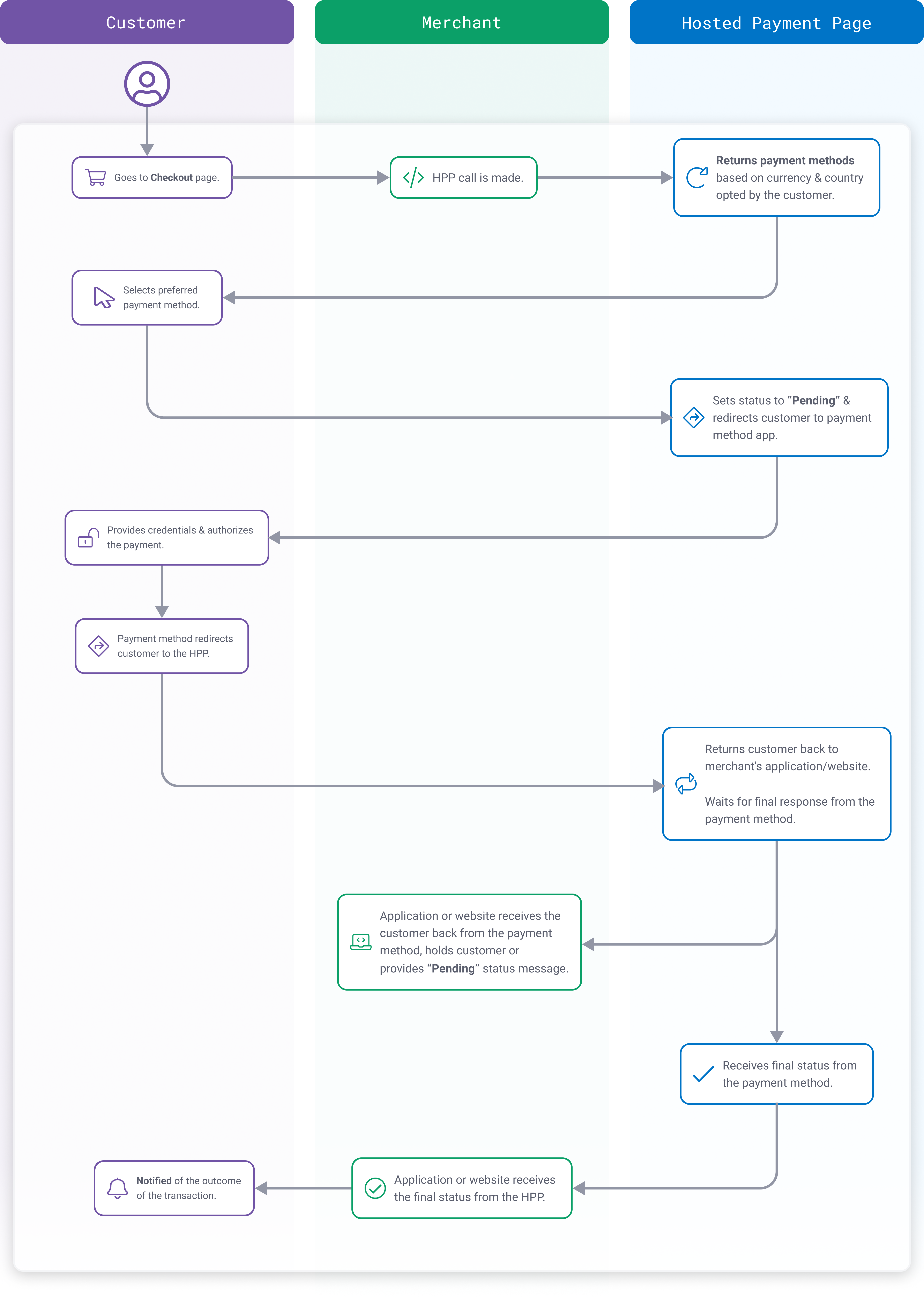
For most non-card payment methods, the HPP integration works like this:
Step 1: Initiate the payment
Once the customer makes their choice, the HPP redirects the customer’s browser to their selected payment method so that they can authenticate and authorize the transaction. All the payment methods have a similar flow except for SEPA (for more information, see SEPA Model A or Model C) Once that's complete, they are redirected back to your application or website along with the transaction response. The final transaction status will also be sent to a dedicated Status Update URL.
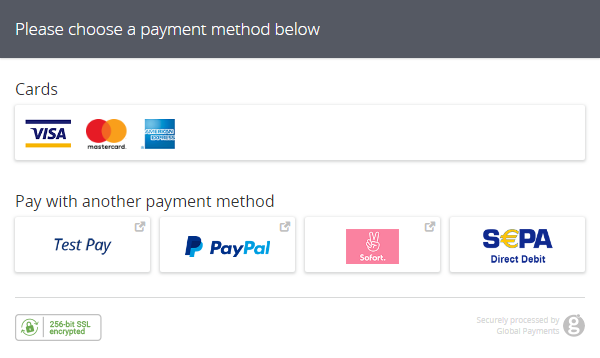
Here, we include the optional field to display a subset of the payment methods enabled on the account. We also supply the customer's country along with their first and last name.
Incidentally, the Payment Methods field (PM_Methods) can be used to include any combination of cards, local payment methods, or alternative payment methods. If the field is blank, all of the enabled payment methods are returned.
import com.global.api.entities.HostedPaymentData;
import com.global.api.entities.enums.AlternativePaymentType;
import com.global.api.entities.enums.HppVersion;
import com.global.api.entities.exceptions.ApiException;
import com.global.api.serviceConfigs.GatewayConfig;
import com.global.api.serviceConfigs.HostedPaymentConfig;
import com.global.api.services.HostedService;

import java.math.BigDecimal;

// configure client, request and HPP settings
GatewayConfig config = new GatewayConfig();
config.setMerchantId("MerchantId");
config.setAccountId("internet");
config.setSharedSecret("secret");
config.setServiceUrl("https://pay.sandbox.realexpayments.com/pay");

HostedPaymentConfig hostedPaymentConfig = new HostedPaymentConfig();
hostedPaymentConfig.setVersion(HppVersion.Version2);

config.setHostedPaymentConfig(hostedPaymentConfig);

HostedService service = new HostedService(config);

HostedPaymentData hostedPaymentData = new HostedPaymentData();
hostedPaymentData.setCustomerCountry("DE");
hostedPaymentData.setCustomerFirstName("James");
hostedPaymentData.setCustomerLastName("Mason");
hostedPaymentData.setMerchantResponseUrl("https://www.example.com/returnUrl");
hostedPaymentData.setTransactionStatusUrl("https://www.example.com/statusUrl");

hostedPaymentData.setPresetPaymentMethods(
        AlternativePaymentType.SOFORTUBERWEISUNG,
        AlternativePaymentType.SEPA_DIRECTDEBIT_PPPRO_MANDATE_MODEL_A,
        AlternativePaymentType.TESTPAY
);

try {
    String hppJson =
            service
                    .charge(new BigDecimal("10.01"))
                    .withCurrency("EUR")
                    .withHostedPaymentData(hostedPaymentData)
                    .serialize();
// TODO: pass the HPP JSON to the client-side
} catch (ApiException e) {
// TODO: Add your error handling here
}require_once('vendor/autoload.php');
use GlobalPayments\Api\Entities\Enums\AlternativePaymentType;
use GlobalPayments\Api\ServiceConfigs\Gateways\GpEcomConfig;
use GlobalPayments\Api\HostedPaymentConfig;
use GlobalPayments\Api\Entities\HostedPaymentData;
use GlobalPayments\Api\Entities\Enums\HppVersion;
use GlobalPayments\Api\Entities\Exceptions\ApiException;
use GlobalPayments\Api\Services\HostedService;
use GlobalPayments\Api\Tests\Integration\Gateways\RealexConnector\Hpp\RealexHppClient;
// configure client, request and HPP settings
$config = new GpEcomConfig();
$config->merchantId = "MerchantId";
$config->accountId = "internet";
$config->sharedSecret = "secret";
$config->serviceUrl = "https://pay.sandbox.realexpayments.com/pay";
$config->hostedPaymentConfig = new HostedPaymentConfig();
$config->hostedPaymentConfig->version = HppVersion::VERSION_2;
$service = new HostedService($config);
$hostedPaymentData = new HostedPaymentData();
$hostedPaymentData->customerCountry = 'DE';
$hostedPaymentData->customerFirstName = 'James';
$hostedPaymentData->customerLastName = 'Mason';
$hostedPaymentData->merchantResponseUrl = 'https://www.example.com/returnUrl';
$hostedPaymentData->transactionStatusUrl = 'https://www.example.com/statusUrl';
$apmTypes = [
AlternativePaymentType::SOFORTUBERWEISUNG,
AlternativePaymentType::PAYPAL,
AlternativePaymentType::SEPA_DIRECTDEBIT_PPPRO_MANDATE_MODEL_A,
AlternativePaymentType::TEST_PAY
];
$hostedPaymentData->presetPaymentMethods = $apmTypes;
try {
$hppJson = $service->charge(10.01)
->withCurrency("EUR")
->withHostedPaymentData($hostedPaymentData)
->serialize();
// TODO: pass the HPP JSON to the client-side
} catch (ApiException $e) {
// TODO: Add your error handling here
} // configure client, request and HPP settings
var config = new GpEcomConfig();
config.MerchantId = "MerchantId";
config.AccountId = "internet";
config.SharedSecret = "secret";
config.ServiceUrl = "https://pay.sandbox.realexpayments.com/pay";
config.HostedPaymentConfig = new HostedPaymentConfig();
config.HostedPaymentConfig.Version = HppVersion.VERSION_2;
var service = new HostedService(config);
var hostedPaymentData = new HostedPaymentData();
hostedPaymentData.CustomerCountry = "DE";
hostedPaymentData.CustomerFirstName = "James";
hostedPaymentData.CustomerLastName = "Mason";
hostedPaymentData.MerchantResponseUrl = "https://www.example.com/returnUrl";
hostedPaymentData.TransactionStatusUrl = "https://www.example.com/statusUrl";
var apmTypes = new AlternativePaymentType[] {
AlternativePaymentType.SOFORTUBERWEISUNG,
AlternativePaymentType.PAYPAL,
AlternativePaymentType.SEPA_DIRECTDEBIT_PPPRO_MANDATE_MODEL_A,
AlternativePaymentType.TESTPAY
};
hostedPaymentData.PresetPaymentMethods = apmTypes;
try
{
var hppJson = service.Charge(10.01m)
.WithCurrency("EUR")
.WithHostedPaymentData(hostedPaymentData)
.Serialize();
// TODO: pass the HPP JSON to the client-side
}
catch (ApiException ex) {
// TODO: Add your error handling here
}<form action="https://pay.sandbox.realexpayments.com/pay" method="POST" target="iframe">
<input type="hidden" name="TIMESTAMP" value="20180614095601">
<input type="hidden" name="MERCHANT_ID" value="MerchantId">
<input type="hidden" name="ACCOUNT" value="internet">
<input type="hidden" name="ORDER_ID" value="N6qsk4kYRZihmPrTXWYS6g">
<input type="hidden" name="AMOUNT" value="1001">
<input type="hidden" name="CURRENCY" value="EUR">
<input type="hidden" name="SHA1HASH" value="308bb8dfbbfcc67c28d602d988ab104c3b08d012">
<input type="hidden" name="AUTO_SETTLE_FLAG" value="1">
<input type="hidden" name="HPP_VERSION" value="2">
<!-- APMs Mandatory Fields -->
<input type="hidden" name="HPP_CUSTOMER_COUNTRY" value="DE">
<input type="hidden" name="HPP_CUSTOMER_FIRSTNAME" value="James">
<input type="hidden" name="HPP_CUSTOMER_LASTNAME" value="Mason">
<input type="hidden" name="MERCHANT_RESPONSE_URL" value="https://www.example.com/returnUrl">
<input type="hidden" name="HPP_TX_STATUS_URL" value="https://www.example.com/statusUrl">
<!-- APMs Mandatory Fields -->
<!-- APMs Optional Fields -->
<input type="hidden" name="PM_METHODS" value="cards|paypal|testpay|sepapm|sofort">
<!-- End APMs Optional Fields -->
<input type="hidden" name="SHA1HASH" value="308bb8dfbbfcc67c28d602d988ab104c3b08d012">
<input type="submit" value="Click To Pay">
</form>HPP example
Step 2: Receive the payment method response
Once the customer completes their transaction with the payment method, they are redirected to the URL you provided in the MERCHANT_RESPONSE_URL field of the HPP request. The current status of the transaction will also be sent as an HTTP POST to that URL.
Your application might put the customer on hold for a few seconds while it checks to see if the Status URL was sent a final update. You can then redirect the customer to a final success or failure page.
import com.global.api.entities.Transaction;
import com.global.api.entities.exceptions.ApiException;
import com.global.api.serviceConfigs.GatewayConfig;
import com.global.api.services.HostedService;

import java.util.HashMap;

// configure client settings
GatewayConfig config = new GatewayConfig();
config.setMerchantId("MerchantId");
config.setAccountId("internet");
config.setSharedSecret("secret");
config.setServiceUrl("https://pay.sandbox.realexpayments.com/pay");

HostedService service = new HostedService(config);
String responseJson = null;

/**
 TODO: grab the JSON response  from the client-side.
 Sample JSON response (values will be Base64 encoded):

 $responseJson = '{
     "MERCHANT_ID": "MerchantId",
     "ACCOUNT": "internet",
     "ORDER_ID": "NWIzNmE2MGQtYzhhOGQyMA",
     "TIMESTAMP": "20211117100417",
     "RESULT": "01",
     "PASREF": "16371434569622613",
     "MERCHANT_RESPONSE_URL": "https://www.example.com/returnUrl",
     "MESSAGE": "PENDING",
     "AMOUNT": "1001",
     "SHA1HASH": "a429120031e3f6ff5cbcf0960acf826cc71c04e3",
     "HPP_CUSTOMER_FIRSTNAME": "James",
     "HPP_CUSTOMER_LASTNAME": "Mason",
     "HPP_CUSTOMER_COUNTRY": "DE",
     "PAYMENTMETHOD": "sofort",
     "PAYMENTPURPOSE": "4JQBVNK REALEXTEST",
     "HPP_CUSTOMER_BANK_ACCOUNT": "",
 }';
 */

try {
    // create the response object from the response JSON
    Transaction parsedResponse = service.parseResponse(responseJson);
    String responseCode = parsedResponse.getResponseCode(); // 01
    String responseMessage = parsedResponse.getResponseMessage(); // PENDING
    HashMap<String, String> responseValues = parsedResponse.getResponseValues(); // get values accessible by key

    String pasref = responseValues.get("PASREF"); // 1636457734629657
    String setupMessage = responseValues.get("MESSAGE"); // Successful
    String orderId = responseValues.get("ORDER_ID"); // MTVmNmY4MGMtMjIyMzJlNA

    String merchantResponseUrl = responseValues.get("MERCHANT_RESPONSE_URL"); // https://www.example.com/responseUrl
    String paymentMethodType = responseValues.get("PAYMENTMETHOD"); // sofort
    String cardReference = responseValues.get("PAYMENTPURPOSE"); // 4NPL0A7 REALEXTEST
    String customerFirstName = responseValues.get("HPP_CUSTOMER_FIRSTNAME"); // James
    String customerLastName = responseValues.get("HPP_CUSTOMER_LASTNAME"); // Mason
    String customerCountry = responseValues.get("HPP_CUSTOMER_COUNTRY"); // DE

    // TODO: update your application and display transaction outcome to the customer
} catch (ApiException e) {
    // For example if the SHA1HASH doesn't match what is expected
    // TODO: add your error handling here
}require_once('vendor/autoload.php');
use GlobalPayments\Api\ServiceConfigs\Gateways\GpEcomConfig;
use GlobalPayments\Api\Services\HostedService;
use GlobalPayments\Api\Entities\Exceptions\ApiException;
// configure client settings
$config = new GpEcomConfig();
$config->merchantId = "MerchantId";
$config->accountId = "internet";
$config->sharedSecret = "secret";
$config->serviceUrl = "https://pay.sandbox.realexpayments.com/pay";
$service = new HostedService($config);
/**
TODO: grab the response JSON from the client-side.
Sample response JSON (values will be Base64 encoded):
$responseJson = '{
"MERCHANT_ID": "MerchantId",
"ACCOUNT": "internet",
"ORDER_ID": "NWIzNmE2MGQtYzhhOGQyMA",
"TIMESTAMP": "20211117100417",
"RESULT": "01",
"PASREF": "16371434569622613",
"MERCHANT_RESPONSE_URL": "https:\/\/www.example.com\/returnUrl",
"MESSAGE": "PENDING",
"AMOUNT": "1001",
"SHA1HASH": "a429120031e3f6ff5cbcf0960acf826cc71c04e3",
"HPP_CUSTOMER_FIRSTNAME": "James",
"HPP_CUSTOMER_LASTNAME": "Mason",
"HPP_CUSTOMER_COUNTRY": "DE",
"PAYMENTMETHOD": "sofort",
"PAYMENTPURPOSE": "4JQBVNK REALEXTEST",
"HPP_CUSTOMER_BANK_ACCOUNT": "",
}';
*/
try {
// create the response object from the response JSON
$parsedResponse = $service->parseResponse($responseJson);
$responseCode = $parsedResponse->responseCode; // 01
$responseMessage = $parsedResponse->responseMessage; // PENDING
$responseValues = $parsedResponse->responseValues; // get values accessible by key
$pasref = $responseValues["PASREF"]; // 1636457734629657
$etupMessage = $responseValues["MESSAGE"]; // Successful
$orderId = $responseValues["ORDER_ID"]; // MTVmNmY4MGMtMjIyMzJlNA
$merchantResponseUrl = $responseValues["MERCHANT_RESPONSE_URL"]; // https://www.example.com/responseUrl
$paymentMethodType = $responseValues["PAYMENTMETHOD"]; // sofort
$cardReference = $responseValues["PAYMENTPURPOSE"]; // 4NPL0A7 REALEXTEST
$customerFirstName = $responseValues["HPP_CUSTOMER_FIRSTNAME"]; // James
$customerLastName = $responseValues["HPP_CUSTOMER_LASTNAME"]; // Mason
$customerCountry = $responseValues["HPP_CUSTOMER_COUNTRY"]; // DE
// TODO: update your application and display transaction outcome to the customer
} catch (ApiException $e) {
// For example if the SHA1HASH doesn't match what is expected
// TODO: add your error handling here
}// configure client settings
var config = new GpEcomConfig();
config.MerchantId = "MerchantId";
config.AccountId = "internet";
config.SharedSecret = "secret";
config.ServiceUrl = "https://pay.sandbox.realexpayments.com/pay";
var service = new HostedService(config);
/**
TODO: grab the response JSON from the client-side.
Sample response JSON (values will be Base64 encoded):
var responseJson = "{
\"MERCHANT_ID\":\"MerchantId\",
\"ACCOUNT\":\"internet\",
\"ORDER_ID\":\"xS_1TgGYk06TIICK6BWfIQ\",
\"TIMESTAMP\":\"20230413121749\",
\"RESULT\": \"01\",
\"PASREF\": \"16371434569622613\",
\"MERCHANT_RESPONSE_URL\":\"https://www.example.com/returnUrl\",
\"MESSAGE\": \"PENDING\",
\"AMOUNT\": \"1001\",
\"SHA1HASH\": \"a429120031e3f6ff5cbcf0960acf826cc71c04e3\",
\"HPP_CUSTOMER_FIRSTNAME\": \"James\",
\"HPP_CUSTOMER_LASTNAME\": \"Mason\",
\"HPP_CUSTOMER_COUNTRY\": \"DE\",
\"PAYMENTMETHOD\": \"sofort\",
\"PAYMENTPURPOSE\": \"4JQBVNK REALEXTEST\",
\"HPP_CUSTOMER_BANK_ACCOUNT\": \"\"
}";
*/
try
{
// create the response object from the response JSON
var parsedResponse = service.ParseResponse(responseJson);
string responseCode = parsedResponse.ResponseCode; // 01
string responseMessage = parsedResponse.ResponseMessage; // PENDING
Dictionary<string, string> responseValues = parsedResponse.ResponseValues; // get values accessible by key
string pasref = responseValues["PASREF"]; // 1636457734629657
string setupMessage = responseValues["MESSAGE"]; // Successful
string orderId = responseValues["ORDER_ID"]; // MTVmNmY4MGMtMjIyMzJlNA
string merchantResponseUrl = responseValues["MERCHANT_RESPONSE_URL"]; // https://www.example.com/responseUrl
string paymentMethodType = responseValues["PAYMENTMETHOD"]; // sofort
string cardReference = responseValues["PAYMENTPURPOSE"]; // 4NPL0A7 REALEXTEST
string customerFirstName = responseValues["HPP_CUSTOMER_FIRSTNAME"]; // James
string customerLastName = responseValues["HPP_CUSTOMER_LASTNAME"]; // Mason
string customerCountry = responseValues["HPP_CUSTOMER_COUNTRY"]; // DE
// TODO: update your application and display transaction outcome to the customer
}
catch (ApiException e) {
// For example if the SHA1HASH doesn't match what is expected
// TODO: add your error handling here
}
}[RESULT=01,
MESSAGE=PENDING,
FUNDSTATUS=WAITING
PASREF=14631546336115597,
ACCOUNT=internet,
MERCHANT_ID=MerchantId,
ORDER_ID=N6qsk4kYRZihmPrTXWYS6g,
TIMESTAMP=20171003164640,
AMOUNT=1001,
MERCHANT_RESPONSE_URL=https://www.example.com/responseUrl,
HPP_LANG=GB,
SHIPPING_CODE=R90|ZQ7,
SHIPPING_CO=GB,
BILLING_CODE=E77|4QJ,
BILLING_CO=GB,
COMMENT1=Mobile Channel,
COMMENT2=Down Payment,
PAYMENTMETHOD=sofort,
WAITFORNOTIFICATION=0,
PAYMENTPURPOSE=37TC6LD Test Transaction&
HPP_CUSTOMER_FIRSTNAME=James,
HPP_CUSTOMER_LASTNAME=Mason,
HPP_CUSTOMER_COUNTRY=DE,
HPP_CUSTOMER_BANK_ACCOUNT=9876543210,
HPP_CUSTOMER_IBAN=DE84837473949793743749,
HPP_CUSTOMER_BIC=GENODEF1GW1,
HPP_CUSTOMER_BANK_NAME=Volksbank Raiffeisenbank,
HPP_CUSTOMER_BANK_CODE=13061028,
SHA1HASH=8ab81d4437e24a88a08cffb51c15151846bd7b61]Step 3: Receive the final status
The URL specified in the HPP_TX_STATUS_URL field receives the final status. Depending on the payment method used, this can happen at the same time as the customer is redirected to your response URL, moments after—or, potentially, the final status update might come days later.
For payment methods in which you expect the final status update to come days later, your Status URL will need to accept the message sent by Global Payments, find the correct order in your application, and update the status accordingly. You may want to inform the customer at this point that their payment was finally accepted. You can also initiate the dispatch of items to the customer.
The timeout period indicates how long the customer has to complete the payment, and by extension, how long your application may need to wait to receive the final status. For timeout details, see the individual Supported Payment Methods.
// coming soon// coming soon// coming soonsha1hash=0aa43f1d647819efd238e46fe3301d80076a8648&
timestamp=20160829141523&
merchantid=MerchantId&
orderid=N6qsk4kYRZihmPrTXWYS6g&
result=00&
message=SUCCEEDED&
pasref=14627849160897986&
paymentmethod=sofort&
waitfornotification=0&
fundstatus=RECIEVED&
paymentpurpose=37TC6LD Test Transaction&
acountholdername=James Mason&
country=DE&
accountnumber=9876543210&
iban=DE84837473949793743749&
bic=GENODEF1GW1&
bankname=Volksbank Raiffeisenbank&
bankcode=13061028&
redirectoptional=0Supported payment methods
Browse the non-card payment methods we support or search for a specific one. Within each payment method are details of the countries and currencies supported, the timeout period and any minimums or maximums that apply to the amount being processed. If additional fields are required, these will also be documented with details of the field syntax.
Explore more functionality to enrich your application.
Payments Methods
With our API, you can accept transactions from a number of worldwide payment methods. This not only widens your customer base to more shoppers across the globe, but also provides the added benefit of managing all your payments through our Reporting tool.
Introduction
In this guide, we set up integration fields for five non-card payment methods (in addition to our standard authorization fields). This structure gives you access to over 30 non-card payment methods (albeit some payment methods may include mandatory or optional additional fields). To see what local and alternative payment methods we support, as well as any supplementary fields that are required for each, see Supported Payment Methods.
For full details of the request and response syntax, see the API Reference for Payment Methods.
For most payment methods, a direct API integration looks like this:
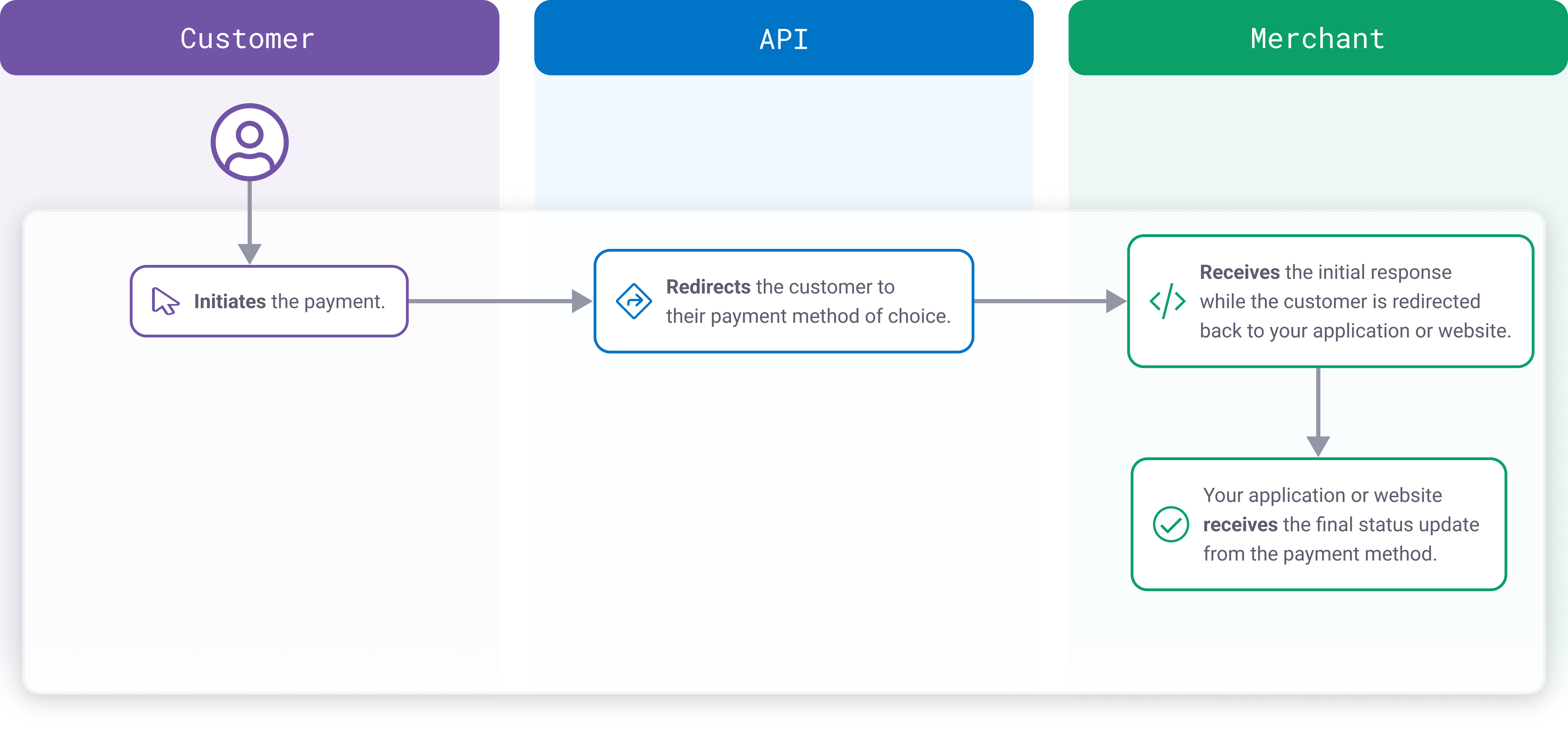
To facilitate these steps, a “payment method details” block is included in the code. This includes data elements for mandatory and optional fields required per payment method.
These fields are always mandatory:
- Return URL
- Status Update URL
- Country
- Currency
- Amount
- Payment Method
- Merchant ID
- Order Id
- Timestamp
- Sha1hash
These fields are optional or mandatory depending on the payment method (and there may be further fields required in addition to the following):
- Account (merchant sub-account)
- Descriptor
- Account Holder name
- Comment (always optional)
Optional and mandatory field information for each payment method is available on the payment method's designated page. These individual pages can be accessed from our list of Supported Payment Methods.
Request types
There are two types of requests that are supported for Payment Method transactions:
- payment-set: used to initiate a payment (
SALE) transaction - payment-credit: used to initiate a credit (
REFUND) transaction
Step 1: Initiate the payment
In a non-card transaction, the first request is a payment-set. This is used to advise the payment method of the details of a new transaction and to retrieve the redirect link necessary to facilitate authentication by your customer with their preferred payment method.
For full details of the request and response syntax, see the API Reference for Payment Methods.
Here, we set up a SOFORT transaction.
// coming soon<?php
require_once('vendor/autoload.php');
use GlobalPayments\Api\Entities\Enums\AlternativePaymentType;
use GlobalPayments\Api\ServiceConfigs\Gateways\GpEcomConfig;
use GlobalPayments\Api\Entities\Exceptions\ApiException;
use GlobalPayments\Api\PaymentMethods\AlternativePaymentMethod;
use GlobalPayments\Api\ServicesContainer;
// configure client
$config = new GpEcomConfig();
$config->merchantId = "MerchantId";
$config->accountId = "internet";
$config->sharedSecret = "secret";
$config->serviceUrl = "https://api.sandbox.realexpayments.com/epage-remote.cgi";
ServicesContainer::configureService($config);
$paymentMethod = new AlternativePaymentMethod(AlternativePaymentType::SOFORTUBERWEISUNG);
$paymentMethod->returnUrl = 'https://www.example.com/returnUrl';
$paymentMethod->statusUpdateUrl = 'https://www.example.com/statusUrl';
$paymentMethod->descriptor = 'Test Transaction';
$paymentMethod->country = 'DE';
$paymentMethod->accountHolderName = 'James Mason';
try {
$response = $paymentMethod->charge(10.01)
->withCurrency("EUR")
->withDescription('New APM')
->execute();
// $response->alternativePaymentResponse->redirectUrl => the redirectUrl for Step2;
} catch (ApiException $e) {
// TODO: Add your error handling here
} // configure client
var config = new GpEcomConfig();
config.MerchantId = "MerchantId";
config.AccountId = "internet";
config.SharedSecret = "secret";
config.ServiceUrl = "https://api.sandbox.realexpayments.com/epage-remote.cgi";
ServicesContainer.ConfigureService(config);
var paymentMethod = new AlternativePaymentMethod();
paymentMethod.AlternativePaymentMethodType = AlternativePaymentType.SOFORTUBERWEISUNG;
paymentMethod.ReturnUrl = 'https://www.example.com/returnUrl';
paymentMethod.StatusUpdateUrl = 'https://www.example.com/statusUrl';
paymentMethod.Descriptor = 'Test Transaction';
paymentMethod.Country = 'DE';
paymentMethod.AccountHolderName = 'James Mason';
try
{
var response = paymentMethod.Charge(10.01m)
.WithCurrency("EUR")
.WithDescription("New APM")
.Execute();
//response.AlternativePaymentResponse.RedirectUrl => the RedirectUrl for Step2;
}
catch (ApiException ex) {
// TODO: Add your error handling here
}<?xml version="1.0" encoding="UTF-8"?>
<request type="payment-set" timestamp="20180613173251">
<merchantid>MerchantId</merchantid>
<account>internet</account>
<amount currency="EUR">1001</amount>
<autosettle flag="1"/>
<orderid>N6qsk4kYRZihmPrTXWYS6g</orderid>
<paymentmethod>sofort</paymentmethod>
<paymentmethoddetails>
<returnurl>https://www.example.com/returnUrl</returnurl>
<statusupdateurl>https://www.example.com/statusUrl</statusupdateurl>
<descriptor>Test Transaction</descriptor>
<country>DE</country>
<accountholdername>James Mason</accountholdername>
</paymentmethoddetails>
<sha1hash>82f3d22c04292f8673bc1e0fb8ecf0c54e38065c</sha1hash>
</request>Step 2: Redirect to the payment method
Following a successful payment-set request, the next step is to redirect the customer to the payment scheme to facilitate authentication and authorization. This can be achieved, for example, using a simple JavaScript redirect. You could also use an HTTP GET (302 redirect).
For full details of the request and response syntax, see the API Reference for Payment Methods.
Here, we redirect the customer to the URL returned in the payment-set response with JavaScript.
<!DOCTYPE html>
<html>
   <head>
      <title>Sample APM Redirect</title>
      <meta charset="UTF-8">
   </head>
   <body>
      <script>
         window.location = "https://www.paymentMethodUrl.com/pay";
      </script>
   </body>
</html>Once the customer completes the transaction with the payment method, they are redirected to the Return URL of the payment-set request. The current status of the transaction will also be returned.
Your application might put the customer on hold for a few seconds while it checks to see if the Status URL was sent a final update. You can then redirect the customer to a final success or failure page once the final status is received.
If the payment method is known to have a long timeout period (that is, can remain in pending state for several hours or days), you may want to advise the customer that the payment is still pending and that you will notify them once it is completed (for example, via email or text message). You would need a separate process to trigger this message once the final status is received, particularly if the transaction goes to “Failed.”
sha1hash=0aa43f1d647819efd238e46fe3301d80076a8648&
timestamp=20181016103012&
merchantid=Merchant ID&
account=internet&
merchanttransactionid=f48856d1c7e4492eb7594e68e2fc682c&
orderid=N6qsk4kYRZihmPrTXWYS6g&
result=01&
Amount=100&
message=PENDING&
paymentpurpose=37TC6LD Test Transaction&
paymentmethod=sofort&
fundstatus=WAITING&
pasref=14627849160897986&
country=DEStep 3: Receive the final status
The URL specified in the Status URL element of the payment-set request receives the final status. Depending on the payment method used, this can happen at the same time as the customer is redirected to your Return URL, moments after, or potentially, the final status update might come days later.
For payment methods in which you expect the final status update to come days later, your Status URL will need to accept the message sent by Global Payments, find the correct order in your application, and update the status accordingly. You may want to inform the customer at this point that their payment was finally accepted (or that it failed). You can also initiate the dispatch of items to the customer.
For full details of the request and response syntax, see the API Reference for Payment Methods.
// coming soon// coming soon// coming soonsha1hash=0aa43f1d647819efd238e46fe3301d80076a8648&
timestamp=20181016103012&
merchantid=Merchant ID&
account=internet&
merchanttransactionid=f48856d1c7e4492eb7594e68e2fc682c&
orderid=N6qsk4kYRZihmPrTXWYS6g&
result=01&
Amount=100&
message=PENDING&
paymentpurpose=37TC6LD Test Transaction&
paymentmethod=sofort&
fundstatus=WAITING&
pasref=14627849160897986&
country=DESupported payment methods
Browse the non-card payment methods we support or search for a specific one. See the details of the countries and currencies that are available with the payment method, whether refunds and/or chargebacks are supported, as well as any additional fields that may exist (and the syntax for providing these).
Explore more functionality to enrich your application.
Payments Methods