You can integrate Card Blocking either through our Hosted Payment Page (HPP) or through direct API integration.
What is Card Blocking?
Card Blocking allows you to choose which card types can be accepted for payment or stored for future-dated payments. The HPP handles the lookup of the card type and informs the customer if the card type is not accepted.
The following transaction types are supported:
- Authorization
- Open To Buy (OTB)
The following card types can be blocked from processing an OTB and Authorization request:
- Consumer Credit
- Consumer Debit
- Commercial Credit
- Commercial Debit
How does Card Blocking work?
Card Blocking can be set up for specified accounts or used within the payment request.
To set up Card Blocking for a specific account, contact your account manager or our support team at ecomsupport@globalpay.com.
As a customer enters a card number into the HPP, Global Payments completes a lookup of the Bank Identification Number (BIN) to determine its type. The response is then cross-referenced with your account settings or payment request.
It’s important to note that your payment request overrides any account setting instructions. For example, if your payment request instructs to block Consumer Credit and your account setting is configured to block Consumer Credit AND Consumer Debit, only the Consumer Credit block rule will be applied.
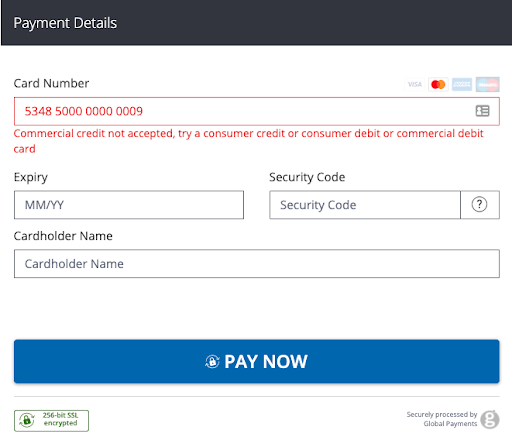
If the returned card type matches your instruction to block a card type, the customer will be shown a message in the HPP informing them that the card type is not accepted and to try another, as shown below. If a card type is blocked, the customer will not be able to proceed with the payment request.
Set up the request
Card Blocking can be enabled at an account or payment-request level, but here we focus on setting it up at a payment-request level.
You can use BLOCK_CARD_TYPE to control how Card Blocking options are presented to the customer in the HPP based on the card type used.
For syntax tables and security hash information, see Card Blocking in the HPP Reference.
//coming soon//coming soon//coming soon<form method="POST" action="https://pay.sandbox.realexpayments.com/pay">
<input type="hidden" name="TIMESTAMP" value="20160513162110">
<input type="hidden" name="MERCHANT_ID" value="Merchant ID">
<input type="hidden" name="ACCOUNT" value="internet">
<input type="hidden" name="ORDER_ID" value="N6qsk4kYRZihmPrTXWYS6g">
<input type="hidden" name="AMOUNT" value="10000">
<!-- Begin Card Block Fields -->
<input type="hidden" name="BLOCK_CARD_TYPE" value="commercialdebit|commercialcredit">
<!-- End Card Block Fields -->
<input type="hidden" name="CURRENCY" value="EUR">
<input type="hidden" name="SHA1HASH" value="308bb8dfbbfcc67c28d602d988ab104c3b08d012">
<input type="hidden" name="AUTO_SETTLE_FLAG" value="1">
<input type="hidden" name="HPP_VERSION" value="2">
<input type="hidden" name="MERCHANT_RESPONSE_URL" value="https://www.example.com/responseUrl">
<input type="hidden" name="CARD_PAYMENT_BUTTON" value="Complete Payment">
<input type="submit" value="Click here to Purchase">
</form>Testing Card Blocking
Use our test cards to try different scenarios for your application to handle. See the Card Blocking section of our Test Cards article.
Enhance your solution
Explore more functionality to enrich your application.
What is Card Blocking?
Card Blocking allows you choose which card types can be accepted for payment or stored for future-dated payments. You can set your block preferences at a payment-request or account level, stopping the transaction from being processed when triggered.
The following transaction types are supported:
- Authorization
- Open to Buy (OTB)
- Receipt-in
The following card types can be blocked from processing an OTB and Authorization request:
- Consumer Credit
- Consumer Debit
- Commercial Credit
- Commercial Debit
How does Card Blocking work?
Card blocking can be set up for specified accounts or within the payment request.
To set up Card Blocking for a specific account, please contact your account manager.
As you post the Payment Processing request (one of the supported requested types), a check of the card type is performed. Based on the returned card type, a card block will be applied if the card type matches an account or payment-request setting.
It’s important to note that your payment request overrides any account setting instructions. For example, if your payment request instructs to block Consumer Credit and your account setting is configured to block Consumer Credit AND Consumer Debit, only the Consumer Credit block rule will be applied. Use either account settings for configuring Card Blocking rules or at a payment-request level.
If the card type used is set to be blocked at an account or payment-request level, an error response code informing that the card type has triggered a block rule will be returned.
Set up the request
Card Blocking can be enabled at an account level or payment-request level. Here, we set it up at the payment-request level.
For syntax tables and security hash information, see Card Blocking in the API Reference.
//coming soon//coming soon//coming soon<?xml version="1.0" encoding="UTF-8"?>
<request type="auth" timestamp="20180613141207">
<merchantid>MerchantId</merchantid>
<account>internet</account>
<channel>ECOM</channel>
<orderid>N6qsk4kYRZihmPrTXWYS6g</orderid>
<amount currency="EUR">1001</amount>
<card>
<number>4263970000005262</number>
<expdate>0425</expdate>
<chname>James Mason</chname>
<type>VISA</type>
<cvn>
<number>123</number>
<presind>1</presind>
</cvn>
</card>
<blockcard>
<commercialcredit>true</commercialcredit>
<commercialdebit>false</commercialdebit>
<consumercredit>false</consumercredit>
<consumerdebit>false</consumerdebit>
</blockcard>
<autosettle flag="1"/>
<sha1hash>87707637a34ba651b6185718c863abc64b673f20</sha1hash>
</request>Set all card types to block
Setting all card types to block is an invalid configuration and will result in the following error code:
<response timestamp="20220815171818">
  <result>561</result>
  <message>All card types are blocked, invalid request</message>
  <orderid>N6qsk4kYRZihmPrTXWYS6g</orderid>
</response>
Testing Card Blocking
Use our test cards to try different scenarios for your application to handle. See the Card Blocking section of our Test Cards article.
Enhance your solution
Explore more functionality to enrich your application.