3D Secure is the authentication protocol used by card schemes, such as Visa and Mastercard, to enable merchants to gain protection from fraud in a Card Not Present (CNP) environment and to comply with European Strong Customer Authentication (SCA) regulations set in Payment Services Directive 2 (PSD2).
The goal of authenticating customers using 3D Secure is for the merchant to achieve a liability shift so they are protected if the transaction turns out to be fraud.
The Global Payments Hosted Payment Page (HPP) can handle the entire 3D Secure authentication flow. This includes:
- Determining which version of 3D Secure to use
- Gathering the necessary device information
- Presenting the challenge to the customer if required
Also, the HPP will process the authorization with the additional authentication information passed on to the Issuer.
Exemptions
3D Secure 2 provides a framework for merchants to benefit from Strong Customer Authentication (SCA) exemptions under certain conditions, such as payments below a certain threshold. An exemption from authentication for these "low-risk" transactions means a customer can avoid an extra step in the payment process.
Exemptions may be applied by the Issuer based on the transaction details or may be specifically requested by the merchant, with their Acquirer’s permission. In the authentication message, you can request an exemption by including it in the Challenge Request Indicator field.
When a merchant requests an exemption (whether via authentication or directly in authorization) and it's successfully applied, they'll no longer be able to avail of a liability shift if a fraud-related chargeback occurs.
For Mastercard exemption requests, see Message Extension.
HPP request
In this example, we’re passing only mandatory fields along with some recommended ones. The more optional fields you send and data you supply, the more likely the authentication for the transaction will be frictionless. For the full list of optional fields and the allowed values in each, see the HPP reference for 3D Secure 2.
// configure client, request and HPP settings
GatewayConfig config = new GatewayConfig();
config.setMerchantId("MerchantId");
config.setAccountId("internet");
config.setSharedSecret("secret");
config.setServiceUrl("https://pay.sandbox.realexpayments.com/pay");

HostedPaymentConfig hostedPaymentConfig = new HostedPaymentConfig();
hostedPaymentConfig.setVersion(HppVersion.Version2);
config.setHostedPaymentConfig(hostedPaymentConfig);

// Add 3D Secure 2 Mandatory and Recommended Fields
HostedPaymentData hostedPaymentData = new HostedPaymentData();
hostedPaymentData.setCustomerEmail("james.mason@example.com");
hostedPaymentData.setCustomerPhoneMobile("44|07123456789");
hostedPaymentData.setAddressesMatch(false);

Address billingAddress = new Address();
billingAddress.setStreetAddress1("Flat 123");
billingAddress.setStreetAddress2("House 456");
billingAddress.setStreetAddress3("Unit 4");
billingAddress.setCity("Halifax");
billingAddress.setPostalCode("W5 9HR");
billingAddress.setCountry("826");

Address shippingAddress = new Address();
shippingAddress.setStreetAddress1("Apartment 825");
shippingAddress.setStreetAddress2("Complex 741");
shippingAddress.setStreetAddress3("House 963");
shippingAddress.setCity("Chicago");
shippingAddress.setState("IL");
shippingAddress.setPostalCode("50001");
shippingAddress.setCountry("840");

HostedService service = new HostedService(config);

try {
    String hppJson = service.charge(new BigDecimal("19.99"))
    .withCurrency("EUR")
    .withHostedPaymentData(hostedPaymentData)
    .withAddress(billingAddress, AddressType.Billing)
    .withAddress(shippingAddress, AddressType.Shipping)
    .serialize();
    // TODO: pass the HPP request JSON to the JavaScript, iOS or Android Library
} catch (ApiException exce) {
    // TODO: Add your error handling here
}
// configure client, request and HPP settings
var service = new HostedService(new GpEcomConfig
{
MerchantId = "MerchantId",
AccountId = "internet",
SharedSecret = "secret",
ServiceUrl = "https://pay.sandbox.realexpayments.com/pay",
HostedPaymentConfig = new HostedPaymentConfig
{
Version = "2"
}
});
// Add 3D Secure 2 Mandatory and Recommended Fields
var hostedPaymentData = new HostedPaymentData
{
CustomerEmail = "james.mason@example.com",
CustomerPhoneMobile = "44|07123456789",
AddressesMatch = false
};
var billingAddress = new Address
{
StreetAddress1 = "Flat 123",
StreetAddress2 = "House 456",
StreetAddress3 = "Unit 4",
City = "Halifax",
PostalCode = "W5 9HR",
Country = "826"
};
var shippingAddress = new Address
{
StreetAddress1 = "Apartment 825",
StreetAddress2 = "Complex 741",
StreetAddress3 = "House 963",
City = "Chicago",
State = "IL",
PostalCode = "50001",
Country = "840",
};
try
{
var hppJson = service.Charge(19.99m)
.WithCurrency("EUR")
.WithHostedPaymentData(hostedPaymentData)
.WithAddress(billingAddress, AddressType.Billing)
.WithAddress(shippingAddress, AddressType.Shipping)
.Serialize();
// TODO: pass the HPP request JSON to the JavaScript, iOS or Android Library
}
catch (ApiException exce)
{
// TODO: Add your error handling here
}<?php
require_once('vendor/autoload.php');
use GlobalPayments\Api\Entities\Address;
use GlobalPayments\Api\Entities\Enums\AddressType;
use GlobalPayments\Api\ServiceConfigs\Gateways\GpEcomConfig;
use GlobalPayments\Api\HostedPaymentConfig;
use GlobalPayments\Api\Entities\HostedPaymentData;
use GlobalPayments\Api\Entities\Enums\HppVersion;
use GlobalPayments\Api\Entities\Exceptions\ApiException;
use GlobalPayments\Api\Services\HostedService;
// configure client, request and HPP settings
$config = new GpEcomConfig();
$config->merchantId = "MerchantId";
$config->accountId = "internet";
$config->sharedSecret = "secret";
$config->serviceUrl = "https://pay.sandbox.realexpayments.com/pay";
$config->hostedPaymentConfig = new HostedPaymentConfig();
$config->hostedPaymentConfig->version = HppVersion::VERSION_2;
$service = new HostedService($config);
// Add 3D Secure 2 Mandatory and Recommended Fields
$hostedPaymentData = new HostedPaymentData();
$hostedPaymentData->customerEmail = "james.mason@example.com";
$hostedPaymentData->customerPhoneMobile = "44|07123456789";
$hostedPaymentData->addressesMatch = false;
$billingAddress = new Address();
$billingAddress->streetAddress1 = "Flat 123";
$billingAddress->streetAddress2 = "House 456";
$billingAddress->streetAddress3 = "Unit 4";
$billingAddress->city = "Halifax";
$billingAddress->postalCode = "W5 9HR";
$billingAddress->country = "826";
$shippingAddress = new Address();
$shippingAddress->streetAddress1 = "Apartment 825";
$shippingAddress->streetAddress2 = "Complex 741";
$shippingAddress->streetAddress3 = "House 963";
$shippingAddress->city = "Chicago";
$shippingAddress->state = "IL";
$shippingAddress->postalCode = "50001";
$shippingAddress->country = "840";
try {
$hppJson = $service->charge(19.99)
->withCurrency("EUR")
->withHostedPaymentData($hostedPaymentData)
->withAddress($billingAddress, AddressType::BILLING)
->withAddress($shippingAddress, AddressType::SHIPPING)
->serialize();
// TODO: pass the HPP JSON to the client-side
} catch (ApiException $e) {
// TODO: Add your error handling here
}<form action="https://pay.sandbox.realexpayments.com/pay" method="POST" target="iframe">
<input type="hidden" name="TIMESTAMP" value="20180613110737">
<input type="hidden" name="MERCHANT_ID" value="MerchantId">
<input type="hidden" name="ACCOUNT" value="internet">
<input type="hidden" name="ORDER_ID" value="N6qsk4kYRZihmPrTXWYS6g">
<input type="hidden" name="AMOUNT" value="1999">
<input type="hidden" name="CURRENCY" value="EUR">
<input type="hidden" name="AUTO_SETTLE_FLAG" value="1">
<input type="hidden" name="COMMENT1" value="Mobile Channel">
<input type="hidden" name="HPP_VERSION" value="2">
<input type="hidden" name="HPP_CHANNEL" value="ECOM">
<!-- Begin 3D Secure 2 Mandatory and Recommended Fields -->
<input type="hidden" name="HPP_CUSTOMER_EMAIL" value="test@example.com">
<input type="hidden" name="HPP_CUSTOMER_PHONENUMBER_MOBILE" value="44|789456123">
<input type="hidden" name="HPP_BILLING_STREET1" value="Flat 123">
<input type="hidden" name="HPP_BILLING_STREET2" value="House 456">
<input type="hidden" name="HPP_BILLING_STREET3" value="Unit 4">
<input type="hidden" name="HPP_BILLING_CITY" value="Halifax">
<input type="hidden" name="HPP_BILLING_POSTALCODE" value="W5 9HR">
<input type="hidden" name="HPP_BILLING_COUNTRY" value="826">
<input type="hidden" name="HPP_SHIPPING_STREET1" value="Apartment 852">
<input type="hidden" name="HPP_SHIPPING_STREET2" value="Complex 741">
<input type="hidden" name="HPP_SHIPPING_STREET3" value="House 963">
<input type="hidden" name="HPP_SHIPPING_CITY" value="Chicago">
<input type="hidden" name="HPP_SHIPPING_STATE" value="IL">
<input type="hidden" name="HPP_SHIPPING_POSTALCODE" value="50001">
<input type="hidden" name="HPP_SHIPPING_COUNTRY" value="840">
<input type="hidden" name="HPP_ADDRESS_MATCH_INDICATOR" value="FALSE">
<input type="hidden" name="HPP_CHALLENGE_REQUEST_INDICATOR" value="NO_PREFERENCE">
<!-- End 3D Secure 2 Mandatory and Recommended Fields -->
<input type="hidden" name="MERCHANT_RESPONSE_URL" value="https://www.example.com/responseUrl">
<input type="hidden" name="SHA1HASH" value="308bb8dfbbfcc67c28d602d988ab104c3b08d012">
<input type="submit" value="Click To Pay">
</form>3D Secure 2
The HPP handles the call to the Global Payments 3D Secure 2 Solution while gathering the necessary device data and contacting the Issuer's ACS. Numerous data points factor into the decision as to whether to present the customer with a 3D Secure authentication challenge. These include but are not limited to:
- Transaction variables such as amount and currency
- The time of day and Merchant Category Code (MCC) being consistent with previous behavior for that customer
- The amount of data provided, including billing and shipping details
If further authentication is not needed to decide whether the transaction should proceed or not, a challenge is not mandated (frictionless flow). If the Issuer decides that further authentication is needed before the transaction can proceed, it will mandate a challenge (challenge flow).
Frictionless flow
In a frictionless flow, the Issuer determines that either no challenge is required to authenticate the transaction or that the transaction should not proceed any further because it’s high risk or fraud is suspected. For European merchants and transactions in scope of PSD2 (Payment Services Directive 2), the Issuer also determines if a valid exemption can be applied.
In a blocked transaction scenario, the HPP returns a failure response message to your application or website. You can then redirect the customer back to the payment page while informing them of the outcome. Otherwise, the HPP will complete the authentication process and proceed to authorization with the 3D Secure authentication data included.
Challenge flow
In a challenge flow, the Issuer has determined that the customer must further authenticate the transaction. The HPP will display the Issuer's ACS to the customer. The challenge may involve a number of steps, including the customer entering a one-time passcode sent to their phone or answering some questions only they would know the answer to.
The type of challenge displayed to the customer is determined by the Issuer's ACS and aligns with at least two elements of SCA:
- Possession - Something only the customer has; for example, their mobile device registered with their bank to which they will receive a code in an SMS
- Inherence - Something only the customer is; for example, their fingerprint or other form of biometric data
- Knowledge - Something only the customer knows; for example, a unique passphrase or answer to a personal question
ACS Simulator
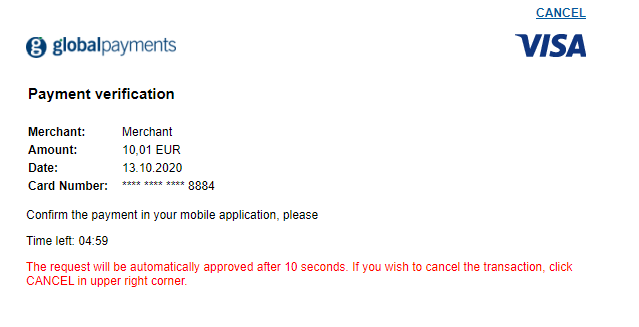
In the Sandbox environment, Global Payments provides an Issuer ACS Simulator that allows you to test different challenge outcomes.
Once the challenge loads, after 10 seconds, the simulator automatically completes the authentication and generates an Authentication Successful response (transStatus = “Y”). This is intended to mimic a scenario where a customer has received a notification on their phone to authenticate using their banking app.
Alternatively, clicking the Cancel button generates an Authentication Failed response (transStatus = “N”). In either scenario, the response is sent in the Challenge Response message (CRes) to the Challenge Notification endpoint.
Challenge outcome
With the customer on the ACS, the following outcomes may occur:
- The authentication is successful.
- The authentication fails, and the customer is not given another chance.
- The authentication fails, and the customer is given another chance.
If the authentication fails, the HPP will return a failure response message (110), and the transaction will not proceed to authorization. If the customer has successfully completed the challenge and authenticated, the HPP will proceed to authorization and include the 3D Secure authentication data.
At this point, in both frictionless and challenge flows, the transaction may authorize or decline as normal based on whether the customer has sufficient funds in their account or entered their security code correctly and so on. The HPP will return the transaction response along with the additional 3D Secure authentication data you can capture in your website or application.
HPP response
The Timestamp returned in the response will be identical to the one sent in the request JSON. This, combined with the Order ID and other transaction variables, can be used to definitively link the response received with the transaction request and order created in your application. You should also check the other transaction variables—for example, the Amount—against what was stored in your application at the time the request JSON was sent.
A 111 result code indicates that the Issuer requires Strong Customer Authentication (SCA) for a transaction. To avoid this outcome, please ensure you enable 3D Secure 2 on the HPP.
[RESULT=00,
 AUTHCODE=12345,
 MESSAGE=[ test system ] Authorised,
 PASREF=14631546336115597,
 AVSPOSTCODERESULT=M,
 AVSADDRESSRESULT=M,
 CVNRESULT=M,
 ACCOUNT=internet,
 MERCHANT_ID=MerchantId,
 ORDER_ID=N6qsk4kYRZihmPrTXWYS6g,
 TIMESTAMP=20180613113227,
 AMOUNT=1001,
 BATCHID=691175,
 CARD_PAYMENT_BUTTON=Pay Invoice,
 MERCHANT_RESPONSE_URL=https://www.example.com/responseUrl,
 HPP_LANG=GB,
 BILLING_CODE=59|123,
 BILLING_CO=GB,
 SHIPPING_CODE=50001|Apartment 852,
 SHIPPING_CO=US,
 COMMENT1=Mobile Channel,
 ECI=5
 AUTHENTICATION_VALUE=ODQzNjgwNjU0ZjM3N2JmYTg0NTM=,
 DS_TRANS_ID=c272b04f-6e7b-43a2-bb78-90f4fb94aa25,
 MESSAGE_VERSION=2.1.0,
 SRD=MMC0F00YE4000000715,
SHA1HASH=8ab81d4437e24a88a08cffb51c15151846bd7b61]Explore more functionality to enrich your application.
How do you want to integrate with 3D Secure 2?
You can either:
- Use Global Payments JavaScript Library and one of our server-side SDKs to get up and running quickly with an end-to-end authentication flow. Or,
- Connect directly to the JSON API with your own client-side implementation.
Use the drop-down arrow below to select the applicable guide and get started.
Introduction
The Global Payments JavaScript Library and server-side SDKs (Java, .NET, PHP) work in tandem to carry out the various 3D Secure 2 steps. On the server side, this includes checking if the card supports the protocol, sending the authentication request, and communicating with the client side in either a frictionless or challenge flow.
On the client side, the JavaScript Library handles the opening of the Method URL (device profiling) if supported, gathers the necessary device data to send in the authentication request, and displays the ACS in the event of a challenge flow. The ACS can be displayed in a Lightbox iFrame created by the JavaScript Library, or you can target your own iFrame.
In this guide, we've broken down each stage of the authentication step by step. To make it easier to understand we've also broken up the code samples for the server-side endpoints and the client-side. For the complete samples, or if you want to skip ahead to the code, see the Additional resources section below.
Step 1: Set up the notification URLs
Before testing or implementing 3D Secure 2, you first need to set up two endpoint URLs in your application or website so that data and event notifications can be received from the Issuer’s Access Control Server (ACS). Each endpoint must be configured to accept an HTTP POST with Base64 encoded values.
The Issuer’s ACS uses notifications in two important ways during authentication:
- Method URL notification - Informs your application or website that the Issuer’s ACS (if supported) completed device profiling of the browser.
- Challenge notification - Informs your application or website that the challenge presented to the customer on the Issuer’s ACS is complete. The POST also contains key authentication data, including whether the customer completed the challenge successfully or not.
The server-side code samples in this step are not specific to the Global Payments SDK. We’ve provided simple examples of how to handle the data sent by the ACS. They should not be used as Production-ready code.
Method URL notification endpoint
If the Issuer’s ACS supports the Method URL step (device profiling) and it completes successfully, the ACS sends a POST to the Method URL notification endpoint containing the Global Payments Server Transaction ID for the authentication.
Sample Method URL notification endpoint (server side)
On the server side, we consume the POST sent by the Issuer’s ACS, decode it, and prepare the string to be returned to the client side.
/*
 * this sample code is not specific to the Global Payments SDK and is intended as a simple example and
 * should not be treated as Production-ready code. You'll need to add your own message parsing and
 * security in line with your application or website
 */
@RequestMapping("/methodUrlResponse")
public void consumeMethodUrlResponse(String threeDSMethodData) throws UnsupportedEncodingException {

   // sample ACS response for Method URL Response Notification
   // String threeDSMethodData = "eyJ0aHJlZURTU2VydmVyVHJhbnNJRCI6ImFmNjVjMzY5LTU5YjktNGY4ZC1iMmY2LTdkN2Q1ZjVjNjlkNSJ9";

   try {
      byte[] decodedBytes = Base64.getDecoder().decode(threeDSMethodData);
      String methodUrlResponseString = new String(decodedBytes);
      Gson gson = new Gson();

      // map to a custom class MethodUrlResponse
      MethodUrlResponse response = gson.fromJson(methodUrlResponseString, MethodUrlResponse.class);

      String threeDSServerTransID = response.getThreeDSServerTransID(); // // af65c369-59b9-4f8d-b2f6-7d7d5f5c69d5

      // TODO: notify client-side that the Method URL step is complete
      // optional to return decoded JSON string, see below
   }

   catch(Exception e) {
      // TODO: add your exception handling here
   }
}<?php
/*
* this sample code is not specific to the Global Payments SDK and is intended as a simple example and
* should not be treated as Production-ready code. You'll need to add your own message parsing and
* security in line with your application or website
*/
$threeDSMethodData = $_REQUEST["threeDSMethodData"];
// sample ACS response for Method URL Response Notification
// $threeDSMethodData = "eyJ0aHJlZURTU2VydmVyVHJhbnNJRCI6ImFmNjVjMzY5LTU5YjktNGY4ZC1iMmY2LTdkN2Q1ZjVjNjlkNSJ9";
try {
$decodedThreeDSMethodData = base64_decode($threeDSMethodData);
$convertedThreeDSMethodData = json_decode($decodedThreeDSMethodData, true);
$serverTransID = $convertedThreeDSMethodData['threeDSServerTransID']; // af65c369-59b9-4f8d-b2f6-7d7d5f5c69d5
// TODO: notify client-side that the Method URL step is complete
// optional to return decoded JSON string, see below
} catch (Exception $exce) {
// TODO: Add your exception handling here
}/*
* this sample code is not specific to the Global Payments SDK and is intended as a simple example and
* should not be treated as Production-ready code. You'll need to add your own message parsing and
* security in line with your application or website
*/
var threeDSMethodData = Request.Form["threeDSMethodData"];
// sample ACS response for Method URL Response Notification
// threeDSMethodData = "eyJ0aHJlZURTU2VydmVyVHJhbnNJRCI6ImFmNjVjMzY5LTU5YjktNGY4ZC1iMmY2LTdkN2Q1ZjVjNjlkNSJ9";
try
{
byte[] data = Convert.FromBase64String(threeDSMethodData);
string methodUrlResponseString = Encoding.UTF8.GetString(data);
// map to a custom class MethodUrlResponse
MethodUrlResponse methodUrlResponse = JsonConvert.DeserializeObject<MethodUrlResponse>(methodUrlResponseString);
string threeDSServerTransID = methodUrlResponse.ThreeDSServerTransID; // af65c369-59b9-4f8d-b2f6-7d7d5f5c69d5
// TODO: notify client-side that the Method URL step is complete (optional - return decoded JSON string), see below
}
catch (Exception exce)
{
// TODO: add your exception handling here
}Sample Method URL notification endpoint (client side)
On the client side, we notify the JavaScript Library that the Method URL step is complete. We may also choose to pass back the available data, in this case the Global Payments Server Transaction ID.
<script src="globalpayments-3dsecure.js"></script>
<script>
GlobalPayments.ThreeDSecure.handleMethodNotification("threeDSServerTransID");
</script>Challenge Notification endpoint
In the event of a challenge, the Issuer's ACS will POST the challenge result (CRes) to the Challenge Notification endpoint. The challenge result contains key information that we can use to determine the next action in the authentication process.
Sample Challenge Notification endpoint (server side)
In our example, we’re using a simple custom class ChallengeUrlResponse, which has string variables for ThreeDSServerTransID, AcsTransID, MessageType, MessageVersion, and TransStatus.
/*
 * this sample code is not specific to the Global Payments SDK and is intended as a simple example and
 * should not be treated as Production-ready code. You'll need to add your own message parsing and
 * security in line with your application or website
 */
@RequestMapping("/challengeUrlResponse")
public void consumeChallengeUrlResponse(@RequestParam("cres") String cres) throws UnsupportedEncodingException {

   // example CRes (Challenge Result) sent by the ACS
   /* String cres = "eyJ0aHJlZURTU2VydmVyVHJhbnNJRCI6ImFmNjVjMzY5LTU5YjktNGY4ZC1iMmY2LTdkN2Q1ZjVjNjlkNSIsImF"
     + "jc1RyYW5zSUQiOiIxM2M3MDFhMy01YTg4LTRjNDUtODllOS1lZjY1ZTUwYThiZjkiLCJjaGFsbGVuZ2VDb21wbGV0a"
     + "W9uSW5kIjoiWSIsIm1lc3NhZ2VUeXBlIjoiQ3JlcyIsIm1lc3NhZ2VWZXJzaW9uIjoiMi4xLjAiLCJ0cmFuc"
     + "1N0YXR1cyI6IlkifQ==";
     */

   try {

      byte[] decodedBytes = Base64.getDecoder().decode(cres);
      String challengeUrlResponseString = new String(decodedBytes);
      Gson gson = new Gson();

      // map to a custom class ChallengeUrlResponse which has String variables for each response element
      ChallengeUrlResponse challengeUrlResponse = gson.fromJson(challengeUrlResponseString, ChallengeUrlResponse.class);

      String threeDSServerTransID = challengeUrlResponse.getThreeDSServerTransID(); // af65c369-59b9-4f8d-b2f6-7d7d5f5c69d5
      String acsTransId = challengeUrlResponse.getAcsTransID(); // 13c701a3-5a88-4c45-89e9-ef65e50a8bf9
      String messageType = challengeUrlResponse.getMessageType(); // Cres
      String messageVersion = challengeUrlResponse.getMessageVersion(); // 2.1.0
      String transStatus = challengeUrlResponse.getTransStatus(); // Y

      // TODO: simple example of how to prepare the JSON string for JavaScript Library (optional)
      Hashtable<String, String> responseObject = new Hashtable<String, String>();
      responseObject.put("threeDSServerTransID", threeDSServerTransID);
      responseObject.put("transStatus", transStatus);

      String responseString = gson.toJson(responseObject);

      // TODO: notify client-side that the Challenge step is complete, see below
   }

   catch(Exception e) {
      // TODO: Add your exception handling here
   }
}<?php
/*
* this sample code is not specific to the Global Payments SDK and is intended as a simple example and
* should not be treated as Production-ready code. You'll need to add your own message parsing and
* security in line with your application or website
*/
$cres = $_REQUEST['cres'];
/* $cres = "eyJ0aHJlZURTU2VydmVyVHJhbnNJRCI6ImFmNjVjMzY5LTU5YjktNGY4ZC1iMmY2LTdkN2Q1ZjVjNjlkNSIsImF"
* . "jc1RyYW5zSUQiOiIxM2M3MDFhMy01YTg4LTRjNDUtODllOS1lZjY1ZTUwYThiZjkiLCJjaGFsbGVuZ2VDb21wbGV0a"
* . "W9uSW5kIjoiWSIsIm1lc3NhZ2VUeXBlIjoiQ3JlcyIsIm1lc3NhZ2VWZXJzaW9uIjoiMi4xLjAiLCJ0cmFuc"
* . "1N0YXR1cyI6IlkifQ==";
*/
try {
$decodedString = base64_decode($cres);
$convertedObject = json_decode($decodedString, true);
$serverTransID = $convertedObject['threeDSServerTransID']; // af65c369-59b9-4f8d-b2f6-7d7d5f5c69d5
$acsTransID = $convertedObject['acsTransID']; // 13c701a3-5a88-4c45-89e9-ef65e50a8bf9
$messageType = $convertedObject['messageType']; // Cres
$messageVersion = $convertedObject['messageVersion']; // 2.1.0
$transStatus = $convertedObject['transStatus']; // Y
// TODO: notify client-side that the Challenge step is complete, see below
} catch (Exception $exce) {
// TODO: Add your exception handling here
}/*
* this sample code is not specific to the Global Payments SDK it is provided as
* a simple example of how to handle the Challenge Response
*/
var cres = Request.Form["cres"];
// Example CRes (Challenge Result) sent by the ACS
// var cRes = "eyJ0aHJlZURTU2VydmVyVHJhbnNJRCI6ImFmNjVjMzY5LTU5YjktNGY4ZC1iMmY2LTdkN2Q1ZjVjNjlkNSIsImF"
// + "jc1RyYW5zSUQiOiIxM2M3MDFhMy01YTg4LTRjNDUtODllOS1lZjY1ZTUwYThiZjkiLCJjaGFsbGVuZ2VDb21wbGV0a"
// + "W9uSW5kIjoiWSIsIm1lc3NhZ2VUeXBlIjoiQ3JlcyIsIm1lc3NhZ2VWZXJzaW9uIjoiMi4xLjAiLCJ0cmFuc"
// + "1N0YXR1cyI6IlkifQ==";
try
{
byte[] data = Convert.FromBase64String(cres);
string challengeUrlResponseString = Encoding.UTF8.GetString(data);
// map to a custom class ChallengeUrlResponse which has String variables for each response element
ChallengeUrlResponse challengeUrlResponse = JsonConvert.DeserializeObject<ChallengeUrlResponse>(challengeUrlResponseString);
var threeDSServerTransID = challengeUrlResponse.ThreeDSServerTransID; // af65c369-59b9-4f8d-b2f6-7d7d5f5c69d5
var acsTransId = challengeUrlResponse.AcsTransID; // 13c701a3-5a88-4c45-89e9-ef65e50a8bf9
var messageType = challengeUrlResponse.MessageType; // Cres
var messageVersion = challengeUrlResponse.MessageVersion; // 2.1.0
var transStatus = challengeUrlResponse.TransStatus; // Y
// TODO: prepare the JSON string for JavaScript Library (optional)
challengeUrlResponseString = JsonConvert.SerializeObject(new
{
threeDSServerTransID = threeDSServerTransID,
transStatus = transStatus
});
// TODO: notify client-side that the Challenge URL step is complete, see below
}
catch (Exception exce)
{
// TODO: add your exception handling here
}Sample Challenge Notification endpoint (client side)
On the client side, we notify the JavaScript Library that the Challenge URL step is complete. As with the Method URL step, we may choose to send back additional data such as Global Payments Server Transaction ID and the Transaction Status, which indicates whether the transaction was successfully authenticated or not.
<script src="globalpayments-3dsecure.js"></script>
<script>
GlobalPayments.ThreeDSecure.handleChallengeNotification('"threeDSServerTransID":"threeDSServerTransID","transStatus":"transStatus"');
</script>Step 2: Check version and enrollment
The authentication process begins with determining if the card is enrolled in 3D Secure 2 or not. If the card is enrolled, the exact version will be returned (2.x.x), along with the necessary Method URL to facilitate the gathering of device data by the Issuer’s ACS (if supported). For a guide on how to send this request when using our Card Storage solution, see the API Reference for Card Storage. If the card is not enrolled, the only value returned will be enrolled = false.
Sample Check Version (client side)
To initiate this, we use the Check Version method of the JavaScript Library. In our example, we also call a Check Version endpoint, which contains our server-side code. To check if the card is enrolled, we only need the full number (PAN). Depending on your application or website’s payment flow, you may also choose to send all the card data (expiration date, security code, and cardholder name) to the server side at this point.
The following example assumes you have an input field with the identifier card-number on the page.
<script src="globalpayments-3dsecure.js"></script>
<script>
const {
   checkVersion,
   getBrowserData,
   initiateAuthentication,
} = GlobalPayments.ThreeDSecure;

// assign the button that will trigger authentication
document.addEventListener('DOMContentLoaded', () => {
   const checkVersionButton = document.getElementById('startButton');
   if (!checkVersionButton) {
      return;
   }

   checkVersionButton.addEventListener('click', async (e) => {
      e.preventDefault();
      // check if the card is enrolled for 3D Secure 2

      try {
         versionCheckData = await checkVersion('/ThreeDSecure2/CheckVersion', {
            card: {
               number: document.getElementById('card-number').value
            },
         });

         if (versionCheckData.error) {
            // TODO: handle the scenario where the card is not enrolled for 3D Secure 2
            return;
         }
      }

      catch (e) {
         // TODO: add your error handling here
      }
// continued in next stepSample Check Version (server side)
On the server side, we need to consume the data sent by the JavaScript Library. In our example, we add the card number to our card object. We also set up our gateway configuration including the Merchant ID (Client ID) and Account ID, along with the URLs we configured in Step 1. Also required is a merchant URL with customer care information. We also set the version of 3D Secure we want to use.
If the Check Version returns true for 3D Secure 2, we return the enrollment status to the client side, along with the Global Payments Server Transaction ID. In addition, if supported by the ACS, we pass back the Method URL and Encoded Method Data required by the JavaScript Library to facilitate the device-profiling step.
If the Issuer's ACS supports the Method URL step (device profiling), we need to open a hidden iFrame targeting the URL returned in the Check Version response. The JavaScript Library automatically performs this step, and the device profiling should complete in seconds. Once it does, the Issuer's ACS sends a form POST and initiates a redirect inside the hidden iFrame to the endpoint we set up in Step 1. As soon as the JavaScript Library receives the response from the Method Notification endpoint, it closes the hidden iFrame and proceeds to the next step.
The JavaScript Library expects a JSON string from the Check Version endpoint. An example is provided in the code sample.
// TODO: consume card data sent from the JS Library (requestJson)

// configure client & request settings
GatewayConfig config = new GatewayConfig();
config.setMerchantId("MerchantId");
config.setAccountId("internet");
config.setSharedSecret("secret");
config.setMethodNotificationUrl("https://www.example.com/methodNotificationUrl");
config.setChallengeNotificationUrl("https://www.example.com/challengeNotificationUrl");
config.setMerchantContactUrl("https://www.example.com/about");
config.setSecure3dVersion(Secure3dVersion.TWO);
ServicesContainer.configureService(config);

// add cardholder data
// Frictionless Example: 4263970000005262
// Challenge Example: 4012001038488884
CreditCardData card = new CreditCardData();
card.setNumber(requestJson.card.number);

ThreeDSecure threeDSecureData = new ThreeDSecure();

try {
   threeDSecureData = Secure3dService.checkEnrollment(card).execute();
}

catch(ApiException exce)
{
   // TODO: add your error handling here
}

Boolean enrolled = threeDSecureData.isEnrolled(); // true
// if enrolled, the available response data
String serverTransactionId = threeDSecureData.getServerTransactionId(); // af65c369-59b9-4f8d-b2f6-7d7d5f5c69d5
String dsStartProtocolVersion = threeDSecureData.getDirectoryServerStartVersion(); // 2.1.0
String dsEndProtocolVersion = threeDSecureData.getDirectoryServerEndVersion(); // 2.1.0
String acsStartProtocolVersion = threeDSecureData.getAcsStartVersion(); // 2.1.0
String acsEndProtocolVersion = threeDSecureData.getAcsEndVersion(); // 2.1.0
String methodUrl = threeDSecureData.getIssuerAcsUrl(); // https://www.acsurl.com/method
String encodedMethodData = threeDSecureData.getPayerAuthenticationRequest(); // Base64 encoded string

// simple example of how to prepare the JSON string for JavaScript Library
Hashtable<String, String> responseObject = new Hashtable<String, String>();
responseObject.put("enrolled", enrolled.toString());

if (enrolled == true) {
   responseObject.put("serverTransactionId", serverTransactionId);
   responseObject.put("methodUrl", methodUrl);
   responseObject.put("methodData", encodedMethodData);
}

Gson gson = new Gson();
String responseString = gson.toJson(responseObject);

/*
/ TODO: pass the Enrolled status, Method URL and Encoded Method Data (if supported) to the client-side
/ Sample string: {"enrolled":"True","serverTransactionId":"6da7ecab-666d-4a3b-b952-cc1d583085b6","methodUrl":"https://test.portal.gpwebpay.com/pay-sim-gpi/sim/acs","methodData":"ewogICJ0aHJlZURTU2VydmVyVHJhbnNJRCIgOiAiNmRhN2VjYWItNjY2ZC00YTNiLWI5NTItY2MxZDU4MzA4NWI2IiwKICAidGhyZWVEU01ldGhvZE5vdGlmaWNhdGlvblVSTCIgOiAiaHR0cDovL2xvY2FsaG9zdDo2MDUxNy9UaHJlZURTZWN1cmUyL01ldGhvZFVybFJlc3BvbnNlIgp9"}
*/<?php
require_once('vendor/autoload.php');
use GlobalPayments\Api\ServiceConfigs\Gateways\GpEcomConfig;
use GlobalPayments\Api\ServicesContainer;
use GlobalPayments\Api\Services\Secure3dService;
use GlobalPayments\Api\PaymentMethods\CreditCardData;
use GlobalPayments\Api\Entities\ThreeDSecure;
use GlobalPayments\Api\Entities\Address;
use GlobalPayments\Api\Entities\BrowserData;
use GlobalPayments\Api\Entities\Enums\Secure3dVersion;
use GlobalPayments\Api\Entities\Enums\AddressType;
use GlobalPayments\Api\Entities\Enums\MethodUrlCompletion;
use GlobalPayments\Api\Entities\Transaction;
use GlobalPayments\Api\Entities\Exceptions\ApiException;
// TODO: consume card data sent from the JS Library ($requestData)
// configure client & request settings
$config = new GpEcomConfig();
$config->merchantId = "MerchantId";
$config->accountId = "internet";
$config->sharedSecret = "secret";
$config->methodNotificationUrl = "https://www.example.com/methodNotificationUrl";
$config->challengeNotificationUrl = "https://www.example.com/challengeNotificationUrl";
$config->merchantContactUrl = "https://www.example.com/about";
$config->secure3dVersion = Secure3dVersion::TWO;
ServicesContainer::configureService($config);
// add cardholder data
// Frictionless Example: 4263970000005262
// Challenge Example: 4012001038488884
$card = new CreditCardData();
$card->number = $requestData['number'];
try {
$threeDSecureData = Secure3dService::checkEnrollment($card)->execute(Secure3dVersion::TWO);
} catch (ApiException $e) {
// TODO: add your error handling here
}
$enrolled = $threeDSecureData->enrolled; // TRUE
// if enrolled, the available response data
$serverTransactionId = $threeDSecureData->serverTransactionId; // af65c369-59b9-4f8d-b2f6-7d7d5f5c69d5
$dsStartProtocolVersion = $threeDSecureData->directoryServerStartVersion; // 2.1.0
$dsEndProtocolVersion = $threeDSecureData->directoryServerEndVersion; // 2.1.0
$acsStartProtocolVersion = $threeDSecureData->acsStartVersion; // 2.1.0
$acsEndProtocolVersion = $threeDSecureData->acsEndVersion; // 2.1.0
$methodUrl = $threeDSecureData->issuerAcsUrl; // https://www.acsurl.com/method
$encodedMethodData = $threeDSecureData->payerAuthenticationRequest; // Base64 encoded string
// simple example of how to prepare the JSON string for JavaScript Library
$responseJson = array(
"enrolled" => $enrolled
);
if ($enrolled === true) {
$responseJson["serverTransactionId"] = $serverTransactionId;
$responseJson["methodUrl"] = $methodUrl;
$responseJson["methodData"] = $encodedMethodData;
}
$responseJson = json_encode($responseJson);
/*
* TODO: pass the Enrolled status, Method URL and Encoded Method Data (if supported) to the client-side
* Sample string: {"enrolled":"True","serverTransactionId":"6da7ecab-666d-4a3b-b952-cc1d583085b6","methodUrl":"https://test.portal.gpwebpay.com/pay-sim-gpi/sim/acs","methodData":"ewogICJ0aHJlZURTU2VydmVyVHJhbnNJRCIgOiAiNmRhN2VjYWItNjY2ZC00YTNiLWI5NTItY2MxZDU4MzA4NWI2IiwKICAidGhyZWVEU01ldGhvZE5vdGlmaWNhdGlvblVSTCIgOiAiaHR0cDovL2xvY2FsaG9zdDo2MDUxNy9UaHJlZURTZWN1cmUyL01ldGhvZFVybFJlc3BvbnNlIgp9"}
*/// TODO: consume card data sent from the JS Library (requestJson)
// configure client & request settings
ServicesContainer.ConfigureService(new GpEcomConfig
{
MerchantId = "MerchantId",
AccountId = "internet",
SharedSecret = "secret",
MethodNotificationUrl = "https://www.example.com/methodNotificationUrl",
ChallengeNotificationUrl = "https://www.example.com/challengeNotificationUrl",
MerchantContactUrl = "https://www.example.com/about",
Secure3dVersion = Secure3dVersion.Two
});
// add cardholder data
CreditCardData card = new CreditCardData
{
Number = requestJson.card.number
};
ThreeDSecure threeDSecureData = new ThreeDSecure();
try
{
threeDSecureData = Secure3dService.CheckEnrollment(card)
.Execute();
}
catch (ApiException exce)
{
// TODO: add your error handling here
}
var enrolled = threeDSecureData.Enrolled; // True
// if enrolled, the available response data
var serverTransactionId = threeDSecureData.ServerTransactionId; // af65c369-59b9-4f8d-b2f6-7d7d5f5c69d5
var dsStartProtocolVersion = threeDSecureData.DirectoryServerStartVersion; // 2.1.0
var dsEndProtocolVersion = threeDSecureData.DirectoryServerEndVersion; // 2.1.0
var acsStartProtocolVersion = threeDSecureData.AcsStartVersion; // 2.1.0
var acsEndProtocolVersion = threeDSecureData.AcsEndVersion; // 2.1.0
var methodUrl = threeDSecureData.IssuerAcsUrl; // https://www.acsurl.com/method
var encodedMethodData = threeDSecureData.PayerAuthenticationRequest; // Base64 encoded string
// TODO: simple example of how to prepare the JSON string for JavaScript Library
string versionCheckResponse;
if (enrolled == "True")
{
versionCheckResponse = JsonConvert.SerializeObject(new
{
enrolled = enrolled,
serverTransactionId = serverTransactionId,
methodUrl = methodUrl,
methodData = encodedMethodData
});
}
else
{
versionCheckResponse = JsonConvert.SerializeObject(new
{
enrolled = enrolled
});
}
/*
/ TODO: pass the Enrolled status, Method URL and Encoded Method Data (if supported) to the client-side
/ Sample string: {"enrolled":"True","serverTransactionId":"6da7ecab-666d-4a3b-b952-cc1d583085b6","methodUrl":"https://test.portal.gpwebpay.com/pay-sim-gpi/sim/acs","methodData":"ewogICJ0aHJlZURTU2VydmVyVHJhbnNJRCIgOiAiNmRhN2VjYWItNjY2ZC00YTNiLWI5NTItY2MxZDU4MzA4NWI2IiwKICAidGhyZWVEU01ldGhvZE5vdGlmaWNhdGlvblVSTCIgOiAiaHR0cDovL2xvY2FsaG9zdDo2MDUxNy9UaHJlZURTZWN1cmUyL01ldGhvZFVybFJlc3BvbnNlIgp9"}
*/Step 3: Initiate authentication
Now that we know if the card is enrolled for 3D Secure 2 and (conditionally) the Method URL process is complete, we can send the authentication request to the Issuer. For this, we use the Initiate Authentication method of the JavaScript Library. In our example, we also call an Initiate Authentication endpoint on the server side. For a guide on how to send this request when using our Card Storage solution, see the API Reference for Card Storage.
Some devices may return a color depth that is not in the list of accepted values. In this scenario, the EMVCo recommendation is to submit the closest lower value. For example, if the color depth returned by the browser is 30, submit 24 as this is the closest lower value.
Exemptions
3D Secure 2 provides a framework for merchants to benefit from SCA exemptions under certain low-risk conditions. Exemptions may be applied by the Issuer based on the transaction details or may be specifically requested by the merchant, with their Acquirer’s permission. In the authentication message, you can request an exemption by including it in the Challenge Request Indicator field.
When a merchant requests an exemption (whether via authentication or directly in authorization) and it's successfully applied, they will no longer be able to avail of a liability shift in the event of a fraud-related chargeback.
For Mastercard exemption requests, see Message Extension.
Sample Initiate Authentication request (client side)
This time, we send the full card data to the server side, including expiration date, security code, and cardholder name. In addition, we must also pass whether the Method URL completed (or took place at all). In the event of a challenge, we can also set how we want the Issuer's ACS to be displayed and what size window the content of the challenge should be formatted for.
Optionally, we can also send any relevant data from the client side, such as the customer (payer) billing and shipping details as well as any required order information. In our sample, all data is obtained on the server side, such as from the database or available variables.
The JavaScript Library expects a JSON string from the Initiate Authentication endpoint. An example is provided in the code sample.
// continued from previous step
      try {
         authenticationData = await initiateAuthentication('/ThreeDSecure2/InitiateAuthentication', {
            serverTransactionId: checkVersionData.serverTransactionId,
            methodUrlComplete: true,
            card: {
               expiryMonth: document.getElementById('expiry-date-mm').value,
               expiryYear: document.getElementById('expiry-date-yy').value,
               securityCode: document.getElementById('cvn').value,
               cardHolderName: document.getElementById('card-holder-name').value
            },
            challengeWindow: {
               windowSize: ChallengeWindowSize.FullScreen,
               displayMode: 'lightbox',
            }
            // order: {}, // optional if data available on client-side
            // payer: {}, // optional if data available on client-side
         });

         // frictionless authentication success and authorization success
         if (authenticationData.result == "AUTHORIZATION_SUCCESS") {
            // TODO: proceed to success page or display success information
         }

         // frictionless authentication success and authorization failure
         else if (authenticationData.result == "AUTHORIZATION_FAILURE") {
            // TODO: proceed to failure page or display decline information
         }

         // frictionless authentication failure
         else if (authenticationData.result == "AUTHENTICATION_FAILURE") {
            // TODO: proceed to failure page or display failed authentication information
         }
// continued in next stepSample Initiate Authentication request (server side)
The authentication request also requires browser data, which the JavaScript Library collects automatically and passes in the request to the server side. We must also obtain the browser IP address and Accept Header using server-side methods (see below). Finally, we add all the mandatory and recommended data to the request, including the Server Transaction ID returned in the Check Version response, and execute the Initiate Authentication method.
In our example, we add only mandatory and recommended fields to the request. For the full list of optional fields, see the API Reference for 3D Secure 2.
// TODO: consume data sent from the JS Library (requestJson)

// add to existing card object or create a new one
// CreditCardData card = new CreditCardData();
// card.setNumber(requestJson.card.number);
card.setExpMonth(requestJson.card.expiryMonth);
card.setExpYear(requestJson.card.expiryYear);
card.setCvn(requestJson.card.securityCode);
card.setCardHolderName(requestJson.card.cardHolderName);

// add the customer's billing address
Address billingAddress = new Address();
billingAddress.setStreetAddress1("Apartment 852");
billingAddress.setStreetAddress2("Complex 741");
billingAddress.setStreetAddress3("Unit 4");
billingAddress.setCity("Chicago");
billingAddress.setPostalCode("50001");
billingAddress.setState("IL");
billingAddress.setCountryCode("840");

// Add the customer's shipping address
Address shippingAddress = new Address();
shippingAddress.setStreetAddress1("Flat 456");
shippingAddress.setStreetAddress2("House 789");
shippingAddress.setStreetAddress3("Basement Flat");
shippingAddress.setCity("Halifax");
shippingAddress.setPostalCode("W5 9HR");
shippingAddress.setCountryCode("826");

// Add captured browser data from the client-side and server-side
BrowserData browserData = new BrowserData();
browserData.setAcceptHeader("text/html,application/xhtml+xml,application/xml;q=9,image/webp,img/apng,/;q=0.8");
browserData.setColorDepth(requestJson.browserData.colorDepth);
browserData.setIpAddress("123.123.123.123");
browserData.setJavaEnabled(requestJson.browserData.javaEnabled);
browserData.setLanguage(requestJson.browserData.language);
browserData.setScreenHeight(requestJson.browserData.screenHeight);
browserData.setScreenWidth(requestJson.browserData.screenWidth);
browserData.setChallengeWindowSize(requestJson.challengeWindow.windowSize);
browserData.setTimezone(requestJson.browserData.timezoneOffset);
browserData.setUserAgent(requestJson.browserData.userAgent);

ThreeDSecure threeDSecureData = new ThreeDSecure();
threeDSecureData.setServerTransactionId(requestJson.serverTransactionId);

try {
   // initiate the 3D Secure 2 authentication request
   threeDSecureData = Secure3dService.initiateAuthentication(card, threeDSecureData)
      .withAmount(new BigDecimal("10.01"))
      .withCurrency("USD")
      .withOrderCreateDate(DateTime.parse("2019-09-09T11:19:12"))
      .withCustomerEmail("james.mason@example.com")
      .withAddress(shippingAddress, AddressType.Billing)
      .withAddress(billingAddress, AddressType.Shipping)
      .withBrowserData(browserData)
      .withMethodUrlCompletion(MethodUrlCompletion.Yes)
      .withMobileNumber("44", "7123456789")
      .execute();
}

catch(ApiException exce) {
   // TODO: add your error handling here
}

String status = threeDSecureData.getStatus();<?php
// TODO: consume data sent from the JS Library ($requestData)
// add to existing card object or create a new one
// $card = new CreditCardData();
// $card->number = $requestData['number'];
$card->expMonth = $requestData['expiryMonth'];
$card->expYear = $requestData['expiryYear'];
$card->cvn = $requestData['securityCode'];
$card->cardHolderName = $requestData['cardHolderName'];
// Add the customer's billing address
$billingAddress = new Address();
$billingAddress->streetAddress1 = "Apartment 852";
$billingAddress->streetAddress2 = "Complex 741";
$billingAddress->streetAddress3 = "Unit 4";
$billingAddress->city = "Chicago";
$billingAddress->state = "IL";
$billingAddress->postalCode = "50001";
$billingAddress->countryCode = "840";
// Add the customer's shipping address
$shippingAddress = new Address();
$shippingAddress->streetAddress1 = "Flat 456";
$shippingAddress->streetAddress2 = "House 789";
$shippingAddress->streetAddress3 = "Basement Flat";
$shippingAddress->city = "Halifax";
$shippingAddress->postalCode = "W5 9HR";
$shippingAddress->countryCode = "826";
// Add captured browser data from the client-side and server-side
// $browserValues = $requestData['browserData'];
$browserData = new BrowserData();
$browserData->acceptHeader = "text/html,application/xhtml+xml,application/xml;q=0.9,image/webp,image/apng,*/*;q=0.8";
$browserData->colorDepth = $browserValues["colorDepth"];
$browserData->ipAddress = "123.123.123.123";
$browserData->javaEnabled = $browserValues["javaEnabled"];
$browserData->language = $browserValues["language"];
$browserData->screenHeight = $browserValues["screenHeight"];
$browserData->screenWidth = $browserValues["screenWidth"];
$browserData->challengWindowSize = $browserValues["challengWindowSize"];
$browserData->timeZone = $browserValues["timeZone"];
$browserData->userAgent = $browserValues["userAgent"];
$threeDSecureData = new ThreeDSecure();
$threeDSecureData->serverTransactionId = $requestData["serverTransactionId"];
try {
$threeDSecureData = Secure3dService::initiateAuthentication($card, $threeDSecureData)
->withAmount(10.01)
->withCurrency("USD")
->withOrderCreateDate(date("Y-m-d H:i:s"))
->withCustomerEmail("james.mason@example.com")
->withAddress($billingAddress, AddressType::BILLING)
->withAddress($shippingAddress, AddressType::SHIPPING)
->withBrowserData($browserData)
->withMethodUrlCompletion(MethodUrlCompletion::YES)
->withMobileNumber("44", "7123456789")
->execute(Secure3dVersion::TWO);
} catch (ApiException $e) {
// TODO: add your error handling here
}
$status = $threeDSecureData->status;// TODO: consume data sent from the JS Library (requestJson)
// add to existing card object or create a new one
// CreditCardData card = new CreditCardData();
// card.Number = requestJson.card.number;
card.ExpMonth = requestJson.card.expiryMonth;
card.ExpYear = requestJson.card.expiryYear;
card.Cvn = requestJson.card.securityCode;
card.CardHolderName = requestJson.card.cardHolderName;
// Add the customer's billing address
Address billingAddress = new Address
{
StreetAddress1 = "Apartment 852",
StreetAddress2 = "Complex 741",
StreetAddress3 = "Unit 4",
City = "Chicago",
PostalCode = "50001",
State = "IL",
CountryCode = "840"
};
// Add the customer's shipping address
Address shippingAddress = new Address
{
StreetAddress1 = "Flat 456",
StreetAddress2 = "House 789",
StreetAddress3 = "Basement Flat",
City = "Halifax",
PostalCode = "W5 9HR",
CountryCode = "826"
};
// Add captured browser data from the client-side and server-side
BrowserData browserData = new BrowserData
{
AcceptHeader = Request.ServerVariables["HTTP_ACCEPT"],
ColorDepth = requestJson.browserData.colorDepth,
IpAddress = Request.ServerVariables["REMOTE_ADDR"],
JavaEnabled = requestJson.browserData.javaEnabled,
Language = requestJson.browserData.language,
ScreenHeight = requestJson.browserData.screenHeight,
Timezone = requestJson.browserData.timezoneOffset,
UserAgent = requestJson.browserData.userAgent,
ScreenWidth = requestJson.browserData.screenWidth,
ChallengeWindowSize = requestJson.challengeWindow.windowSize
};
ThreeDSecure threeDSecureData = new ThreeDSecure
{
ServerTransactionId = requestJson.serverTransactionId
};
try
{
threeDSecureData = Secure3dService.InitiateAuthentication(card, threeDSecureData)
.WithAmount(10.01m)
.WithCurrency("USD")
.WithOrderCreateDate(DateTime.Parse("2019-09-09T11:19:12"))
.WithCustomerEmail("james.mason@example.com")
.WithAddress(billingAddress, AddressType.Billing)
.WithAddress(shippingAddress, AddressType.Shipping)
.WithBrowserData(browserData)
.WithMethodUrlCompletion(requestJson.methodUrlComplete)
.WithMobileNumber("44", "7123456789")
.Execute();
}
catch (ApiException exce)
{
// TODO: add your error handling here
}
var status = threeDSecureData.Status;Step 4: Frictionless & challenge flows
At this point, the Issuer analyzes the transaction based on the data your application provided as well as historical “normal” customer behavior and transaction analysis. The more optional fields you send and data you supply, the more likely the authentication for the transaction will be frictionless.
If further authentication is not needed to decide whether the transaction should proceed or not, a challenge is not mandated (frictionless flow). If the Issuer decides that further authentication is needed before the transaction can proceed, it will mandate a challenge (challenge flow).
Frictionless flow
In a frictionless flow, the Issuer determines that either no challenge is required to authenticate the transaction or that the transaction should not proceed any further because it’s high risk or fraud is suspected. For European merchants and transactions in scope of PSD2, the Issuer also determines if a valid exemption can be applied.
Depending on the outcome and the relevant ECI value, your application can now proceed to Authorization.
Sample frictionless response (server side)
In our sample below, we proceed straight to authorization and return the outcome to the client side. Hence, the Initiate Authentication method of the JavaScript Library ultimately receives the authorization response, the transaction is complete, and all that remains is to inform the customer of the outcome.
In the event of the ECI value indicating no liability shift away from the merchant, we’re returning an authentication failed message to the client side. In our client-side example above (Initiate Authentication), we included logic to handle each potential outcome:
- Authentication success and authorization success
- Authentication success and authorization failure
- Authentication failure
You can tailor this flow to your application as needed. For example, you may choose to simply return the frictionless authentication outcome to the JavaScript Library and proceed to authorization from a different endpoint initiated by the client side. The JavaScript Library and SDK are completely flexible in this regard.
// frictionless flow
if (!status.equals("CHALLENGE_REQUIRED")) {

   // data required for authorization or database record
   String authenticationValue = threeDSecureData.getAuthenticationValue(); // ODQzNjgwNjU0ZjM3N2JmYTg0NTM=
   String dsTransId = threeDSecureData.getDirectoryServerTransactionId(); // c272b04f-6e7b-43a2-bb78-90f4fb94aa25
   String messageVersion = threeDSecureData.getMessageVersion(); // 2.1.0
   String eci = threeDSecureData.getEci(); // 05

   // TODO: simple example of how to prepare the JSON string for JavaScript Library
   Hashtable<String, String> responseObject = new Hashtable<String, String>();

   // TODO: depending on the ECI value proceed to authorization or return authentication failed to the client-side
   if (eci.equals("05") || eci.equals("06") || eci.equals("01") || eci.equals("02")) {

      Transaction response = new Transaction();
      // proceed to authorization with liability shift
      try {
         response = card.charge(new BigDecimal("10.01"))
            .withCurrency("USD")
            .execute();

         // authorization successful
         responseObject.put("result", "AUTHORIZATION_SUCCESS");
      }

      catch (ApiException exce) {
         // TODO: add your error handling here
         // authorization failed
         responseObject.put("result", "AUTHORIZATION_FAILURE");
      }
   }

   else {
      // authentication failed, no liability shift
      responseObject.put("result", "AUTHENTICATION_FAILURE");
   }

   Gson gson = new Gson();
   String responseString = gson.toJson(responseObject);

   /*
    * TODO: pass to the client-side the relevant outcome
    * Authentication Success & Authorization Success or
    * Authentication Success & Authorization Failure or
    * Authentication Failure
    */
}<?php
// frictionless flow
if ($status !== "CHALLENGE_REQUIRED") {
// data required for authorization or database record
$authenticationValue = $threeDSecureData->authenticationValue; // ODQzNjgwNjU0ZjM3N2JmYTg0NTM=s
$dsTransId = $threeDSecureData->directoryServerTransactionId; // c272b04f-6e7b-43a2-bb78-90f4fb94aa25
$messageVersion = $threeDSecureData->messageVersion; // 2.1.0
$eci = $threeDSecureData->eci; // 05
// simple example of how to prepare the JSON string for JavaScript Library
$responseJson = array();
// TODO: depending on the ECI value proceed to authorization or return authentication failed to the client-side
if ($eci === "05" || $eci === "06" || $eci === "01" || $eci === "02") {
// proceed to authorization with liability shift
try {
$response = $card->charge(10.01)
->withCurrency("USD")
->execute();
// authorization successful
$responseJson["result"] = "AUTHORIZATION_SUCCESS";
} catch (ApiException $e) {
// TODO: Add your error handling here
// authorization failed
$responseJson["result"] = "AUTHORIZATION_FAILURE";
}
} else {
// authentication failed, no liability shift
$responseJson["result"] = "AUTHENTICATION_FAILURE";
}
$responseJson = json_encode($responseJson);
/*
* TODO: pass to the client-side the relevant outcome
* Authentication Success & Authorization Success or
* Authentication Success & Authorization Failure or
* Authentication Failure
*/
}// frictionless flow
if (status != "CHALLENGE_REQUIRED")
{
// data required for authorization or database record
var authenticationValue = threeDSecureData.AuthenticationValue; // ODQzNjgwNjU0ZjM3N2JmYTg0NTM=
var dsTransId = threeDSecureData.DirectoryServerTransactionId; // c272b04f-6e7b-43a2-bb78-90f4fb94aa25
var messageVersion = threeDSecureData.MessageVersion; // 2.1.0
var eci = threeDSecureData.Eci; // 5
// TODO: simple example of how to prepare the JSON string for JavaScript Library
string initiateAuthenticationResponse;
// TODO: depending on the ECI value proceed to authorization or return authentication failed to the client-side
if (eci == 5 || eci == 6 || eci == 1 || eci == 2)
{
Transaction response = new Transaction();
// proceed to authorization with liability shift
try
{
response = card.Charge(10.01m)
.WithCurrency("USD")
.Execute();
// authorization successful
initiateAuthenticationResponse = JsonConvert.SerializeObject(new
{
result = "AUTHORIZATION_SUCCESS"
});
// TODO: pass the authorization success to the client-side
}
catch (ApiException exce)
{
// TODO: add your error handling here
// authorization failure
initiateAuthenticationResponse = JsonConvert.SerializeObject(new
{
result = "AUTHORIZATION_FAILURE"
});
// TODO: pass the authorization failure to the client-side
}
}
else
{
// authentication failure, no liability shift
initiateAuthenticationResponse = JsonConvert.SerializeObject(new
{
result = "AUTHENTICATION_FAILURE"
});
// TODO: pass the authentication failure to the client-side
}
/*
* TODO: pass to the client-side the relevant outcome
* Authentication Success & Authorization Success or
* Authentication Success & Authorization Failure or
* Authentication Failure
*/
}Challenge flow
In a challenge flow, the Issuer determines that further authentication is required for the transaction to proceed. This may be due to various reasons, including a high value transaction, unusual payment behavior for this particular customer (time of day, type of merchant and so on), mismatching data, or not enough data was submitted for them to make a determination.
Sample Challenge Response (server side)
In our example, we return the necessary variables to the client side for the JavaScript Library to display the challenge to the customer. This includes the Issuer's ACS URL and the Encoded Challenge Request (CReq). The challenge request is made up of various transaction variables, including the identifiers for the authentication (Server Transaction ID, ACS Transaction ID, and the Challenge Window Size).
// challenge flow
else {
String challengeRequestUrl = threeDSecureData.getIssuerAcsUrl(); // https://www.acs.com/challenge
String encodedCreq = threeDSecureData.getPayerAuthenticationRequest(); // Very long base64 encoded string
Boolean challengeMandated = threeDSecureData.isChallengeMandated(); // true
// TODO: simple example of how to prepare the JSON string for JavaScript Library
Gson gson = new Gson();
Hashtable<String, String> challenge = new Hashtable<String, String>();
challenge.put("requestUrl", challengeRequestUrl);
challenge.put("encodedChallengeRequest", encodedCreq);
String challengeString = gson.toJson(challenge);
Hashtable<String, String> responseObject = new Hashtable<String, String>();
responseObject.put("status", status);
responseObject.put("challenge", challengeString);
responseObject.put("challengeMandated", challengeMandated.toString());
String responseString = gson.toJson(responseObject);
/*
/ TODO: pass the Challenge URL and Encoded Challenge Request to the client-side
/ sample string: {"status":"CHALLENGE_REQUIRED","challenge":{\"requestUrl\":\"https://test.portal.gpwebpay.com/pay-sim-gpi/sim/acs\",\"encodedChallengeRequest\":\"ewogICJ0aHJlZURTU2VydmVyVHJhbnNJRCIgOiAiODA1NjYzNTgtMjA4Ny00MWUyLTliMTctM2VhOTVkMTNiNDM4IiwKICAiYWNzVHJhbnNJRCIgOiAiNTk5NzkxMmUtMDk0Ny00MmFkLWExYmYtY2ViN2QzZWZlNTM5IiwKICAiY2hhbGxlbmdlV2luZG93U2l6ZSIgOiAiMDUiLAogICJtZXNzYWdlVHlwZSIgOiAiQ1JlcSIsCiAgIm1lc3NhZ2VWZXJzaW9uIiA6ICIyLjEuMCIsCiAgImV4cGVjdGVkUmVzcG9uc2VUeXBlIiA6ICJDUkVTIgp9\"},"challengeMandated":true}
*/
}<?php
// challenge flow
else {
// data required for challenge
$challengeRequestUrl = $threeDSecureData->issuerAcsUrl; // https://www.acs.com/challenge
$encodedCreq = $threeDSecureData->payerAuthenticationRequest; // Very long base64 encoded string
$challengeMandated = $threeDSecureData->challengeMandated; // true
// TODO: simple example of how to prepare the JSON string for JavaScript Library
$responseJson = array(
"status" => $status,
"challengeMandated" => $challengeMandated,
"challenge" => array(
"requestUrl" => $challengeRequestUrl,
"encodedChallengeRequest" => $encodedCreq
)
);
$responseJson = json_encode($responseJson);
/*
* TODO: pass the Challenge URL and Encoded Challenge Request to the client-side
* sample string: {"status":"CHALLENGE_REQUIRED","challenge":{\"requestUrl\":\"https://test.portal.gpwebpay.com/pay-sim-gpi/sim/acs\",\"encodedChallengeRequest\":\"ewogICJ0aHJlZURTU2VydmVyVHJhbnNJRCIgOiAiODA1NjYzNTgtMjA4Ny00MWUyLTliMTctM2VhOTVkMTNiNDM4IiwKICAiYWNzVHJhbnNJRCIgOiAiNTk5NzkxMmUtMDk0Ny00MmFkLWExYmYtY2ViN2QzZWZlNTM5IiwKICAiY2hhbGxlbmdlV2luZG93U2l6ZSIgOiAiMDUiLAogICJtZXNzYWdlVHlwZSIgOiAiQ1JlcSIsCiAgIm1lc3NhZ2VWZXJzaW9uIiA6ICIyLjEuMCIsCiAgImV4cGVjdGVkUmVzcG9uc2VUeXBlIiA6ICJDUkVTIgp9\"},"challengeMandated":true}
*/
}// frictionless flow
if (status != "CHALLENGE_REQUIRED")
{
// data required for authorization or database record
var authenticationValue = threeDSecureData.AuthenticationValue; // ODQzNjgwNjU0ZjM3N2JmYTg0NTM=
var dsTransId = threeDSecureData.DirectoryServerTransactionId; // c272b04f-6e7b-43a2-bb78-90f4fb94aa25
var messageVersion = threeDSecureData.MessageVersion; // 2.1.0
var eci = threeDSecureData.Eci; // 5
// TODO: simple example of how to prepare the JSON string for JavaScript Library
string initiateAuthenticationResponse;
// TODO: depending on the ECI value proceed to authorization or return authentication failed to the client-side
if (eci == 5 || eci == 6 || eci == 1 || eci == 2)
{
Transaction response = new Transaction();
// proceed to authorization with liability shift
try
{
response = card.Charge(10.01m)
.WithCurrency("USD")
.Execute();
// authorization successful
initiateAuthenticationResponse = JsonConvert.SerializeObject(new
{
result = "AUTHORIZATION_SUCCESS"
});
// TODO: pass the authorization success to the client-side
}
catch (ApiException exce)
{
// TODO: add your error handling here
// authorization failure
initiateAuthenticationResponse = JsonConvert.SerializeObject(new
{
result = "AUTHORIZATION_FAILURE"
});
// TODO: pass the authorization failure to the client-side
}
}
else
{
// authentication failure, no liability shift
initiateAuthenticationResponse = JsonConvert.SerializeObject(new
{
result = "AUTHENTICATION_FAILURE"
});
// TODO: pass the authentication failure to the client-side
}
/*
* TODO: pass to the client-side the relevant outcome
* Authentication Success & Authorization Success or
* Authentication Success & Authorization Failure or
* Authentication Failure
*/
}Step 5: Present the challenge
To facilitate authentication, the JavaScript Library opens the Issuer's ACS URL in an iFrame while sending the Challenge Request to it. The content of the iFrame is formatted per the Challenge Window Size set in the library (WINDOWED_600X400 is the default). The maximum amount of time the iFrame should remain open to display the challenge in 600 seconds (set by the Issuer's ACS).
The type of challenge displayed to the customer is determined by the Issuer's ACS and aligns with at least two elements of Strong Customer Authentication:
- Possession - Something only the customer has; for example, their mobile device registered with their bank to which they will receive a code in an SMS
- Inherence - Something only the customer is; for example, their fingerprint or other form of biometric data
- Knowledge - Something only the customer knows; for example, a unique passphrase or answer to a personal question
ACS Simulator
In the Sandbox environment, Global Payments provides an Issuer ACS Simulator that allows you to test different challenge outcomes.
Once the challenge loads, after 10 seconds, the simulator automatically completes the authentication and generates an Authentication Successful response (transStatus = “Y”). This is intended to mimic a scenario where a customer has received a notification on their phone to authenticate using their banking app.
Alternatively, clicking the Cancel button generates an Authentication Failed response (transStatus = “N”). In either scenario, the response is sent in the Challenge Response message (CRes) to the Challenge Notification endpoint.
Sample challenge response (client side)
When the challenge is completed and the JavaScript Library receives the response from the Challenge Notification endpoint, the iFrame closes and we proceed to the next step. As outlined previously, our Challenge Notification endpoint passes back the Transaction Status (transStatus) to the client side, notifying us if the authentication was successful or not, along with the Global Payments Server Transaction ID.
On the client side, if the challenge was completed successfully, we proceed to the next step by submitting our form to the Authorization endpoint after appending the Server Transaction ID to it. For challenge scenarios, we need to execute one more request before sending the authorization request.
// continued from previous step
// challenge success
else if (authenticationData.challenge.response.data.transStatus == "Y") {
var serverTransactionId = authenticationData.challenge.response.data.threeDSServerTransID;
var form = document.getElementById("myForm");
form.setAttribute("action", "/ThreeDSecure2/Authorization");
var formServerTransId = document.createElement("input");
formServerTransId.setAttribute("type", "hidden");
formServerTransId.setAttribute("name", "serverTransId");
formServerTransId.setAttribute("value", serverTransactionId);
form.appendChild(formServerTransId);
form.submit();
}
// challenge failure
else {
// TODO: proceed to failure page or display failed authentication information
return false;
}
}
catch (e) {
// TODO: add your error handling here
}
});
});
</script>Step 6: Obtain authentication data
At this point, we know the customer has successfully completed the challenge. However, unlike in a frictionless scenario, our application doesn’t have all the data we need to proceed to authorization.
When the customer completes the challenge, the Issuer's ACS also sends the outcome to the Global Payments 3D Secure Solution, with the full authentication data. The Get Authentication Data method in the SDK allows us to retrieve the necessary data for authorization, including:
- ECI
- Authentication Value
- DS Trans ID (Directory Server Transaction ID)
- Message Version
If the customer canceled during the challenge or the authentication did not proceed for another reason, the summary endpoint will include this information. You can then update your application or website accordingly.
Sample obtain authentication data (server side)
In our example, we only need to submit the Server Transaction ID.
// TODO: consume data from client-side (form)
/*
* if required, create card object with form data or use existing
* CreditCardData card = new CreditCardData();
* card.setNumber(form.card.number);
* card.setExpMonth(form.card.expiryMonth);
* card.setExpYear(form.card.expiryYear);
* card.setCvn(form.card.securityCode);
* card.setCardHolderName(form.card.cardHolderName);
*/
ThreeDSecure threeDSecureData = new ThreeDSecure();
String serverTransactionId = form.serverTransId;
try {
threeDSecureData = Secure3dService.getAuthenticationData()
.withServerTransactionId(serverTransactionId)
.execute();
}
catch (ApiException exec) {
// TODO: add your error handling here
}
String authenticationValue = threeDSecureData.getAuthenticationValue(); // ODQzNjgwNjU0ZjM3N2JmYTg0NTM=
String dsTransId = threeDSecureData.getDirectoryServerTransactionId(); // c272b04f-6e7b-43a2-bb78-90f4fb94aa25
String messageVersion = threeDSecureData.getMessageVersion(); // 2.1.0
String eci = threeDSecureData.getEci(); // 05<?php
// TODO: consume data from client-side ($_REQUEST)
/*
* if required, create card object with form data or use existing
* $card = new CreditCardData();
* $card->number = $_REQUEST["card-number"];
* $card->expMonth = $_REQUEST['expiryMonth'];
* $card->expYear = $_REQUEST['expiryYear'];
* $card->cvn = $_REQUEST['securityCode'];
* $card->cardHolderName = $_REQUEST['cardHolderName'];
*/
$threeDSecureData = new ThreeDSecure();
$serverTransactionId = $_REQUEST["serverTransId"];
try {
$threeDSecureData = Secure3dService::getAuthenticationData()
->withServerTransactionId($serverTransactionId)
->execute(Secure3dVersion::TWO);
} catch (ApiException $e) {
// TODO: add your error handling here
}
$authenticationValue = $threeDSecureData->authenticationValue; // ODQzNjgwNjU0ZjM3N2JmYTg0NTM=s
$dsTransId = $threeDSecureData->directoryServerTransactionId; // c272b04f-6e7b-43a2-bb78-90f4fb94aa25
$messageVersion = $threeDSecureData->messageVersion; // 2.1.0
$eci = $threeDSecureData->eci; // 05// TODO: consume data from client-side (form)
/*
* if required, create card object with form data or use existing
* var cardNumber = Request.Form["card-number"];
* var expiryMonth = Request.Form["expiry-date-mm"];
* var expiryYear = Request.Form["expiry-date-yy"];
* var securityCode = Request.Form["cvn"];
* var cardHolderName = Request.Form["card-holder-name"];
*/
var serverTransId = Request.Form["serverTransId"];
ThreeDSecure threeDSecureData = new ThreeDSecure();
try
{
threeDSecureData = Secure3dService.GetAuthenticationData()
.WithServerTransactionId(serverTransId)
.Execute();
}
catch (ApiException exce)
{
// TODO: add your error handling here
}
var authenticationValue = threeDSecureData.AuthenticationValue; // ODQzNjgwNjU0ZjM3N2JmYTg0NTM=
var dsTransId = threeDSecureData.DirectoryServerTransactionId; // c272b04f-6e7b-43a2-bb78-90f4fb94aa25
var messageVersion = threeDSecureData.MessageVersion; // 2.1.0
var eci = threeDSecureData.Eci; // 5Step 7: Authorize with 3D Secure data
If you're processing the payment with Global Payments, now that the 3D Secure process is complete, and depending on the ECI value returned, we can proceed to authorization while including the authentication data.
Sample authorization with 3D Secure data
Like we did in a frictionless scenario, here we check the ECI value to ensure it affords the merchant a liability shift. And if it does, we proceed to authorization. At this point, the transaction is processed as normal and may be successful or declined based on standard criteria: sufficient funds, correct security code entered, and so forth.
Transaction response = null;
// TODO: depending on the ECI value proceed to authorization or return authentication failed to the client-side
if (eci.equals("05") || eci.equals("06") || eci.equals("01") || eci.equals("02")) {
card.setThreeDSecure(threeDSecureData);
// proceed to authorization with liability shift
try {
response = card.charge(new BigDecimal("10.01"))
.withCurrency("USD")
.execute();
}
catch(ApiException exce) {
// TODO: add your error handling here
}
}
else {
// TODO: if liability shift required - halt transaction
}
if (response != null) {
String result = response.getResponseCode(); // 00 == Success
String message = response.getResponseMessage(); // [ test system ] AUTHORISED
// get the details to save to the DB for future requests
String orderId = response.getOrderId(); // ezJDQjhENTZBLTdCNzNDQw
String authCode = response.getAuthorizationCode(); // 12345
String paymentsReference = response.getTransactionId(); // pasref
String schemeReferenceData = response.getSchemeId(); // MMC0F00YE4000000715
}<?php
$response = new Transaction();
// TODO: depending on the ECI value proceed to authorization or return authentication failed to the client-side
if ($eci === "05" || $eci === "06" || $eci === "01" || $eci === "02") {
$card->threeDSecure = $threeDSecureData;
// proceed to authorization with liability shift
try {
$response = $card->charge(10.01)
->withCurrency("USD")
->execute();
} catch (ApiException $e) {
// TODO: Add your error handling here
}
} else {
// TODO: if liability shift required - halt transaction
}
if (isset($response)) {
$result = $response->responseCode; // 00 == Success
$message = $response->responseMessage; // [ test system ] AUTHORISED
// get the details to save to the DB for future requests
$orderId = $response->orderId; // N6qsk4kYRZihmPrTXWYS6g
$authCode = $response->authorizationCode; // 12345
$paymentsReference = $response->transactionId; // 14610544313177922
$schemeReferenceData = $response->schemeId; // MMC0F00YE4000000715
}Transaction response = null;
// TODO: depending on the ECI value proceed to Authorization or halt transaction
if (eci == 5 || eci == 6 || eci == 1 || eci == 2)
{
card.ThreeDSecure = threeDSecureData;
try
{
response = card.Charge(10.01m)
.WithCurrency("USD")
.Execute();
}
catch (ApiException exce)
{
// TODO: add your error handling here
}
}
else
{
// if liability shift required - halt transaction
}
if (response != null)
{
var result = response.ResponseCode; // 00 == Success
var message = response.ResponseMessage; // [ test system ] AUTHORISED
// get the response details to save to the DB for future requests
var orderId = response.OrderId; // ezJDQjhENTZBLTdCNzNDQw
var authCode = response.AuthorizationCode; // 12345
var paymentsReference = response.TransactionId; // pasref
var schemeReferenceData = response.SchemeId; // MMC0F00YE4000000715
}Additional resources
Complete client-side example
<script src="globalpayments-3dsecure.js"></script>
<script>
const {
checkVersion,
getBrowserData,
initiateAuthentication,
} = GlobalPayments.ThreeDSecure;
// assign the button that will trigger authentication
document.addEventListener('DOMContentLoaded', () => {
const checkVersionButton = document.getElementById('startButton');
if (!checkVersionButton) {
return;
}
checkVersionButton.addEventListener('click', async (e) => {
e.preventDefault();
// check if the card is enrolled for 3D Secure 2
try {
versionCheckData = await checkVersion('/ThreeDSecure2/CheckVersion', {
card: {
number: document.getElementById('card-number').value
},
});
if (versionCheckData.error) {
// TODO: handle the scenario where the card is not enrolled for 3D Secure 2
return;
}
}
catch (e) {
// TODO: add your error handling here
}
try {
authenticationData = await initiateAuthentication('/ThreeDSecure2/InitiateAuthentication', {
serverTransactionId: checkVersionData.serverTransactionId,
methodUrlComplete: true,
card: {
expiryMonth: document.getElementById('expiry-date-mm').value,
expiryYear: document.getElementById('expiry-date-yy').value,
securityCode: document.getElementById('cvn').value,
cardHolderName: document.getElementById('card-holder-name').value
},
challengeWindow: {
windowSize: ChallengeWindowSize.FullScreen,
displayMode: 'lightbox',
}
// order: {}, // optional if data available on client-side
// payer: {}, // optional if data available on client-side
});
// frictionless authentication success and authorization success
if (authenticationData.result == "AUTHORIZATION_SUCCESS") {
// TODO: proceed to success page or display success information
}
// frictionless authentication success and authorization failure
else if (authenticationData.result == "AUTHORIZATION_FAILURE") {
// TODO: proceed to failure page or display decline information
}
// frictionless authentication failure
else if (authenticationData.result == "AUTHENTICATION_FAILURE") {
// TODO: proceed to failure page or display failed authentication information
}
// challenge success
else if (authenticationData.challenge.response.data.transStatus == "Y") {
var serverTransactionId = authenticationData.challenge.response.data.threeDSServerTransID;
var form = document.getElementById("myForm");
form.setAttribute("action", "/ThreeDSecure2/Authorization");
var formServerTransId = document.createElement("input");
formServerTransId.setAttribute("type", "hidden");
formServerTransId.setAttribute("name", "serverTransId");
formServerTransId.setAttribute("value", serverTransactionId);
form.appendChild(formServerTransId);
form.submit();
}
// challenge failure
else {
// TODO: proceed to failure page or display failed authentication information
return false;
}
}
catch (e) {
// TODO: add your error handling here
}
});
});
</script>Check Version example
// TODO: consume card data sent from the JS Library (requestJson)
// configure client & request settings
GatewayConfig config = new GatewayConfig();
config.setMerchantId("MerchantId");
config.setAccountId("internet");
config.setSharedSecret("secret");
config.setMethodNotificationUrl("https://www.example.com/methodNotificationUrl");
config.setChallengeNotificationUrl("https://www.example.com/challengeNotificationUrl");
config.setMerchantContactUrl("https://www.example.com/about");
config.setSecure3dVersion(Secure3dVersion.TWO);
ServicesContainer.configureService(config);
// add cardholder data
// Frictionless Example: 4263970000005262
// Challenge Example: 4012001038488884
CreditCardData card = new CreditCardData();
card.setNumber(requestJson.card.number);
ThreeDSecure threeDSecureData = new ThreeDSecure();
try {
threeDSecureData = Secure3dService.checkEnrollment(card).execute();
}
catch(ApiException exce)
{
// TODO: add your error handling here
}
Boolean enrolled = threeDSecureData.isEnrolled(); // true
// if enrolled, the available response data
String serverTransactionId = threeDSecureData.getServerTransactionId(); // af65c369-59b9-4f8d-b2f6-7d7d5f5c69d5
String dsStartProtocolVersion = threeDSecureData.getDirectoryServerStartVersion(); // 2.1.0
String dsEndProtocolVersion = threeDSecureData.getDirectoryServerEndVersion(); // 2.1.0
String acsStartProtocolVersion = threeDSecureData.getAcsStartVersion(); // 2.1.0
String acsEndProtocolVersion = threeDSecureData.getAcsEndVersion(); // 2.1.0
String methodUrl = threeDSecureData.getIssuerAcsUrl(); // https://www.acsurl.com/method
String encodedMethodData = threeDSecureData.getPayerAuthenticationRequest(); // Base64 encoded string
// simple example of how to prepare the JSON string for JavaScript Library
Hashtable<String, String> responseObject = new Hashtable<String, String>();
responseObject.put("enrolled", enrolled.toString());
if (enrolled == true) {
responseObject.put("serverTransactionId", serverTransactionId);
responseObject.put("methodUrl", methodUrl);
responseObject.put("methodData", encodedMethodData);
}
Gson gson = new Gson();
String responseString = gson.toJson(responseObject);
/*
/ TODO: pass the Enrolled status, Method URL and Encoded Method Data (if supported) to the client-side
/ Sample string: {"enrolled":"True","serverTransactionId":"6da7ecab-666d-4a3b-b952-cc1d583085b6","methodUrl":"https://test.portal.gpwebpay.com/pay-sim-gpi/sim/acs","methodData":"ewogICJ0aHJlZURTU2VydmVyVHJhbnNJRCIgOiAiNmRhN2VjYWItNjY2ZC00YTNiLWI5NTItY2MxZDU4MzA4NWI2IiwKICAidGhyZWVEU01ldGhvZE5vdGlmaWNhdGlvblVSTCIgOiAiaHR0cDovL2xvY2FsaG9zdDo2MDUxNy9UaHJlZURTZWN1cmUyL01ldGhvZFVybFJlc3BvbnNlIgp9"}
*/<?php
require_once('vendor/autoload.php');
use GlobalPayments\Api\ServiceConfigs\Gateways\GpEcomConfig;
use GlobalPayments\Api\ServicesContainer;
use GlobalPayments\Api\Services\Secure3dService;
use GlobalPayments\Api\PaymentMethods\CreditCardData;
use GlobalPayments\Api\Entities\ThreeDSecure;
use GlobalPayments\Api\Entities\Address;
use GlobalPayments\Api\Entities\BrowserData;
use GlobalPayments\Api\Entities\Enums\Secure3dVersion;
use GlobalPayments\Api\Entities\Enums\AddressType;
use GlobalPayments\Api\Entities\Enums\MethodUrlCompletion;
use GlobalPayments\Api\Entities\Transaction;
use GlobalPayments\Api\Entities\Exceptions\ApiException;
// TODO: consume card data sent from the JS Library ($requestData)
// configure client & request settings
$config = new GpEcomConfig();
$config->merchantId = "MerchantId";
$config->accountId = "internet";
$config->sharedSecret = "secret";
$config->methodNotificationUrl = "https://www.example.com/methodNotificationUrl";
$config->challengeNotificationUrl = "https://www.example.com/challengeNotificationUrl";
$config->merchantContactUrl = "https://www.example.com/about";
$config->secure3dVersion = Secure3dVersion::TWO;
ServicesContainer::configureService($config);
// add cardholder data
// Frictionless Example: 4263970000005262
// Challenge Example: 4012001038488884
$card = new CreditCardData();
$card->number = $requestData['number'];
try {
$threeDSecureData = Secure3dService::checkEnrollment($card)->execute(Secure3dVersion::TWO);
} catch (ApiException $e) {
// TODO: add your error handling here
}
$enrolled = $threeDSecureData->enrolled; // TRUE
// if enrolled, the available response data
$serverTransactionId = $threeDSecureData->serverTransactionId; // af65c369-59b9-4f8d-b2f6-7d7d5f5c69d5
$dsStartProtocolVersion = $threeDSecureData->directoryServerStartVersion; // 2.1.0
$dsEndProtocolVersion = $threeDSecureData->directoryServerEndVersion; // 2.1.0
$acsStartProtocolVersion = $threeDSecureData->acsStartVersion; // 2.1.0
$acsEndProtocolVersion = $threeDSecureData->acsEndVersion; // 2.1.0
$methodUrl = $threeDSecureData->issuerAcsUrl; // https://www.acsurl.com/method
$encodedMethodData = $threeDSecureData->payerAuthenticationRequest; // Base64 encoded string
// simple example of how to prepare the JSON string for JavaScript Library
$responseJson = array(
"enrolled" => $enrolled
);
if ($enrolled === true) {
$responseJson["serverTransactionId"] = $serverTransactionId;
$responseJson["methodUrl"] = $methodUrl;
$responseJson["methodData"] = $encodedMethodData;
}
$responseJson = json_encode($responseJson);
/*
* TODO: pass the Enrolled status, Method URL and Encoded Method Data (if supported) to the client-side
* Sample string: {"enrolled":"True","serverTransactionId":"6da7ecab-666d-4a3b-b952-cc1d583085b6","methodUrl":"https://test.portal.gpwebpay.com/pay-sim-gpi/sim/acs","methodData":"ewogICJ0aHJlZURTU2VydmVyVHJhbnNJRCIgOiAiNmRhN2VjYWItNjY2ZC00YTNiLWI5NTItY2MxZDU4MzA4NWI2IiwKICAidGhyZWVEU01ldGhvZE5vdGlmaWNhdGlvblVSTCIgOiAiaHR0cDovL2xvY2FsaG9zdDo2MDUxNy9UaHJlZURTZWN1cmUyL01ldGhvZFVybFJlc3BvbnNlIgp9"}
*/// TODO: consume card data sent from the JS Library (requestJson)
// configure client & request settings
ServicesContainer.ConfigureService(new GpEcomConfig
{
MerchantId = "MerchantId",
AccountId = "internet",
SharedSecret = "secret",
MethodNotificationUrl = "https://www.example.com/methodNotificationUrl",
ChallengeNotificationUrl = "https://www.example.com/challengeNotificationUrl",
MerchantContactUrl = "https://www.example.com/about",
Secure3dVersion = Secure3dVersion.Two
});
// add cardholder data
CreditCardData card = new CreditCardData
{
Number = requestJson.card.number
};
ThreeDSecure threeDSecureData = new ThreeDSecure();
try
{
threeDSecureData = Secure3dService.CheckEnrollment(card)
.Execute();
}
catch (ApiException exce)
{
// TODO: add your error handling here
}
var enrolled = threeDSecureData.Enrolled; // True
// if enrolled, the available response data
var serverTransactionId = threeDSecureData.ServerTransactionId; // af65c369-59b9-4f8d-b2f6-7d7d5f5c69d5
var dsStartProtocolVersion = threeDSecureData.DirectoryServerStartVersion; // 2.1.0
var dsEndProtocolVersion = threeDSecureData.DirectoryServerEndVersion; // 2.1.0
var acsStartProtocolVersion = threeDSecureData.AcsStartVersion; // 2.1.0
var acsEndProtocolVersion = threeDSecureData.AcsEndVersion; // 2.1.0
var methodUrl = threeDSecureData.IssuerAcsUrl; // https://www.acsurl.com/method
var encodedMethodData = threeDSecureData.PayerAuthenticationRequest; // Base64 encoded string
// TODO: simple example of how to prepare the JSON string for JavaScript Library
string versionCheckResponse;
if (enrolled == "True")
{
versionCheckResponse = JsonConvert.SerializeObject(new
{
enrolled = enrolled,
serverTransactionId = serverTransactionId,
methodUrl = methodUrl,
methodData = encodedMethodData
});
}
else
{
versionCheckResponse = JsonConvert.SerializeObject(new
{
enrolled = enrolled
});
}
/*
/ TODO: pass the Enrolled status, Method URL and Encoded Method Data (if supported) to the client-side
/ Sample string: {"enrolled":"True","serverTransactionId":"6da7ecab-666d-4a3b-b952-cc1d583085b6","methodUrl":"https://test.portal.gpwebpay.com/pay-sim-gpi/sim/acs","methodData":"ewogICJ0aHJlZURTU2VydmVyVHJhbnNJRCIgOiAiNmRhN2VjYWItNjY2ZC00YTNiLWI5NTItY2MxZDU4MzA4NWI2IiwKICAidGhyZWVEU01ldGhvZE5vdGlmaWNhdGlvblVSTCIgOiAiaHR0cDovL2xvY2FsaG9zdDo2MDUxNy9UaHJlZURTZWN1cmUyL01ldGhvZFVybFJlc3BvbnNlIgp9"}
*/Complete Initiate Authentication example
// TODO: consume data sent from the JS Library (requestJson)
// add to existing variable or create a new one
// CreditCardData card = new CreditCardData();
// card.setNumber(requestJson.card.number);
card.setExpMonth(requestJson.card.expiryMonth);
card.setExpYear(requestJson.card.expiryYear);
card.setCvn(requestJson.card.securityCode);
card.setCardHolderName(requestJson.card.cardHolderName);
// add the customer's billing address
Address billingAddress = new Address();
billingAddress.setStreetAddress1("Apartment 852");
billingAddress.setStreetAddress2("Complex 741");
billingAddress.setStreetAddress3("Unit 4");
billingAddress.setCity("Chicago");
billingAddress.setPostalCode("50001");
billingAddress.setState("IL");
billingAddress.setCountryCode("840");
// add the customer's shipping address
Address shippingAddress = new Address();
shippingAddress.setStreetAddress1("Flat 456");
shippingAddress.setStreetAddress2("House 789");
shippingAddress.setStreetAddress3("Basement Flat");
shippingAddress.setCity("Halifax");
shippingAddress.setPostalCode("W5 9HR");
shippingAddress.setCountryCode("826");
// add captured browser data from the client-side and server-side
BrowserData browserData = new BrowserData();
browserData.setAcceptHeader("text/html,application/xhtml+xml,application/xml;q=9,image/webp,img/apng,/;q=0.8");
browserData.setColorDepth(requestJson.browserData.colorDepth);
browserData.setIpAddress("123.123.123.123");
browserData.setJavaEnabled(requestJson.browserData.javaEnabled);
browserData.setLanguage(requestJson.browserData.language);
browserData.setScreenHeight(requestJson.browserData.screenHeight);
browserData.setScreenWidth(requestJson.browserData.screenWidth);
browserData.setChallengeWindowSize(requestJson.challengeWindow.windowSize);
browserData.setTimezone(requestJson.browserData.timezoneOffset);
browserData.setUserAgent(requestJson.browserData.userAgent);
ThreeDSecure threeDSecureData = new ThreeDSecure();
threeDSecureData.setServerTransactionId(requestJson.serverTransactionId);
try {
// initiate the 3D Secure 2 authentication request
threeDSecureData = Secure3dService.initiateAuthentication(card, threeDSecureData)
.withAmount(new BigDecimal("10.01"))
.withCurrency("USD")
.withOrderCreateDate(DateTime.parse("2019-09-09T11:19:12"))
.withCustomerEmail("james.mason@example.com")
.withAddress(shippingAddress, AddressType.Billing)
.withAddress(billingAddress, AddressType.Shipping)
.withBrowserData(browserData)
.withMethodUrlCompletion(MethodUrlCompletion.No)
.withMobileNumber("44", "7123456789")
.execute();
}
catch(ApiException exce) {
// TODO: add your error handling here
}
String status = threeDSecureData.getStatus();
// frictionless flow
if (!status.equals("CHALLENGE_REQUIRED")) {
// data required for authorization or database record
String authenticationValue = threeDSecureData.getAuthenticationValue(); // ODQzNjgwNjU0ZjM3N2JmYTg0NTM=
String dsTransId = threeDSecureData.getDirectoryServerTransactionId(); // c272b04f-6e7b-43a2-bb78-90f4fb94aa25
String messageVersion = threeDSecureData.getMessageVersion(); // 2.1.0
String eci = threeDSecureData.getEci(); // 5
// TODO simple example of how to prepare the JSON string for JavaScript Library
Hashtable<String, String> responseObject = new Hashtable<String, String>();
// TODO: depending on the ECI value proceed to authorization or return authentication failed to the client-side
if (eci.equals("05") || eci.equals("06") || eci.equals("01") || eci.equals("02")) {
Transaction response = new Transaction();
// proceed to authorization with liability shift
try {
response = card.charge(new BigDecimal("10.01"))
.withCurrency("USD")
.execute();
// authorization successful
responseObject.put("result", "AUTHORIZATION_SUCCESS");
}
catch (ApiException exce) {
// TODO: add your error handling here
// authorization failed
responseObject.put("result", "AUTHORIZATION_FAILURE");
}
}
else {
// authentication failed, no liability shift
responseObject.put("result", "AUTHENTICATION_FAILURE");
}
Gson gson = new Gson();
String responseString = gson.toJson(responseObject);
/*
* TODO: pass to the client-side the relevant outcome
* Authentication Success & Authorization Success or
* Authentication Success & Authorization Failure or
* Authentication Failure
*/
}
// challenge flow
else {
String challengeRequestUrl = threeDSecureData.getIssuerAcsUrl(); // https://www.acs.com/challenge
String encodedCreq = threeDSecureData.getPayerAuthenticationRequest(); // Very long base64 encoded string
Boolean challengeMandated = threeDSecureData.isChallengeMandated(); // true
// TODO: simple example of how to prepare the JSON string for JavaScript Library
Gson gson = new Gson();
Hashtable<String, String> challenge = new Hashtable<String, String>();
challenge.put("requestUrl", challengeRequestUrl);
challenge.put("encodedChallengeRequest", encodedCreq);
String challengeString = gson.toJson(challenge);
Hashtable<String, String> responseObject = new Hashtable<String, String>();
responseObject.put("status", status);
responseObject.put("challenge", challengeString);
responseObject.put("challengeMandated", challengeMandated.toString());
String responseString = gson.toJson(responseObject);
/*
/ TODO: pass the Challenge URL and Encoded Challenge Request to the client-side
/ sample string: {"status":"CHALLENGE_REQUIRED","challenge":{\"requestUrl\":\"https://test.portal.gpwebpay.com/pay-sim-gpi/sim/acs\",\"encodedChallengeRequest\":\"ewogICJ0aHJlZURTU2VydmVyVHJhbnNJRCIgOiAiODA1NjYzNTgtMjA4Ny00MWUyLTliMTctM2VhOTVkMTNiNDM4IiwKICAiYWNzVHJhbnNJRCIgOiAiNTk5NzkxMmUtMDk0Ny00MmFkLWExYmYtY2ViN2QzZWZlNTM5IiwKICAiY2hhbGxlbmdlV2luZG93U2l6ZSIgOiAiMDUiLAogICJtZXNzYWdlVHlwZSIgOiAiQ1JlcSIsCiAgIm1lc3NhZ2VWZXJzaW9uIiA6ICIyLjEuMCIsCiAgImV4cGVjdGVkUmVzcG9uc2VUeXBlIiA6ICJDUkVTIgp9\"},"challengeMandated":true}
*/
}<?php
// TODO: consume data sent from the JS Library ($requestData)
// add to existing card object or create a new one
// $card = new CreditCardData();
// $card->number = $requestData['number'];
$card->expMonth = $requestData['expiryMonth'];
$card->expYear = $requestData['expiryYear'];
$card->cvn = $requestData['securityCode'];
$card->cardHolderName = $requestData['cardHolderName'];
// Add the customer's billing address
$billingAddress = new Address();
$billingAddress->streetAddress1 = "Apartment 852";
$billingAddress->streetAddress2 = "Complex 741";
$billingAddress->streetAddress3 = "Unit 4";
$billingAddress->city = "Chicago";
$billingAddress->state = "IL";
$billingAddress->postalCode = "50001";
$billingAddress->countryCode = "840";
// Add the customer's shipping address
$shippingAddress = new Address();
$shippingAddress->streetAddress1 = "Flat 456";
$shippingAddress->streetAddress2 = "House 789";
$shippingAddress->streetAddress3 = "Basement Flat";
$shippingAddress->city = "Halifax";
$shippingAddress->postalCode = "W5 9HR";
$shippingAddress->countryCode = "826";
// Add captured browser data from the client-side and server-side
// $browserValues = $requestData['browserData'];
$browserData = new BrowserData();
$browserData->acceptHeader = "text/html,application/xhtml+xml,application/xml;q=0.9,image/webp,image/apng,*/*;q=0.8";
$browserData->colorDepth = $browserValues["colorDepth"];
$browserData->ipAddress = "123.123.123.123";
$browserData->javaEnabled = $browserValues["javaEnabled"];
$browserData->language = $browserValues["language"];
$browserData->screenHeight = $browserValues["screenHeight"];
$browserData->screenWidth = $browserValues["screenWidth"];
$browserData->challengWindowSize = $browserValues["challengWindowSize"];
$browserData->timeZone = $browserValues["timeZone"];
$browserData->userAgent = $browserValues["userAgent"];
$threeDSecureData = new ThreeDSecure();
$threeDSecureData->serverTransactionId = $requestData["serverTransactionId"];
try {
$threeDSecureData = Secure3dService::initiateAuthentication($card, $threeDSecureData)
->withAmount(10.01)
->withCurrency("USD")
->withOrderCreateDate(date("Y-m-d H:i:s"))
->withCustomerEmail("james.mason@example.com")
->withAddress($billingAddress, AddressType::BILLING)
->withAddress($shippingAddress, AddressType::SHIPPING)
->withBrowserData($browserData)
->withMethodUrlCompletion(MethodUrlCompletion::YES)
->withMobileNumber("44", "7123456789")
->execute(Secure3dVersion::TWO);
} catch (ApiException $e) {
// TODO: add your error handling here
}
$status = $threeDSecureData->status;
// Frictionless Flow
if ($status !== "CHALLENGE_REQUIRED") {
// data required for authorization or database record
$authenticationValue = $threeDSecureData->authenticationValue; // ODQzNjgwNjU0ZjM3N2JmYTg0NTM=s
$dsTransId = $threeDSecureData->directoryServerTransactionId; // c272b04f-6e7b-43a2-bb78-90f4fb94aa25
$messageVersion = $threeDSecureData->messageVersion; // 2.1.0
$eci = $threeDSecureData->eci; // 05
// simple example of how to prepare the JSON string for JavaScript Library
$responseJson = array();
// TODO: depending on the ECI value proceed to authorization or return authentication failed to the client-side
if ($eci === "05" || $eci === "06" || $eci === "01" || $eci === "02") {
$response = new Transaction();
// proceed to authorization with liability shift
try {
$response = $card->charge(10.01)
->withCurrency("USD")
->execute();
// authorization successful
$responseJson["result"] = "AUTHORIZATION_SUCCESS";
} catch (ApiException $e) {
// TODO: Add your error handling here
// authorization failed
$responseJson["result"] = "AUTHORIZATION_FAILURE";
}
} else {
// authentication failed, no liability shift
$responseJson["result"] = "AUTHENTICATION_FAILURE";
}
$responseJson = json_encode($responseJson);
/*
* TODO: pass to the client-side the relevant outcome
* Authentication Success & Authorization Success or
* Authentication Success & Authorization Failure or
* Authentication Failure
*/
}
// Challenge Flow
else {
// data required for challenge
$challengeRequestUrl = $threeDSecureData->issuerAcsUrl; // https://www.acs.com/challenge
$encodedCreq = $threeDSecureData->payerAuthenticationRequest; // Very long base64 encoded string
$challengeMandated = $threeDSecureData->challengeMandated; // true
// TODO: simple example of how to prepare the JSON string for JavaScript Library
$responseJson = array(
"status" => $status,
"challengeMandated" => $challengeMandated,
"challenge" => array(
"requestUrl" => $challengeRequestUrl,
"encodedChallengeRequest" => $encodedCreq
)
);
$responseJson = json_encode($responseJson);
/*
* TODO: pass the Challenge URL and Encoded Challenge Request to the client-side
* sample string: {"status":"CHALLENGE_REQUIRED","challenge":{\"requestUrl\":\"https://test.portal.gpwebpay.com/pay-sim-gpi/sim/acs\",\"encodedChallengeRequest\":\"ewogICJ0aHJlZURTU2VydmVyVHJhbnNJRCIgOiAiODA1NjYzNTgtMjA4Ny00MWUyLTliMTctM2VhOTVkMTNiNDM4IiwKICAiYWNzVHJhbnNJRCIgOiAiNTk5NzkxMmUtMDk0Ny00MmFkLWExYmYtY2ViN2QzZWZlNTM5IiwKICAiY2hhbGxlbmdlV2luZG93U2l6ZSIgOiAiMDUiLAogICJtZXNzYWdlVHlwZSIgOiAiQ1JlcSIsCiAgIm1lc3NhZ2VWZXJzaW9uIiA6ICIyLjEuMCIsCiAgImV4cGVjdGVkUmVzcG9uc2VUeXBlIiA6ICJDUkVTIgp9\"},"challengeMandated":true}
*/
}// TODO: consume data sent from the JS Library (requestJson)
// add to existing card object or create a new one
// CreditCardData card = new CreditCardData();
// card.Number = requestJson.card.number;
card.ExpMonth = requestJson.card.expiryMonth;
card.ExpYear = requestJson.card.expiryYear;
card.Cvn = requestJson.card.securityCode;
card.CardHolderName = requestJson.card.cardHolderName;
// Add the customer's billing address
Address billingAddress = new Address
{
StreetAddress1 = "Apartment 852",
StreetAddress2 = "Complex 741",
StreetAddress3 = "Unit 4",
City = "Chicago",
PostalCode = "50001",
State = "IL",
CountryCode = "840"
};
// Add the customer's shipping address
Address shippingAddress = new Address
{
StreetAddress1 = "Flat 456",
StreetAddress2 = "House 789",
StreetAddress3 = "Basement Flat",
City = "Halifax",
PostalCode = "W5 9HR",
CountryCode = "826"
};
// Add captured browser data from the client-side and server-side
BrowserData browserData = new BrowserData
{
AcceptHeader = Request.ServerVariables["HTTP_ACCEPT"],
ColorDepth = requestJson.browserData.colorDepth,
IpAddress = Request.ServerVariables["REMOTE_ADDR"],
JavaEnabled = requestJson.browserData.javaEnabled,
Language = requestJson.browserData.language,
ScreenHeight = requestJson.browserData.screenHeight,
Timezone = requestJson.browserData.timezoneOffset,
UserAgent = requestJson.browserData.userAgent,
ScreenWidth = requestJson.browserData.screenWidth,
ChallengeWindowSize = requestJson.challengeWindow.windowSize
};
ThreeDSecure threeDSecureData = new ThreeDSecure
{
ServerTransactionId = requestJson.serverTransactionId
};
try
{
threeDSecureData = Secure3dService.InitiateAuthentication(card, threeDSecureData)
.WithAmount(10.01m)
.WithCurrency("USD")
.WithOrderCreateDate(DateTime.Parse("2019-09-09T11:19:12"))
.WithCustomerEmail("james.mason@example.com")
.WithAddress(billingAddress, AddressType.Billing)
.WithAddress(shippingAddress, AddressType.Shipping)
.WithBrowserData(browserData)
.WithMethodUrlCompletion(requestJson.methodUrlComplete)
.WithMobileNumber("44", "7123456789")
.Execute();
}
catch(ApiException exce)
{
// TODO: add your error handling here
}
var status = threeDSecureData.Status;
// frictionless flow
if (status != "CHALLENGE_REQUIRED")
{
   // data required for authorization or database record
   var authenticationValue = threeDSecureData.AuthenticationValue; // ODQzNjgwNjU0ZjM3N2JmYTg0NTM=
   var dsTransId = threeDSecureData.DirectoryServerTransactionId; // c272b04f-6e7b-43a2-bb78-90f4fb94aa25
   var messageVersion = threeDSecureData.MessageVersion; // 2.1.0
   var eci = threeDSecureData.Eci; // 5

   // TODO: simple example of how to prepare the JSON string for JavaScript Library
   string initiateAuthenticationResponse;

   // TODO: depending on the ECI value proceed to authorization or return authentication failed to the client-side
   if (eci == 5 || eci == 6 || eci == 1 || eci == 2)
   {
      Transaction response = new Transaction();
      // proceed to authorization with liability shift
      try
      {
         response = card.Charge(10.01m)
            .WithCurrency("USD")
            .Execute();

         // authorization successful
         initiateAuthenticationResponse = JsonConvert.SerializeObject(new
         {
            result = "AUTHORIZATION_SUCCESS"
         });
         // TODO: pass the authorization success to the client-side
      }

      catch (ApiException exce)
      {
         // TODO: add your error handling here
         // authorization failure
         initiateAuthenticationResponse = JsonConvert.SerializeObject(new
         {
            result = "AUTHORIZATION_FAILURE"
         });
         // TODO: pass the authorization failure to the client-side
      }
   }

   else
   {
      // authentication failure, no liability shift
      initiateAuthenticationResponse = JsonConvert.SerializeObject(new
      {
         result = "AUTHENTICATION_FAILURE"
      });
      // TODO: pass the authentication failure to the client-side
   }

   /*
    * TODO: pass to the client-side the relevant outcome
    * Authentication Success & Authorization Success or
    * Authentication Success & Authorization Failure or
    * Authentication Failure
    */
}
// challenge flow
else
{
var challengeRequestUrl = threeDSecureData.IssuerAcsUrl; // https://www.acs.com/challenge
var encodedCReq = threeDSecureData.PayerAuthenticationRequest; // Very long base64 encoded string
var challengeMandated = threeDSecureData.ChallengeMandated; // true
// TODO: simple example of how to prepare the JSON string for JavaScript Library
string initiateAuthenticationResponse;
initiateAuthenticationResponse = JsonConvert.SerializeObject(new
{
status = status,
challenge = new Dictionary<string, string>
{
{ "requestUrl", challengeRequestUrl },
{ "encodedChallengeRequest", encodedCReq }
},
challengeMandated = challengeMandated,
});
/*
/ TODO: pass the Challenge URL and Encoded Challenge Request to the client-side
/ sample string: {"status":"CHALLENGE_REQUIRED","challenge":{"requestUrl":"https://test.portal.gpwebpay.com/pay-sim-gpi/sim/acs","encodedChallengeRequest":"ewogICJ0aHJlZURTU2VydmVyVHJhbnNJRCIgOiAiODA1NjYzNTgtMjA4Ny00MWUyLTliMTctM2VhOTVkMTNiNDM4IiwKICAiYWNzVHJhbnNJRCIgOiAiNTk5NzkxMmUtMDk0Ny00MmFkLWExYmYtY2ViN2QzZWZlNTM5IiwKICAiY2hhbGxlbmdlV2luZG93U2l6ZSIgOiAiMDUiLAogICJtZXNzYWdlVHlwZSIgOiAiQ1JlcSIsCiAgIm1lc3NhZ2VWZXJzaW9uIiA6ICIyLjEuMCIsCiAgImV4cGVjdGVkUmVzcG9uc2VUeXBlIiA6ICJDUkVTIgp9"},"challengeMandated":true}
*/
}Complete Obtain Authentication Data & Authorization example
// TODO: consume data from client-side (form)
/*
* if required, create card variable with form data
* CreditCardData card = new CreditCardData();
* card.setNumber(form.card.number);
* card.setExpMonth(form.card.expiryMonth);
* card.setExpYear(form.card.expiryYear);
* card.setCvn(form.card.securityCode);
* card.setCardHolderName(form.card.cardHolderName);
*/
ThreeDSecure threeDSecureData = new ThreeDSecure();
String serverTransactionId = form.serverTransId;
try {
threeDSecureData = Secure3dService.getAuthenticationData()
.withServerTransactionId(serverTransactionId)
.execute();
}
catch (ApiException exec) {
// TODO: add your error handling here
}
String authenticationValue = threeDSecureData.getAuthenticationValue(); // ODQzNjgwNjU0ZjM3N2JmYTg0NTM=
String dsTransId = threeDSecureData.getDirectoryServerTransactionId(); // c272b04f-6e7b-43a2-bb78-90f4fb94aa25
String messageVersion = threeDSecureData.getMessageVersion(); // 2.1.0
String eci = threeDSecureData.getEci(); // 5
Transaction response = null;
// TODO: depending on the ECI value proceed to authorization or return authentication failed to the client-side
if (eci.equals("05") || eci.equals("06") || eci.equals("01") || eci.equals("02")) {
card.setThreeDSecure(threeDSecureData);
// proceed to authorization with liability shift
try {
response = card.charge(new BigDecimal("10.01"))
.withCurrency("USD")
.execute();
}
catch (ApiException exce) {
// TODO: add your error handling here
}
}
else {
// TODO: if liability shift required - halt transaction
}
if (response != null) {
String result = response.getResponseCode(); // 00 == Success
String message = response.getResponseMessage(); // [ test system ] AUTHORISED
// get the details to save to the DB for future requests
String orderId = response.getOrderId(); // ezJDQjhENTZBLTdCNzNDQw
String authCode = response.getAuthorizationCode(); // 12345
String paymentsReference = response.getTransactionId(); // pasref
String schemeReferenceData = response.getSchemeId(); // MMC0F00YE4000000715
}<?php
// Optional TODO: consume data from client-side ($_REQUEST)
/*
* if required, create card variable with form data
* CreditCardData card = new CreditCardData();
* card.setNumber(form.card.number);
* card.setExpMonth(form.card.expiryMonth);
* card.setExpYear(form.card.expiryYear);
* card.setCvn(form.card.securityCode);
* card.setCardHolderName(form.card.cardHolderName);
*/
$threeDSecureData = new ThreeDSecure();
$serverTransactionId = $_REQUEST["serverTransId"];
try {
$threeDSecureData = Secure3dService::getAuthenticationData()
->withServerTransactionId($serverTransactionId)
->execute(Secure3dVersion::TWO);
} catch (ApiException $e) {
// TODO: add your error handling here
}
$authenticationValue = $threeDSecureData->authenticationValue; // ODQzNjgwNjU0ZjM3N2JmYTg0NTM=s
$dsTransId = $threeDSecureData->directoryServerTransactionId; // c272b04f-6e7b-43a2-bb78-90f4fb94aa25
$messageVersion = $threeDSecureData->messageVersion; // 2.1.0
$eci = $threeDSecureData->eci; // 05
$response = new Transaction();
// TODO: depending on the ECI value proceed to authorization or return authentication failed to the client-side
if ($eci === "05" || $eci === "06" || $eci === "01" || $eci === "02") {
$card->threeDSecure = $threeDSecureData;
// proceed to authorization with liability shift
try {
$response = $card->charge(10.01)
->withCurrency("USD")
->execute();
} catch (ApiException $e) {
// TODO: Add your error handling here
}
} else {
// TODO: if liability shift required - halt transaction
}
if ($response != null) {
$result = $response->responseCode; // 00 == Success
$message = $response->responseMessage; // [ test system ] AUTHORISED
// get the details to save to the DB for future requests
$orderId = $response->orderId; // N6qsk4kYRZihmPrTXWYS6g
$authCode = $response->authorizationCode; // 12345
$paymentsReference = $response->transactionId; // 14610544313177922
$schemeReferenceData = $response->schemeId; // MMC0F00YE4000000715
}// TODO: consume data sent from the JS Library (requestJson)
// add to existing card object or create a new one
// CreditCardData card = new CreditCardData();
// card.Number = requestJson.card.number;
card.ExpMonth = requestJson.card.expiryMonth;
card.ExpYear = requestJson.card.expiryYear;
card.Cvn = requestJson.card.securityCode;
card.CardHolderName = requestJson.card.cardHolderName;
// Add the customer's billing address
Address billingAddress = new Address
{
StreetAddress1 = "Apartment 852",
StreetAddress2 = "Complex 741",
StreetAddress3 = "Unit 4",
City = "Chicago",
PostalCode = "50001",
State = "IL",
CountryCode = "840"
};
// Add the customer's shipping address
Address shippingAddress = new Address
{
StreetAddress1 = "Flat 456",
StreetAddress2 = "House 789",
StreetAddress3 = "Basement Flat",
City = "Halifax",
PostalCode = "W5 9HR",
CountryCode = "826"
};
// Add captured browser data from the client-side and server-side
BrowserData browserData = new BrowserData
{
AcceptHeader = Request.ServerVariables["HTTP_ACCEPT"],
ColorDepth = requestJson.browserData.colorDepth,
IpAddress = Request.ServerVariables["REMOTE_ADDR"],
JavaEnabled = requestJson.browserData.javaEnabled,
Language = requestJson.browserData.language,
ScreenHeight = requestJson.browserData.screenHeight,
Timezone = requestJson.browserData.timezoneOffset,
UserAgent = requestJson.browserData.userAgent,
ScreenWidth = requestJson.browserData.screenWidth,
ChallengeWindowSize = requestJson.challengeWindow.windowSize
};
ThreeDSecure threeDSecureData = new ThreeDSecure
{
ServerTransactionId = requestJson.serverTransactionId
};
try
{
threeDSecureData = Secure3dService.InitiateAuthentication(card, threeDSecureData)
.WithAmount(10.01m)
.WithCurrency("USD")
.WithOrderCreateDate(DateTime.Parse("2019-09-09T11:19:12"))
.WithCustomerEmail("james.mason@example.com")
.WithAddress(billingAddress, AddressType.Billing)
.WithAddress(shippingAddress, AddressType.Shipping)
.WithBrowserData(browserData)
.WithMethodUrlCompletion(requestJson.methodUrlComplete)
.WithMobileNumber("44", "7123456789")
.Execute();
}
catch(ApiException exce)
{
// TODO: add your error handling here
}
var status = threeDSecureData.Status;
// frictionless flow
if (status != "CHALLENGE_REQUIRED")
{
   // data required for authorization or database record
   var authenticationValue = threeDSecureData.AuthenticationValue; // ODQzNjgwNjU0ZjM3N2JmYTg0NTM=
   var dsTransId = threeDSecureData.DirectoryServerTransactionId; // c272b04f-6e7b-43a2-bb78-90f4fb94aa25
   var messageVersion = threeDSecureData.MessageVersion; // 2.1.0
   var eci = threeDSecureData.Eci; // 5

   // TODO: simple example of how to prepare the JSON string for JavaScript Library
   string initiateAuthenticationResponse;

   // TODO: depending on the ECI value proceed to authorization or return authentication failed to the client-side
   if (eci == 5 || eci == 6 || eci == 1 || eci == 2)
   {
      Transaction response = new Transaction();
      // proceed to authorization with liability shift
      try
      {
         response = card.Charge(10.01m)
            .WithCurrency("USD")
            .Execute();

         // authorization successful
         initiateAuthenticationResponse = JsonConvert.SerializeObject(new
         {
            result = "AUTHORIZATION_SUCCESS"
         });
         // TODO: pass the authorization success to the client-side
      }

      catch (ApiException exce)
      {
         // TODO: add your error handling here
         // authorization failure
         initiateAuthenticationResponse = JsonConvert.SerializeObject(new
         {
            result = "AUTHORIZATION_FAILURE"
         });
         // TODO: pass the authorization failure to the client-side
      }
   }

   else
   {
      // authentication failure, no liability shift
      initiateAuthenticationResponse = JsonConvert.SerializeObject(new
      {
         result = "AUTHENTICATION_FAILURE"
      });
      // TODO: pass the authentication failure to the client-side
   }

   /*
    * TODO: pass to the client-side the relevant outcome
    * Authentication Success & Authorization Success or
    * Authentication Success & Authorization Failure or
    * Authentication Failure
    */
}
// challenge flow
else
{
var challengeRequestUrl = threeDSecureData.IssuerAcsUrl; // https://www.acs.com/challenge
var encodedCReq = threeDSecureData.PayerAuthenticationRequest; // Very long base64 encoded string
var challengeMandated = threeDSecureData.ChallengeMandated; // true
// TODO: simple example of how to prepare the JSON string for JavaScript Library
string initiateAuthenticationResponse;
initiateAuthenticationResponse = JsonConvert.SerializeObject(new
{
status = status,
challenge = new Dictionary<string, string>
{
{ "requestUrl", challengeRequestUrl },
{ "encodedChallengeRequest", encodedCReq }
},
challengeMandated = challengeMandated,
});
/*
/ TODO: pass the Challenge URL and Encoded Challenge Request to the client-side
/ sample string: {"status":"CHALLENGE_REQUIRED","challenge":{"requestUrl":"https://test.portal.gpwebpay.com/pay-sim-gpi/sim/acs","encodedChallengeRequest":"ewogICJ0aHJlZURTU2VydmVyVHJhbnNJRCIgOiAiODA1NjYzNTgtMjA4Ny00MWUyLTliMTctM2VhOTVkMTNiNDM4IiwKICAiYWNzVHJhbnNJRCIgOiAiNTk5NzkxMmUtMDk0Ny00MmFkLWExYmYtY2ViN2QzZWZlNTM5IiwKICAiY2hhbGxlbmdlV2luZG93U2l6ZSIgOiAiMDUiLAogICJtZXNzYWdlVHlwZSIgOiAiQ1JlcSIsCiAgIm1lc3NhZ2VWZXJzaW9uIiA6ICIyLjEuMCIsCiAgImV4cGVjdGVkUmVzcG9uc2VUeXBlIiA6ICJDUkVTIgp9"},"challengeMandated":true}
*/
}Step 1: Set up the notification URL
Before testing or implementing 3D Secure 2, you first need to set up and configure an endpoint in your application or website that will receive data and event notifications from the Issuer's Access Control Server (ACS). The endpoint must be configured to accept an HTTP POST with Base64url encoded values.
The Issuer's ACS uses notifications in two important ways during authentication: 1) when the ACS has completed device profiling (Method Notification) and 2) when the customer has completed the challenge (if required to do so).
The non-SDK code samples used throughout this article are purely examples and should not be used as Production-ready code.
Sample 3DS Method Notification endpoint
/*
 * this sample code is intended as a simple example and should not be treated as Production-ready code
 * you'll need to add your own message parsing and security in line with your application or website
 */
@RequestMapping("/methodUrlResponse")
public void consumeMethodUrlResponse(String threeDSMethodData) throws UnsupportedEncodingException {

   // sample ACS response for Method URL Response Notification
   // String threeDSMethodData = "eyJ0aHJlZURTU2VydmVyVHJhbnNJRCI6ImFmNjVjMzY5LTU5YjktNGY4ZC1iMmY2LTdkN2Q1ZjVjNjlkNSJ9";

   try {
      byte[] decodedBytes = Base64.getDecoder().decode(threeDSMethodData);
      String methodUrlResponseString = new String(decodedBytes);
      Gson gson = new Gson();

      // map to a custom class MethodUrlResponse
      MethodUrlResponse response = gson.fromJson(methodUrlResponseString, MethodUrlResponse.class);

      String threeDSServerTransID = response.getThreeDSServerTransID(); // // af65c369-59b9-4f8d-b2f6-7d7d5f5c69d5

      // TODO: notify client-side that the Method URL step is complete
   }

   catch(Exception e) {
      // TODO: add your exception handling here
   }
}<?php
/*
* this sample code is intended as a simple example and should not be treated as Production-ready code
* you'll need to add your own message parsing and security in line with your application or website
*/
$threeDSMethodData = $_REQUEST["threeDSMethodData"];
// sample ACS response for Method URL Response Notification
// $threeDSMethodData = "eyJ0aHJlZURTU2VydmVyVHJhbnNJRCI6ImFmNjVjMzY5LTU5YjktNGY4ZC1iMmY2LTdkN2Q1ZjVjNjlkNSJ9";
try {
$decodedThreeDSMethodData = base64_decode($threeDSMethodData);
$convertedThreeDSMethodData = json_decode($decodedThreeDSMethodData, true);
$serverTransID = $convertedThreeDSMethodData['threeDSServerTransID']; // af65c369-59b9-4f8d-b2f6-7d7d5f5c69d5
// TODO: notify client-side that the Method URL step is complete
} catch (Exception $exce) {
// TODO: Add your exception handling here
}/*
* this sample code is intended as a simple example and should not be treated as Production-ready code
* you'll need to add your own message parsing and security in line with your application or website
*/
var threeDSMethodData = Request.Form["threeDSMethodData"];
// sample ACS response for Method URL Response Notification
// threeDSMethodData = "eyJ0aHJlZURTU2VydmVyVHJhbnNJRCI6ImFmNjVjMzY5LTU5YjktNGY4ZC1iMmY2LTdkN2Q1ZjVjNjlkNSJ9";
try
{
byte[] data = Convert.FromBase64String(threeDSMethodData);
string methodUrlResponseString = Encoding.UTF8.GetString(data);
// map to a custom class MethodUrlResponse
MethodUrlResponse methodUrlResponse = JsonConvert.DeserializeObject<MethodUrlResponse>(methodUrlResponseString);
string threeDSServerTransID = methodUrlResponse.ThreeDSServerTransID; // af65c369-59b9-4f8d-b2f6-7d7d5f5c69d5
// TODO: notify client-side that the Method URL step is complete
}
catch (Exception exce)
{
// TODO: add your exception handling here
}Sample ACS Challenge Notification endpoint
/*
 * this sample code is intended as a simple example and should not be treated as Production-ready code
 * you'll need to add your own message parsing and security in line with your application or website
 */
@RequestMapping("/challengeUrlResponse")
public void consumeChallengeUrlResponse(@RequestParam("cres") String cres) throws UnsupportedEncodingException {

   // example CRes (Challenge Result) sent by the ACS
   /* String cres = "eyJ0aHJlZURTU2VydmVyVHJhbnNJRCI6ImFmNjVjMzY5LTU5YjktNGY4ZC1iMmY2LTdkN2Q1ZjVjNjlkNSIsImF"
     + "jc1RyYW5zSUQiOiIxM2M3MDFhMy01YTg4LTRjNDUtODllOS1lZjY1ZTUwYThiZjkiLCJjaGFsbGVuZ2VDb21wbGV0a"
     + "W9uSW5kIjoiWSIsIm1lc3NhZ2VUeXBlIjoiQ3JlcyIsIm1lc3NhZ2VWZXJzaW9uIjoiMi4xLjAiLCJ0cmFuc"
     + "1N0YXR1cyI6IlkifQ==";
     */

   try {

      byte[] decodedBytes = Base64.getDecoder().decode(cres);
      String challengeUrlResponseString = new String(decodedBytes);
      Gson gson = new Gson();

      // map to a custom class ChallengeUrlResponse which has String variables for each response element
      ChallengeUrlResponse challengeUrlResponse = gson.fromJson(challengeUrlResponseString, ChallengeUrlResponse.class);

      String threeDSServerTransID = challengeUrlResponse.getThreeDSServerTransID(); // af65c369-59b9-4f8d-b2f6-7d7d5f5c69d5
      String acsTransId = challengeUrlResponse.getAcsTransID(); // 13c701a3-5a88-4c45-89e9-ef65e50a8bf9
      String messageType = challengeUrlResponse.getMessageType(); // Cres
      String messageVersion = challengeUrlResponse.getMessageVersion(); // 2.1.0
      String transStatus = challengeUrlResponse.getTransStatus(); // Y

      // TODO: notify client-side that the Challenge step is complete and pass any required data
   }

   catch(Exception e) {
      // TODO: Add your exception handling here
   }
}<?php
/*
* this sample code is intended as a simple example and should not be treated as Production-ready code
* you'll need to add your own message parsing and security in line with your application or website
*/
$cres = $_REQUEST['cres'];
/* $cres = "eyJ0aHJlZURTU2VydmVyVHJhbnNJRCI6ImFmNjVjMzY5LTU5YjktNGY4ZC1iMmY2LTdkN2Q1ZjVjNjlkNSIsImF"
* . "jc1RyYW5zSUQiOiIxM2M3MDFhMy01YTg4LTRjNDUtODllOS1lZjY1ZTUwYThiZjkiLCJjaGFsbGVuZ2VDb21wbGV0a"
* . "W9uSW5kIjoiWSIsIm1lc3NhZ2VUeXBlIjoiQ3JlcyIsIm1lc3NhZ2VWZXJzaW9uIjoiMi4xLjAiLCJ0cmFuc"
* . "1N0YXR1cyI6IlkifQ==";
*/
try {
$decodedString = base64_decode($cres);
$convertedObject = json_decode($decodedString, true);
$serverTransID = $convertedObject['threeDSServerTransID']; // af65c369-59b9-4f8d-b2f6-7d7d5f5c69d5
$acsTransID = $convertedObject['acsTransID']; // 13c701a3-5a88-4c45-89e9-ef65e50a8bf9
$messageType = $convertedObject['messageType']; // Cres
$messageVersion = $convertedObject['messageVersion']; // 2.1.0
$transStatus = $convertedObject['transStatus']; // Y
// TODO: notify client-side that the Challenge step is complete and pass any required data
} catch (Exception $exce) {
// TODO: Add your exception handling here
}/*
* this sample code is intended as a simple example and should not be treated as Production-ready code
* you'll need to add your own message parsing and security in line with your application or website
*/
var cres = Request.Form["cres"];
// Example CRes (Challenge Result) sent by the ACS
// var cRes = "eyJ0aHJlZURTU2VydmVyVHJhbnNJRCI6ImFmNjVjMzY5LTU5YjktNGY4ZC1iMmY2LTdkN2Q1ZjVjNjlkNSIsImF"
// + "jc1RyYW5zSUQiOiIxM2M3MDFhMy01YTg4LTRjNDUtODllOS1lZjY1ZTUwYThiZjkiLCJjaGFsbGVuZ2VDb21wbGV0a"
// + "W9uSW5kIjoiWSIsIm1lc3NhZ2VUeXBlIjoiQ3JlcyIsIm1lc3NhZ2VWZXJzaW9uIjoiMi4xLjAiLCJ0cmFuc"
// + "1N0YXR1cyI6IlkifQ==";
try
{
byte[] data = Convert.FromBase64String(cres);
string challengeUrlResponseString = Encoding.UTF8.GetString(data);
// map to a custom class ChallengeUrlResponse which has String variables for each response element
ChallengeUrlResponse challengeUrlResponse = JsonConvert.DeserializeObject<ChallengeUrlResponse>(challengeUrlResponseString);
var threeDSServerTransID = challengeUrlResponse.ThreeDSServerTransID; // af65c369-59b9-4f8d-b2f6-7d7d5f5c69d5
var acsTransId = challengeUrlResponse.AcsTransID; // 13c701a3-5a88-4c45-89e9-ef65e50a8bf9
var messageType = challengeUrlResponse.MessageType; // Cres
var messageVersion = challengeUrlResponse.MessageVersion; // 2.1.0
var transStatus = challengeUrlResponse.TransStatus; // Y
// TODO: notify client-side that the Challenge step is complete and pass any required data
}
catch (Exception exce)
{
// TODO: add your exception handling here
}Step 2: Gather device data
When we send the first request to initiate 3D Secure 2 (Step 5), we’ll need to provide browser data in addition to customer billing/shipping details and transaction information. You can gather this data independently of the 3D Secure authentication process, such as when the customer first lands on your website.
In our examples below, we gather as much data as we can on the client side using JavaScript. For some of the variables (browserLanguage, userAgent, and timeZoneOffSet), you can also use server-side methods.
Sample client-side code
function gatherBrowserData() {
  var colorDepth = screen.colorDepth; // 24
  var javaEnabled = navigator.javaEnabled(); // true
  var browserLanguage = navigator.language; // en_US
  var screenHeight = screen.height; // 1080
  var screenWidth = screen.width; // 1920
  var userAgent = navigator.userAgent;
  // Mozilla/5.0 (Windows NT 6.1; Win64; x64) AppleWebKit/537.36 (KHTML, like Gecko) Chrome/70.0.3538.110 Safari/537.36

  var browserTime = new Date();
  var browserTimezoneZoneOffset = browserTime.getTimezoneOffset(); // 0
}Sample server-side code
// import javax.servlet.http.HttpServletRequest;
String customerIp = request.getRemoteAddr(); // 123.123.123.123
String acceptHeader = request.getHeader("accept"); // text/html,application/xhtml+xml,application/xml;q=0.9,image/webp,image/apng,*/*;q=0.8<?php
$customerIp = $_SERVER['REMOTE_ADDR']; // 123.123.123.123
$acceptHeader = $_SERVER['HTTP_ACCEPT']; // text/html,application/xhtml+xml,application/xml;q=0.9,image/webp,image/apng,*/*;q=0.8String customerIp = Request.ServerVariables["REMOTE_ADDR"];
String acceptHeader = Request.ServerVariables["HTTP_ACCEPT"];Step 3: Check the 3D Secure version
The 3D Secure authentication process begins with checking the version that the card supports. Global Payments maintains an up-to-date database of BIN ranges and the 3D Secure versions they support.
If the card is enrolled in 3D Secure 2, the exact version will be returned (2.x.x) along with the necessary URL to facilitate the gathering of device data by the Issuer's ACS (if supported). If the card is not enrolled, the only value returned will be enrolled = false.
Sample request
curl https://api.sandbox.globalpay-ecommerce.com/3ds2/protocol-versions
-H "Content-type: application/json"
-H "X-GP-VERSION: 2.2.0"
-H "Authorization: securehash 0204a841510d67a46fbd305a60253d7bade32c6e"
-X POST
-d '{
   "request_timestamp": "2019-07-30T08:41:07.590604",
   "merchant_id": "MerchantId",
   "account_id": "internet",
   "number": "4263970000005262",
   "scheme": "VISA",
   "method_notification_url": "https://www.example.com/dsNotificationUrl"
}'[Conditional] Step 4: Open the ACS Method URL
If the Issuer's ACS supports gathering of device data, the ACS Method URL will be returned in the response to the version check. On the client side, we need to open a hidden iFrame targeting the 3DS ACS Method URL and POST the 3DS Method Data object to it.
The 3DS Method Data object is a Base64url-encoded JSON object containing the Server Transaction ID and your Method Notification URL. This was returned in the response to the 3D Secure version check in Step 3.
Sample client-side code
<!DOCTYPE html>
<html>
   <meta charset="ISO-8859-1">
   <head>
      <title>Sample Open Method URL Page</title>
      <script>
         var form = document.createElement("form");
         form.setAttribute("method", "POST");
         form.setAttribute("action", "https://www.acsurl.com/method");
         form.setAttribute("target", "hidden_iframe");

         var threeDSMethodData = document.createElement("input");
         threeDSMethodData.setAttribute("type", "hidden");
         threeDSMethodData.setAttribute("name", "threeDSMethodData");
         // add the JSON object returned by Global Payments
         threeDSMethodData.setAttribute("value", threeDSmethodDataObject);;
         form.appendChild(threeDSMethodData);
         document.body.appendChild(form);

         form.submit();
      </script>
   </head>
   <body>
      <iframe id="hidden_iframe" name="hidden_iframe" style="display: none;"></iframe>
   </body>
</html>If the ACS Method URL successfully gathers the device information, it will send a form POST in the iFrame and redirect the browser to your Notification URL. Your client-side code will be able to detect the redirection and close the hidden iFrame accordingly. Collection of device data should complete in seconds. Once it does, your application can proceed to the next step, setting the 3DS Method Completion Indicator to true.
If gathering the device information is not successful, the maximum timeout set by the ACS is 10 seconds. However, you may want to proceed to the next step sooner than that. In this case, your application should close the iFrame within your determined time frame (for example, 3 seconds) and set the 3DS Method Completion Indicator to false in the next request.
Step 5: Initiate authentication
Assuming you have already gathered the relevant device data and (conditionally) the ACS Method URL process is complete, your application can now begin 3D Secure 2 authentication. We’ve outlined below the required and recommended data to be sent in the POST to the authentication endpoint. This includes the billing and shipping details of the customer, at least one phone number, the device data and the transaction details (amount, currency and so on).
You must also include your application’s Challenge Notification URL, a flag indicating the outcome from the ACS Method URL (or whether it took place at all), and a link to an About or Contact page on your website with customer care information.
Some devices may return a color depth that is not in the list of accepted values. In this scenario, the EMVCo recommendation is to submit the closest lower value. For example, if the color depth returned by the browser is 30, submit 24 as this is the closest lower value.
Exemptions
3D Secure 2 provides a framework for merchants to benefit from SCA exemptions under certain low-risk conditions. Exemptions may be applied by the Issuer based on the transaction details or may be specifically requested by the merchant, with their Acquirer’s permission. In the authentication message, you can request an exemption by including it in the Challenge Request Indicator field.
When a merchant requests an exemption (whether via authentication or directly in authorization) and it's successfully applied, they will no longer be able to avail of a liability shift in the event of a fraud-related chargeback.
For Mastercard exemption requests, see Message Extension.
Sample request
In this example, we’re passing only mandatory fields, along with some recommended ones. The more optional fields you send and data you supply, the more likely the authentication for the transaction will be frictionless. For the full list of optional fields and the allowed values in each, see the API Reference for 3D Secure 2.
curl https://api.sandbox.globalpay-ecommerce.com/3ds2/authentications
-H "Content-type: application/json"
-H "X-GP-VERSION: 2.2.0"
-H "Authorization: securehash abafc599cfa60c94b8f41d0668dac5ed6b0a21f7"
-X POST
-d '{
   "request_timestamp": "2019-07-30T08:52:44.991911",
   "authentication_source": "BROWSER",
   "authentication_request_type": "PAYMENT_TRANSACTION",
   "message_category": "PAYMENT_AUTHENTICATION",
   "message_version": "2.2.0",
   "challenge_request_indicator":"NO_PREFERENCE",
   "server_trans_id": "ad0fffeb-bfff-44d0-881f-b857fe77c5a2",
   "merchant_id": "MerchantId",
   "account_id": "internet",
   "card_detail": {
      "number": "4263970000005262",
      "scheme": "VISA",
      "expiry_month": "10",
      "expiry_year": "25",
      "full_name": "James Mason"
   },
   "order": {
      "date_time_created": "2019-04-26T10:19:32.552327Z",
      "amount": "1001",
      "currency": "EUR",
      "id": "3400dd37-101d-4940-be15-3c963b6109b3",
      "address_match_indicator": "false",
      "shipping_address": {
         "line1": "Apartment 852",
         "line2": "Complex 741",
         "line3": "House 963",
         "city": "Chicago",
         "postal_code": "50001",
         "state": "IL",
         "country": "840"
      }
   },
   "payer": {
      "email": "james.mason@example.com",
      "billing_address": {
         "line1": "Flat 123",
         "line2": "House 456",
         "line3": "Unit 4",
         "city": "Halifax",
         "postal_code": "W5 9HR",
         "country": "826"
      },
      "mobile_phone": {
         "country_code": "44",
         "subscriber_number": "7123456789"
      }
   },
   "challenge_notification_url": "https://www.example.com/challengeNotificationUrl",
   "method_url_completion": "YES",
   "browser_data": {
      "accept_header": "text/html,application/xhtml+xml,application/xml;q=0.9,image/webp,image/apng,*/*;q=0.8",
      "color_depth": "TWENTY_FOUR_BITS",
      "ip": "123.123.123.123",
      "java_enabled": "true",
      "javascript_enabled": "true",
      "language": "en-US",
      "screen_height": "1080",
      "screen_width": "1920",
      "challenge_window_size": "FULL_SCREEN",
      "timezone": "0",
      "user_agent": "Mozilla/5.0 (Windows NT 6.1; Win64; x64) AppleWebKit/537.36 (KHTML, like Gecko) Chrome/70.0.3538.110 Safari/537.36"
   },
   "merchant_contact_url": "https://www.example.com/about"
}'Step 6: Frictionless & challenge flows
At this point, the Issuer analyzes the transaction based on the data your application provided as well as historical “normal” customer behavior and transaction analysis. The more optional fields you send and data you supply, the more likely the authentication for the transaction will be frictionless.
If further authentication is not needed to decide whether the transaction should proceed or not, a challenge is not mandated (frictionless flow). If the Issuer decides that further authentication is needed before the transaction can proceed, it will mandate a challenge (challenge flow).
Frictionless flow
In a frictionless flow, the Issuer determines that either no challenge is required to authenticate the transaction or that the transaction should not proceed any further because it’s high risk or fraud is suspected. For European merchants and transactions in scope of PSD2, the Issuer will also determine if a valid exemption can be applied.
Successful authentication response
{
    "server_trans_id": "ad0fffeb-bfff-44d0-881f-b857fe77c5a2",
    "acs_trans_id": "13c701a3-5a88-4c45-89e9-ef65e50a8bf9",
    "ds_trans_id": "c272b04f-6e7b-43a2-bb78-90f4fb94aa25",
    "authentication_value": "ODQzNjgwNjU0ZjM3N2JmYTg0NTM=",
    "eci": "05",
    "acs_rendering_type": {},
    "status": "AUTHENTICATION_SUCCESSFUL",
    "status_reason": "LOW_CONFIDENCE",
    "authentication_source": "BROWSER",
    "message_category": "PAYMENT_AUTHENTICATION",
    "message_version": "2.2.0",
    "message_extension": [
        {
            "name": "Sample Extension",
            "id": "B000000009-sampleExtension",
            "criticality_indicator": "false",
            "data": {
                "B000000009-sampleExtension": {
                    "sampleData": "sampleValue"
                }
            }
        }
    ],
    "acs_reference_number": "3DS_LOA_ACS_201_13579",
    "whitelist_status": "PENDING_CARDHOLDER_CONFIRMATION"
}Depending on the outcome, your application can now either proceed to authorization or display a message to the customer telling them their transaction was unsuccessful and return them to the payment page.
Challenge flow
In the challenge flow, the Issuer determines that further authentication is required for the transaction to proceed. This may be due to various reasons, including a high value transaction, unusual payment behavior for this particular customer (time of day, type of merchant and so on) or mismatching/not enough data has been submitted for them to make a determination.
The Global Payments 3DS solution will format the Challenge Request message and return it to your application for you to send it to the Issuer ACS. The Challenge Request is made up of various transaction variables including the identifiers for the authentication (Server Transaction ID, ACS Transaction ID and the Challenge Window Size). The Challenge Request must be sent to the ACS within 30 seconds or the challenge will timeout.
Challenge response
{
    "server_trans_id": "ad0fffeb-bfff-44d0-881f-b857fe77c5a2",
    "acs_trans_id": "13c701a3-5a88-4c45-89e9-ef65e50a8bf9",
    "ds_trans_id": "c272b04f-6e7b-43a2-bb78-90f4fb94aa25",
    "authentication_type": "DYNAMIC_CHALLENGE",
    "acs_rendering_type": {},
    "challenge_mandated": true,
    "status": "CHALLENGE_REQUIRED",
    "status_reason": "LOW_CONFIDENCE",
    "challenge_request_url": "https://test.portal.gpwebpay.com/pay-sim-gpi/sim/acs",
    "authentication_source": "BROWSER",
    "message_category": "PAYMENT_AUTHENTICATION",
    "message_version": "2.2.0",
    "message_extension": [
        {
            "name": "Sample Extension",
            "id": "B000000009-sampleExtension",
            "criticality_indicator": "false",
            "data": {
                "B000000009-sampleExtension": {
                    "sampleData": "sampleValue"
                }
            }
        }
    ],
    "encoded_creq": "eyJ0aHJlZURTU2VydmVyVHJhbnNJRCI6ImFmNjVjMzY5LTU5YjktNGY4ZC1iMmY2LTdkN2Q1ZjVjNjlkNSIsImFjc1RyYW5zSUQiOiIxM2M3MDFhMy01YTg4LTRjNDUtODllOS1lZjY1ZTUwYThiZjkiLCJjaGFsbGVuZ2VXaW5kb3dTaXplIjoiNjAweDQwMCIsIm1lc3NhZ2VUeXBlIjoiQ3JlcSIsIm1lc3NhZ2VWZXJzaW9uIjoiMi4xLjAifQ",
    "acs_reference_number": "3DS_LOA_ACS_201_13579",
    "decoupled_response_indicator": "DECOUPLED_AUTHENTICATION_NOT_UTILISED",
    "whitelist_status": "PENDING_CARDHOLDER_CONFIRMATION",
}Step 7: Present the challenge
To facilitate authentication, your application or website needs to open the ACS URL in an iFrame. The content of the iFrame will be formatted per the Challenge Window Size parameter of the authentication request.
Sample code
var form = document.createElement("form");
form.setAttribute("method", "POST");
form.setAttribute("action", "https://www.acs.com/challenge");
form.setAttribute("target", "iframe");

var creqData = document.createElement("input");
creqData.setAttribute("type", "hidden");
creqData.setAttribute("name", "creq");
//add creq object obtained from the server
creqData.setAttribute("value", creqObject);
form.appendChild(creqData);

/* optional parameter to include Session Data
var sessionData = document.createElement("input");
sessionData.setAttribute("type", "hidden");
sessionData.setAttribute("name", "threeDSSessionData");
creqDatasetAttribute("value", sessionDataObject);
form.appendChild(sessionData);
*/

document.body.appendChild(form);

form.submit();Sample challenge
The type of challenge displayed to the customer is determined by the Issuer's ACS and aligns with at least two elements of Strong Customer Authentication:
- Possession - Something only the customer has; for example, their mobile device registered with their bank to which they will receive a code in an SMS
- Inherence - Something only the customer is; for example, their fingerprint or other form of biometric data
- Knowledge - Something only the customer knows; for example, a unique passphrase or answer to a personal question
With the customer on the ACS, the following outcomes may occur:
- The authentication is successful (Transaction Status = Y)
- The authentication fails, and the customer is not given another chance (Transaction Status = N)
- The authentication fails, and the customer is given another chance
Once the customer completes the challenge (regardless of the outcome), the ACS performs two actions:
- Informs the Global Payments 3DS Solution of the result and passes along the authentication variables.
- As with the ACS Method URL, sends a form POST and redirects the browser to your notification URL with the Challenge Result (
CRes). Your client-side code will be able to detect the redirection.
ACS Simulator
In the Sandbox environment, Global Payments provides an Issuer ACS Simulator that allows you to test different challenge outcomes.
Once the challenge loads, after 10 seconds, the simulator automatically completes the authentication and generates an Authentication Successful response (transStatus = “Y”). This is intended to mimic a scenario where a customer has received a notification on their phone to authenticate using their banking app.
Alternatively, clicking the Cancel button will generate an Authentication Failed response (transStatus = “N”). In either scenario, the response is sent in the Challenge Response message (CRes) to the Challenge Notification endpoint.
For full details on the contents of the Challenge Result message, see the API reference for 3D Secure 2.
Step 8: Obtain the authentication data
If the transaction qualifies as authenticated (Transaction Status = Y), the final step before processing the authorization is to obtain the necessary authentication data from the Global Payments 3DS solution. This is the data the ACS passed to Global Payments when the customer completed the challenge.
To do this, we call the authentications endpoint with the relevant 3DS Server Transaction ID.
https://api.globalpay.com/3ds2/authentications/{server_trans_id}?merchant_id={merchant_id}&request_timestamp={request_timestamp}
If the customer canceled during the challenge or the authentication did not proceed for another reason, the summary endpoint will also provide you with the information available so you can update your application or website accordingly.
The most important information we need for the authorization is the ECI and authentication value.
Sample request
curl "https://api.sandbox.globalpay-ecommerce.com/3ds2/authentications/ad0fffeb-bfff-44d0-881f-b857fe77c5a2?merchant_id=MerchantId&request_timestamp=2019-07-30T08:52:44.991911"
-H "Content-type: application/json"
-H "X-GP-VERSION: 2.2.0"
-H "Authorization: securehash 3acf61a9f49ee7a57fb57d710b97dd00399342a4"
-X GETSample response
{
    "server_trans_id": "af65c369-59b9-4f8d-b2f6-7d7d5f5c69d5",
    "acs_trans_id": "13c701a3-5a88-4c45-89e9-ef65e50a8bf9",
    "ds_trans_id": "c272b04f-6e7b-43a2-bb78-90f4fb94aa25",
    "authentication_type": "DYNAMIC_CHALLENGE",
    "authentication_value": "ODQzNjgwNjU0ZjM3N2JmYTg0NTM=",
    "eci": "05",
    "challenge_mandated": true,
    "status": "AUTHENTICATION_SUCCESSFUL",
    "status_reason": "HIGH_CONFIDENCE",
    "challenge_request_url": "https://test.portal.gpwebpay.com/pay-sim-gpi/sim/acs",
    "authentication_source": "BROWSER",
    "message_category": "PAYMENT_AUTHENTICATION",
    "message_version": "2.2.0",
    "message_extension": [
        {
            "name": "Sample Extension",
            "id": "B000000009-sampleExtension",
            "criticality_indicator": "false",
            "data": {
                "B000000009-sampleExtension": {
                    "sampleData": "sampleValue"
                }
            }
        }
    ],
    "encoded_creq": "eyJ0aHJlZURTU2VydmVyVHJhbnNJRCI6ImFmNjVjMzY5LTU5YjktNGY4ZC1iMmY2LTdkN2Q1ZjVjNjlkNSIsImFjc1RyYW5zSUQiOiIxM2M3MDFhMy01YTg4LTRjNDUtODllOS1lZjY1ZTUwYThiZjkiLCJjaGFsbGVuZ2VXaW5kb3dTaXplIjoiNjAweDQwMCIsIm1lc3NhZ2VUeXBlIjoiQ3JlcSIsIm1lc3NhZ2VWZXJzaW9uIjoiMi4xLjAifQ",
    "decoupled_response_indicator": "DECOUPLED_AUTHENTICATION_NOT_UTILISED",
    "whitelist_status": "PENDING_CARDHOLDER_CONFIRMATION"
}Step 9: Authorize with 3DS data
If you're processing the payment with Global Payments, now that the 3D Secure process is complete, and depending on the ECI value returned, we can proceed to authorization while including the authentication data. The transaction will be processed as normal and may be successful or declined based on standard criteria: sufficient funds, correct security code entered, and so on.
// if you're using the Global Payments JS Library and SDK solution for 3D Secure 2
// you can skip below to Transaction response = null;

// Configure client & request settings
GatewayConfig config = new GatewayConfig();
config.setMerchantId("MerchantId");
config.setAccountId("internet");
config.setSharedSecret("secret");
config.setServiceUrl("https://api.sandbox.realexpayments.com/epage-remote.cgi");
ServicesContainer.configureService(config);

// Create the card object
CreditCardData card = new CreditCardData();
card.setNumber("4012001038488884");
card.setExpMonth(12);
card.setExpYear(2025);
card.setCvn("123");
card.setCardHolderName("James Mason");

// Add obtained 3D Secure 2 authentication data
ThreeDSecure threeDSecureData = new ThreeDSecure();
threeDSecureData.setAuthenticationValue("ODQzNjgwNjU0ZjM3N2JmYTg0NTM=");
threeDSecureData.setDirectoryServerTransactionId("c272b04f-6e7b-43a2-bb78-90f4fb94aa25");
threeDSecureData.setEci("05");
threeDSecureData.setMessageVersion("2.1.0");

// Add the 3D Secure 2 data to the card object
card.setThreeDSecure(threeDSecureData);

Transaction response = null;

try {
   response = card.charge(new BigDecimal("10.01"))
         .withCurrency("USD")
         .execute();
}

catch (ApiException exec) {
   // TODO: add your error handling here
}

if (response != null) {
   String result = response.getResponseCode(); // 00 == Success
   String message = response.getResponseMessage(); // [ test system ] AUTHORISED

   // get the details to save to the DB for future requests
   String orderId = response.getOrderId(); // ezJDQjhENTZBLTdCNzNDQw
   String authCode = response.getAuthorizationCode(); // 12345
   String paymentsReference = response.getTransactionId(); // pasref
   String schemeReferenceData = response.getSchemeId(); // MMC0F00YE4000000715
}<?php
require_once ('vendor/autoload.php');
// if you're using the Global Payments JS Library and SDK solution for 3D Secure 2
// you can skip below to $response = new Transaction();
use GlobalPayments\Api\ServiceConfigs\Gateways\GpEcomConfig;
use GlobalPayments\Api\ServicesContainer;
use GlobalPayments\Api\Entities\Exceptions\ApiException;
use GlobalPayments\Api\PaymentMethods\CreditCardData;
use GlobalPayments\Api\Entities\Enums\CvnPresenceIndicator;
use GlobalPayments\Api\Entities\ThreeDSecure;
use GlobalPayments\Api\Entities\Transaction;
$config = new GpEcomConfig();
$config->merchantId = "myMerchantId";
$config->accountId = "ecom3ds";
$config->sharedSecret = "secret";
$config->serviceUrl = "https://api.sandbox.realexpayments.com/epage-remote.cgi";
ServicesContainer::configureService($config);
// create the card object
$card = new CreditCardData();
$card->number = "4263970000005262";
$card->expMonth = 12;
$card->expYear = 2025;
$card->cvn = "131";
$card->cvnPresenceIndicator = CvnPresenceIndicator::PRESENT;
$card->cardHolderName = "James Mason";
// add obtained 3D Secure 2 authentication data
$threeDSecureData = new ThreeDSecure();
$threeDSecureData->authenticationValue = "ODQzNjgwNjU0ZjM3N2JmYTg0NTM=";
$threeDSecureData->directoryServerTransactionId = "c272b04f-6e7b-43a2-bb78-90f4fb94aa25";
$threeDSecureData->eci = "5";
$threeDSecureData->messageVersion = "2.1.0";
// add the 3D Secure 2 data to the card object
$card->threeDSecure = $threeDSecureData;
$response = new Transaction();
try {
// process an auto-settle authorization
$response = $card->charge(10.01)
->withCurrency("EUR")
->execute();
} catch (ApiException $e) {
// TODO: Add your error handling here
}
if ($response != null) {
$result = $response->responseCode; // 00 == Success
$message = $response->responseMessage; // [ test system ] AUTHORISED
// get the details to save to the DB for future requests
$orderId = $response->orderId; // N6qsk4kYRZihmPrTXWYS6g
$authCode = $response->authorizationCode; // 12345
$paymentsReference = $response->transactionId; // 14610544313177922
$schemeReferenceData = $response->schemeId; // MMC0F00YE4000000715
}// if you're using the Global Payments JS Library and SDK solution for 3D Secure 2
// you can skip below to Transaction response = null;
// configure client and request settings
ServicesContainer.ConfigureService(new GpEcomConfig
{
MerchantId = "myMerchantId",
AccountId = "ecom3ds",
SharedSecret = "secret",
ServiceUrl = "https://api.sandbox.realexpayments.com/epage-remote.cgi"
});
var card = new CreditCardData
{
Number = "4012001038488884",
ExpMonth = 12,
ExpYear = 2025,
Cvn = "131",
CardHolderName = "James Mason"
};
// add obtained 3D Secure 2 authentication data
var threeDSecureData = new ThreeDSecure()
{
AuthenticationValue = "ODQzNjgwNjU0ZjM3N2JmYTg0NTM=",
DirectoryServerTransactionId = "c272b04f-6e7b-43a2-bb78-90f4fb94aa25",
Eci = 5,
MessageVersion = "2.1.0"
};
// add the 3D Secure 2 data to the card object
card.ThreeDSecure = threeDSecureData;
Transaction response = null;
try
{
response = card.Charge(10.01m)
.WithCurrency("USD")
.Execute();
}
catch (ApiException exce)
{
// TODO: add your error handling here
}
if (response != null)
{
var result = response.ResponseCode; // 00 == Success
var message = response.ResponseMessage; // [ test system ] AUTHORISED
// get the response details to save to the DB for future requests
var orderId = response.OrderId; // ezJDQjhENTZBLTdCNzNDQw
var authCode = response.AuthorizationCode; // 12345
var paymentsReference = response.TransactionId; // pasref
var schemeReferenceData = response.SchemeId; // MMC0F00YE4000000715
}<?xml version="1.0" encoding="UTF-8"?>
<request type="auth" timestamp="20180613104233">
<merchantid>MerchantId</merchantid>
<account>internet</account>
<orderid>AWfoT2k9TzuA0wn8Ze_IIQ</orderid>
<amount currency="EUR">1000</amount>
<card>
<number>4263970000005262</number>
<expdate>0525</expdate>
<chname>Philip Marlowe</chname>
<type>VISA</type>
<cvn>
<number>123</number>
<presind>1</presind>
</cvn>
</card>
<autosettle flag="1"/>
<mpi>
<eci>5</eci>
<ds_trans_id>c272b04f-6e7b-43a2-bb78-90f4fb94aa25</ds_trans_id>
<authentication_value>ODQzNjgwNjU0ZjM3N2JmYTg0NTM=</authentication_value>
<message_version>2.2.0</message_version>
<exempt_status>TRANSACTION_RISK_ANALYSIS</exempt_status>
</mpi>
<sha1hash>c87e5fa0858671510a02477d146ef744233e4ba8</sha1hash>
</request>