The DCC feature is currently not available in the United States or Canada. For more information, check with your account manager.
With Dynamic Currency Conversion (DCC), you can provide customers purchasing internationally a final payment amount in the currency of their card. Either you or a third-party Currency Conversion Processor (CCP) provides the interbank exchange rate available at the time of transaction and displays it to the customer, as well as the markup percentage and commission applied. This way, the customer knows the exchange rate and any fees before they decide to use DCC to complete the payment.
In this guide, you’ll learn how DCC can be enabled on the Hosted Payment Page (HPP).
HPP request
Once configured on your account, DCC can be enabled or disabled in the request. However, this is not a mandatory field. The most up-to-date exchange rate will be obtained, and the HPP will present the choice of currencies to the customer.
// configure client, request and HPP settings
GatewayConfig config = new GatewayConfig();
config.setMerchantId("MerchantId");
config.setAccountId("internet");
config.setSharedSecret("secret");
config.setServiceUrl("https://pay.sandbox.realexpayments.com/pay");

HostedPaymentConfig hostedPaymentConfig = new HostedPaymentConfig();
hostedPaymentConfig.setVersion(HppVersion.Version2);
// optional value to enable or disable DCC
hostedPaymentConfig.setDynamicCurrencyConversionEnabled(true);
config.setHostedPaymentConfig(hostedPaymentConfig);

HostedService service = new HostedService(config);

try {
   String hppJson = service.charge(new BigDecimal("19.99"))
      .withCurrency("EUR")
      .serialize();
   // TODO: pass the HPP JSON to the client-side
} catch (ApiException exce) {
   // TODO: add your error handling here
}<?php
require_once('vendor/autoload.php');
use GlobalPayments\Api\ServiceConfigs\Gateways\GpEcomConfig;
use GlobalPayments\Api\HostedPaymentConfig;
use GlobalPayments\Api\Services\HostedService;
use GlobalPayments\Api\Entities\Enums\HppVersion;
use GlobalPayments\Api\Entities\Exceptions\ApiException;
$config = new GpEcomConfig();
$config->merchantId = "MerchantId";
$config->accountId = "internet";
$config->sharedSecret = "secret";
$config->serviceUrl = "https://pay.sandbox.realexpayments.com/pay";
$config->hostedPaymentConfig = new HostedPaymentConfig();
$config->hostedPaymentConfig->version = HppVersion::VERSION_2;
$config->hostedPaymentConfig->dynamicCurrencyConversionEnabled = true;
$service = new HostedService($config);
try {
$hppJson = $service->Authorize(19.99)
->withCurrency("EUR")
->serialize();
// TODO: pass the HPP JSON to the client-side
} catch (ApiException $e) {
// TODO: Add your error handling here
}// configure client, request and HPP settings
var service = new HostedService(new GpEcomConfig
{
MerchantId = "MerchantId",
AccountId = "internet",
SharedSecret = "secret",
ServiceUrl = "https://pay.sandbox.realexpayments.com/pay",
HostedPaymentConfig = new HostedPaymentConfig
{
Version = "2",
DynamicCurrencyConversionEnabled = true
}
});
try
{
var hppJson = service.Authorize(10.01m)
.WithCurrency("EUR")
.Serialize();
// TODO: pass the HPP JSON to the client-side
}
catch (ApiException exce)
{
// TODO: add your error handling here
}<form action="https://pay.sandbox.realexpayments.com/pay" method="POST" target="iframe">
<input type="hidden" name="TIMESTAMP" value="20180613110737">
<input type="hidden" name="MERCHANT_ID" value="MerchantId">
<input type="hidden" name="ACCOUNT" value="internet">
<input type="hidden" name="ORDER_ID" value="N6qsk4kYRZihmPrTXWYS6g">
<input type="hidden" name="AMOUNT" value="1999">
<input type="hidden" name="CURRENCY" value="EUR">
<input type="hidden" name="AUTO_SETTLE_FLAG" value="1">
<input type="hidden" name="HPP_VERSION" value="2">
<input type="hidden" name="MERCHANT_RESPONSE_URL" value="https://www.example.com/responseUrl">
<!-- DCC Optional Field -->
<input type="hidden" name="DCC_ENABLE" value="1">
<!-- End DCC Optional Field -->
<input type="hidden" name="SHA1HASH" value="308bb8dfbbfcc67c28d602d988ab104c3b08d012">
<input type="submit" value="Click To Pay">
</form>HPP example
HPP response
All of the DCC information returned by the HPP will be contained in the response. You can then record which currency the customer chose to pay with, the rate, and converted amount.
The Timestamp returned in the response will be identical to the one sent in the request (JSON). This, combined with the Order ID and other transaction variables, can be used to definitively link the response received with the transaction request and order created in your application.
You should also check the other transaction variables—for example, the Amount—against what was stored in your application at the time the request (JSON) was sent.
The Timestamp returned in the response will be identical to the one sent in the request JSON. This, combined with the Order ID and other transaction variables, can be used to definitively link the response received with the transaction request and order created in your application. You should also check the other transaction variables, for example the Amount, against what was stored in your application at the time the request JSON was sent.
// configure client settings
GatewayConfig config = new GatewayConfig();
config.setMerchantId("MerchantId");
config.setSharedSecret("secret");
config.setServiceUrl("https://pay.sandbox.realexpayments.com/pay");

HostedService service = new HostedService(config);

/* TODO: grab the response JSON from the client-side.
   sample response JSON (values will be Base64 encoded):
   String responseJson = "{ \"MERCHANT_ID\": \"MerchantId\", \"ACCOUNT\": \"internet\", \"ORDER_ID\": \"GTI5Yxb0SumL_TkDMCAxQA\", \"AMOUNT\": \"1999\", "
 + "\"TIMESTAMP\": \"20170725154824\", \"SHA1HASH\": \"843680654f377bfa845387fdbace35acc9d95778\", \"RESULT\": \"00\", \"AUTHCODE\": \"12345\", "
 + "\"CARD_PAYMENT_BUTTON\": \"Place Order\", \"AVSADDRESSRESULT\": \"M\", \"AVSPOSTCODERESULT\": \"M\", \"BATCHID\": \"445196\", \"MESSAGE\": \"[ test system ] Authorised\", "
 + "\"PASREF\": \"15011597872195765\", \"CVNRESULT\": \"M\", \"HPP_FRAUDFILTER_RESULT\": \"PASS\", \"DCCCCP\": \"fexco\", \"DCCRATE\": \"1.7203\", "
 + "\"DCCMERCHANTAMOUNT\": \"1999\", \"DCCCARDHOLDERAMOUNT\": \"3439\", \"DCCMERCHANTCURRENCY\": \"EUR\", \"DCCCARDHOLDERCURRENCY\": \"AUD\", "
 + "\"DCCMARGINRATEPERCENTAGE\": \"3.75\", \"DCCEXCHANGERATESOURCENAME\": \"REUTERS WHOLESALE INTERBANK\", \"DCCCOMMISSIONPERCENTAGE\": \"0\", "
 + "\"DCCEXCHANGERATESOURCETIMESTAMP\": \"20170518162700\", \"DCCCHOICE\": \"YES\"}";
 */

try {
   Transaction response = service.parseResponse(responseJson, true);
   String responseCode = response.getResponseCode(); // 00
   HashMap<String, String> responseValues = response.getResponseValues(); // get values accessible by key
   String conversionProcessor = responseValues.get("DCCCCP"); // fexco
   String conversionRate = responseValues.get("DCCRATE"); // 1.7203
   String merchantAmount = responseValues.get("DCCMERCHANTAMOUNT"); // 1999
   String cardholderAmount = responseValues.get("DCCCARDHOLDERAMOUNT"); // 3439
   String merchantCurrency = responseValues.get("DCCMERCHANTCURRENCY"); // EUR
   String cardholderCurrency = responseValues.get("DCCCARDHOLDERCURRENCY"); // AUD
   String marginPercentage = responseValues.get("DCCMARGINRATEPERCENTAGE"); // 3.75
   String exchangeSource = responseValues.get("DCCEXCHANGERATESOURCENAME"); // REUTERS WHOLESALE INTERBANK
   String commissionPercentage = responseValues.get("DCCCOMMISSIONPERCENTAGE"); // 0
   String exchangeTimestamp = responseValues.get("DCCEXCHANGERATESOURCETIMESTAMP"); // 20170518162700
   String dccChoice = responseValues.get("DCCCHOICE"); // Yes
   // TODO: update your application and display transaction outcome to the customer
} catch (ApiException e) {
   // TODO: add your error handling here
}<?php
require_once('vendor/autoload.php');
use GlobalPayments\Api\ServiceConfigs\Gateways\GpEcomConfig;
use GlobalPayments\Api\Services\HostedService;
use GlobalPayments\Api\Entities\Exceptions\ApiException;
// configure client settings
$config = new GpEcomConfig();
$config->merchantId = "MerchantId";
$config->accountId = "internet";
$config->sharedSecret = "secret";
$config->serviceUrl = "https://pay.sandbox.realexpayments.com/pay";
$service = new HostedService($config);
/*
* TODO: grab the response JSON from the client-side.
* sample response JSON (values will be Base64 encoded):
* $responseJson ='{"MERCHANT_ID":"MerchantId","ACCOUNT":"internet","ORDER_ID":"GTI5Yxb0SumL_TkDMCAxQA","AMOUNT":"1999",' .
* '"TIMESTAMP":"20170725154824","SHA1HASH":"843680654f377bfa845387fdbace35acc9d95778","RESULT":"00","AUTHCODE":"12345",' .
* '"CARD_PAYMENT_BUTTON":"Place Order","AVSADDRESSRESULT":"M","AVSPOSTCODERESULT":"M","BATCHID":"445196",' .
* '"MESSAGE":"[ test system ] Authorised","PASREF":"15011597872195765","CVNRESULT":"M","HPP_FRAUDFILTER_RESULT":"PASS",' .
* '"DCCCCP":"fexco","DCCRATE":"1.7203","DCCMERCHANTAMOUNT":"1999","DCCCARDHOLDERAMOUNT":"3439","DCCMERCHANTCURRENCY":"EUR",' .
* '"DCCCARDHOLDERCURRENCY":"AUD","DCCMARGINRATEPERCENTAGE":"3.75","DCCEXCHANGERATESOURCENAME":"REUTERS WHOLESALE INTERBANK",' .
* '"DCCCOMMISSIONPERCENTAGE":"0","DCCEXCHANGERATESOURCETIMESTAMP":"20170518162700","DCCCHOICE":"YES"}";
*/
try {
$parsedResponse = $service->parseResponse($responseJson, true);
$responseCode = $parsedResponse->responseCode; // 00
$responseValues = $parsedResponse->responseValues; // get values accessible by key
$conversionProcessor = $responseValues["DCCCCP"]; // fexco
$conversionRate = $responseValues["DCCRATE"]; // 1.7203
$merchantAmount = $responseValues["DCCMERCHANTAMOUNT"]; // 1999
$cardholderAmount = $responseValues["DCCCARDHOLDERAMOUNT"]; // 3439
$merchantCurrency = $responseValues["DCCMERCHANTCURRENCY"]; // EUR
$cardholderCurrency = $responseValues["DCCCARDHOLDERCURRENCY"]; // AUD
$marginPercentage = $responseValues["DCCMARGINRATEPERCENTAGE"]; // 3.75
$exchangeSource = $responseValues["DCCEXCHANGERATESOURCENAME"]; // REUTERS WHOLESALE INTERBANK
$commissionPercentage = $responseValues["DCCCOMMISSIONPERCENTAGE"]; // 0
$exchangeTimestamp = $responseValues["DCCEXCHANGERATESOURCETIMESTAMP"]; // 20170518162700
$dccChoice = $responseValues["DCCCHOICE"]; // Yes
// TODO: update your application and display transaction outcome to the customer
} catch (ApiException $e) {
// TODO: Add your error handling here
}// configure client settings
var service = new HostedService(new GpEcomConfig
{
MerchantId = "MerchantId",
AccountId = "internet",
SharedSecret = "secret",
ServiceUrl = "https://pay.sandbox.realexpayments.com/pay",
});
// TODO: grab the response JSON from the client-side for example:
// var responseJson = Request.Form["hppResponse"];
try
{
Transaction response = service.ParseResponse(responseJson, true);
var responseCode = response.ResponseCode; // 00
var responseValues = response.ResponseValues; // get values accessible by key
var conversionProcessor = responseValues["DCCCCP"]; // fexco
var conversionRate = responseValues["DCCRATE"]; // 1.7203
var merchantAmount = responseValues["DCCMERCHANTAMOUNT"]; // 1999
var cardholderAmount = responseValues["DCCCARDHOLDERAMOUNT"]; // 3439
var merchantCurrency = responseValues["DCCMERCHANTCURRENCY"]; // EUR
var cardholderCurrency = responseValues["DCCCARDHOLDERCURRENCY"]; // AUD
var marginPercentage = responseValues["DCCMARGINRATEPERCENTAGE"]; // 3.75
var exchangeSource = responseValues["DCCEXCHANGERATESOURCENAME"]; // REUTERS WHOLESALE INTERBANK
var commissionPercentage = responseValues["DCCCOMMISSIONPERCENTAGE"]; // 0
var exchangeTimestamp = responseValues["DCCEXCHANGERATESOURCETIMESTAMP"]; // 20170518162700
var dccChoice = responseValues["DCCCHOICE"]; // Yes
// TODO: update your application and display transaction outcome to the customer
}
catch (ApiException exce)
{
// TODO: add your error handling here
}<!-- Additional Response Fields -->
[DCCCCP=Currency Conversion Processor,
DCCRATE=1.6728,
DCCMERCHANTAMOUNT=1001,
DCCCARDHOLDERAMOUNT=1674,
DCCMERCHANTCURRENCY=GBP,
DCCCARDHOLDERCURRENCY=AUD,
DCCMARGINRATEPERCENTAGE=3,
DCCEXCHANGERATESOURCENAME=Reuters Wholesale Interbank,
DCCCOMMISSIONPERCENTAGE=0,
DCCEXCHANGERATESOURCETIMESTAMP=20180613173251,
DCCCHOICE=Yes]EEA currencies
Background
In April 2020, the European Union introduced new rules governing the transparency of a merchant markup on currency conversions for certain currencies in the European Economic Area (EEA). These currencies include: EUR, BGN, HRK, DKK, HUF, PLN, CZK, RON, and SEK.
For merchants utilizing DCC, the EEA rules mean that if the exchange rate offered to the customer has a markup that makes the amount above the European Central Bank (ECB) exchange rate, this percentage rate must be displayed to the consumer.
Compliance
On the HPP, when the customer is presented with the choice to pay in the currency of their card or the merchant’s base currency, the markup amount applied will be displayed to them. If the exchange rate offered is the same or less than the ECB rate, the markup will be displayed as 0%.
The value of the rate field returned in the Rate Lookup response will be the rate provided by the merchant or CCP, inclusive of their markup. The value of the margin percentage field will reflect the markup rate of the merchant or CCP in relation to the current ECB rate.
Explore more functionality to enrich your application.
In this guide, you'll learn how to obtain the relevant currency and exchange rate, present the option to the customer, and process the authorization with 3D Secure 2 (3DS2) authentication (if applicable).
Step 1: Check the card currency and exchange rate
To start, we need to check if the card is available for DCC and what the current exchange rate is.
If the card is not eligible for DCC or the card currency is the same as your base currency, you will receive a "105" as response code. In this case, proceed with a standard Authorization without DCC details.
// configure client & request settings
GatewayConfig config = new GatewayConfig();
config.setMerchantId("MerchantId");
config.setAccountId("internet");
config.setSharedSecret("secret");
config.setServiceUrl("https://api.sandbox.realexpayments.com/epage-remote.cgi");
ServicesContainer.configureService(config);

// create the card object
CreditCardData card = new CreditCardData();
card.setNumber("4006097467207025");
card.setExpMonth(12);
card.setExpYear(2025);
card.setCvn("131");
card.setCvnPresenceIndicator(CvnPresenceIndicator.Present);
card.setCardHolderName("James Mason");

try {
   DccRateData dccRateData = card.getDccRate(DccRateType.Sale, new BigDecimal("10.01"), "EUR", DccProcessor.Fexco);
   // get the details to present the choice to the customer
   String cardHolderCurrency = dccRateData.getCurrency(); // AUD
   BigDecimal cardHolderAmount = dccRateData.getAmount(); // 1722
   BigDecimal cardHolderRate = dccRateData.getDccRate(); // 1.7203
}

catch (ApiException exce) {
   // TODO: add your error handling here
}<?php
require_once('vendor/autoload.php');
use GlobalPayments\Api\ServiceConfigs\Gateways\GpEcomConfig;
use GlobalPayments\Api\ServicesContainer;
use GlobalPayments\Api\PaymentMethods\CreditCardData;
use GlobalPayments\Api\Entities\Exceptions\ApiException;
use GlobalPayments\Api\Utils\GenerationUtils;
$config = new GpEcomConfig();
$config->merchantId = "MerchantId";
$config->accountId = "internet";
$config->sharedSecret = "secret";
$config->serviceUrl = "https://api.sandbox.realexpayments.com/epage-remote.cgi";
ServicesContainer::configureService($config);
// create the card object
$card = new CreditCardData();
$card->number = "4006097467207025";
$card->expMonth = 12;
$card->expYear = 2025;
$card->cvn = "131";
$card->cardHolderName = "James Mason";
try {
// check if Dynamic Currency Conversion is available
$response = $card->getDccRate("1", "19.99", "EUR", "fexco", GenerationUtils::getGuid());
} catch (ApiException $e) {
// TODO: add your error handling here
}
if (isset($response)) {
$dccResponseResult = $response->dccResponseResult;
// get the details to present to the customer
$cardHolderCurrency = $dccResponseResult->cardHolderCurrency; // AUD
$customerAmount = $dccResponseResult->cardHolderAmount; // 3439
$exchangeRate = $dccResponseResult->cardHolderRate; // 1.7203
// TODO: update your application and display the conversion option to the customer
}// coming soon<?xml version="1.0" encoding="UTF-8"?>
<request type="dccrate" timestamp="20180613173251">
<merchantid>MerchantId</merchantid>
<account>internet</account>
<orderid>HUrD-jsFSniaul_g0_z4YA</orderid>
<amount currency="EUR">1001</amount>
<card>
<number>4006097467207025</number>
<expdate>1218</expdate>
<chname>James Mason</chname>
<type>VISA</type>
</card>
<!-- Begin DCC Elements -->
<dccinfo>
<ccp>Currency Conversion Processor</ccp>
<type>1</type>
<ratetype>S</ratetype>
</dccinfo>
<!-- End DCC Elements -->
<sha1hash>30e37e11a44ff9eee125933bd48455991820a7d7</sha1hash>
</request>Step 2: Offer the choice of currency to the customer
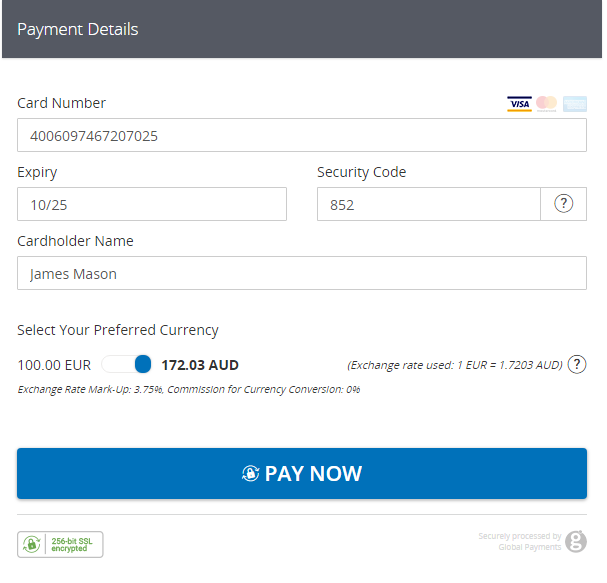
Now that we have the card currency, exchange rate, and amount, we can present the option to the customer. For this example, the card currency is Swedish Krona (SEK) and our base currency is Euro (EUR). The screenshot below shows an example of how the HPP presents this choice to the customer.
Step 3: Authenticate payment using correct currency
A requirement of 3DS is that the amount and currency authenticated should match the amount and currency authorized. Therefore, where DCC is used, you must ensure to authenticate the customer with the correct currency. The 3D Secure implementation flow you use depends on the customer’s actions:
- If the customer was offered DCC and did not accept, or was not offered DCC, follow the Initiate Authentication flow of the API Reference for 3D Secure.
- If the customer was offered and accepted DCC, follow the Authentication with DCC and Authorization with DCC flows of the API Reference for Dynamic Currency Conversion.
Step 4: Send the authorization with DCC details
Once the customer makes their decision, you can send the authorization along with the DCC information. In our example, the customer chose to pay in the currency of their card. You can populate the converted amount, rate, and currency into the request.
// configure client & request settings
GatewayConfig config = new GatewayConfig();
config.setMerchantId("MerchantId");
config.setAccountId("internet");
config.setSharedSecret("secret");
config.setServiceUrl("https://api.sandbox.realexpayments.com/epage-remote.cgi");
ServicesContainer.configureService(config);

// create the card object
CreditCardData card = new CreditCardData();
card.setNumber("4006097467207025");
card.setExpMonth(12);
card.setExpYear(2025);
card.setCvn("131");
card.setCvnPresenceIndicator(CvnPresenceIndicator.Present);
card.setCardHolderName("James Mason");

// populate the dcc data based on the customer's choice
DccRateData dccRateData = new DccRateData();
dccRateData.setDccProcessor("fexco");
dccRateData.setDccRateType("S");
dccRateData.setCurrency("AUD");
dccRateData.setAmount(new BigDecimal("1722"));
dccRateData.setDccRate(new BigDecimal("1.7203"));

try {
   // process an auto-settle authorization with dcc data
   Transaction response = card.charge(new BigDecimal("10.01"))
      .withOrderId("9QDdMAGhTeiCyNxkuiMXYA")
      .withDccRateData(dccRateData)
      .withCurrency("EUR")
      .execute();

   String result = response.getResponseCode(); // 00 == Success
   String message = response.getResponseMessage(); // [ test system ] AUTHORISED

   // get the details to save to the DB for future requests
   String authCode = response.getAuthorizationCode(); // 12345
   String paymentsReference = response.getTransactionId(); // pasref 14622680939731425
   String schemeReferenceData = response.getSchemeId(); // MMC0F00YE4000000715
}

catch (ApiException exce) {
   // TODO: add your error handling here
}<?php
require_once('vendor/autoload.php');
use GlobalPayments\Api\ServiceConfigs\Gateways\GpEcomConfig;
use GlobalPayments\Api\ServicesContainer;
use GlobalPayments\Api\PaymentMethods\CreditCardData;
use GlobalPayments\Api\Entities\DccRateData;
use GlobalPayments\Api\Entities\Exceptions\ApiException;
$config = new GpEcomConfig();
$config->merchantId = "MerchantId";
$config->accountId = "internet";
$config->sharedSecret = "secret";
$config->serviceUrl = "https://api.sandbox.realexpayments.com/epage-remote.cgi";
ServicesContainer::configureService($config);
// create the card object
$card = new CreditCardData();
$card->number = "4006097467207025";
$card->expMonth = 12;
$card->expYear = 2025;
$card->cvn = "131";
$card->cardHolderName = "James Mason";
// populate the dcc data based on the customer's choice
$dccRateData = new DccRateData();
$dccRateData->dccProcessor = "fexco";
$dccRateData->dccRateType = "S";
$dccRateData->currency = "AUD";
$dccRateData->dccRate = "1.7203";
$dccRateData->amount = "3439";
try {
// Submit the Authorization with the customer's DCC choice
$response = $card->charge(19.99)
->withOrderId("cd82c0aa-cf3c-4887-aed9-0680aee9f484") // same Order ID as Rate Lookup
->withDccRateData($dccRateData)
->withCurrency("EUR")
->execute();
} catch (ApiException $e) {
// TODO: add your error handling here
}
if (isset($response)) {
$result = $response->responseCode; // 00 == Success
$message = $response->responseMessage; // [ test system ] AUTHORISED
// get the details to save to the DB for future requests
$orderId = $response->orderId; // N6qsk4kYRZihmPrTXWYS6g
$authCode = $response->authorizationCode; // 12345
$paymentsReference = $response->transactionId; // pasref: 14610544313177922
$schemeReferenceData = $response->schemeId; // MMC0F00YE4000000715
// TODO: update your application and display transaction outcome to the customer
}// coming soon<?xml version="1.0" encoding="UTF-8"?>
<request type="auth" timestamp="20180613104233">
<merchantid>MerchantId</merchantid>
<account>internet</account>
<orderid>AWfoT2k9TzuA0wn8Ze_IIQ</orderid>
<amount currency="EUR">1000</amount>
<card>
<number>4263970000005262</number>
<expdate>0525</expdate>
<chname>Philip Marlowe</chname>
<type>VISA</type>
<cvn>
<number>123</number>
<presind>1</presind>
</cvn>
</card>
<autosettle flag="1"/>
<mpi>
<eci>5</eci>
<ds_trans_id>c272b04f-6e7b-43a2-bb78-90f4fb94aa25</ds_trans_id>
<authentication_value>ODQzNjgwNjU0ZjM3N2JmYTg0NTM=</authentication_value>
<message_version>2.2.0</message_version>
<exempt_status>LOW_VALUE</exempt_status>
</mpi>
<!-- Begin DCC Elements -->
<dccinfo>
<ccp>Currency Conversion Processor</ccp>
<type>1</type>
<rate>1.6728</rate>
<ratetype>S</ratetype>
<amount currency="AUD">167</amount>
</dccinfo>
<!-- End DCC Elements -->
<sha1hash>c87e5fa0858671510a02477d146ef744233e4ba8</sha1hash>
</request>EEA currencies
Background
In April 2020, the European Union introduced new rules governing the transparency of a merchant markup on currency conversions for certain currencies in the European Economic Area (EEA). These currencies include: EUR, BGN, HRK, DKK, HUF, PLN, CZK, RON, and SEK.
For merchants utilizing DCC, the EEA rules mean that if the exchange rate offered to the customer has a markup that makes the amount above the European Central Bank (ECB) exchange rate, this percentage rate must be displayed to the consumer.
Compliance
When the customer is presented with the choice to pay in the currency of their card or the merchant’s base currency, the markup amount should be displayed to them. If the exchange rate offered is the same or less than the ECB rate, the markup should be displayed as 0%.
The value of the rate field returned in the Rate Lookup response will be the rate provided by the merchant or CCP, inclusive of their markup. The value of the margin percentage field will reflect the markup rate of the merchant or CCP in relation to the current ECB rate.
Explore more functionality to enrich your application.