This guide focuses on adding the Hosted Payment Page (HPP) to your application or website. First, we set up your server-side code using either direct integration or one of our SDKs (Java, PHP, or .NET). Then, we set up the client-side using one of our libraries (HTML/JavaScript, iOS, or Android). Lastly, we process the HPP response by setting up the endpoint.
For more information on the HPP, see our Overview.
Remember to first register for a developer account if you don't already have one. Once logged in, you can request Sandbox credentials from the My Apps section.
Step 1: Set up your server
First, we set up the server-side code. If you're using one of our SDKs, we'll create our request object and convert it to JSON. Your application code can then pass the JSON string to the client-side library. If you're integrating directly, your application can build the HTTP POST itself.
Always keep your shared secret on the server-side to avoid exposing it to the public.
// configure client, request and HPP settings
GatewayConfig config = new GatewayConfig();
config.setMerchantId("MerchantId");
config.setAccountId("internet");
config.setSharedSecret("secret");
config.setServiceUrl("https://pay.sandbox.realexpayments.com/pay");

HostedPaymentConfig hostedPaymentConfig = new HostedPaymentConfig();
hostedPaymentConfig.setVersion(HppVersion.Version2);
config.setHostedPaymentConfig(hostedPaymentConfig);

// Add 3D Secure 2 Mandatory and Recommended Fields
HostedPaymentData hostedPaymentData = new HostedPaymentData();
hostedPaymentData.setCustomerEmail("james.mason@example.com");
hostedPaymentData.setCustomerPhoneMobile("44|07123456789");
hostedPaymentData.setAddressesMatch(false);

Address billingAddress = new Address();
billingAddress.setStreetAddress1("Flat 123");
billingAddress.setStreetAddress2("House 456");
billingAddress.setStreetAddress3("Unit 4");
billingAddress.setCity("Halifax");
billingAddress.setPostalCode("W5 9HR");
billingAddress.setCountry("826");

Address shippingAddress = new Address();
shippingAddress.setStreetAddress1("Apartment 825");
shippingAddress.setStreetAddress2("Complex 741");
shippingAddress.setStreetAddress3("House 963");
shippingAddress.setCity("Chicago");
shippingAddress.setState("IL");
shippingAddress.setPostalCode("50001");
shippingAddress.setCountry("840");

HostedService service = new HostedService(config);

try {
    String hppJson = service.charge(new BigDecimal("19.99"))
    .withCurrency("EUR")
    .withHostedPaymentData(hostedPaymentData)
    .withAddress(billingAddress, AddressType.Billing)
    .withAddress(shippingAddress, AddressType.Shipping)
    .serialize();
    // TODO: pass the HPP request JSON to the JavaScript, iOS or Android Library
} catch (ApiException exce) {
    // TODO: Add your error handling here
}<?php
require_once('vendor/autoload.php');
use GlobalPayments\Api\Entities\Address;
use GlobalPayments\Api\Entities\Enums\AddressType;
use GlobalPayments\Api\ServiceConfigs\Gateways\GpEcomConfig;
use GlobalPayments\Api\HostedPaymentConfig;
use GlobalPayments\Api\Entities\HostedPaymentData;
use GlobalPayments\Api\Entities\Enums\HppVersion;
use GlobalPayments\Api\Entities\Exceptions\ApiException;
use GlobalPayments\Api\Services\HostedService;
// configure client, request and HPP settings
$config = new GpEcomConfig();
$config->merchantId = "MerchantId";
$config->accountId = "internet";
$config->sharedSecret = "secret";
$config->serviceUrl = "https://pay.sandbox.realexpayments.com/pay";
$config->hostedPaymentConfig = new HostedPaymentConfig();
$config->hostedPaymentConfig->version = HppVersion::VERSION_2;
$service = new HostedService($config);
// Add 3D Secure 2 Mandatory and Recommended Fields
$hostedPaymentData = new HostedPaymentData();
$hostedPaymentData->customerEmail = "james.mason@example.com";
$hostedPaymentData->customerPhoneMobile = "44|07123456789";
$hostedPaymentData->addressesMatch = false;
$billingAddress = new Address();
$billingAddress->streetAddress1 = "Flat 123";
$billingAddress->streetAddress2 = "House 456";
$billingAddress->streetAddress3 = "Unit 4";
$billingAddress->city = "Halifax";
$billingAddress->postalCode = "W5 9HR";
$billingAddress->country = "826";
$shippingAddress = new Address();
$shippingAddress->streetAddress1 = "Apartment 825";
$shippingAddress->streetAddress2 = "Complex 741";
$shippingAddress->streetAddress3 = "House 963";
$shippingAddress->city = "Chicago";
$shippingAddress->state = "IL";
$shippingAddress->postalCode = "50001";
$shippingAddress->country = "840";
try {
$hppJson = $service->charge(19.99)
->withCurrency("EUR")
->withHostedPaymentData($hostedPaymentData)
->withAddress($billingAddress, AddressType::BILLING)
->withAddress($shippingAddress, AddressType::SHIPPING)
->serialize();
// TODO: pass the HPP JSON to the client-side
} catch (ApiException $e) {
// TODO: Add your error handling here
}// configure client, request and HPP settings
var service = new HostedService(new GpEcomConfig
{
MerchantId = "MerchantId",
AccountId = "internet",
SharedSecret = "secret",
ServiceUrl = "https://pay.sandbox.realexpayments.com/pay",
HostedPaymentConfig = new HostedPaymentConfig
{
Version = "2"
}
});
// Add 3D Secure 2 Mandatory and Recommended Fields
var hostedPaymentData = new HostedPaymentData
{
CustomerEmail = "james.mason@example.com",
CustomerPhoneMobile = "44|07123456789",
AddressesMatch = false
};
var billingAddress = new Address
{
StreetAddress1 = "Flat 123",
StreetAddress2 = "House 456",
StreetAddress3 = "Unit 4",
City = "Halifax",
PostalCode = "W5 9HR",
Country = "826"
};
var shippingAddress = new Address
{
StreetAddress1 = "Apartment 825",
StreetAddress2 = "Complex 741",
StreetAddress3 = "House 963",
City = "Chicago",
State = "IL",
PostalCode = "50001",
Country = "840",
};
try
{
var hppJson = service.Charge(19.99m)
.WithCurrency("EUR")
.WithHostedPaymentData(hostedPaymentData)
.WithAddress(billingAddress, AddressType.Billing)
.WithAddress(shippingAddress, AddressType.Shipping)
.Serialize();
// TODO: pass the HPP request JSON to the JavaScript, iOS or Android Library
}
catch (ApiException exce)
{
// TODO: Add your error handling here
}<form action="https://pay.sandbox.realexpayments.com/pay" method="POST" target="iframe">
<input type="hidden" name="TIMESTAMP" value="20180613110737">
<input type="hidden" name="MERCHANT_ID" value="MerchantId">
<input type="hidden" name="ACCOUNT" value="internet">
<input type="hidden" name="ORDER_ID" value="N6qsk4kYRZihmPrTXWYS6g">
<input type="hidden" name="AMOUNT" value="1999">
<input type="hidden" name="CURRENCY" value="EUR">
<input type="hidden" name="AUTO_SETTLE_FLAG" value="1">
<input type="hidden" name="COMMENT1" value="Mobile Channel">
<input type="hidden" name="HPP_VERSION" value="2">
<input type="hidden" name="HPP_CHANNEL" value="ECOM">
<input type="hidden" name="HPP_LANG" value="en">
<!-- Begin 3D Secure 2 Mandatory and Recommended Fields -->
<input type="hidden" name="HPP_CUSTOMER_EMAIL" value="test@example.com">
<input type="hidden" name="HPP_CUSTOMER_PHONENUMBER_MOBILE" value="44|789456123">
<input type="hidden" name="HPP_BILLING_STREET1" value="Flat 123">
<input type="hidden" name="HPP_BILLING_STREET2" value="House 456">
<input type="hidden" name="HPP_BILLING_STREET3" value="Unit 4">
<input type="hidden" name="HPP_BILLING_CITY" value="Halifax">
<input type="hidden" name="HPP_BILLING_POSTALCODE" value="W5 9HR">
<input type="hidden" name="HPP_BILLING_COUNTRY" value="826">
<input type="hidden" name="HPP_SHIPPING_STREET1" value="Apartment 852">
<input type="hidden" name="HPP_SHIPPING_STREET2" value="Complex 741">
<input type="hidden" name="HPP_SHIPPING_STREET3" value="House 963">
<input type="hidden" name="HPP_SHIPPING_CITY" value="Chicago">
<input type="hidden" name="HPP_SHIPPING_STATE" value="IL">
<input type="hidden" name="HPP_SHIPPING_POSTALCODE" value="50001">
<input type="hidden" name="HPP_SHIPPING_COUNTRY" value="840">
<input type="hidden" name="HPP_ADDRESS_MATCH_INDICATOR" value="FALSE">
<input type="hidden" name="HPP_CHALLENGE_REQUEST_INDICATOR" value="NO_PREFERENCE">
<!-- End 3D Secure 2 Mandatory and Recommended Fields -->
<!-- Begin Fraud Management and Reconciliation Fields -->
<input type="hidden" name="BILLING_CODE" value="59|123">
<input type="hidden" name="BILLING_CO" value="GB">
<input type="hidden" name="SHIPPING_CODE" value="50001|Apartment 852">
<input type="hidden" name="SHIPPING_CO" value="US">
<input type="hidden" name="CUST_NUM" value="6e027928-c477-4689-a45f-4e138a1f208a">
<input type="hidden" name="VAR_REF" value="Acme Corporation">
<input type="hidden" name="PROD_ID" value="SKU1000054">
<!-- End Fraud Management and Reconciliation Fields -->
<input type="hidden" name="MERCHANT_RESPONSE_URL" value="https://www.example.com/responseUrl">
<input type="hidden" name="CARD_PAYMENT_BUTTON" value="Pay Invoice">
<input type="hidden" name="CUSTOM_FIELD_NAME" value="Custom Field Data">
<input type="hidden" name="SHA1HASH" value="308bb8dfbbfcc67c28d602d988ab104c3b08d012">
<input type="submit" value="Click To Pay">
</form>Step 2: Set up your client
Use the drop-down arrow below to select a library. After making a selection, follow the steps to set up your client for that library.
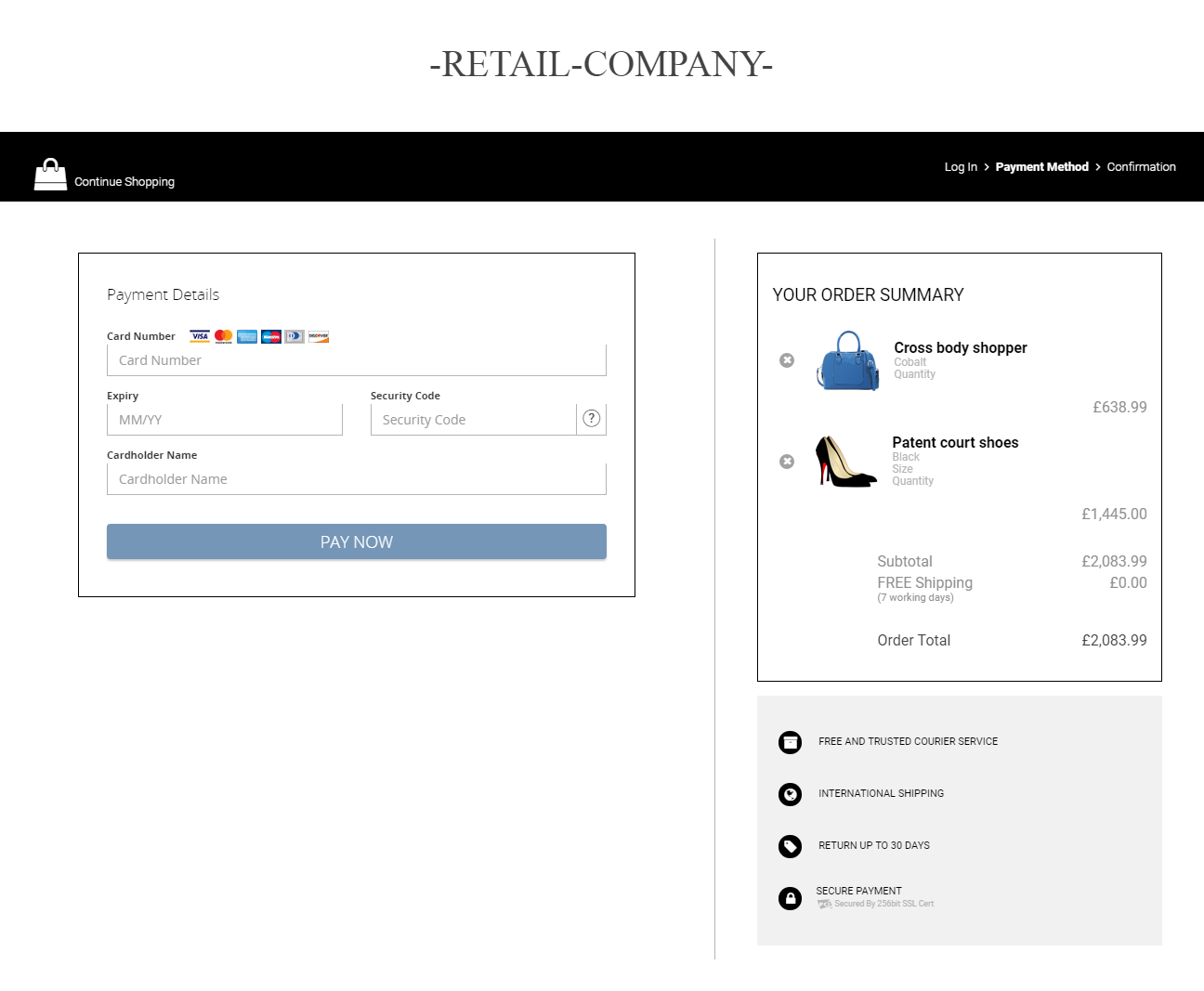
Download our JavaScript library from GitHub to integrate with our server-side SDK. The library interfaces with the server-side SDK of your choice and generates the payment form for your website or application.
You can choose to render the payment form using your own embedded iFrame, as a Lightbox, or by performing a full-page redirect. In Lightbox mode, for example, the JavaScript library creates the overlay, opens the iFrame, displays the HPP, and retrieves the response to send to the server-side SDK. In mobile browsers, the HPP opens in a new tab.
You may need to modify the below sample code to suit your needs.
HPP example (embedded iFrame)
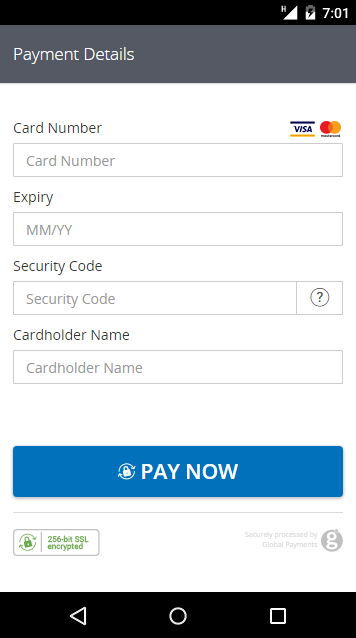
Download our Android library on GitHub to use the HPP in-app. Use Maven or Gradle to install it. For more information on installation, see our Android Library article.
The Android library interfaces with the server-side SDK of your choice. It processes the request, presents the payment form, and handles the transaction outcome.
The Android library is compatible with Android SDK 19+ and Android version 4.4+.
You may need to modify the below sample code to suit your needs.
Instantiate
To instantiate the HPPManager, use the following:
HPPManager hppManager = new HPPManager();
Integrate with your server
The HPPManager requires three server URLs:
- Request Producer URL - Using one of the HPP server-side SDKs, this URL creates the necessary request JSON as outlined in Step 1 above.
- HPP URL - Location to send the request. The default value for live transactions is https://pay.realexpayments.com/pay.
- Response Consumer URL - Using one of the server-side SDKs, this endpoint takes the response received back from the HPP, decodes it, and checks the validity of the hash. See the sample code for Consume HPP Response JSON below.
The three URLs can be set in the following way:
hppManager.setHppRequestProducerURL("https://myserver.com/hppRequestProducer");
hppManager.setHppURL("https://pay.sandbox.realexpayments.com/pay");
hppManager.setHppResponseConsumerURL("https://myserver.com/hppResponseConsumer");
Implement HPPManagerListener in your activity
There are three possible outcomes from the HPP interaction:
- Concluded successfully
- Failed with an error
- Canceled by the user (for example, user taps Back)
Note that these are independent of the transaction's outcome (whether it was authorized successfully or not). Here, we're referencing the Android library's actual communication with the HPP. You can implement the following methods specified in HPPManagerListener to receive the result from the HPPManager:
@Override public void hppManagerCompletedWithResult(ConsumerResponse consumerResponse) { /* success */ }
@Override public void hppManagerFailedWithError(HPPError error) { /* something went wrong */}
@Override public void hppManagerCancelled() { /* operation was canceled */ }
Present the payment form
Insert the HPPManager fragment into your activity as follows. When executing this code, HPPManager will process the given parameters, get the request from the server, send the encoded request to HPP, and present the form received back.
Fragment hppManagerFragment = hppManager.newInstance();
getFragmentManager()
        .beginTransaction()
        .add(R.id.container,hppManagerFragment)
        .commit();
Android in-app example
You can style the HPP using templates to maintain a consistent design for your app. For more information on how to do this and to download some sample templates, see our HPP Customization article.
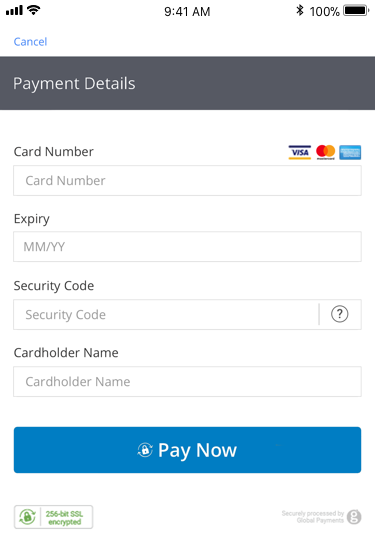
Download our iOS HPP library on GitHub to use the HPP in-app. Use Cocoapods to install it. For more information on installation, see our iOS Library article.
The iOS library interfaces with the server-side SDK of your choice. It processes the request, presents the payment form, and handles the transaction outcome.
The iOS library is compatible with Xcode 7.1.1+ | iOS 8.0+.
You may need to modify the below sample code to suit your needs.
Instantiate
To instantiate the HPPManager, use the following:
let hppManager = HPPManager();
Integrate with your server
The HPPManager requires three server URLs:
- Request Producer URL - Using one of the HPP server-side SDKs, this URL creates the necessary request JSON as outlined in Step 1 above.
- HPP URL - Location to send the request. The default for live transactions is {{ hpp_url }}
- Response Consumer URL - Using one of the server-side SDKs, this endpoint takes the response received back from the HPP, decodes it, and checks the validity of the hash. See the sample code for Consume HPP Response JSON below.
The three URLs can be set in the following way:
hppManager.HPPRequestProducerURL = NSURL(string: "https://myserver.com/hppRequestProducer");
hppManager.HPPURL = NSURL(string: "https://pay.realexpayments.com/pay");
hppManager.HPPResponseConsumerURL = NSURL(string: "https://myserver.com/hppResponseConsumer");
Set delegate
Next, set the object that will act as the delegate for the HPPManager. The delegate implements the HPPManagerDelegate protocol and therefore receives the response from the HPPManager.
hppManager.delegate = self;
Delegate callbacks
There are three possible outcomes from the HPP interaction:
- Concluded successfully - Returns the decoded JSON from HPP, parsed as a native Dictionary of name/value pairs.
- Failed with an error - Returns an object of the NSError class. You can access properties such as code and localizedDescription for more details on the error.
- Canceled by the user (for example, user tapped Cancel).
Note that these are independent of the outcome of the transaction (whether it was authorized successfully or not). Here, we're referring to the iOS library's actual communication with the HPP.
The HPPManager's delegate should implement the following three functions to receive the result from the HPPManager:
func HPPManagerCompletedWithResult(result: Dictionary <String, String>);
func HPPManagerFailedWithError(error: NSError?);
func HPPManagerCancelled();
Present the payment form
Using the presentViewInViewController() method, the HPPManager will process the given parameters, get the request from the server, send the encoded request to HPP, and present the form received back.
hppManager.presentViewInViewController(self);
iOS in-app example
You can style the HPP using templates to maintain a consistent design for your app. For more information on how to do this and to download some sample templates, see our Customization article.
Step 3: Process the HPP response
On the server-side, set up your Response endpoint to take in the response JSON and create the HPP response object. This will contain all the transaction response values you need to update your application. If you're using full-page redirect, the response will be a standard HTTP POST.
The response from HPP will contain a hashed string (SHA1HASH field) made up of key transaction variables, including the Order ID, Result Code, and Timestamp. The SDK will construct and check the hash to ensure the response hasn't been tampered with. It will throw an exception if what it constructs doesn't match the SHA1HASH returned in the response.
The Timestamp returned in the response will be identical to the one sent in the request JSON. This, combined with the Order ID and other transaction variables, can be used to definitively link the response received with the transaction request and order created in your application. You should also check the other transaction variables—for example, the Amount—against what was stored in your application at the time the request JSON was sent.
A 111 result code indicates that the Issuer requires Strong Customer Authentication (SCA) for a transaction. To avoid this outcome, please ensure you enable 3D Secure 2 on the HPP.
// configure client settings
GatewayConfig config = new GatewayConfig();
config.setMerchantId("MerchantId");
config.setSharedSecret("secret");
config.setServiceUrl("https://pay.sandbox.realexpayments.com/pay");

HostedService service = new HostedService(config);

/* TODO: grab the response JSON from the client-side.
   sample response JSON (values will be Base64 encoded):
   String responseJson = "{ \"MERCHANT_ID\": \"MerchantId\", \"ACCOUNT\": \"internet\", \"ORDER_ID\": \"GTI5Yxb0SumL_TkDMCAxQA\", \"AMOUNT\": \"1999\", "
 + "\"TIMESTAMP\": \"20170725154824\", \"SHA1HASH\": \"843680654f377bfa845387fdbace35acc9d95778\", \"RESULT\": \"00\", \"AUTHCODE\": \"12345\", "
 + "\"CARD_PAYMENT_BUTTON\": \"Place Order\", \"AVSADDRESSRESULT\": \"M\", \"AVSPOSTCODERESULT\": \"M\", \"BATCHID\": \"445196\", \"MESSAGE\": \"[ test system ] Authorised\", "
 + "\"PASREF\": \"15011597872195765\", \"CVNRESULT\": \"M\", \"HPP_FRAUDFILTER_RESULT\": \"PASS\"}";
 */

try {
   // create the response object from the response JSON
   Transaction response = service.parseResponse(responseJson, true);
   String orderId = response.getOrderId(); // GTI5Yxb0SumL_TkDMCAxQA
   String responseCode = response.getResponseCode(); // 00
   String responseMessage = response.getResponseMessage(); // [ test system ] Authorised
   HashMap<String, String> responseValues = response.getResponseValues(); // get values accessible by key
   String fraudFilterResult = responseValues.get("HPP_FRAUDFILTER_RESULT"); // PASS
   // TODO: update your application and display transaction outcome to the customer
} catch (ApiException exce) {
   // For example if the SHA1HASH doesn't match what is expected
   // TODO: add your error handling here
}<?php
require_once('vendor/autoload.php');
use GlobalPayments\Api\ServiceConfigs\Gateways\GpEcomConfig;
use GlobalPayments\Api\Services\HostedService;
use GlobalPayments\Api\Entities\Exceptions\ApiException;
// configure client settings
$config = new GpEcomConfig();
$config->merchantId = "MerchantId";
$config->accountId = "internet";
$config->sharedSecret = "secret";
$config->serviceUrl = "https://pay.sandbox.realexpayments.com/pay";
$service = new HostedService($config);
/*
* TODO: grab the response JSON from the client-side.
* sample response JSON (values will be Base64 encoded):
* $responseJson ='{"MERCHANT_ID":"MerchantId","ACCOUNT":"internet","ORDER_ID":"GTI5Yxb0SumL_TkDMCAxQA","AMOUNT":"1999",' .
* '"TIMESTAMP":"20170725154824","SHA1HASH":"843680654f377bfa845387fdbace35acc9d95778","RESULT":"00","AUTHCODE":"12345",' .
* '"CARD_PAYMENT_BUTTON":"Place Order","AVSADDRESSRESULT":"M","AVSPOSTCODERESULT":"M","BATCHID":"445196",' .
* '"MESSAGE":"[ test system ] Authorised","PASREF":"15011597872195765","CVNRESULT":"M","HPP_FRAUDFILTER_RESULT":"PASS"}";
*/
try {
// create the response object from the response JSON
$parsedResponse = $service->parseResponse($responseJson, true);
$orderId = $parsedResponse->orderId; // GTI5Yxb0SumL_TkDMCAxQA
$responseCode = $parsedResponse->responseCode; // 00
$responseMessage = $parsedResponse->responseMessage; // [ test system ] Authorised
$responseValues = $parsedResponse->responseValues; // get values accessible by key
} catch (ApiException $e) {
// For example if the SHA1HASH doesn't match what is expected
// TODO: add your error handling here
}// configure client settings
var service = new HostedService(new GpEcomConfig
{
MerchantId = "MerchantId",
AccountId = "internet",
SharedSecret = "secret",
ServiceUrl = "https://pay.sandbox.realexpayments.com/pay"
});
/* TODO: grab the response JSON from the client-side for example:
var responseJson = Request.Form["hppResponse"];
sample response JSON (values will be Base64 encoded):
var responseJson = "{ \"MERCHANT_ID\": \"MerchantId\", \"ACCOUNT\": \"internet\", \"ORDER_ID\": \"GTI5Yxb0SumL_TkDMCAxQA\", \"AMOUNT\": \"1999\","
+ "\"TIMESTAMP\": \"20170725154824\", \"SHA1HASH\": \"843680654f377bfa845387fdbace35acc9d95778\", \"RESULT\": \"00\", \"AUTHCODE\": \"12345\","
+ "\"CARD_PAYMENT_BUTTON\": \"Place Order\", \"AVSADDRESSRESULT\": \"M\", \"AVSPOSTCODERESULT\": \"M\", \"BATCHID\": \"445196\","
+ "\"MESSAGE\": \"[ test system ] Authorised\", \"PASREF\": \"15011597872195765\", \"CVNRESULT\": \"M\", \"HPP_FRAUDFILTER_RESULT\": \"PASS\"}";
*/
try
{
// create the response object from the response JSON
Transaction response = service.ParseResponse(responseJson, true);
var orderId = response.OrderId; // GTI5Yxb0SumL_TkDMCAxQA
var responseCode = response.ResponseCode; // 00
var responseMessage = response.ResponseMessage; // [ test system ] Authorised
var responseValues = response.ResponseValues; // get values accessible by key
var fraudFilterResult = responseValues["HPP_FRAUDFILTER_RESULT"]; // PASS
// TODO: update your application and display transaction outcome to the customer
}
catch (ApiException exce)
{
// TODO: add your error handling here
}[RESULT=00,
AUTHCODE=12345,
MESSAGE=[ test system ] Authorised,
PASREF=14631546336115597,
AVSPOSTCODERESULT=M,
AVSADDRESSRESULT=M,
CVNRESULT=M,
ACCOUNT=internet,
MERCHANT_ID=MerchantId,
ORDER_ID=N6qsk4kYRZihmPrTXWYS6g,
TIMESTAMP=20180613113227,
AMOUNT=1001,
BATCHID=691175,
CARD_PAYMENT_BUTTON=Pay Invoice,
MERCHANT_RESPONSE_URL=https://www.example.com/responseUrl,
HPP_LANG=GB,
BILLING_CODE=59|123,
BILLING_CO=GB,
SHIPPING_CODE=50001|Apartment 852,
SHIPPING_CO=US,
COMMENT1=Mobile Channel,
ECI=5
AUTHENTICATION_VALUE=ODQzNjgwNjU0ZjM3N2JmYTg0NTM=,
DS_TRANS_ID=c272b04f-6e7b-43a2-bb78-90f4fb94aa25,
MESSAGE_VERSION=2.1.0,
SRD=MMC0F00YE4000000715,
SHA1HASH=8ab81d4437e24a88a08cffb51c15151846bd7b61]Testing HPP
Use our test cards to try out different scenarios for your application to handle. For the full list of test cards, see Test Cards.
Enhance your solution
Explore more functionality to enrich your application.
Card Payments