Loading...


Installment Service is only available to merchants in Canada who use us as their acquirer and those in the UK using a GPUK connection.
To see if your acquirer can support Installment Service, contact a member of our support team.
For more information on our Installment Service, see our Overview.
In this guide, you'll learn how to directly integrate with Installment Service and how to use it to offer installment payments to your customers.
The code samples in this guide are provided in JSON as well as XML.
To use our Installment Service, you first need to get it enabled on your account. To do this, contact your account manager.
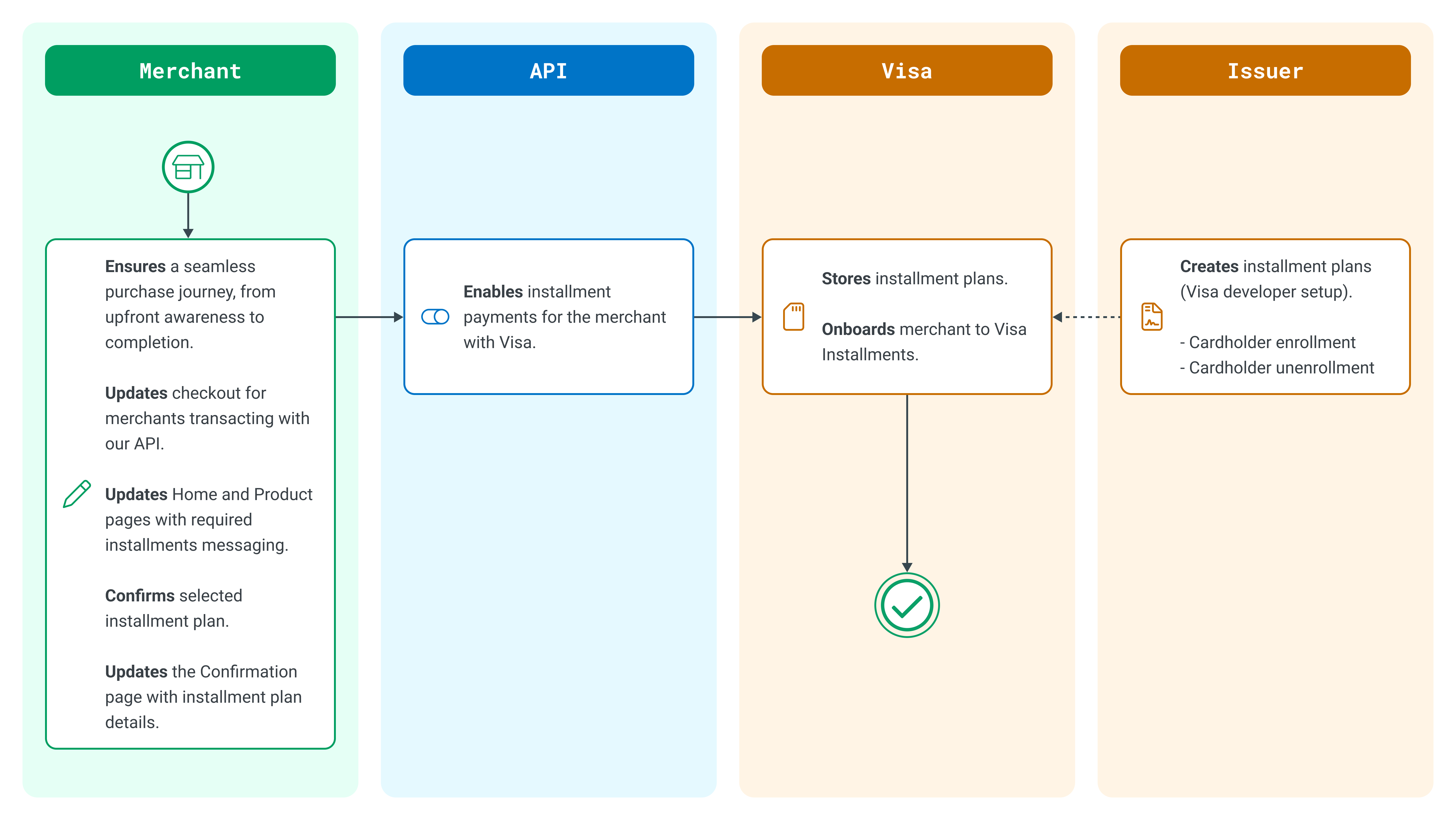
Setting up the service for direct API integration typically works like this:
Installment Service endpoints:
Sandbox: https://api.sandbox.globalpay-ecommerce.com/installments/plans/match
Production: https://api.globalpay-ecommerce.com/installments/plans/match
Next, we use the GetEligiblePlans request to retrieve the eligible plans that match the Issuer’s criteria for the transaction.
For syntax tables and security hash information, see the API Reference for Installment Service.
curl https://api.sandbox.globalpay-ecommerce.com/installments/plans/match
-H "Content-type: application/json"
-H "Authorization: sha256hash ff90a189d9ba5a23eec8578ddffba350fbd701faaba7428c59b65ca2c83e1bdd"
-X POST
-d '{
  "partner": "GPECOM",
  "provider": "VIS",
  "merchant_id": "MerchantId",
  "account_id": "accountId",
  "card": {
    "number": "4263970000005262"
   },
  "amount": "1000",
  "currency": "CAD",
  "channel": "ECOM",
  "request_timestamp": "2023-01-01T12:00:00.000Z",
  "filter": {
    "enabled": true,
    "max_term_months_merchant_funded": 24,
    "plan_type": "MERCHANT_FUNDED"
    "amount_threshold": 1000
  }
}'{
"amount": 1000000,
"currency": "CAD",
"matched_plans": [
{
"name": "plan24CwAPR",
"type": "ISSUER_DEFAULT",
"number_of_installments": 24,
"funded_by": [
"CONSUMER"
],
"installment_frequency": "MONTHLY",
"terms_and_conditions": [
{
"url": "http://www.myurl.com",
"version": "25798469",
"text": "You are selecting a 24-month installment plan. The total purchase amount will be deducted from your available credit limit. As set forth in your terms, your installment fee will be 13.99% APR calculated for 24 months. If you miss an installment payment, the standard rate of purchases will apply to the remaining installment balance.",
"language_code": "ENG"
}
],
"cost_info": {
"annual_percentage_rate": 13.99,
"fee_info": [
{
"type": "CONSUMER",
"rate_percentage": 5,
"flat_fee": 0
}
],
"total_plan_cost": 1130500,
"total_fees": 130500,
"total_upfront_fees": 100000,
"total_recurring_fees": 30500,
"first_installment": {
"upfront_fee": 100000,
"installment_fee": 1270,
"amount": 41666
},
"last_installment": {
"installment_fee": 1270,
"amount": 41666
},
"currency": "CAD"
},
"plan_id": "7533d4f7-6a10-5557-2e92-132d06157502"
}
]
}To confirm the selected installment plan by the user, send the plan details in the Authorization request. After the cardholder selects an installment plan, the merchant should provide installment plan details in Auth and Receipt-in requests under the optional XML tag.
For the full Authorization request, see the API Reference for Card Payments.
Installment Service Confirm selected plans endpoints:
Sandbox: https://api.sandbox.globalpay-ecommerce.com/installments/confirmations
Production: https://api.globalpay-ecommerce.com/installments/confirmations
<installment>
<provider>VIS</provider>
<planid>3fa85f64-5717-4562-b3fc-2c963f66afa6</planid>
<tcversion>2</tcversion>
<tclang>eng</tclang>
</installment>When displaying plan details, you must comply with the messaging options in our Installments Enabled by Visa UX Guide. To download the guide, see the Display installment plan details section.
For help with implementing the Installment Service into the checkout experience for your app or website, use our Installments Enabled by Visa UX Guide. The guide focuses on information visibility in ecommerce transactions and includes design requirements and marketing guidelines to help you get started. To download the guide, see the Display installment plan details section.
When displaying plan details, you must comply with the messaging options in our Installments Enabled by Visa UX Guide. To download the guide, see the Display installment plan details section.
Once the payment is processed with the installment plan and the payment is complete, you can then display the details on the confirmation page and receipt. For an example, see our Installments Enabled by Visa UX Guide. To download the guide, see the Display installment plan details section.
Although not required, you can display installment plan details on other pages of your website or application, such as on the homepage or various product pages. Doing so can raise awareness of these payment options during the shopping process and can lead to higher customer conversion rates.
If you decide to display plan details on other pages, you must use the messaging options we provide in our Installments Enabled by Visa UX Guide. The guide focuses on information visibility in ecommerce transactions and includes design requirements and marketing guidelines to help you get started.
To download the guide for your region, click the applicable button below.
Download for CanadaOur Installment Service solution is available for testing in our Sandbox environment for registered users of this developer portal. Use our test cards to try different scenarios for your application to handle.
For more information, see the Installments section of our Test Cards article.
Explore more functionality to enrich your application. For the detailed API specification and a full list of features, see the API Reference.
See the full API specification for Installment Service.
Integrate with alternative and local payment methods.
Integrate with alternative and local payment methods.
Add strong customer authentication to your online payment flow.
Securely store card data with no increased PCI DSS compliance requirements.