Loading...


For more information on Open Banking and Bank Payment, see our Overview.
In this guide, you’ll learn how to process a transaction with the Bank Payment payment method via direct API integration using our Bank Payment infrastructure. We also provide information on testing Bank Payment, including a checklist for testing key scenarios and steps to use our mock bank for the redirect.
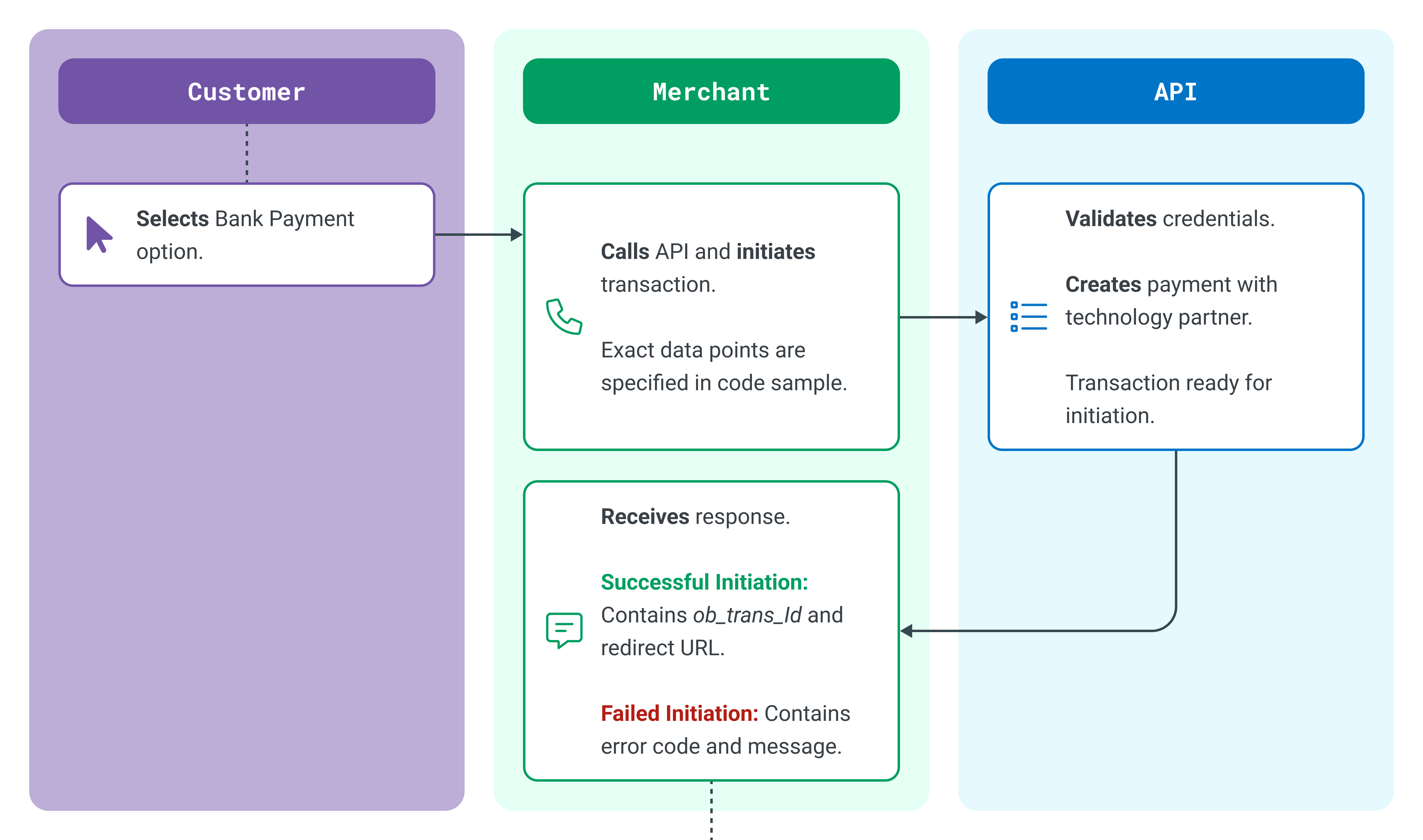
First, we submit a mandatory request to initiate a Bank Payment transaction. It needs to include the transaction’s core parameters so that we have enough information to create the payment with our infrastructure partner, Token, and the customer’s bank. A successful transaction request will return a unique Bank Payment transaction identifier and a redirect URL, which you’ll use to facilitate the customer confirmation of the transaction (Step 2).
The following illustration shows the high-level flow for creating a Bank Payment transaction.
Where payment.scheme is FASTER PAYMENTS, available payment.destination fields will be account_number, sort_code, and name.
Where payment.scheme is SEPA, available payment.destination fields will be iban and name.
There are certain use cases where PAN data can be passed through in the remittance fields with Type = PAN and Value = the 16-digit PAN. This is available via API only. For more information, contact your account manager.
The Bank Payment conditional fields (type = C) capture the merchant’s bank details that are required to complete the transaction. These fields are conditional based on the payment types SEPA or FASTERPAYMENTS. However, these fields remain optional. If they remain blank in the request, we will use the bank details in our database. You can still opt to use different details on a request-by-request basis, which will override what is stored in our database. This is only relevant for Direct Settlement. For Managed Settlement, we provide the bank details.
You can use any of the following algorithms: SHA1, SHA256, SHA384, or SHA512. We highly recommend SHA512. The blueprint of the hash for this request is:
No bank details included in the request:
"Timestamp.merchantid.orderid.amount.currency.sortcode.accountnumber.iban"The timezone is Europe/Dublin and should be the time the transaction is initiated.
Our initial string for a GBP transaction will be:
"20220118101735.MerchantId.3400dd37-101d-4940-be15-3c963b6109b3.1001.GBP.123456.12345678."If the payment method type was SEPA, we don’t include the Sort Code and Account Number. So, our EUR string would be:
"20220118101735.MerchantId.3400dd37-101d-4940-be15-3c963b6109b3.1001.GBP...123456789101112"If the bank details are not sent in the request (managed settlement or using the default details from your configuration), then the sortcode.accountnumber.iban would need to be populated as blank while generating hash to comply with the hash format.
After step 1, you'll have a string that you can now concatenate with your Shared Secret. For example: Po8lRRT67a is the Shared Secret in the below example.
"e8aedc5ddc9025f72ee71a6f7a48aaa638a09493354f65efd984ffefbe5420867d121f3b395644300063f349f79293511ac481d02bfb39531e227e2ff70224a7.Po8lRRT67a"The final string to add to the request header should be a hash of your concatenated string, using the same algorithm as in step 1.
a641a3f6937a809b5fec294160f1a9e451a518835110854c4280150bf69206a4562709e69a3d29b90671d887f78b993cadf973a2d93e33207afdd33d78741399The response to a Transaction Initiation request is either a payment initiation record or a failure message (code and message). If the transaction was successfully initiated, the response returns the order.id that you provided in the request. It also includes the redirect URL and unique Bank Payment transaction identifier generated by us.
{
   "order": {
        "id": "70692f734e06416eb72541d72"
    },
   "ob_trans_id": "lQBGLEiQxzQsw8clv2",
   "status": "PAYMENT_INITIATED",
   "redirect_url": "https://sandbox.globalpay-ecommerce.com/openbanking/process/lQBGLEiQxzQsw8clv2"
}| Element/Field | Format | Description |
|---|---|---|
| id | string | Order ID. The unique merchant created identifier for the transaction (echoed back to the merchant). |
| ob_trans_id | string | Bank Payment Transaction ID. Unique identifier assigned by the Bank Payment service for the transaction. |
| status | string | Message text of the response from the Bank Payment service. |
| Redirect_url | string | URL the customer’s browser must be directed to continue the transaction. |
| Element/Field | Format | Description |
|---|---|---|
| code | numeric | Three-digit error code. |
| message | string | Error code and description of the error. The following error codes may be received: 401 Merchant is not enabled for Open Banking 401 Merchant currency is not enabled for Open Banking 401 UNAUTHORIZED: Please check your code and the Developer Documentation (hash mismatch error) 400 [descriptive message about specific error in the request fields] 500 INTERNAL SERVER ERROR |
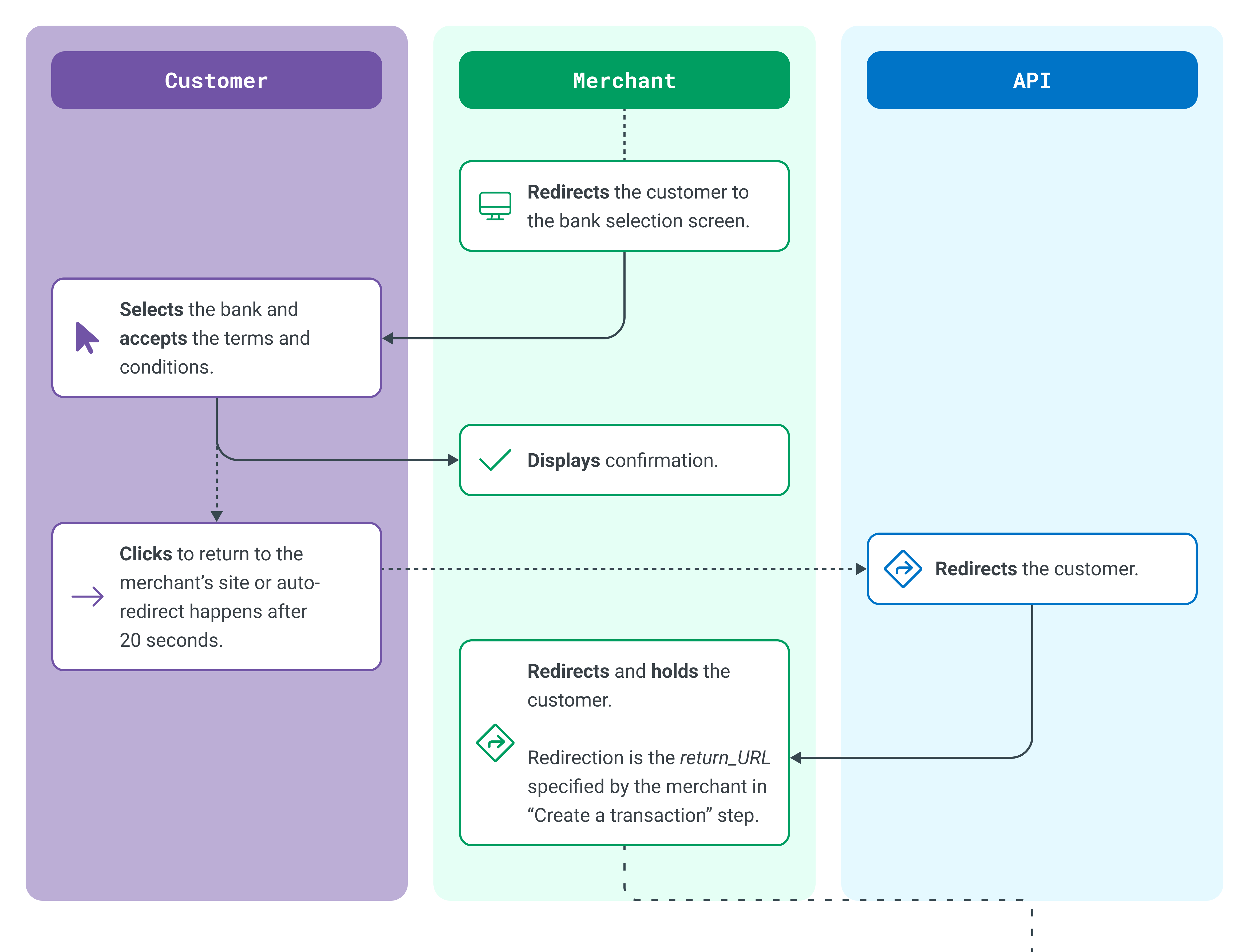
After initiating the Bank Payment transaction, you then redirect the customer to the Bank Selection screen. The customer’s browser will be redirected to Bank Payment solution and then to our infrastructure partner Token.io (Token), who hosts the bank selection user interface (UI).
The following illustration shows the high-level flow for redirecting the customer to select a bank.
<script>
   window.location = "https://sandbox.globalpay-ecommerce.com/openbanking/process/lQBGLEiQxzQsw8clv2";
</script>The browser will be redirected back to the Return URL (return_url) you specified in Step 1. The redirection will include the Bank Payment Transaction ID (ob_trans_id) as a URL parameter. At this point, you’ll need to temporarily hold the customer while you query the final status of the transaction.
https://www.example.com/returnUrl?ob_trans_id=lQBGLEiQxzQsw8clv2Adding ?country=XX to the web-app URL, where XX equals the two-letter ISO alpha-2 country code, pre-selects the country value in the Bank Selection screen viewed by the customer. For example:
https://sandbox.globalpay-ecommerce.com/openbanking/process/lQBGLEiQxzQsw8clv2?country=GB The above URL pre-selects the United Kingdom as the country. You have the option to save a default country in the initial configuration. This would be the default country, but if you include the country in the request, this will override the configuration.
English is the default language, but adding ?lang=XX to the web-app URL, where XX equals the two-letter ISO 639-1 language code, specifies the language the UI appears in. For example:
https://sandbox.globalpay-ecommerce.com/openbanking/process/lQBGLEiQxzQsw8clv2?lang=DE The above URL sets the initial language to German (DE). The user can override this selection by clicking the language button in the top-right corner. Supported languages include English, German, Slovenian, Portuguese, Italian, French, Czech, Polish, Spanish, Hungarian, and Dutch.
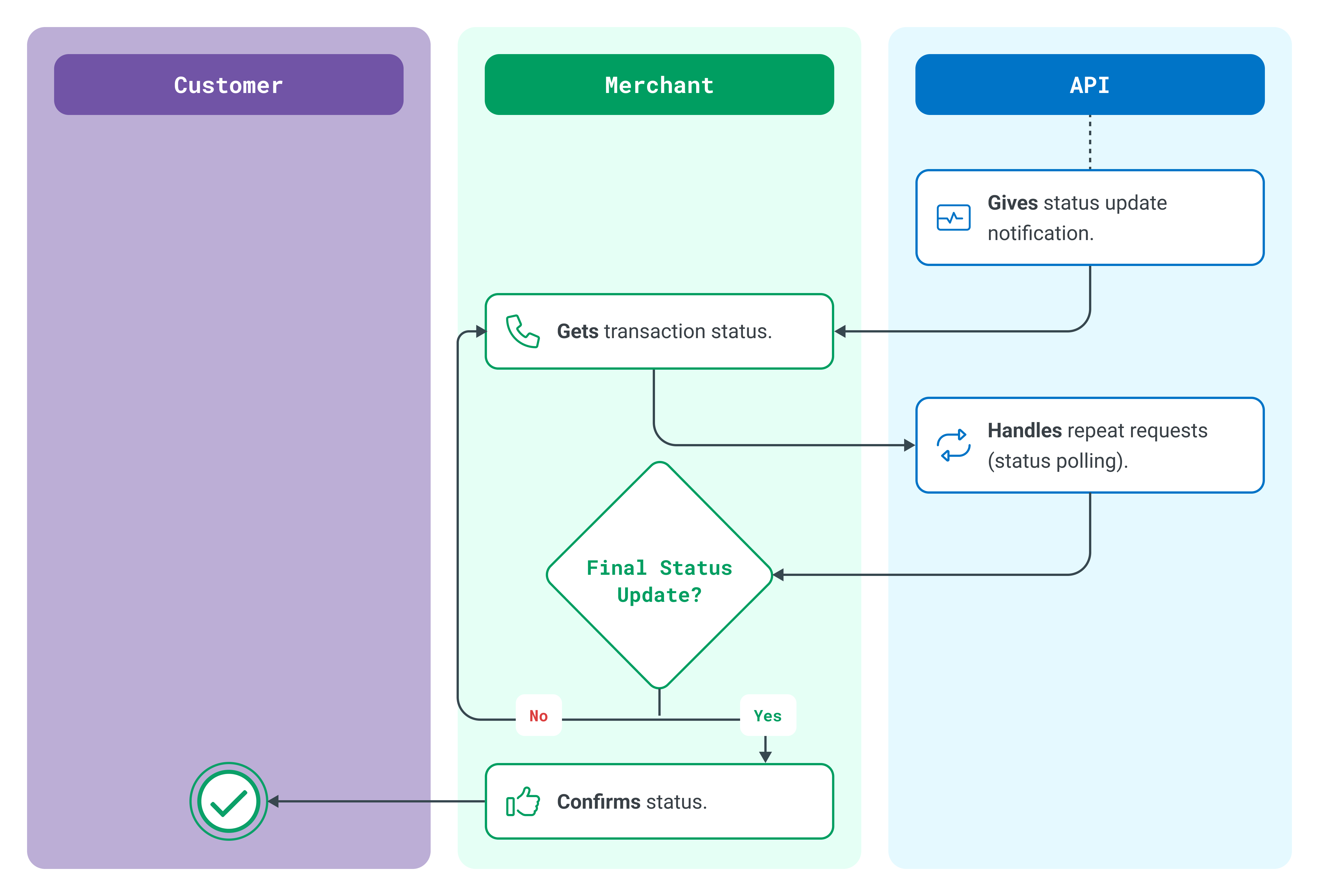
After receiving a callback on return_url with the ob_trans_id parameter, you need to call the GET /payments endpoint with ob_trans_id to receive payment status. With this in mind, in the case of asynchronous payment methods, the Return URL should be treated as an interim step.
Your application may choose to hold the customer here for a few moments (for example, 5 seconds) while you call the GET /payment endpoint and wait to check if the Status URL is sent a final update. In the event of the Status URL not receiving the final status update within your determined time limit, you can display a message to the customer informing them that their order will be processed when the final status is received.
The following illustration shows the high-level flow to receive the payment status.
This endpoint is used to fetch the status of a transaction based on query parameters. This endpoint is also protected with a hash check. See also the More about GET /payments endpoints section below.
The Billing Address field is not required for Bank Payment. If you’re offering Bank Payment only (without cards) and not shipping any goods (services, bills, paying a balance), this is less information for the customer to type in.
You can use any of the following algorithms: SHA1, SHA256, SHA384, or SHA512. We highly recommend SHA512. The blueprint of the hash for this request is below. Leave unused fields blank.
timestamp.merchantId.accountId.obTransId.startDateAndTimeStamp.endDateAndTimeStamp.returnPiiGET timestamp should be today’s date.
returnPii - Indicates if sensitive information such as destination account number, account sort code, IBAN, and account name, should be returned in the response. If set to TRUE, the data will be returned; if set to FALSE, the data will not be returned.
Below is the initial string for a request that contains timestamp, merchant_id, ob_trans_id, and returnPii. Leave unused fields blank.
20220421155117.realexprepro..WdSec0LZ80yMZzmhYK...trueAfter step 1, you'll have a string that you can now concatenate with your Shared Secret. For example: secret is the Shared Secret in the below example that uses SHA512.
"2db35465d399cbd50d871ae3f90f04923e2415ef0f7801da4b82a00b29dac3419e81e24df07077c84db65dcbf43996ddd2d9625afabe0869be9dc8a9031aef66.secret"The final string that we add to the request header should be a hash of your concatenated string, using the same algorithm as in step 1.
5cd8442eda79bb313cd3ef94ccc97e8474a27aad8ecd7fa4d7c5e59c47c89eae5cecae97e90fb3a0d68669a28aaa81d76d018ffe8a8b036f8d6a1f161121d136If the customer drops out of the journey and redirects back to the payment page, a new payment request and a new hash will need to be created.
Once you know the final status of the transaction, you can display your standard success or failure message to the customer, confirm their transaction, and complete your payment process. Or, in the case of failure, loop the customer back to try again or try another payment method.
Open Banking transactions are asynchronous, meaning that most transactions have an initial status of “Processing” with a result of “Intermediate” before receiving a “Final” result from the bank (Success/Failure). An Intermediate result might also indicate that the customer is progressing through their payment journey.
The following table describes the various API statuses and results.
| Status | Description | Result |
|---|---|---|
| PAYMENT_INITIATED | Payment request has been sent to the Open Banking Service and the consumer will begin their payment journey. | N/A |
| SUCCESS | Transaction is complete and the bank has given a successful response. | Final |
| PROCESSING | Customer’s bank has not yet completed the payment. Timeframe to complete: Faster Payments: 2 hours SEPA: 24 hours | Intermediate |
| REQUEST_CONSUMER_CONSENT | Customer is in the journey. | Intermediate |
| PAYMENT_NOT_COMPLETED | Customer dropped out of the journey. | Final |
| INVALID_STATUS | Token is unable to map the raw bank status. | Final |
| FAILURE_EXPIRED | Only relevant for 1-step banks. Callback not received from the bank to notify us and the merchant that the customer completed authorization during the required timeframe (15 minutes after transfer creation) and the payment expired. | Final |
| FAILURE_INSUFFICIENT_FUNDS | The customer completed the payment but does not have enough funds, the payment is declined. | Final |
| FAILURE_GENERIC | Typically a tech failure, but it can also be that the bank sends us a failure callback without further information nor transaction status. | Final |
| FAILURE_PERMISSION_DENIED | Only relevant for 2-step banks. User denied authorization at the bank. | Final |
| FAILURE_CANCELED | Status from the bank. Mapped from ISO20022 status CANC. | Final |
| PENDING_EXTERNAL_AUTHORIZATION | Pre Status - Not end, SEPA only - bank waiting for the user. Waiting for user authorization at the bank. Will transition to FAILURE_EXPIRED if the user doesn't authorize the payment within 15 minutes. | Intermediate |
| FAILURE_DECLINED | Usually means bank rejection. Mapped from ISO20022 status RJCT. | Final |
| Bad Request | Input into the payment request is not correct. | Final |
| UNAUTHORIZED | Typically an issue with the hash. | Final |
| INTERNAL_SERVER_ERROR | Issue with our server. | Final |
| ERROR_NOT_FOUND | Issue with our server. | Final |
| NOT_ENABLED_FOR_MERCHANT | Bank Payment was not configured on the merchant’s sub-account. |
In the event that the bank holds the funds for fraud or other checks, the status will remain as PROCESSING until the bank actually moves the funds (the customer will see Submitted on the UI). Once the funds have moved, Token makes a webhook call to us with the obTransId. We retrieve the current payment status from Token. After getting the current status, we will send a message to your Status URL letting you know there is an update.
The status_url is not always notified. If the status is terminal (Success/Decline/Error) when we redirect the customer to your return_url, we will not send a webhook to the status_url. The status_url is only notified when the status changes.
It’s possible to get this notification before the customer returns to the return_url. If this happens, you should proceed to do a GET to retrieve the status. A customer could have exited the browser at this stage of the journey, which could result in no update on the return_url (or they might return at a later time). Some merchants set up optional polling as an additional check to ensure that they have the latest status. We have this polling in place with the banks to ensure we retrieve the latest status from them.
You will receive a notification on the status URL (status_url in payment initiation request). It will include the Bank Payment Transaction ID (ob_trans_id) as a URL parameter.
https://www.example.com/notificationUrl?ob_trans_id=vBpD6WcCjZEVdr1F94After getting a notification about a status change, you can query the API (GET /payments) to get the latest status of the transaction (see Step 3).
The GET /payments endpoint could also be used for querying payment reports based on the parameters below. The required fields are merchantId and either ob_trans_id or startDateTime and endDateTime; if absent, a BAD-REQUEST response (400) is returned. Other fields, such as accountId or transactionState are used to add more filters to the result list. If the ob_trans_id is present, do not include the account_id, as this will result in an error.
If you send ob_trans_id, you will get back a list of one transaction. You could also pass in other optional fields as search query parameters to fetch a list of transactions meeting that search criteria. As an example, you could pass in startDateTime and endDateTime to fetch a list of transactions within a date range.
Type indicates whether the element is Mandatory (M), Optional (O), or Conditional (C)—dependent on another field or regional requirement.
| Element/Field | Category | Format | Type | Length | Description |
|---|---|---|---|---|---|
| timestamp | timestamp | numeric | M | 14 | Timestamp of the request. Can only be between yesterday and tomorrow. The timezone is Europe/Dublin. Format: YYYYMMDDHHMMSS |
| merchantId | string | alphanumeric | M | 1-50 | Client ID assigned by us. |
| accountId | string | alphanumeric | O | 1-50 | The sub-account for the request to be processed through. |
| startDateTime | timestamp | numeric | O | 14 | Used to search between a date range (maximum range is 30 days). Format:YYYYMMDDHHMMSS |
| endDateTime | timestamp | numeric | O | 14 | Used to search between a date range (maximum range is 30 days). Format:YYYYMMDDHHMMSS |
| returnPii | boolean | True or False | O | NA | Indicates if sensitive information such as destination account number, IBAN, account name, or sort code should be sent back in the response (when set to TRUE). They will not be sent back if set to FALSE. |
| obTransId | string | alphanumeric | O | 18 | Bank PaymentTransaction ID. Unique identifier assigned by the Bank Payment service for a transaction. |
| transactionState | enum | enum | O | NA | Enum with the following acceptable values for various transaction statuses: "PAYMENT_INITIATED" "REQUEST_CONSUMER_CONSENT" "PROCESSING" "UNKNOWN" "SUCCESS" "INVALID_STATUS" "FAILURE_INSUFFICIENT_FUNDS" "FAILURE_GENERIC" "FAILURE_PERMISSION_DENIED" "FAILURE_CANCELED" "FAILURE_EXPIRED" "PENDING_EXTERNAL_AUTHORIZATION" "FAILURE_DECLINED" |
| pageSize | string | numeric | O | 1-100 | Used to control the number of records per page. Useful for query parameters that result in a large list of transactions. If not provided, the value defaults to 100. |
| pageNumber | string | numeric | O | 1-1000000 | Indicates the starting page number of the report. Useful for query parameters that result in a large list of transactions. If not provided, the value defaults to 100. |
| Element/Field | Format | Description |
|---|---|---|
| pageNumber | numeric | Indicates the starting page number of the report. |
| record_count | numeric | Indicates the number of records on a page. |
| max_page_size | numeric | Indicates the maximum number of records on a page. |
| total_number_of_records | numeric | Indicates the total number of records in the full report. |
| payment_id | numeric | Sequential count identifier of the record in our Bank Payment service database. |
| order_id | string | Unique merchant-created identifier for the transaction. |
| amount | integer | The smallest unit of the currency. For example: 2000 = €20.00 |
| currency | string | The processing currency of the transaction. |
| dest_sort_code | string | [Conditional: only returned if returnPii parameter is set to TRUE in the request]. Returned for transactions where the method (payment_type) is FASTERPAYMENTS. The sort code of the destination account used for the receipt of funds for the transaction. (For Managed Settlement, this will be a collections account with us.) |
| dest_account_number | string | [Conditional: only returned if returnPii parameter is set to TRUE in the request]. Returned for transactions where the method (payment_type) is FASTERPAYMENTS. The destination account number of the account used for the receipt of funds for the transaction. (For Managed Settlement, this will be a collections account with us.) |
| dest_iban | string | [Conditional: only returned if returnPii parameter is set to TRUE in the request]. Returned for transactions where the method (payment_type) is SEPA. The IBAN of the account used for the receipt of funds for the transaction. (For Managed Settlement, this will be a collections account with us.) |
| dest_account_name | string | The name of the merchant presented to the customer as the payee for the transaction. |
| payment_type | string | The bank transfer method (scheme). Possible values: FASTERPAYMENTS or SEPA |
| created_on | string | Timestamp from when the transaction was originally created. Format: YYYY-MM-DDTHH:MM:SS.SSS |
| ob_trans_id | string | Bank Payment Transaction ID. Unique identifier assigned by our Bank Payment service for the transaction. |
| status |
| Element/Field | Format | Description |
|---|---|---|
| code | numeric | Three-digit error code. |
| message | string | Error code and description of the error. The following error codes may be received: 401 Merchant is not enabled for Open Banking 401 Merchant currency is not enabled for Open Banking 401 UNAUTHORIZED: Please check your code and the Developer Documentation (hash mismatch error) 400 [descriptive message about specific error in the request fields] 500 INTERNAL SERVER ERROR |
If a customer drops out of the journey, you need to be able to return them to the payment flow. For example, the customer can click Cancel in the Bank Selection pages. This will redirect them to your response_url. Typically, you would want to show them their payment options again.
The status you receive in these situations is Payment_Not_Complete (result - 01).
In Sandbox, when a customer cancels from the simulated bank (NatWest), a redirect to the response_url fails. Instead, they are redirected to a Technical Error page with the message: “We are unable to process your request due to a technical error.”
In Production, this message is, “Sorry, looks like something went wrong. Please try again.”
Endpoint (POST):
https://api.sandbox.globalpay-ecommerce.com/openbanking/refunds
For production, remove “sandbox” from the above URL.
Hash format (required only in header):
merchantId.accountId.timestamp.orderid.obTransId.amount
Refunds are only applicable for merchants using Managed Settlement. Refunds can be initiated in the RealControl portal or via direct API integration, as shown in this section.
To initiate a refund, you must use OrderId and ob_trans_id from the initial transaction. A refund can be full or partial (up to 100% of the initial transaction amount). The merchant sets the description. Refund transactions appear as “BANK PAYMNT REFUND” on the customer’s bank account statement.
Refund transactions will generate a new ob_trans_id.
{
    "merchant_id": "merchant x",
    "account_id": "account y",
    "request_timestamp": "20220425170039",
    "order": {
      "id": "486d636dcfc04f47a4869a336",
      "ob_trans_id": "WHV5Pit9U6TaOPod7E",
      "amount": "100",
      "description": "test refund"
    }
}{
"order": {
"currency": "GBP",
"amount": 100,
"id": "486d636dcfc04f47a4869a336"
},
"ob_trans_id": "7OekQpSR8tErZWHQn7",
"status": "SUCCESS"
}Type indicates whether the element is Mandatory (M), Optional (O), or Conditional (C) - dependent on another field or regional requirement.
| Element/Field | Category | Format | Type | Length | Description |
|---|---|---|---|---|---|
| Description | string | alphanumeric | M | ≤18 | Used to describe the refund. |
| obTransId | string | alphanumeric | M | Identifies the initial transaction. |
Most refunds give a SUCCESS response, but in some cases, it returns as INITIATION_PROCESSING. This is similar to a sale in which you're awaiting confirmation from the bank. If this happens, we recommend that you send a GET request to the below endpoint to retrieve the status of the transaction. Most transactions that start as INITIATION_PROCESSING are updated within 2 minutes. However, if the status doesn’t change after 2 minutes, poll the endpoint until you receive a successful response.
This endpoint can also be used to retrieve a list of refunds based on search criteria. It accepts search criteria as query parameters. The Request Syntax table below contains fields that can be used for a search. You must use obTransId or OrderId, or the startDatetime and endDateTime for the query.
curl --location 'https://api.sandbox.globalpay-ecommerce.com/openbanking/refunds?merchantId=openbanking&accountId=TestAccount×tamp=20230823112408&startDateTime=20221001000000&endDateTime=20221031000000' \
--header 'Authorization: SHA1 eabe1bb14697a78b7765ae7769f1c428c674973b'
//For production, remove “sandbox” from the endpoint.Type indicates whether the element is Mandatory (M), Optional (O), or Conditional (C) - dependent on another field or regional requirement.
| Element/Field | Category | Format | Type | Length | Description |
|---|---|---|---|---|---|
| timestamp | timestamp | numeric | M | 14 | The timestamp of the request.This could only be between yesterday and tomorrow. Format: YYYYMMDDHHMMSS |
| merchantId | string | alphanumeric | M | 1-50 | Your Client ID assigned by us. |
| accountId | string | alphanumeric | O | 1-50 | The sub-account for this request to be processed through. It can accept comma-separated lists of accounts as well. |
| startDateTime | timestamp | numeric | O | 14 | Used to search between a date range (max. range is 30 days). Format:YYYYMMDDHHMMSS |
| endDateTime | timestamp | numeric | O | 14 | Used to search between a date range (max. range is 30 days). Format:YYYYMMDDHHMMSS |
| orderId | string | alphanumeric | M | 50 | Used for Bank Payment payment initiation. |
| obTransId | string | alphanumeric | O | 18 | Open Banking Transaction ID of the refund. Note that this relates to a refund and not a payment. |
| transactionState | enum | enum | O | NA | Enum with below acceptable values for various Transaction statuses: INITIATION_PENDING INITIATION_COMPLETED INITIATION_REJECTED INITIATION_FAILED INITIATION_PROCESSING |
| pageSize | string | numeric | O | 1-100 | Number of records provided per page. Used where the list of transactions for the query parameters is large. If not provided, default value is 100. |
| pageNumber | string | numeric | O | 1-1000000 | Page number of the records to start at. Used where the list of transactions for the query parameters is large. If not provided, the default value is 100. |
The refund GET works based on passing the obTransId only and gives the status of a specific refund. The orderId is needed to get status of all the refund transactions (if you have many partial refunds), while obTransId can be provided to get status of specific refund transaction.
{
    "page_number": 1,
    "record_count": 2,
    "max_page_size": 100,
    "total_number_of_records": 2,
    "refunds": [
        {
            "order_id": "989af86aa17d41ab92d608c44",
            "amount": "19",
            "currency": "GBP",
            "payment_type": "FASTERPAYMENTS",
            "created_on": "2022-10-17T11:09:15.1433333",
            "ob_trans_id": "lv2hOzOrtWLuJ4Vph1",
            "status": "SUCCESS",
            "merchant_id": "openbankingprodmgm",
            "account_id": "GPAPIManaged",
            "token_member_id": "m:26QwR7pYiMj7dmYdrpAYZyRg4LPk:5zKtXEAq",
            "token_transfer_id": "b4557601:FduuWJHpi2"
        },
        {
            "order_id": "51eeaa2433dd434faf8add7d2",
            "amount": "19",
            "currency": "GBP",
            "payment_type": "FASTERPAYMENTS",
            "created_on": "2022-10-17T11:52:01.2933333",
            "ob_trans_id": "NwRSZiXEyajngYhr8f",
            "status": "SUCCESS",
            "merchant_id": "openbankingprodmgm",
            "account_id": "GPAPIManaged",
            "token_member_id": "m:26QwR7pYiMj7dmYdrpAYZyRg4LPk:5zKtXEAq",
            "token_transfer_id": "b4557601:oC0Ux1wPEs"
        }
    ]
}| Element/Field | Format | Description |
|---|---|---|
| pageNumber | numeric | Indicates the page number of the report. |
| record_count | numeric | Indicates the number of records on this page. |
| max_page_size | numeric | Indicates the maximum number of records on a page. |
| total_number_of_records | numeric | Indicates the total number of records in the full report. |
| refunds | ||
| order_id | string | Unique merchant-created identifier for the transaction. |
| amount | integer | Amount in the smallest unit of the currency. Example: 2000 = €20.00 |
| currency | string | Processing currency of the transaction. |
| payment_type | string | Bank transfer method (scheme). Possible values: FASTERPAYMENTS SEPA |
| created_on | string | Timestamp from when the transaction was originally created. Format: YYYY-MM-DDTHH:MM:SS.SSS |
| ob_trans_id | string | Open Banking Transaction ID: Unique identifier assigned by the Bank Payment service for the refund. |
| status | string | Status of the refund. Possible values: SUCCESS INITIATION_PENDING INITIATION_COMPLETED INITIATION_REJECTED INITIATION_FAILED INITIATION_PROCESSING |
| token_member_id | string | Related to the memberID whose Bank Payment license is used for the refund. |
| token_transfer_id | String | Unique identifier generated by Token, the third-party technology partner that processed the Bank Payment transaction request. |
| merchant_id | string | Client ID assigned by us. |
| account_id | string | Sub-account used to process the original Bank Payment transaction. |
The following table describes the various refund statuses.
| Status | Description |
|---|---|
| INITIATION_PENDING | The bank has not yet acknowledged the transaction. |
| INITIATION_PROCESSING* | The bank has acknowledged the transaction and has started processing it. |
| INVALID_STATUS | We can’t map the status the bank provided, e.g., the bank introduces a new status that we can’t recognize. |
| INITIATION_FAILED | We failed to initiate the transfer, e.g., a bad request, or refund amount > sale amount. |
| INITIATION_REJECTED | Transfer was rejected by the bank. |
| INITIATION_NO_FINAL_STATUS_AVAILABLE - INITIATION_PROCESSING | Transactions move to this status after a certain timeout period. |
| INITIATION_COMPLETE | Successful refund. |
| *Transfers in INITIATION_PROCESSING will transition to INITIATION_NO_FINAL_STATUS_AVAILABLE after 1 day on Sandbox and 30 days on Production. |
If you offer Bank Payment on a mobile app, it’s important to seamlessly redirect from your app to the customer’s banking app, and then back to your app. To help with this, see the following developer documentation:
You can use any of the following algorithms: SHA1, SHA256, SHA384, or SHA512. We highly recommend SHA512. The blueprint of the hash for this request is (leave unused fields blank):
timestamp.merchantId.accountId.obTransId.orderId.startDateTime.endDateTimeFor example:
20230817164543.realexprepro.openBankingHSBC..be4a8cd227954e289a5ea5b3d..After step 1, you'll have a string that you now concatenate with your Shared Secret. For example: secret is the shared secret in the below example.
"f8632615a7640e31b72eb44dbbd9646605c5e7dc.secret"The final string that we add to the request header should be a hash, using the same algorithm as step 1, of your concatenated string.
febc2a2dafeba4227caed8ab2a4c7a64451a954cFinal Authorization header:
SHA1 febc2a2dafeba4227caed8ab2a4c7a64451a954cOur Bank Payment solution is available for testing in our Sandbox environment for registered users of this developer portal. For Bank Payment, we provide "test banks" instead of test cards. Each one provides a different outcome. For a table of test banks and login information, see the Bank Payment section of our Test Cards article.
A number of key testing scenarios should be used to test Bank Payment. Each one should be done in both Production and Sandbox:
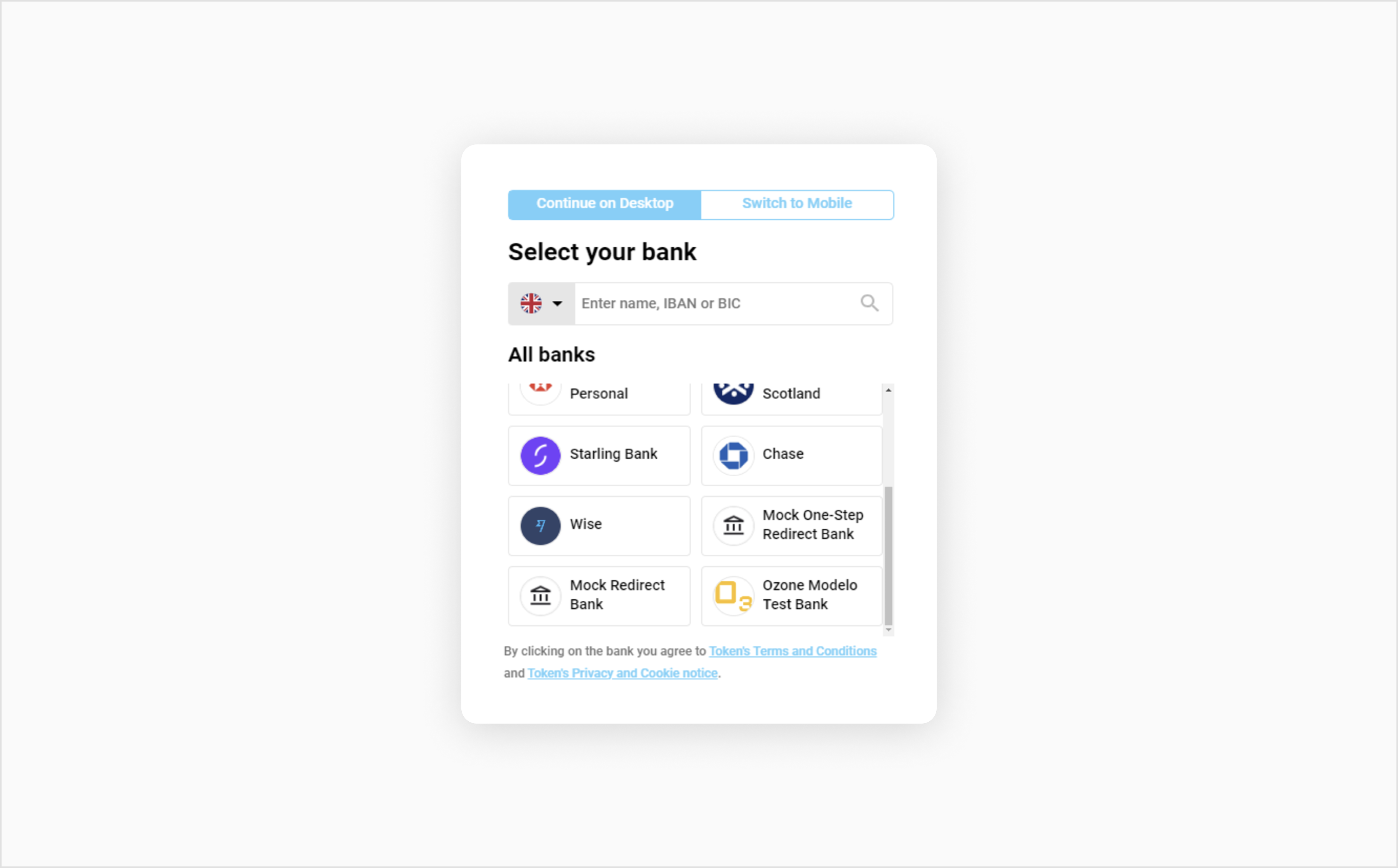
For testing Bank Payment, we provide the fictitious bank for redirects. For a list of various amounts that correspond to different test scenarios, see our test cards for Bank Payment.
To use our mock bank, follow the steps below:
Our Postman collection for Bank Payment is available for downloading as a JSON file. You can use this collection to test transactions via the XML API.
The zip file below contains the following files:
To download the collection (.zip file), click the button below:
Download File| Final |
| string |
| Status of the transaction. Possible values for various transaction statuses: PAYMENT_INITIATED REQUEST_CONSUMER_CONSENT PROCESSING UNKNOWN SUCCESS INVALID_STATUS FAILURE_INSUFFICIENT_FUNDS FAILURE_GENERIC FAILURE_PERMISSION_DENIED FAILURE_CANCELED FAILURE_EXPIRED PENDING_EXTERNAL_AUTHORIZATION FAILURE_DECLINED |
| token_request_id | string | Unique identifier generated by Token, the third-party technology partner that processed the Bank Payment transaction request. |
| token_transfer_id | String | Unique identifier generated by Token, the third-party technology partner that processed the Bank Payment transaction request. |
| merchant_id | string | Your Client ID assigned by us. |
| account_id | string | The sub-account used to process the original Bank Payment transaction. |