Loading...


You can easily add Open Banking to a new or existing integration, including with our hosted solutions. For merchants, the benefits of Open Banking include:
To facilitate Open Banking purchases on merchant ecommerce sites, we built a service called Bank Payment in collaboration with our infrastructure partner, Token.io (Token). Merchants can enable Open Banking bank payments, allowing customers to pay for goods using a transfer directly from their bank account.
Compared with other providers, our solution has advantages in key criteria when it comes to successful bank payment adoption for merchants.
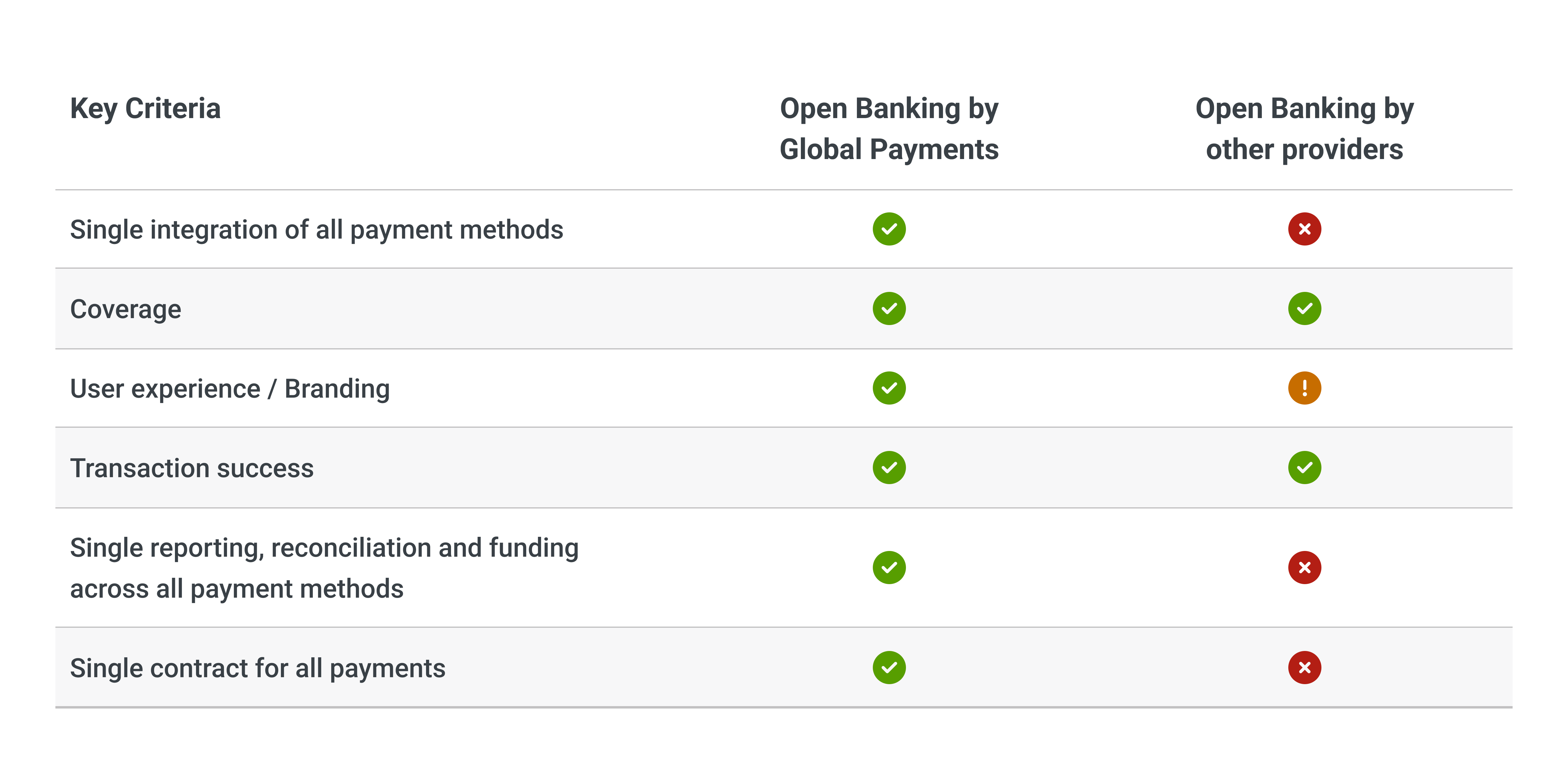
Our Solution vs. Other Providers
Open Banking is the process through which banks allow third-party financial service companies to access a customer’s financial data via APIs (with the customer’s permission). Examples include a customer opting in to Open Banking to share their financial information with a mortgage lender or authorizing a third party to make payments from their bank account on their behalf.
Existing and new merchants can easily access Bank Payment with little or no changes to their existing integration, including those who use our Hosted Payment Page (HPP). It will appear as another payment option alongside alternative payment methods like PayPal or local payment methods.
Bank Payment Option
Bank Payment transactions display in Merchant Portal the next day and in the RealControl portal in real time, with a Bank Payment icon in the Payment Method column. For reporting, you can also use Settlement APIs and transaction status GET requests.
Open Banking transactions must be conducted under the license of a regulated entity called a Payment Initiation Service Provider (PISP). The PISP ensures that the transaction is processed according to the rules of Open Banking payments as set by the regulator, and hence provides terms and conditions (T&Cs) to the customer. The PISP also governs the user interface (UI) and journey flow.
We offer flexibility on which entity serves as the PISP. Merchants can use our PISP license or the license from our partner bank, HSBC. The journey flow for both of these options is nearly identical. Larger merchants who hold their own PISP license, such as financial institutions, can also be accommodated. In some instances, we might defer to our technology partner (also a regulated PISP) to serve as the license holder — in this case, the UI will be very similar to what is displayed using our license.
We work with our infrastructure partner, Token, to process Bank Payment transactions. This third-party company serves as an intermediary between us and the banks of each country. Token has an API integration with participating banks (see full coverage on their website). This API is called when a customer using Bank Payment is redirected to their bank for authentication.
Bank Payment transactions allow the funds to transfer directly from a customer’s account into your account (Direct Settlement). This gives fast access to the money but may be difficult for reconciliation of every individual transaction on your bank statement and funds arriving throughout the day.
To overcome this issue, we offer a managed service (Managed Settlement) where we collect the funds on your behalf throughout the day and then make a batch settlement (the same as for card transactions). Reporting and reconciliation tools are available in our Merchant Portal. The choice of settlement option could have a minor impact on the payment request (for more details, see our guide).
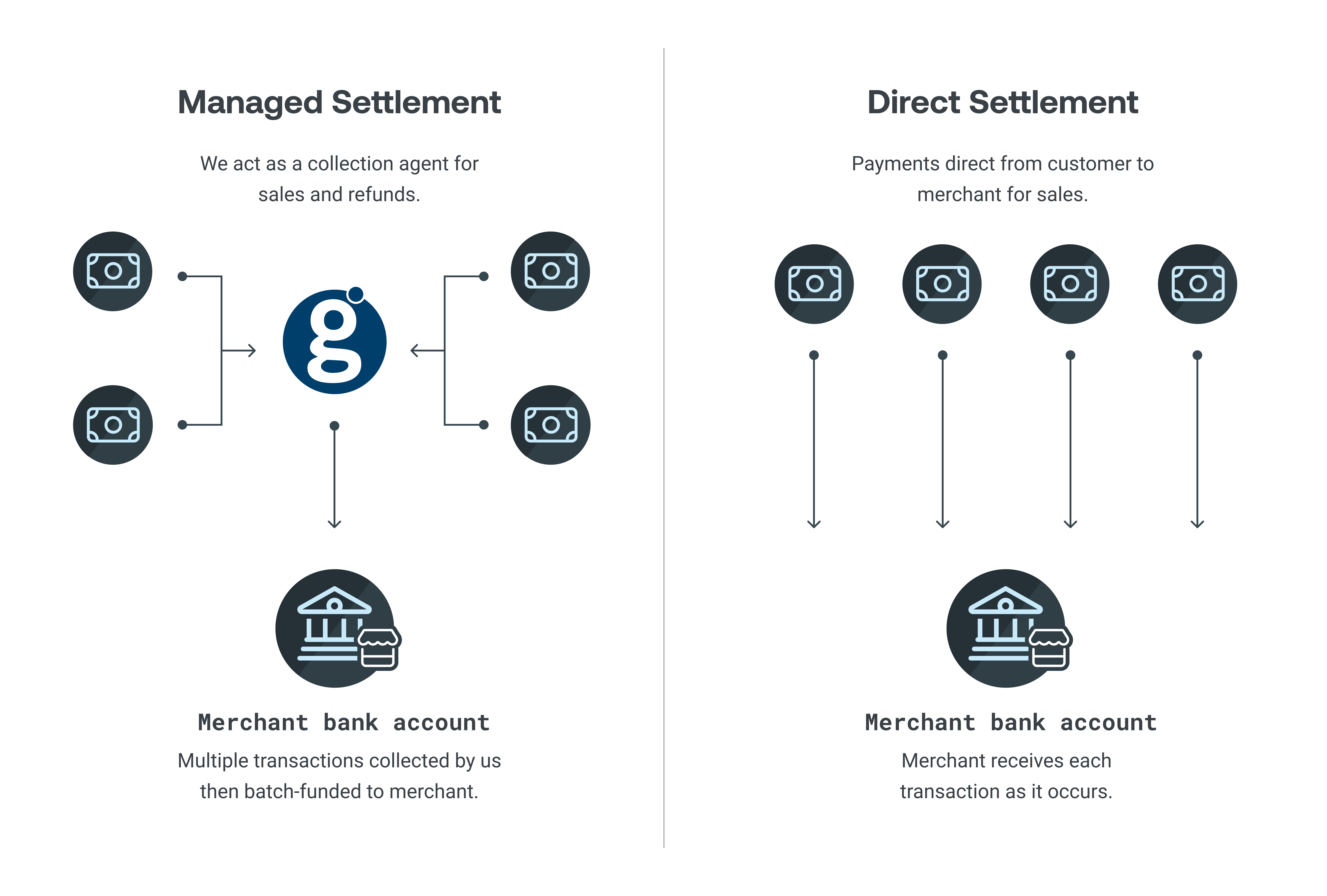
Bank Payment - Settlement Options
For Managed Settlement, receiving bank account information (that is, beneficiary account) is not required in the payment request. We append our own beneficiary account details to the transaction request before it’s sent to the bank for the customer to authenticate and confirm the payment.
For Direct Settlement, you can either store the bank account details in your account or pass them through in the payment request. You may want to use different accounts for receiving funds in different currencies, for example, one for British pound (GBP) and another for euro (EUR) transactions. If you have the bank account details stored with us, you can choose to supersede this on a transaction-by-transaction basis by supplying the details in the request.
If you’re using an HSBC PISP, the beneficiary accounts must be an HSBC account and must be stored by us. Also, the accounts must be allowlisted and can’t be sent in the request. You’ll need to submit these accounts to us during onboarding so we can allowlist them.
Where possible, a customer should be able to select the currency that they want to pay in. Many banks use the SWIFT network to route cross-border and trans-currency payments. However, this can trigger significant transaction fees, which can lead to a poor user experience and less ongoing conversion.
You can initiate cross-border payments with Bank Payment. However, there is a lack of consistency in how this works across the banks that our infrastructure partner, Token, provides connectivity to.
Your incorporation location as a merchant is not important when collecting cross-border payments via Bank Payment, but the beneficiary accounts you use are. These accounts dictate the currency and payment method types that can be received and used, such as Single Euro Payments Area (SEPA) or Faster Payments.
For payments in euros, use a euro-denominated beneficiary account at an institution that is connected to the SEPA network. For payments in GBP, use a GBP-denominated beneficiary account at an institution that is connected to the Faster Payments network.
To offer Bank Payment to your customers, just include the Bank Payment button as an additional option at checkout. When a customer selects Bank Payment as a payment method, the transaction is initiated. The customer is redirected to a Bank Selection screen and then to their bank account provider where they log in using the bank’s web or mobile app (device dependent) to confirm the payment. They are then redirected to your return URL where you can hold them temporarily until you call and receive the final status of the transaction.
The following sections describe each step of the Bank Payment process:
After initiating the Bank Payment transaction, the customer is then redirected to the Bank Selection screen. Their browser redirects them to our Bank Payment solution and then onwards to our infrastructure partner, Token, who hosts the bank selection UI.
The customer is then presented with the list of supported banks for the currency of the transaction and their country. After selecting a bank, they then confirm the payment details and continue to the bank’s T&Cs page.
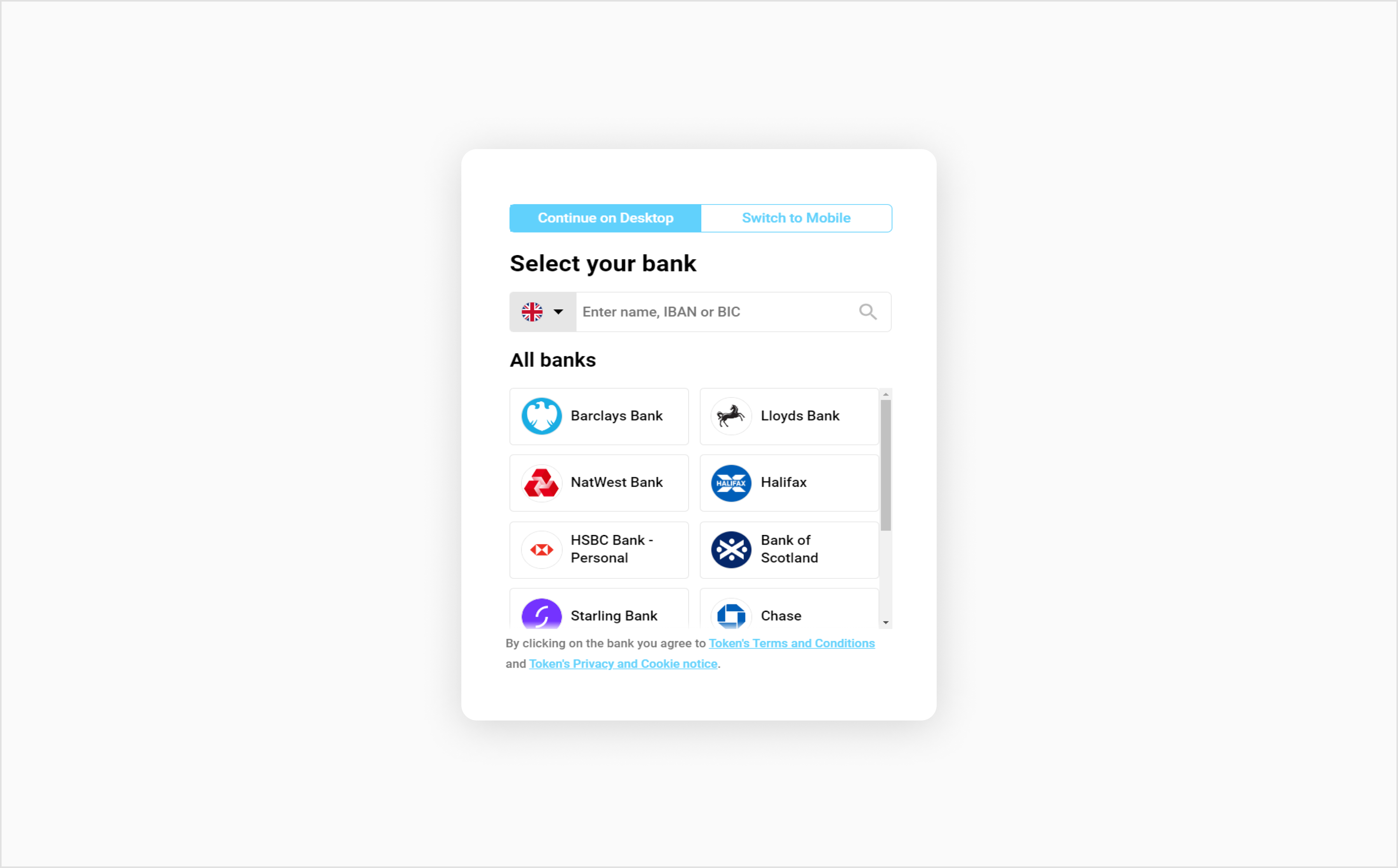
Bank Selection Screen
After the customer selects the bank they want to use to pay, they need to accept the T&Cs of the Bank Payment transaction. These terms are governed by the PISP — that is, the regulated entity that is authorized by the Financial Conduct Authority, or equivalent authority, to provide Bank Payment services.
This is a required step in Bank Payment so that the customer is fully aware of the conditions of the transaction. Either we can serve as the PISP or one of our partners can (Token or HSBC UK), depending on the settings agreed to and configured when you set up Bank Payment with us.
At the next step, the customer is redirected to their bank to log in and confirm the payment. If they are transacting on a mobile device that has their bank app installed, they are prompted to use the app (Decoupled Model).
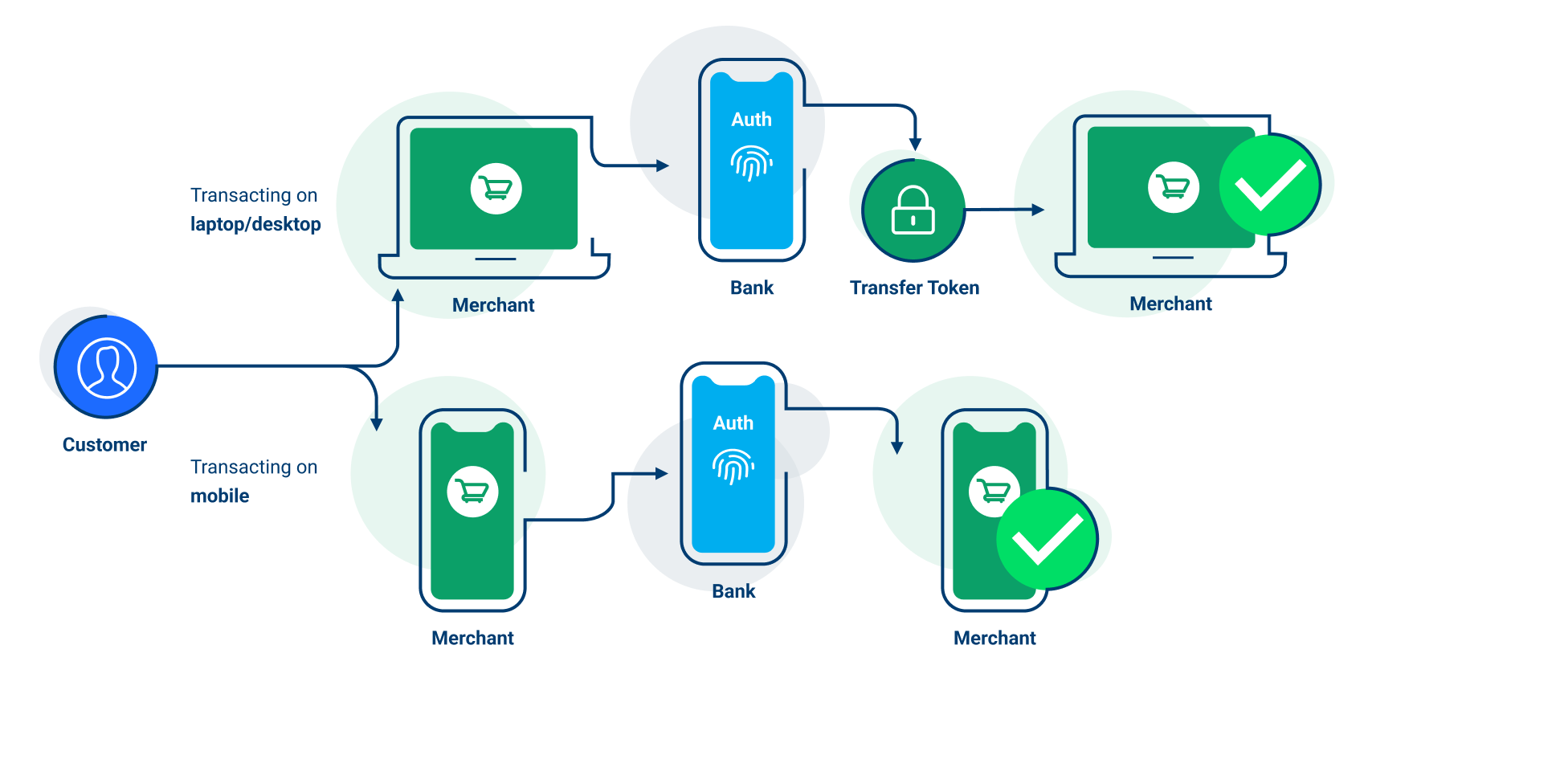
Decoupled Model (Mobile Device App)
Otherwise, they are redirected to a web app (Redirect Model) hosted and controlled by the bank.
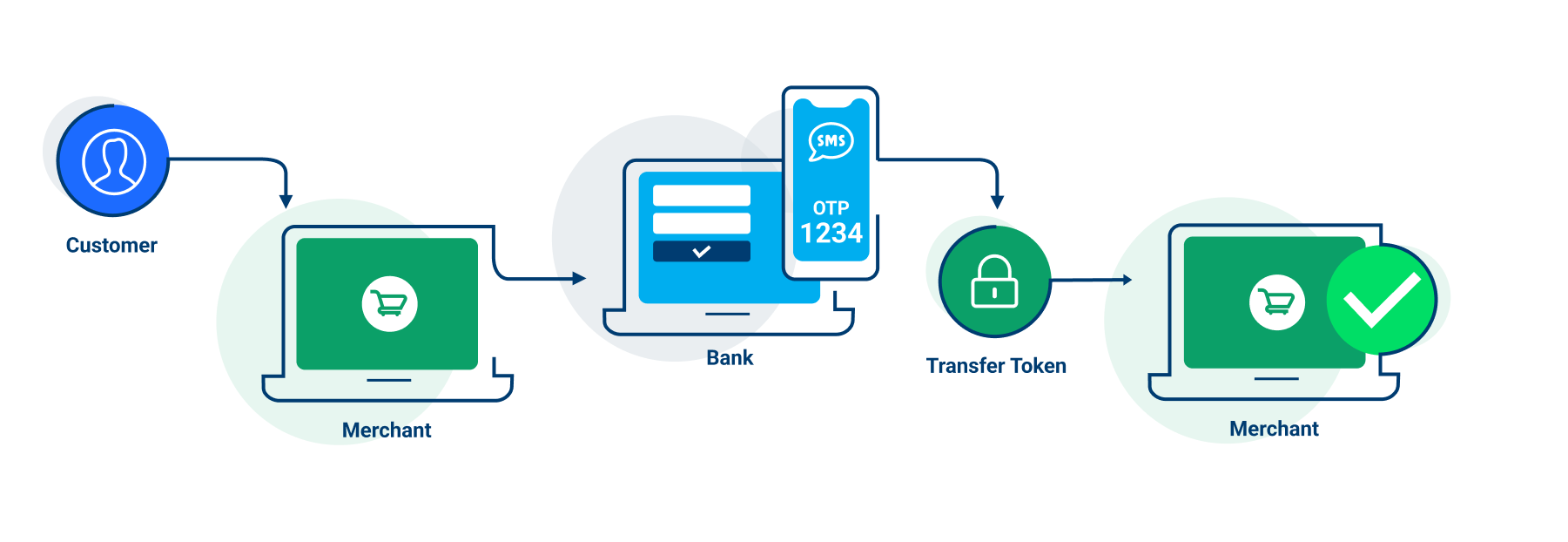
Redirect Model (Website) (Mobile Device App)
The customer then logs in using their online or mobile banking credentials (this might include multi-factor authentication if required by their bank). They can see all the transaction details (including amount, payee, and remittance reference) automatically populated. The customer simply selects the account they want to pay from and confirms the transaction.
Before the customer is redirected back to your website, they are presented with the Payment Confirmation screen. This is another required step in Bank Payment so that the customer is fully aware of the conditions of the transaction.
At this point, the customer is shown one of the following potential outcomes:
After 20 seconds, the customer is automatically returned to the merchant’s website where they will see their final confirmation and summary. Or, they can click the Back to [Merchant] button to do so sooner.
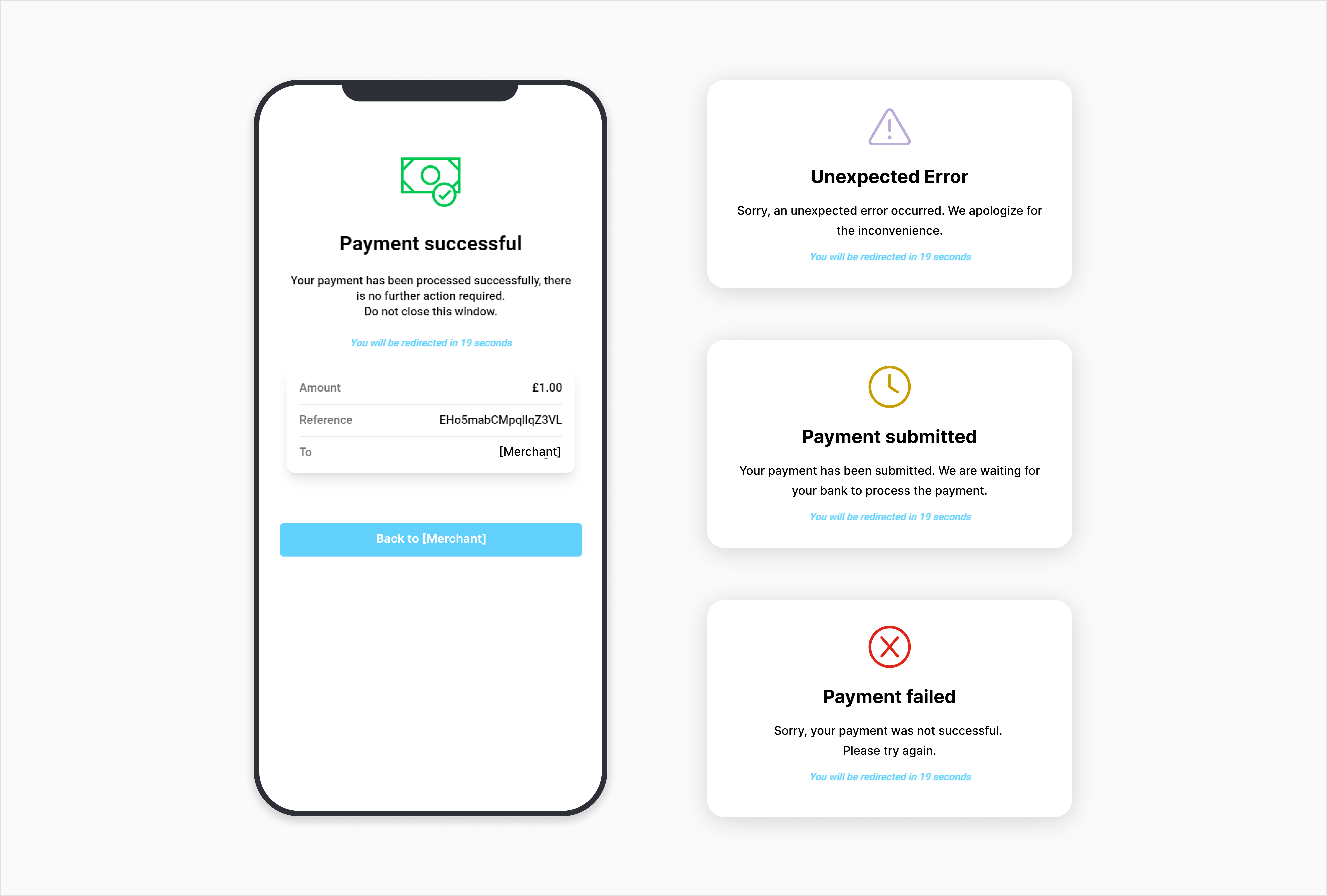
Bank Payment Potential Outcomes
In the final step, the browser is redirected back to the Return URL (return_url) that you specify. The redirection includes the Bank Payment Transaction ID (ob_trans_id) as a URL parameter. At this point, you need to hold the customer temporarily while you query the final status of the transaction.
To help increase customer adoption of Bank Payment in your app or website, we’ve compiled some helpful customization tips you can use during your UI development of the payment journey. For example, you can add a temporary interstitial page that explains to customers what happens if they select Bank Payment. The wording could be something like:
“You will be redirected to your bank to process the payment.”
You can also send out communications to recurring customers to introduce the new payment method. Our tips and strategies can help explain Bank Payment to your customers as well as guide them to using it more frequently.
To get familiar with how Open Banking works, see our guide.
Remember to first register for a developer account if you don't already have one. Once logged in, you can request Sandbox credentials from your account.