Loading...


Please check with your relationship or sales manager for availability and more details.
This guide focuses on how to send commands to a point-of-sale (POS) device using our Unified Cloud Integration (UCI) solution. First, we initiate an instant transaction with a sale (Authorize) request. Optional steps include a restaurant scenario where we initiate orders and review open orders in our app. Finally, we review the outcome of the device command that was relayed to the device.
You’ll also find decriptions of UCI action types and some answers to common questions we get about our UCI product.
Our UCI solution is a combination of our REST API, UCI service, and Android suite of POS terminals. Our API allows you to send basic retail and restaurant transaction commands — such as authorize, refund, adjust, reverse, pre-authorize, capture, batch close, and so forth — directly to a payment device.
With this type of integration, you don’t need to physically connect your POS application to the payment device. UCI manages everything for you. That means no need to manage certifications, vendor specifications, or any additional software or SDKs.
In addition to basic retail and restaurant device commands, you can also initiate orders such as a restaurant bill on devices. These orders are queued in our UCI service and are then distributed to each payment terminal within a merchant’s location. As payments are made, those orders are automatically updated on the device. Coupled with a payment terminal, this provides you with a full Pay at Table experience.
Each device is assigned a unique device_reference value. Device commands are sent to our API, specifying the device_reference to relay the command to. Every device command is assigned a Device Command ID (DVC_Id). This is your reference for each command that was relayed to a device and is your main source of reference for the outcome of that command.
The outcome of the device command can be sent to a notification status URL that you specify in the request. Or, you can query our API using the DVC_Id to find the device command result.
Payment transactions are also assigned a Transaction ID (TRN_Id). These can be referenced to perform secondary transactions such as reversals, captures, and so forth, as needed.
Before starting the steps in this guide, you must do the following:
Instant transactions are most common in a retail environment and are represented within the action_type in the request.
Valid action types include:
AuthorizeRefundPreAuthorizeAdjustReverseReverse_AuthIncrementCaptureBatch_CloseParameters_DownloadPingThese commands send an instant command to the specified device to take action as instructed. The request is acknowledged with an interim response indicating the device command was initiated with the device.
This is an example of a sale (Authorize) request. All instant action_type commands follow the same basic structure. Some Action Types may include additional fields.
curl --location 'https://base.url/ucp/device_commands ' \
--header 'Content-Type: application/json' \
--header 'Authorization: Bearer XLky3MCUyMPnIIU5G29e2aRUa8X3' \
--header 'Accept: application/json' \
--header 'X-GP-Version: 03-02-2021' \
--data '{
    "device_reference": "uds_123456789",
    "action_type": "AUTHORIZE",
    "transaction": {
        "amount": "1234",
        "gratuity_amount": "120",
        }
    },
    "notifications": {
        "status_url": "http://Partner.URL/Callbacks/UCI"
    }
}'This is an example of a sale (Authorize) response, but any action_type returns the same basic structure.
curl --location 'https://base.url/ucp/device_commands ' \
--header 'Content-Type: application/json' \
--header 'Authorization: Bearer XLky3MCUyMPnIIU5G29e2aRUa8X3' \
--header 'Accept: application/json' \
--header 'X-GP-Version: 03-02-2021' \
--data '{
    "id": "DVC_478c5ee17b9a4907a947d41a6b4997ee",
    "device_reference": "uds_123456789",
    "action_type": "AUTHORIZE"
    "status": "INITIATED"
    "action": {
        "id": "ACT_de7855d9ce184c639ccdc4699b3a5f2e",
        "type": "DEVICE_COMMAND_CREATE",
        "time_created": "2024-05-20T18:54:18.190Z",
        "result_code": "SUCCESS",
        "app_id": "17ebd417071c4289ada5d847fdc0e595",
        "app_name": "Your POS Application"
    }
}'Orders are queued transactions that will be paid at a later time, such as a restaurant bill or check. Orders are sent to each device at a merchant location and are removed once they have been paid in full or deleted by you. Combined with a portable terminal, you can now:
This example shows three app screens used to initiate an order: 1) the server selects the check, 2) the server opens the selected check, and 3) the cardholder makes the payment.
| 1. Server Selects Check | 2. Server Opens Check | 3. Cardholder Makes Payment |
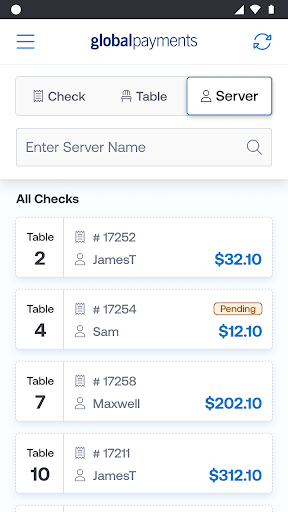 | 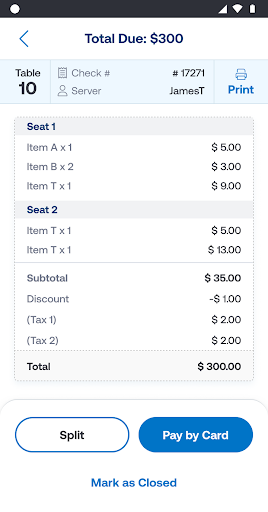 | 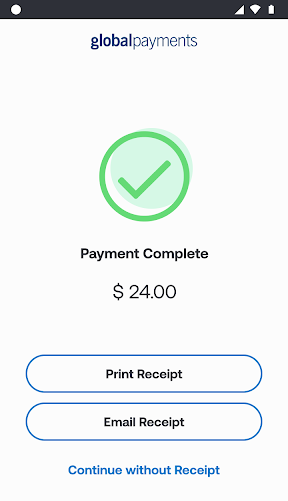 |
Order Transaction Process Example
Valid action types are:
Create_OrderDelete_OrderPending_Transaction_ListThis is an example of an order request showing two seats.
curl --location 'https://base.URL/ucp/device_commands ' \
--header 'Content-Type: application/json' \
--header 'Authorization: Bearer XLky3MCUyMPnIIU5G29e2aRUa8X3' \
--header 'Accept: application/json' \
--header 'X-GP-Version: 03-02-2021' \
--data '{
    "device_reference": "uds_123456789",
    "action_type": "CREATE_ORDER",
    "system": {
        "name": "Happy Merchant",
        "mid": 123456789,
},
    "order": {
        "reference": "123456",
        "time_created_reference": "2024-05-20T18:54:18.190Z",
        "description": "Table #15",
        "user_reference": "Server #11",
        "subtotal_amount": "4199",
        "discount_amount": "0",
        "tax_amount": "294",
        "tax2_amount": "252",
        "tax3_amount": "0",
        "surcharge_amount": "200",
        "total_amount": "4945",
        "amount": "4945",
        "items": [// Restaurant Seating
            {
                "line_number": 1, //Seat Number
                "items_breakdown": [
                    {
                        "description": "Apples",
                        "quantity": 5,
                        "amount": "1050"
                    },
                    {
                        "description": "Grapes",
                        "quantity": 12,
                        "amount": "1050"
                    }
                ],
                "subtotal_amount": "2049",
                "discount_amount": "0",
                "tax_amount": "143",
                "tax2_amount": "123",
                "tax3_amount": "0",
                "surcharge_amount": "1",
                "total_amount": "2415",
                "amount_due": "2415"
            },
            {
                "line_number": 2, //Seat Number
                "item_selections": [
                    {
                        "description": "Berries",
                        "quantity": 100,
                        "amount": "1075"
                    },
                    {
                        "description": "Limes",
                        "quantity": 20,
                        "amount": "1075"
                    }
                ],
                "subtotal_amount": "2150",
                "discount_amount": "0",
                "tax_amount": "151",
                "tax2_amount": "129",
                "tax3_amount": "0",
                "surcharge_amount": "1",
                "total_amount": "2530",
                "amount_due": "2530"
            }
        ]
    },
    "notifications": {
        "status_url": "https://Partner.URL/Callbacks/UCI"
    }
}'This is an example of a Create_Order response. The DVC_ID and device_reference are returned.
curl --location 'https://base.url/ucp/device_commands ' \
--header 'Content-Type: application/json' \
--header 'Authorization: Bearer XLky3MCUyMPnIIU5G29e2aRUa8X3' \
--header 'Accept: application/json' \
--header 'X-GP-Version: 03-02-2021' \
--data '{
    "id": "DVC_478c5ee17b9a4907a947d41a6b4997ee",
    "device_reference": "uds_123456789",
    "action_type": "CREATE_ORDER"
    "status": "COMPLETED"
    "action": {
        "id": "ACT_de7855d9ce184c639ccdc4699b3a5f2e",
        "type": "DEVICE_COMMAND_CREATE",
        "time_created": "2024-05-20T18:54:18.190Z",
        "result_code": "SUCCESS",
        "app_id": "17ebd417071c4289ada5d847fdc0e595",
        "app_name": "Your POS Application"
    }
}'As part of the orders workflow, you can also retrieve a list of open orders (that is, orders that are not in a completed status) at any time.
This is an example of an open orders request.
curl --location 'https://base.URL/ucp/device_commands ' \
--request POST
--header 'Content-Type: application/json' \
--header 'Authorization: Bearer XLky3MCUyMPnIIU5G29e2aRUa8X3' \
--header 'Accept: application/json' \
--header 'X-GP-Version: 03-02-2021' \
--data '{
    "device_reference": "uds_123456789",
    "action_type": "PENDING_TRANSACTION_LIST",
    "notifications": {
        "status_url": "http://jovanny.name/Callbacks/UCI"
    }
}'This is an example of an open orders response that shows two orders that are not in a completed status, one of which was partially paid.
[
    {
        "id": "DVC_05716b3f-c836-4041-a917-e61ede7c2419",
        "device_reference": "uds_123456789",
        "system": {
            "mid": "2222b68bb"
        },
        "order": {
            "time_created_reference":"2024-05-20T18:54:18.190Z",
            "reference": "432556",
            "description": "12",
            "user_reference": "7",
            "amount": "345",
            "requested_amount": "1000"
        }
    },
{
        "id": "DVC_05716b3f-c836-4041-a917-e61ede7c2420",
        "device_reference": "uds_123456789",
        "system": {
            "mid": "2222b68bb"
        },
        "order": {
            "time_created_reference": "2024-05-20T18:59:30.190Z",
            "reference": "432556",
            "description": "15",
            "user_reference": "8",
            "amount": "799",
            "requested_amount": "1500"
        }
    },
    {
        "action": {
          "id": "ACT_c5c78b09-dcca-4620-a6f3-8b42f0a78a83",
            "type": "PENDING_TRANSACTION_LIST",
             "time_created":"2024-06-25T13:30:23.750Z",
             "result_code": "SUCCESS",
        "app_id": "aa9c1cda-def7-44ca-8345-1a7cfdcf4753",
        "app_name": "Rowe - Zulauf"
        }
    }
]The final step is to review the outcome of the device command that was relayed to the device. The device will take the appropriate action once the command is sent. The result of that action is then returned to our API. It can be sent to your notification URL, or you can query the API using the DVC_Id.
The result for instant transactions may take some time depending on certain human factors, such as the amount of time a cardholder takes to present their payment mechanism, enter a PIN if needed, or confirm any device prompting. In general, a result is usually available in 5 seconds but can take as long as 50 seconds depending on the human factor.
Results can also be validated using our X-GP-Signature header field. See our Validating Webhook Notifications page for details.
This is an example of a POST transaction result request. This request can be used instead of or in addition to our callback response.
curl --location 'https://base.url/ucp/device_commands ' \
--request POST
--header 'Content-Type: application/json' \
--header 'Authorization: Bearer XLky3MCUyMPnIIU5G29e2aRUa8X3' \
--header 'Accept: application/json' \
--header 'X-GP-Version: 03-02-2021' \
--data '{
    "id": "DVC_478c5ee17b9a4907a947d41a6b4997ee",
    "device_reference": "uds_123456789",
    "action_type": "TRANSACTION_LIST",
    "notifications": {
        "status_url": "https://haylie.com/Callbacks/UCI"
    }
} 'This is a sample response of a Device Command outcome, retrieved via our API using the above POST method and/or sent to your notification URL automatically. Responses may contain multiple transactions within the transaction object if multiple transactions are performed, as is the case with partial payments or restaurant splits broken down by seat.
curl --location 'https://base.url/ucp/device_commands ' \
--header 'Content-Type: application/json' \
--header 'Authorization: Bearer XLky3MCUyMPnIIU5G29e2aRUa8X3' \
--header 'Accept: application/json' \
--header 'X-GP-Version: 03-02-2021' \
--data '{
    "id": "DVC_478c5ee17b9a4907a947d41a6b4997ee",
    "device_reference": "uds_123456789",
    "action_type": "TRANSACTION_LIST",
    "status": "COMPLETED",
    "transaction": [
        {
            "id": "TRN_de7855d9ce184c639ccdc4699b3a5f2e",
            "time_created_reference": "2024-05-20T18:54:18.190Z",
            "parent-action_type": "AUTHORIZE",
            "authorization_mode": "",
            "tax_amount": "100",
            "gratuity_amount": "123",
            "cashback_amount": "21",
            "surcharge_amount": "30",
            "amount": "34543",
            "request_amount": "54677",
            "system": {
                "name": "Happy Merchant",
                "mid": 123456789,
		  },
            "currency": "EUR",
            "currency_conversion": {
                "conversion_rate": "1",
                "payer_amount": "500"
            },
            "payment_method": {
                "id": "",
                "message": "",
                "entry_mode": "Chip",
                "cvm": "PIN",
                "apm": {
                    "provider_transaction_reference": "BLIK12345",
                    "custom_reference": "Blik7890"
                },
                "emv": {
                    "aid": "A0000000031010",
                    "tvr": "0000000000",
                    "tsi": "0000",
				"cvm": "PIN"
                },
                "card": {
                    "brand": "TD VISA DEBIT",
                    "masked_number_last4": "************2074",
                    "auth_code": "dbfc66",
                    "provider": {
                        "avs_postal_code_result": null,
                        "cvv_result": null
                    }
                }
            }
        },
   ],
    "action": {
        "id": "ACT_12d6ae92e3ac40889dfde867f2f2543c",
        "type": "DEVICE_GET_LIST",
        "time_created": "2024-05-20T18:54:18.190Z",
        "result_code": "SUCCESS",
        "app_id": "17ebd417071c4289ada5d847fdc0e595",
        "app_name": "Your POS Application"
    }
}'The following is a list of all action types and their intended use.
| Action_Type | Description |
|---|---|
| Authorize | Initiate a sale command on the device. |
| Refund | Initiate a refund command on the device. |
| PreAuthorize | Initiate a pre-authorization command on the device. |
| Capture | Initiate a capture of a pre-authorized transaction on the device. |
| Adjust | Initiate an adjustment of a previously captured sale on the device. |
| Increment | Initiate an incremental authorization of a prior pre-authorization on the device. |
| Reverse | Initiate a reversal of a previous sale or pre-authorization on the device. |
| Reverse_Auth | Initiate a reversal of a previous authorization on the device. |
| Batch_Close | Initiate a batch-close command on the device. |
| Last_Transaction | Get the last DVC_Id performed on the device. |
| Transaction_List | Get the result of the transaction command from the device. |
| Pending_Transaction_List | Get a list of pending/unpaid orders from the device. |
| Create_Order | Create an order on the device. |
| Delete_Order | Delete an order from the device. |
| Ping | Test the communications to a device. |
| Parameters_download | Initiate a parameter download on the device (region specific). |
Resend the bill using the Create_Order action type, and be sure to include the same check number (order.reference). Bills uploaded with the same check number during the same day will replace the previous bill. This will generate a new DVC_Id for the updated version of the bill. The prior bill’s DVC_Id will still be used if any payments were made before the new bill version was uploaded.
Every bill uploaded has a “keep-alive” time value of 6 hours, but the merchant can change it up to 99 hours if it meets their business needs. If the keep-alive time expires, UCI will automatically cancel the bill.
The bill keep-alive timer starts when a bill is uploaded or updated from a POS. Therefore, if a specific bill needs to stay available beyond the keep-alive time, the POS can just resubmit the bill and the timer will restart.
Note: The best practice is for the POS to send a Delete request if needed.
If the restaurant POS doesn't support orders entered by seat number, only by tables, send all items under seat #1. The payment terminal will not give the option to split by seat.