Loading...


You can accept transactions from a number of worldwide local and alternative payment methods. This not only widens your customer base to more shoppers across the globe, but also provides the added benefit of managing all your payments through our Reporting tool.
In this guide, we set up the request, which gives you access to over 20 alternative payment methods (APMs).
At a high level, the majority of APMs work like this:
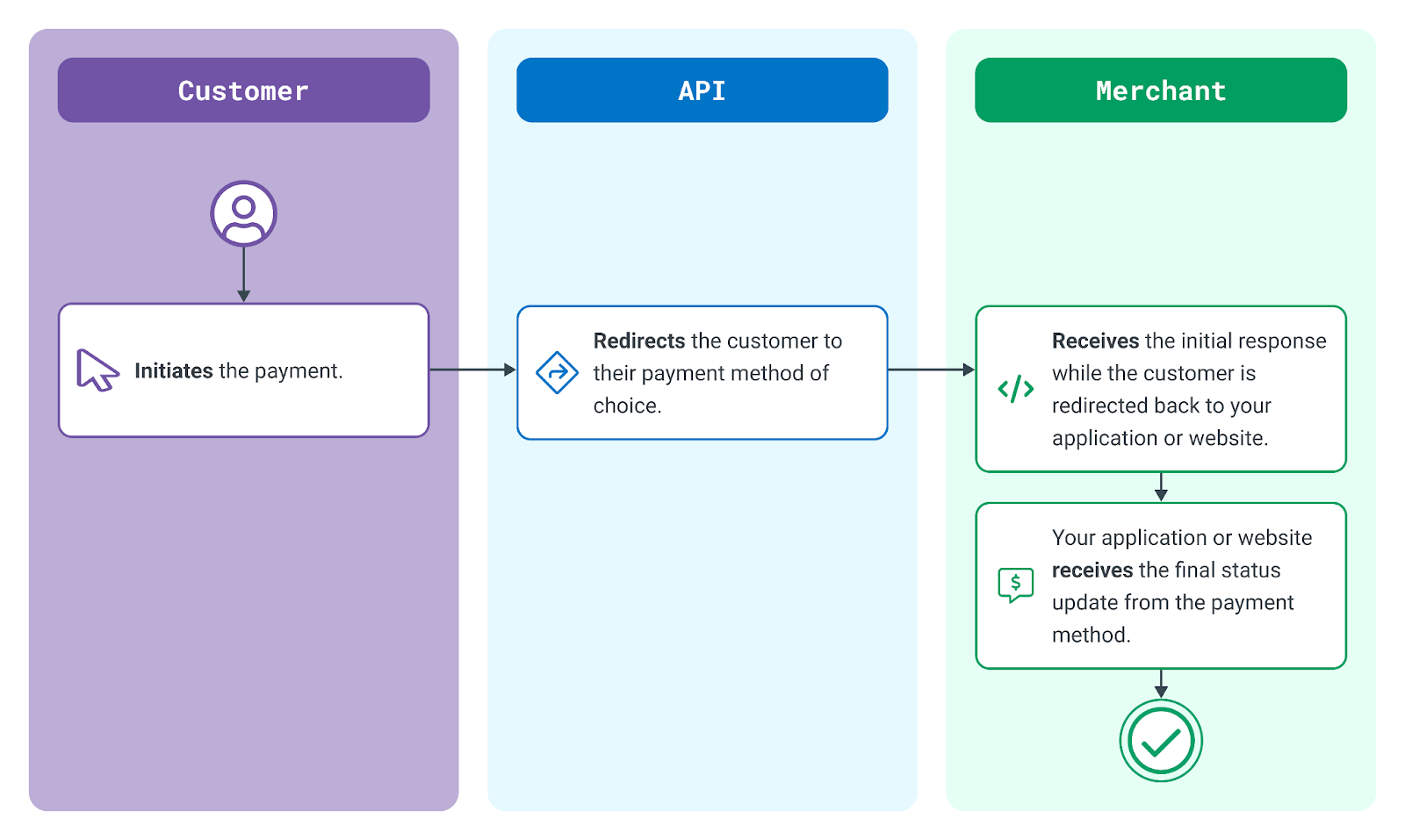
Typical API Integration for an APM
Before starting the steps in this guide, you must do the following:
In an APM transaction, the first request is a Transactions Create. This is used to advise the payment method of the details of a new transaction and to retrieve the necessary information required to facilitate authentication.
In this example, we set up a TestPay transaction.
Following a successful initiation of the transaction, the next step is to redirect the customer to the payment scheme to facilitate authentication and authorization. This can be achieved, for example, using a simple JavaScript redirect. You could also use a HTTP GET (302 redirect).
In this example, we redirect the customer to the URL returned in the response using JavaScript.
<!DOCTYPE html>
<html>

<head>
<title>Sample APM Redirect</title>
<meta charset="UTF-8">
</head>

<body>
<script>
   window.location = "https://www.paymentMethodUrl.com/pay";
</script>
</body>

</html>
Once the customer completes their transaction with the payment method, they are redirected to the Return URL of the initial request. The current status of the transaction will also be returned.
Your application might put the customer on hold for a few seconds while it checks to see if the Status URL was sent a final update. You can then redirect the customer to a final success or failure page.
X-GP-Signature=a86a2c3550c4228263fbd8cf0b4bd7c29ca453881495d1236507fe0bab9ce300dfba6dd12b308cc7b0d9d88cfb956a48c5fcd205579fda47e88b83a80fe9030b&
id=TRN_JOGrqvzOvbLy4V2n7cHsusYy8aainM&
status=PENDING&
reference=APM-20200417&
payment_method_result=01&
payment_method_message=PENDING&
provider=testpay&
apm_wait_notification=0&
apm_optional_redirect=0&
apm_fund_status=NOT_EXPECTED&
apm_payment_description=2NFQYHC&
apm_confirmed_accountholder=Jane Doe&
apm_account_number=93722&
country=GB&
apm_bank_iban=&
apm_bank_identifier_code=&
apm_bank_name=&
apm_bank_code=&
action_id=ACT_x0xHTCKj7gLDjJ0Om7r8lJ8lMo7nwy&
action_type=RETURN_NOTIFICATION&
action_time_created=2020-04-20T13:17:21.914ZThe URL specified in the Status URL element in the initial request will receive the final status. Depending on the payment method used, this can happen at the same time as the customer is redirected to your Return URL, moments after — or, potentially, the final status update might come days later.
For payment methods in which you expect the final status update to come days later, your Status URL will need to accept the message sent by us, find the correct order in your application, and update the status accordingly. You may want to inform the customer at this point that their payment was finally accepted. You can also initiate the dispatch of items to the customer.
{
   "id":"TRN_JOGrqvzOvbLy4V2n7cHsusYy8aainM",
   "time_created":"2020-04-20T13:17:21.914Z",
   "type":"SALE",
   "status":"CAPTURED",
   "channel":"CNP",
   "capture_mode":"AUTO",
   "amount":"1999",
   "currency":"EUR",
   "country":"GB",
   "merchant_id":"MER_c4c0df11039c48a9b63701adeaa296c3",
   "merchant_name":"Sandbox_merchant_2",
   "account_id":"TRA_6716058969854a48b33347043ff8225f",
   "account_name":"Transaction_Processing",
   "reference":"APM-20200417",
   "payment_method":{
      "result":"00",
      "message":"SUCCEEDED",
      "entry_mode":"ECOM",
      "apm":{
         "provider":"testpay",
         "wait_notification":"",
         "fund_status":"NOT_EXPECTED",
         "payment_description":"3K1TRAA",
         "confirmed_accountholder":"Former Glory",
         "account_number":"93722",
         "iban":"DE25700251750322205970",
         "bank_identifier_code":"HYVEDEMM643",
         "bank_name":"HypoVereinsbank Penzberg",
         "bank_address":"",
         "optional_redirect":""
      }
   },
   "batch_id":"",
   "action":{
      "id":"ACT_mkP7xm9u47kLgTwTKhYfQXRvfynwjP",
      "type":"STATUS_NOTIFICATION",
      "time_created":"2020-04-20T14:36:58.193Z",
      "result_code":"SUCCESS",
      "app_id":"jrYHwMdYRBDGmFwwAVmi5WufYzxuQIQj",
      "app_name":"sample_app"
   }
} Browse the APMs we support or search for a specific one. If additional fields are required, these will be documented along with the countries and currencies that are available with the payment method.
Explore more functionality to enrich your application.