Loading...


PayPal is a digital wallet that can store a customer’s payment and personal information on an app or browser for quick payments in-person, online, or on a mobile device. Customers use saved funding sources to pay securely online or to “top up” their wallet balance. We offer merchants several ways to integrate PayPal into their app or website to make the checkout experience secure, fast, and convenient.
For merchants, the benefits of PayPal include:
In this section, we present some “real world” examples that can be enabled through our PayPal solution. Keep in mind that this section doesn’t cover all of the use cases.
A merchant wants to accommodate their customers who are worried about sharing their credit card information. For this reason, they include PayPal as a payment method because it encrypts the bank information.
A merchant wants to enable their customers to complete their online transaction quickly and efficiently. For this reason, they include PayPal as a payment method because customers will not have to fill in all of their credit card details in the form.
A merchant wants to allow their customers to complete online transactions regardless of if they have their credit card or not. If their customer urgently needs to complete an online transaction they can select PayPal as an alternative payment method.
When a customer chooses to pay using PayPal at checkout, they are redirected to the PayPal portal (or PayPal app) to authenticate and authorize the transaction.
Within the PayPal portal or app, the customer can choose between a variety of payment methods to make the payment. The choices depend on a number of factors, such as the transaction amount and the funding sources that the customer has linked to their PayPal account. These payment methods might include:
The funds are deposited into your PayPal Business account. You can then transfer the funds to your bank account through the PayPal portal. You can also set up automatic (periodic) transfers within the PayPal portal.
There are several PayPal transaction types. Their use cases are described in the table below.
| PayPal Transaction Type | Use Case |
|---|---|
| AUTO | You want to charge the customer right after they authorized the payment. |
| LATER | You want to charge the customer at a later time after their authorization, e.g., when your product is ready to be shipped. |
| MULTI | You want to charge the customer at a later time after their authorization and in multiple installments, e.g., if an order is composed of multiple items that you will ship separately, and you want to charge for each item individually as it is shipped. |
AUTO capture is the most common PayPal transaction type. It has four mandatory steps and one optional one:
At a high level, a typical flow for a PayPal AUTO capture transaction works like this:
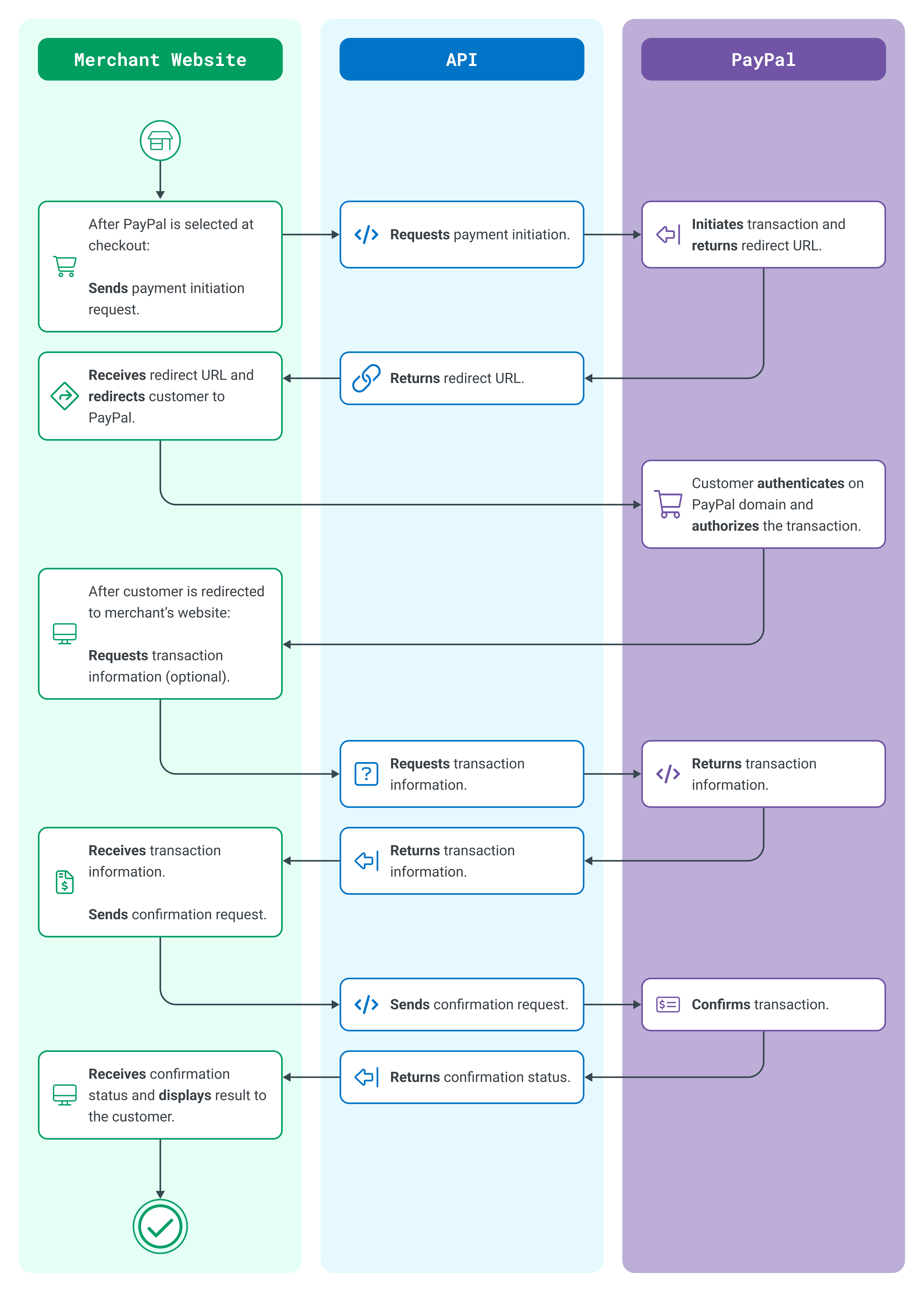
PayPal Typical Flow
To try PayPal, follow the steps and code samples in our guide. We provide steps for both direct API integration and for our hosted solution, Drop-In User Interface (UI).
Remember to first register for a developer account if you don't already have one. Once logged in, you can request Sandbox credentials from your account.