Loading...


Bank Payment, also known as Bankovní Platba, is one of the leading bank-to-bank payment methods in the Czech Republic, providing fast, secure, and convenient payment solutions for businesses and consumers.
In this guide, we offer three easy ways to integrate with our Bank Payment solution. Once integrated, Bankovní Platba will appear as another payment option alongside alternative payment methods like cards, PayPal or any other local payment methods. You can learn more about how to use these options by clicking on the tabs below.

Payment method option.
In this guide, we'll show you how to set up the request, receive the response, and handle the transaction status to give you access to Bank Payment.
At a high level, the majority of APMs work like this:
The diagram below illustrates the interaction between the customer, our API, and the merchant to use an alternative payment method.
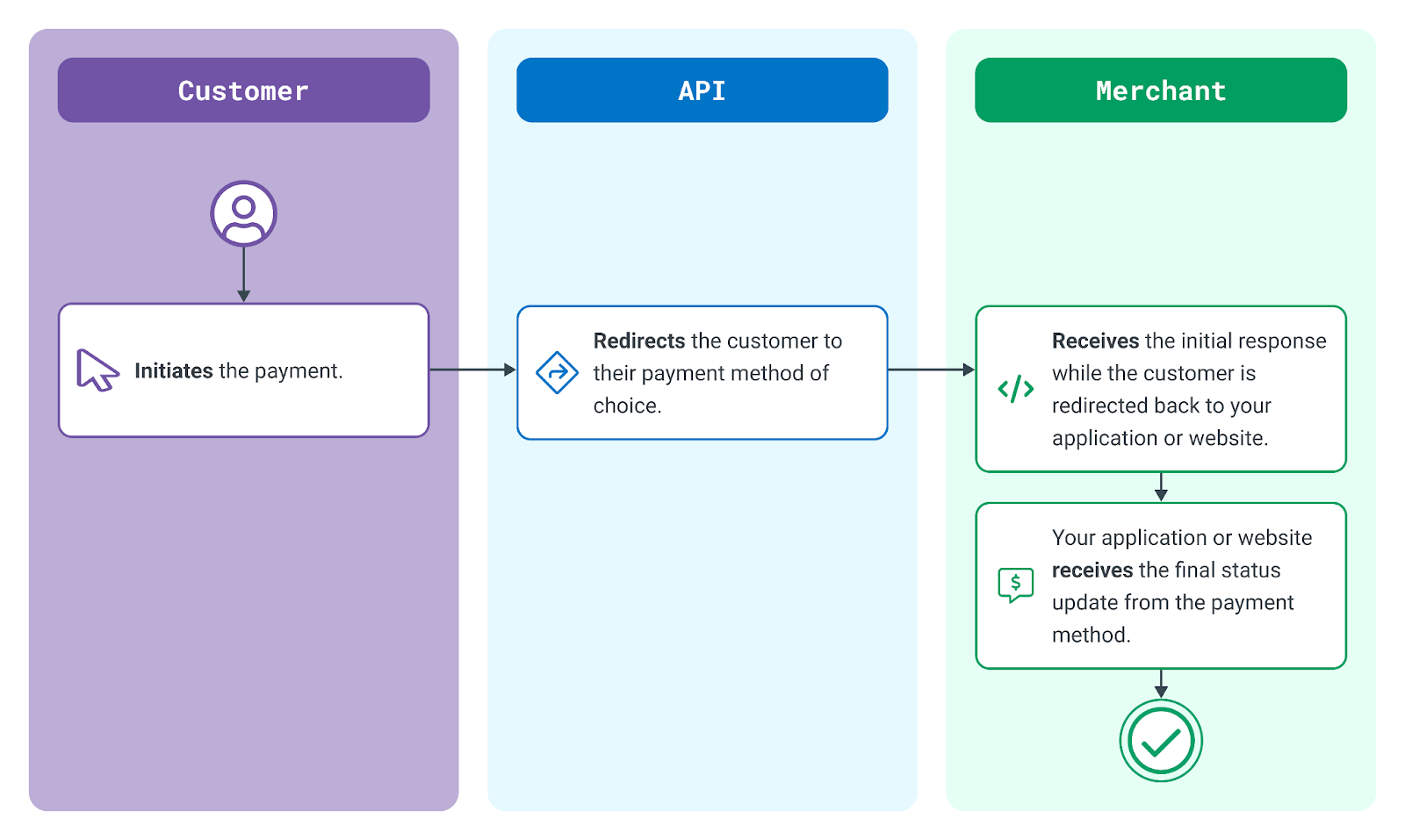
Typical API Integration for Bank Payment
Prior to initiating the payment call, the merchant will need to get a list of banks that are available based on the country so that the country and currency details can be sent in the initiation request.
curl --location 'https://apis.sandbox.globalpay.com/ucp/transactions/banks?payment_method=bank_payment&country=CZ¤cy=CZK&account_id=TRA_24bfc3d8513142c8be754003c7c17059' \
--header 'Accept: application/json' \
--header 'Accept-Encoding: gzip' \
--header 'X-GP-Version: 2021-03-22' \
--header 'Content-Type: application/json' \
--header 'Authorization: Bearer 8V81ra1cZCUtALpjKnrHu7udsrhA'{
"total_record_count": 13,
"current_page_size": 13,
"merchant_id": "MER_461194d8057xxxx08ca360ea8270",
"merchant_name": "Sandbox_Merchant",
"account_id": "TRA_08e5bac604xxxx96ad0d623fbba",
"account_name": "Open_Banking_account",
"filter": {
"payment_method": "BANK_PAYMENT",
"account_id": "TRA_08e5bac604xxxx96ad0d623fbba",
"country": "CZ",
"currency": "CZK"
},
"paging": {
"page_size": 13,
"page": 1,
"order": "ASC",
"order_by": "BANK_NAME"
},
"payment_method": {
"bank_transfer": {
"banks": [
{
"code": "qrcz",
"name": "QR Platba",
"logo_url": ""
},
{
"code": "ceskasporitelna",
"name": "Česká spořitelna",
"logo_url": "https://developer.globalpay.com/gh-assets/apms%3Agpe-ob%3Acz%3Aceskasporitelna.svg"
},
{
"code": "csob",
"name": "ČSOB",
"logo_url": "https://developer.globalpay.com/gh-assets/apms%3Agpe-ob%3Acz%3Acsob.svg"
},
{
"code": "komercnibanka",
"name": "Komerční banka",
"logo_url": "https://developer.globalpay.com/gh-assets/apms%3Agpe-ob%3Acz%3Akomercnibanka.svg"
},
{
"code": "raiffesenbank",
"name": "Raiffesenbank",
"logo_url": "https://developer.globalpay.com/gh-assets/apms%3Agpe-ob%3Acz%3Araiffesenbank.svg"
},
{
"code": "fiobanka",
"name": "Fio banka",
"logo_url": "https://developer.globalpay.com/gh-assets/apms%3Agpe-ob%3Acz%3Afiobanka.svg"
},
{
"code": "monetamoneybank",
"name": "MONETA Money Bank",
"logo_url": "https://developer.globalpay.com/gh-assets/apms%3Agpe-ob%3Acz%3Amonetamoneybank.svg"
},
{
"code": "airbank",
"name": "AirBank",
"logo_url": "https://developer.globalpay.com/gh-assets/apms%3Agpe-ob%3Acz%3Aairbank.svg"
},
{
"code": "mbank",
"name": "mBank",
"logo_url": "https://developer.globalpay.com/gh-assets/apms%3Agpe-ob%3Acz%3Ambank.svg"
},
{
"code": "postacz",
"name": "Česká Pošta",
"logo_url": ""
},
{
"code": "unicredit",
"name": "UniCredit",
"logo_url": "https://developer.globalpay.com/gh-assets/apms%3Aunicreditbank.svg"
},
{
"code": "creditasbanka",
"name": "Banka Creditas",
"logo_url": ""
},
{
"code": "jtbanka",
"name": "J&T Banka",
"logo_url": ""
}
]
}
},
"action": {
"id": "ACT_Zk2AezTYFAe0rXfTt9EOFGYSeDyQCu",
"type": "BANK_LIST",
"time_created": "2025-05-28T15:38:37.157Z",
"result_code": "SUCCESS",
"app_id": "JtivfTN6wN6lPLDA0eiRlbuqIB5AkKl7",
"app_name": "qa-cert-mindbody"
}
}The first request is a Transaction Create. This is used to advise the payment method of the details of a new transaction and to retrieve the necessary information required to facilitate authentication.
In this example, we set up a Bank Payment transaction.
curl --location 'https://apis.sandbox.globalpay.com/ucp/transactions' \
--header 'Accept: application/json' \
--header 'Accept-Encoding: gzip' \
--header 'X-GP-Version: 2021-03-22' \
--header 'Content-Type: application/json' \
--header 'Authorization: Bearer xxxxxxxxxxxxxxxxxxxx' \
--data '{
    "merchant_id": "",
    "account_id": "TRA_08e5bac604xxxx96ad0d623fbba",
    "channel": "CNP",
    "capture_mode": "AUTO",
    "type": "SALE",
    "amount": "1000",
    "currency": "CZK",
    "country": "CZ",
    "reference": "59016331",
    "payment_method": {
        "name": "Jane",
        "entry_mode": "ECOM",
        "apm": {
            "provider": "bank_payment"
        },
        "bank_transfer": {
            "bank": {
                "name": "mbank"
            }
        }
    },
    "payer": {
        "country": "CZ",
        "email": ""
    },
    "notifications": {
        "return_url": "https://webhook.site/d76a62ef-4bd1-4a96-b8e2-ef0ea00fd2d4",
        "status_url": "https://webhook.site/d76a62ef-4bd1-4a96-b8e2-ef0ea00fd2d4",
        "cancel_url": "https://webhook.site/d76a62ef-4bd1-4a96-b8e2-ef0ea00fd2d4"
    }
}'{
"id": "TRN_DN2r7jVy0PGO0qsrct3l3Dj_59016331",
"time_created": "2025-04-22T15:42:23.145Z",
"type": "SALE",
"status": "INITIATED",
"channel": "CNP",
"capture_mode": "AUTO",
"amount": "1000",
"currency": "CZK",
"country": "CZ",
"merchant_id": "MER_461194d8057xxxx08ca360ea8270",
"merchant_name": "Sandbox_Merchant",
"account_id": "TRA_08e5bac604xxxx96ad0d623fbba",
"account_name": "Open_Banking_account",
"reference": "59016331",
"payment_method": {
"result": "01",
"message": "PENDING",
"entry_mode": "ECOM",
"provider_narrative": "",
"apm": {
"redirect_url": "https://merch-prod.snd.sample.com/info/?orderId=1ZPR16BCPG250422GUEST000P01&token=eyJhbGciOiJIUzI1NiJ9.eyJvcmRlcklkIjoiMVpQUjE2QkNQRzI1MDQyMkdVRVNUMDAwUDAxIiwicG9zSWQiOiI4NXdrMTZNSSIsImF1dGhvcml0aWVzIjpbIlJPTEVfQ0xJRU5UIl0sImV4cCI6MTc0NTQyMjk0MSwiaXNzIjoiUEFZVSIsImF1ZCI6ImFwaS1nYXRld2F5Iiwic3ViIjoiUGF5VSBzdWJqZWN0IiwianRpIjoiMTk3ZWEwNDItNzk2Mi00ZjUwLTg2MGYtZTZjMWMxYjU0MGUyIn0.1sPGsu9IrcQdLSzw-BWDhG3ekNREM9s8qFcUISyjxuw",
"provider": "bank_payment",
"provider_payer_name": "Jane",
"wait_notification": "",
"fund_status": "",
"optional_redirect": "",
"bank": {
"account_number": "",
"iban": "",
"identifier_code": "",
"name": "",
"code": ""
},
"mandate": {
"reference": ""
}
}
},
"platforms": [
{
"type": "ECOM",
"transaction_id": "",
"order_id": "TRN_DN2r7jVy0PGO0qsrct3l3Dj_59016331",
"authcode": "",
"pasref": "17453365403079031000000"
}
],
"payer": {
"country": "CZ",
"email": ""
},
"batch_id": "",
"action": {
"id": "ACT_DN2r7jVy0PGO0qsrcsc95En",
"type": "INITIATE",
"time_created": "2025-04-22T15:42:23.145Z",
"result_code": "SUCCESS",
"app_id": "p2GgW0PntEU4qXhJHPoDqj",
"app_name": "Test_App"
}
}Following a successful initiation of the transaction, the next step is to redirect the customer to their bank to facilitate authentication and authorization. This can be achieved in a couple of ways. For example, you could use a simple JavaScript redirect as shown below, or an HTTP GET (302 redirect).
<!DOCTYPE html>
<html>

<head>
  <title>Sample APM Redirect</title>
  <meta charset="UTF-8">
</head>

<body>
  <script>
    window.location = "https://www.paymentMethodUrl.com/pay";
  </script>
</body>

</html>
Once the customer completes their transaction with the payment method, they are redirected to the Return URL of the initial request. The current status of the transaction will also be returned.
Your application might put the customer on hold for a few seconds while it checks to see if the Status URL was sent a final update. You can then redirect the customer to a final success or failure page.
The URL specified in the Status URL element in the initial request will receive the final status.
Depending on the payment method used, this can happen at the same time as the customer is redirected to your Return URL or within moments. It's also possible that the final status update might come days later.
When you receive the final status update, you may want to send the customer a status notification to indicate that the payment was finally accepted. At this point, you can begin the process of shipping the purchased items to the customer.
{
   "id":"TRN_DN2r7jVy0PGO0qsrct3l3Dj_59016331",
   "time_created":"2024-01-15T13:17:21.914Z",
   "type":"SALE",
   "status":"CAPTURED",
   "channel":"CNP",
   "capture_mode":"AUTO",
   "amount":"1000",
   "currency":"CZK",
   "country":"CZ",
    "merchant_id": "MER_461194d8057xxxx08ca360ea8270",
    "merchant_name": "Sandbox_Merchant",
    "account_id": "TRA_08e5bac604xxxx96ad0d623fbba",
    "account_name": "Open_Banking_account",
   "reference":"59016331",
   "payment_method":{
      "result":"00",
      "message":"SUCCEEDED",
      "entry_mode":"ECOM",
      "apm":{
         "provider":"ob",
         "wait_notification":"",
         "fund_status":"NOT_EXPECTED",
         "payment_description":"3K1TRQQ",
         "confirmed_accountholder":"Former Glory",
         "account_number":"93722",
         "iban":"DE2570025xxxxxxxxxxxx",
         "bank_identifier_code":"xxxxxxxx",
         "bank_name":"xxxxxxxxx",
         "bank_address":"",
         "optional_redirect":""
      }
   },
   "batch_id":"",
   "action":{
      "id":"ACT_mkP7xm9u47kLgTwTKhYfQXwjP",
      "type":"STATUS_NOTIFICATION",
      "time_created":"2020-04-20T14:36:58.193Z",
      "result_code":"SUCCESS",
      "app_id":"p2GgW0PntEU4qXhJHPoDqj",
      "app_name":"Test_App"
   }
}