Loading...


Merchants have many options when it comes to accepting card payments at the point of sale (POS) from customers who visit their place of business. This article first explains how this card-present process works — such as authorization flow, entry methods, and payer verification — and then covers the various integration solutions we offer to meet the needs of your POS application.
POS environments primarily include “brick and mortar” merchants who want to have their customers (that is, cardholders) pay by swiping an attached terminal device. Application developers who want to use our API to integrate card-present transaction processing into their existing POS application should integrate using our POS options.
Our API uses a REST framework and is designed to connect payments from numerous regions, channels, and payment methods worldwide into a single integration. It’s ideally suited if you want to add in-store payments to your existing online integration, such as an app or website. (For more information on taking online payments, see Online Payments.)
Customers have the option of paying with their card in person at a store (card present) or using their card remotely to pay via some type of technology (card not present). Our API, when implemented in a POS environment, creates a card-present environment, as defined below:
The outcome of each card-present authorization request is determined by the card issuer. The issuer analyzes the information in the request and either approves or declines. This information can include merchant location, merchant type/category, transaction amount, whether the card was present, how the payer was authenticated, and — if the card was present — other risk factors from the chip.
The entire processing time should take no longer than 2–3 seconds, which speaks to the robustness of the payments ecosystem considering all of the entities involved in the transaction. For more information on the key players in the payments industry, see Introduction to Payments and our Payments Glossary.
At a high level, a typical payment authorization works like this:
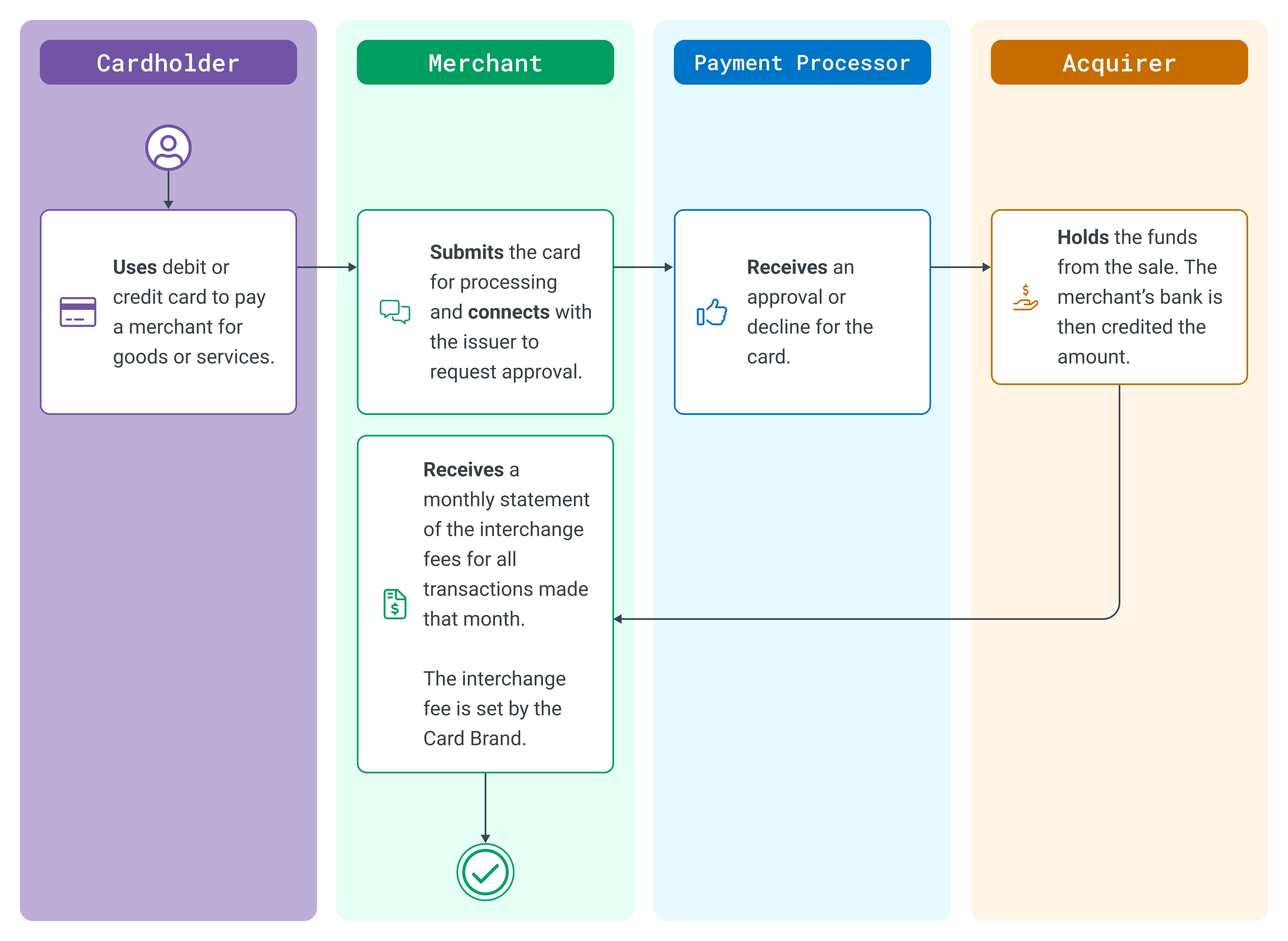
Payment Authorization Process
Card data can be collected in different ways:
To verify a cardholder’s identity, several types of security can be implemented, as described in the next section.
There are several payer verification methods that can be supported. We list them below from highest to lowest security:
The following factors determine the payer verification method:
There are various types of integrations for you to choose from. One of these types of integrations should meet the needs of your POS application. We have solutions for each, which you can discuss with your account manager. The pros and cons of each integration are described in each section below.
Standalone terminals are an in-store method that integrates to our API but has no communication with your POS system. After consulting with an account manager, you purchase an off-the-shelf terminal that already runs a terminal application connected to our API. This will allow your business to quickly run credit card transactions with little additional training. No certifications are required on your end, but additional functionality is limited to what is already available on the terminal.
| PROS | CONS |
|---|---|
|
|
Semi-integration is much easier from a time and effort perspective but is less flexible. This is our preferred integration method as it doesn’t require platform/gateway or EMV certifications, all of which can take a significant amount of time. Semi-integration also significantly reduces your PCI PA-DSS scope from your POS solution.
| PROS | CONS |
|---|---|
|
|
Cloud integrations are a subset of semi-integration since they use a semi-integrated capable device. Cloud integrations are typically used by integrators with browser or web-based solutions that can communicate only via a browser versus traditional “fat client” software running on a computer. With semi-integration, the POS application maintains a connection to the device via serial/USB or TCP/IP (Ethernet or WiFi).
With cloud integration, the POS application is not physically connected to the device. The POS uses a cloud message routing service as does the terminal. Once the POS sends the transaction request to the cloud-routing service, the device performs the transaction and sends the results to the cloud routing service, which then sends the results back to the POS.
| PROS | CONS |
|---|---|
|
|
Full integration is the most demanding, but it also provides the most flexibility. You have full control over the payer experience and workflows. This type of integration requires a certification to our processing platform followed by EMV certifications in each processing region.
In addition, you would be coding directly to a payment device to retrieve card/EMV data to send us for transaction processing. This gives you full control of what is displayed on the device, so you can add marketing images or videos and display or collect any additional information from the payer. Your POS solution needs to be PA-DSS compliant, as you’re in control of sensitive payment card data.
| PROS | CONS |
|---|---|
|
|
To get started with POS transactions, read more about our integration methods.